Google reviews shape how local businesses get found, judged, and chosen.
They influence where you show up in local search, whether someone trusts you enough to call, and whether AI tools put you on the shortlist when people ask for the best option nearby.
This guide covers the full lifecycle of a Google review. You'll learn how to:
- Earn more Google reviews consistently
- Respond to positive, negative, and neutral reviews
- Handle fake reviews and extortion attempts
- Put your best reviews to work in your marketing
What are Google reviews?
Google reviews are the public ratings and written comments customers leave about your business on your Google Business Profile.
Anyone with a Google account can write one, and they appear in the exact spots people check when they're deciding where to spend money.
Your reviews and overall star rating show up across several Google surfaces:
- Google Search results and the knowledge panel: When someone searches your business name, your rating and recent reviews appear in the panel on the right side of the results page. This is often the first impression a potential customer gets of you.
- Google Maps listings: Your reviews sit front and center on your Maps profile, where people browse and compare nearby options. Maps is where a lot of "near me" searches end up.
- The local map pack: This is the boxed set of three businesses Google features at the top of local searches. Your star rating and review count both influence whether you land there.
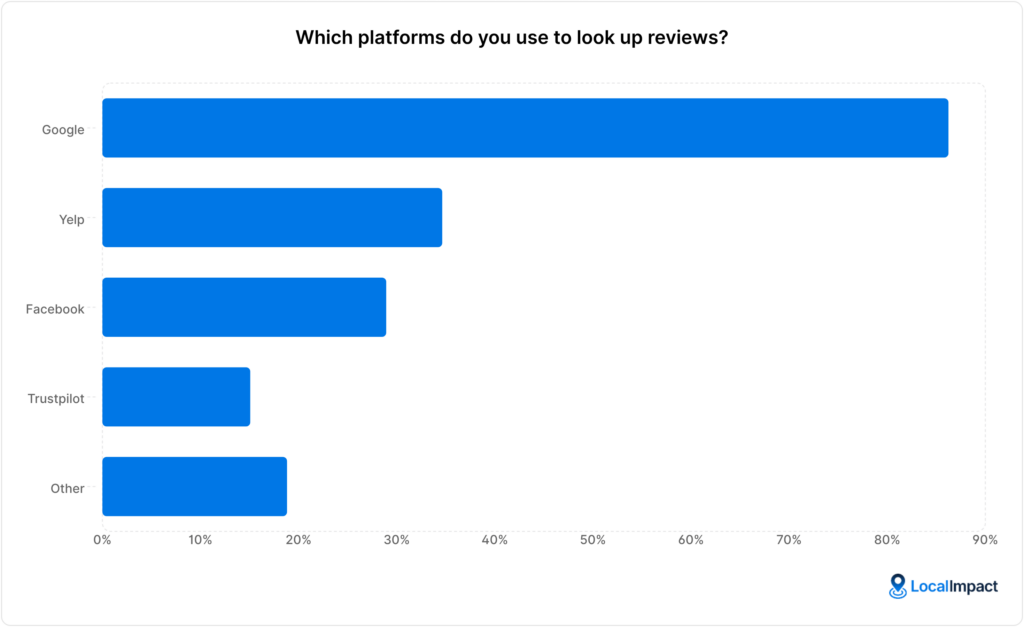
Google is also where people look first. In our State of Online Reviews report, 86% of consumers said they use Google to look up reviews of businesses, well ahead of Yelp, Facebook, or any other platform.
Why Google reviews matter for local businesses in 2026
Reviews touch almost every part of how a local business grows, from search visibility to the moment someone decides to pick up the phone.
Here's where they make the biggest difference:
- Google reviews help shape your local search ranking: Google factors review count, rating, and recency into how it ranks local businesses. With 92% of consumers reading at least one review in the past year, a thin or stale review profile makes it harder to get seen at all.
- Reviews build trust and lift conversions: A strong rating reassures people before they ever contact you, and a weak one sends them elsewhere. In our research, 88% of consumers said they've avoided a business after reading negative reviews about it.
- Reviews feed AI search and recommendations: AI tools like ChatGPT and Google's AI summaries pull from public review signals when they suggest businesses. Your review text and rating give these tools the language and proof they need to describe and recommend you.
- Reviews surface insights you can act on: Patterns in your feedback tell you what customers love and where you're slipping, from slow response times to a standout team member. Reading reviews as operational data helps you fix problems before they cost you more business.
- A steady, recent flow signals an active, trustworthy business: Fresh reviews show both Google and potential customers that you're busy and that people keep choosing you. We'll dig into why this matters so much in the next section.
What is Google review velocity and why does it matter?
Google review velocity is the rate at which your business earns new Google reviews over time, along with whether that pace looks natural.
Google doesn't just count your total reviews or average rating. It looks at momentum and patterns to judge whether your business looks active right now.
A business earning a handful of reviews every week looks alive and engaged, while one with three hundred reviews and nothing new in six months looks stagnant, even with a higher total.
Why this carries weight for local rankings:
- Review velocity feeds Google's prominence signal: Reviews contribute to prominence, one of the three core local ranking factors alongside relevance and distance. When two businesses are similar in proximity and relevance, steady review momentum often becomes the tie-breaker for a local pack spot.
- Every new review adds fresh, keyword-rich content: Customers describe real experiences in natural language, mentioning services, neighborhoods, and outcomes that reinforce your relevance for searches you never explicitly targeted. A profile that stops earning reviews stops accumulating these signals, and freshness decays while competitors with steady flow pull ahead.
- Recency reassures the people reading your profile: A steady stream of recent reviews tells shoppers you're still active and that quality hasn't slipped. A profile where the newest review is months old plants doubt about whether you're even still operating the way you used to.
The pattern matters as much as the pace, and this is where a lot of businesses get into trouble. A sudden burst of reviews can do more harm than good:
- Spikes can trigger Google's spam filters: Jumping from a couple of reviews a week to dozens in a day reads as manipulation to Google's systems, which can lead to filtered reviews or a ranking drop. Gradual increases over time are far safer.
- Clusters erode trust with shoppers too: People notice when fifty five-star reviews land in two days or when several reviews share near-identical wording. Even legitimate reviews look suspicious when they arrive in an unnatural clump.
Justin Herring, founder of YEAH! Local, makes the case for a steady pace:
"The shops that ask for a review after each job do better in the map listings than the ones who get 30 reviews in a day. It looks more real to Google.
Keep it consistent. That's the key."
Healthy velocity mirrors your actual customer flow, so the right pace depends on your transaction volume. A small local business might aim for a few reviews a month, while a busy restaurant or multi-location brand will naturally earn far more.
How customers leave, edit, and delete a review
Knowing the steps yourself makes it easier to guide customers through them, especially the ones who aren't sure how it works. Here's how a customer leaves a review from a phone or computer:
- Find your business on Google Search or Maps: They'll need to be signed into their Google account first. A quick search of your business name brings up your profile.
- Open the reviews section and tap "Write a review": This opens a window with the star selector and a comment box.
- Choose a star rating and add a comment: A short note about their experience makes the review far more useful to other shoppers.
- Post the review: It usually appears within a few minutes, though sometimes Google takes longer to publish it.
Customers can also change a review they've already left. They open their Google Maps contributions, find the review, choose the edit option, update it, and post again.
If a customer wants to remove their own review, the steps are similar. They find the review in their contributions and select delete.
You can't remove a customer's review yourself, though there are ways to handle ones that break Google's rules (more on that below).
How to get more Google reviews
A bigger, fresher pile of reviews does a lot of work for a local business.
It strengthens the prominence signal that helps you rank, gives shoppers the volume of feedback they look for before trusting you, and keeps your profile active in a way that both Google and customers notice.
Getting more Google reviews comes down to making the ask easy, asking at the right time, and doing it consistently. The sections below walk through each piece.
Set up and optimize your Google Business Profile
Everything starts with a complete, verified Google Business Profile (GBP). It's the page your reviews live on, and an incomplete or unverified profile can stop customers from leaving feedback or even finding you in the first place.
Make sure your profile includes accurate business information, current hours, your service area, photos, and a clear list of what you offer. Verifying the profile also unlocks your ability to respond to reviews and report ones that break Google's policies.
A well-maintained profile does double duty. It helps you rank in local search, and it gives customers confidence that they're looking at a real, active business when they land on your page.
Further reading: Google Business Profile Optimization: 7 Essential Tips
Create a short review link and QR code
The fewer steps between "yes" and a posted review, the more reviews you'll collect. A shortened direct link, a QR code, and clear instructions remove most of the friction customers run into.
A direct review link takes customers straight to the review window, cutting out the friction of searching and scrolling. You can use our free Google review link generator to create a review link for your business.
Turning that link into a QR code opens up your offline channels. A code on a receipt, a counter card, or a window sticker lets customers leave a review on the spot while their experience is fresh.
To generate a QR code for your review link, use our QR code generator.
Get more Google reviews for your business
Generate more Google reviews for your business with LocalImpact's automated tools.
Ask at the right moment
Timing has a big effect on whether a customer follows through. Since most reviews get written within a week of the purchase, the best moment to ask is while the experience is still fresh, ideally the same day.
Madeleine Beach, Director of Marketing at Pilothouse, ties the ask to the moment the experience lands:
"Grab your reviews when you finish a successful interaction, as this timing increases the likelihood of response because the experience is still fresh."
The right moment varies by business. A home service company might ask right after finishing the job, a retailer at checkout, and a clinic once treatment wraps up. The common thread is asking when satisfaction is at its peak.
Further reading: When to Ask Customers for Reviews: Timing Tips Before Requesting a Review
Empower your team to ask
Your frontline staff have the most face-to-face moments with happy customers, which makes them your best source of review requests. A customer who just had a great interaction with someone is often glad to leave feedback when that person asks directly.
Give your team simple scripts and a clear sense of when to ask, so the request feels natural and not pushy. You can also keep it motivating by tracking which team members generate reviews and recognizing the ones who do it well.
Further reading: How to Ask for a Google Review: 6 Expert Tips
Automate review requests as you grow
Manual asking works until your volume grows or things get busy, at which point requests start slipping through the cracks. This is where automation keeps your review flow steady without adding to your workload.
The data makes a strong case for it. While 72% of buyers have left a review at some point, the single biggest obstacle businesses report is simply that customers forget to follow through.
You can use LocalImpact to set up automated email and SMS review requests that ensure every customer gets asked to leave a review. There’s also the option to set up one or more follow-up reminders to nudge busy customers into following through.
Caleb Johnstone, SEO Director at Paperstack, frames automation as an ongoing habit:
"If you want more reviews consistently, you should make your review request process a continuous process rather than a one time push campaign."
What you need to know about Google's review policy
Google has clear rules about how businesses can collect and manage reviews, and following them protects both your rankings and your listing. Crossing the line can get individual reviews removed, and repeated violations can put your whole profile at risk.
A few rules trip businesses up most often:
- Don't buy reviews: Purchased reviews violate Google's policies and tend to get detected and removed, and they can trigger penalties or legal scrutiny. We lay out the full case in our piece on why you shouldn't buy Google reviews.
- Be careful with incentives: Offering discounts or rewards in exchange for reviews is against Google's guidelines, even when your intentions are good. Our article on review incentives explains what's allowed and what isn't.
- Avoid review gating: Selectively asking only happy customers for reviews while steering unhappy ones elsewhere is prohibited. Every customer should get the same opportunity to leave honest feedback.
Further reading: Everything You Should Know About Google Review Policy
How to respond to Google reviews
Responding to reviews shows customers you're paying attention, and the speed of your reply matters as much as the content. In our State of Online Reviews survey, 70% of consumers said they expect a business to reply to a review within one to three days.
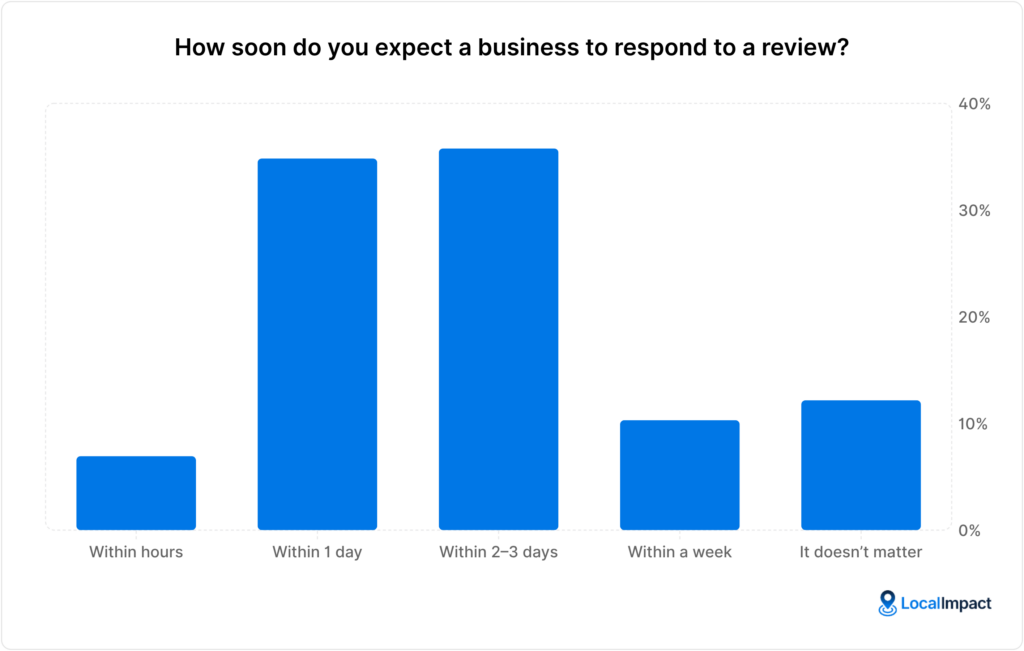
Quick, consistent replies signal that you're attentive and that you take customer experiences seriously. But these can be difficult to manage once your business starts getting a large number of reviews.
LocalImpact lets you read and respond to all the reviews your business gets across different platforms in one central location.
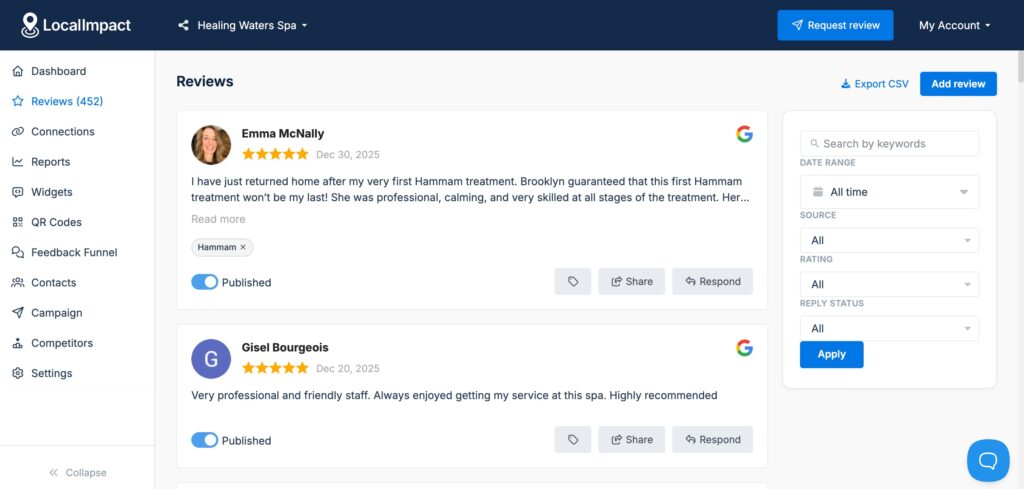
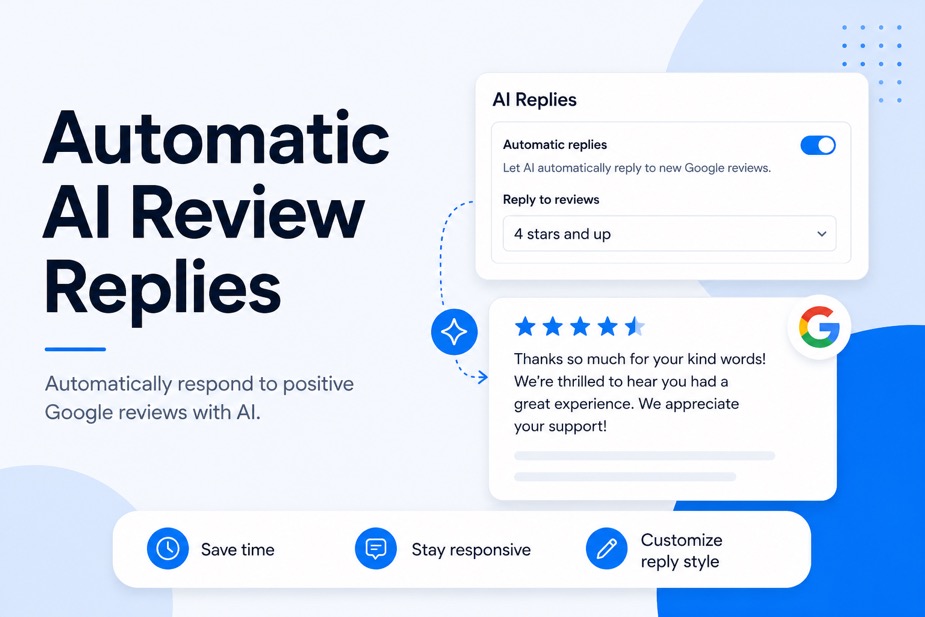
You also have the option to speed up or automate replies using AI.
How to respond to positive reviews
A positive review deserves a quick, warm acknowledgment. Thanking the customer by name, referencing something specific they mentioned, and inviting them back turns a nice review into a stronger relationship.
Keep these replies short and genuine. A few sentences that sound like a real person, not a template, do more for your brand than a long generic thank-you. You don't have to reply to every single positive review, though doing so shows other shoppers that you're engaged.
For wording you can adapt, see our positive review response examples.
How to respond to negative reviews
Negative reviews are where a thoughtful response pays off most. In our research, 78% of buyers said that seeing a considered reply to a negative review made them more likely to trust the business, so the people reading along matter as much as the original reviewer.
A few principles keep these replies effective:
- Pause, then stay factual: Replying while frustrated rarely helps. A calm, professional tone protects your reputation with everyone who reads the exchange later.
- Move the resolution offline: Acknowledge the issue publicly, then invite the customer to continue by phone or email. This shows you care without airing every detail in public.
- Close the loop: Once you've sorted things out, a brief public note that the issue was resolved reassures future readers.
Further reading: 16 Experts Share the Best Ways to Respond to Negative Reviews
How to respond to neutral reviews
Neutral reviews, the three-star "it was fine" kind, are easy to overlook and worth answering. A thoughtful reply can nudge a lukewarm customer toward a better opinion and shows others that you engage with all feedback, not just the extremes.
Thank the reviewer, acknowledge the part of their experience that fell short, and invite them to share more so you can make it right.
Treating a neutral review with the same care as a negative one often turns a so-so impression into a reason to come back.
Get more Google reviews for your business
Generate more Google reviews for your business with LocalImpact's automated tools.
How to handle fake reviews
Fake reviews have become a routine problem for local businesses. In our research on the topic, 72% of owners said they'd received a fake review in the past 12 months, so if it happens to you, you're in very common company.
The frustrating part is how slowly the remedy works. Only 28% of owners said a fake review they reported was removed promptly, which means the review often keeps dragging on your rating while you wait.
Here's how to handle one when it appears:
- Flag and report it: On your Google Business Profile, report the review and select the reason it violates Google's content policies, whether it's spam, a conflict of interest, or content that's clearly off-topic or fake. This starts the review process on Google's end.
- Document why it's fake: Keep notes and screenshots showing the review describes a service you don't offer, a customer you never had, or a pattern of suspicious activity. Evidence strengthens your case if Google follows up.
- Respond while you wait: A calm public reply noting that you have no record of the interaction lets other shoppers see your side, even if the review stays up. This softens the impact during the lag before removal.
When removal stalls, the most reliable counterweight is a steady flow of authentic reviews that keeps your overall rating strong.
Further reading: How to Spot and Remove Fake Google Reviews
How to handle review extortion
Review extortion is a specific and nastier scenario. Someone threatens to post a damaging review, or refuses to remove one they've already left, unless you pay them or meet some demand.
This is different from an unhappy customer, and it calls for a different playbook:
- Don't pay: Giving in tends to invite repeat demands and rarely ends the problem. Paying also doesn't guarantee the review comes down.
- Document everything: Save messages, emails, and screenshots that show the threat and the demand. This record is what makes a report credible.
- Report it as a policy violation: Extortion attempts violate Google's content policies, and the evidence you've gathered supports your case for removal. You can report review extortion using this form.
Further reading: Review Extortion: When Google Reviews Turn Into Ransom
How to get the most out of your Google reviews
Collecting reviews is only half the value. Putting them to work across your website, social channels, and ads turns customer feedback into a marketing asset that keeps earning its keep.
Kent Lewis, founder of Anvil Media, sums up the approach:
"For maximum impact, incorporate a review feed on your website and highlight reviews via social and email communications."
Showcase reviews on your website
Featuring your best Google reviews on your site gives visitors social proof at the exact moment they're deciding whether to trust you.
Reviews on your homepage build overall credibility, while reviews on service or product pages reassure people who are close to converting.
Placement matters. Putting relevant reviews near high-intent spots, like a contact form or a booking button, gives hesitant visitors a final nudge right where they need it.
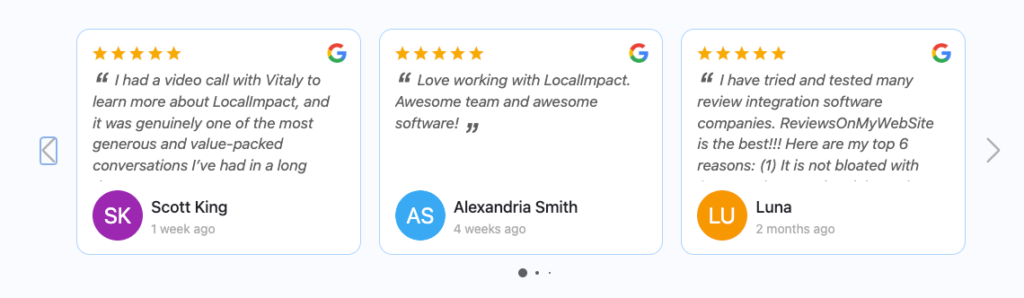
LocalImpact offers a review widget that allows you to showcase your business’s top reviews on your website with ease. You also have the option to customize the widget to fit your website’s look and feel.
Share reviews on social media
A glowing review makes for easy, authentic social content. Turning a standout review into a simple graphic or post puts customer voices in front of your followers and reminds them why people choose you.
Sharing reviews also encourages more of them. When customers see you celebrating real feedback, they're more likely to leave their own, which feeds your review flow and your social presence at the same time.
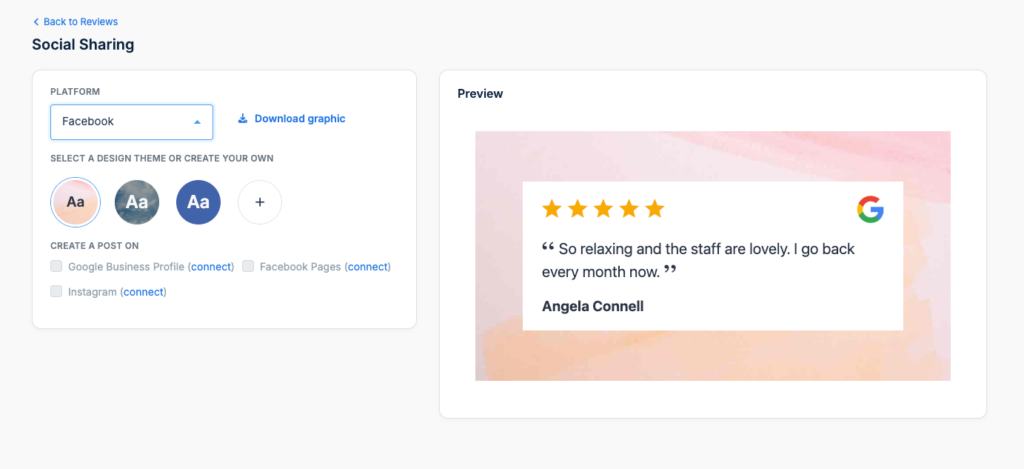
You can use LocalImpact’s social sharing feature to turn your reviews into engaging social media posts and share them with your followers in just a few clicks.
Use reviews in your advertising
Reviews can strengthen your paid marketing, too. Google Seller Ratings can attach your star rating to your ads, helping them stand out and earn more attention in a crowded results page.
The language in your reviews is useful raw material for ad copy. Pulling the specific phrases customers use, like fast response or friendly crew, gives your ads wording that already resonates because it came from real buyers.
This matters more as AI shapes discovery, since reviews remain the trust signal people lean on when deciding whether to act on a recommendation.
How to track and manage your reviews over time
Reviews aren't a set-and-forget project. Watching the right signals and keeping things consistent across your business is what turns review management into steady growth.
The review metrics worth watching
Star rating is the obvious number, though it tells only part of the story. A fuller picture comes from tracking several signals together.
The metrics worth keeping an eye on:
- Review volume and velocity: Tracking how many new reviews you earn each month shows whether your collection system is working or stalling. A steady upward pace is the goal.
- Rating trend over time: Watching your average move month to month catches problems early, before a slow slide becomes a serious dip. It also shows whether changes you've made are paying off.
- Response rate and speed: Keeping tabs on how many reviews you reply to and how fast helps you hit the one-to-three day window customers expect. Consistency here builds trust with everyone reading along.
- Sentiment and themes: Looking for recurring topics in your reviews surfaces what customers value and where you keep falling short. These patterns are some of the most useful feedback you'll get.
Managing reviews across multiple locations
If you run more than one location, consistency becomes the central challenge. In our research, coordinating across teams and locations was the single biggest reputation management challenge owners reported.
Different locations responding in different ways, or at different speeds, creates an uneven experience and risks one weak spot dragging down your brand.
A shared set of review guidelines, consistent training, and a central dashboard for monitoring every location keep standards even.
LocalImpact helps here by pulling reviews from all your locations and review sites into one place, so you can monitor, respond, and spot trends without logging into a dozen profiles.
Frequently asked questions about Google reviews
When it comes to Google reviews, a few questions come up again and again. Here are clear answers to the most common ones.
Why did my Google reviews disappear?
Reviews usually vanish for one of a few reasons. Google's spam filters may have flagged the review, the reviewer may have deleted it themselves, or there may be an issue with your Google Business Profile, such as a suspension or a duplicate listing.
Sometimes legitimate reviews get caught by automated filters by mistake. If a chunk of reviews disappears at once, it's worth checking that your profile is verified and in good standing.
Our guide to missing Google reviews covers how to diagnose and recover them.
Why is my average rating lower than my individual ratings?
This catches a lot of owners off guard. If every review you have is five stars but your overall rating shows 4.7, the math seems off until you know how Google calculates it.
Google doesn't simply average your stars. It weighs review quantity and other signals to produce an overall score, which means a small handful of perfect reviews may not display as a flat 5.0 until you've collected more.
As your review count grows, the displayed rating tends to settle closer to your true average.
How many Google reviews does my business need?
There's no single magic number, though more is generally better for both ranking and trust.
A useful floor comes from buyer behavior: most consumers read between four and ten reviews before making a decision, so you want enough recent feedback to satisfy that scanning.
Beyond clearing that bar, aim to keep pace with your local competitors and to maintain a steady flow of fresh reviews. A business with plenty of recent feedback reads as more active and trustworthy than one with a few old reviews.
What's the difference between Google Customer Reviews and Business Profile reviews?
These two get mixed up often because the names are so similar. They serve different businesses and show up in different places.
The key differences:
- Google Business Profile reviews are the local reviews customers leave on your profile, visible in Search and Maps. They're what most local businesses focus on, and they drive local SEO and trust.
- Google Customer Reviews is a separate program for e-commerce stores that surveys buyers after an online purchase and feeds verified ratings into Google Shopping and ads. It's tied to a confirmed transaction through the Merchant Center.
If you run a local, service-based business, Business Profile reviews are almost certainly what you care about.
Bringing it together
Google reviews influence nearly every step of how a local business gets discovered and chosen in 2026, from search rankings to the final decision to call. A strong, recent, well-managed review profile is one of the most valuable assets you can build.
The pieces fit together into a simple system: keep your Google Business Profile sharp, ask every customer consistently, respond quickly and thoughtfully, deal with fake reviews and extortion calmly, and put your best feedback to work in your marketing.
This matters more as AI reshapes discovery. AI tools can introduce your business to people who've never heard of you, and your reviews are what decide whether that attention turns into a customer.
LocalImpact brings the whole system into one place. You can monitor reviews across Google and dozens of other platforms, generate fresh reviews automatically with email and SMS campaigns, automate replies using AI, and showcase your best reviews on your website
Start your free trial today and turn your reviews into your strongest growth channel.