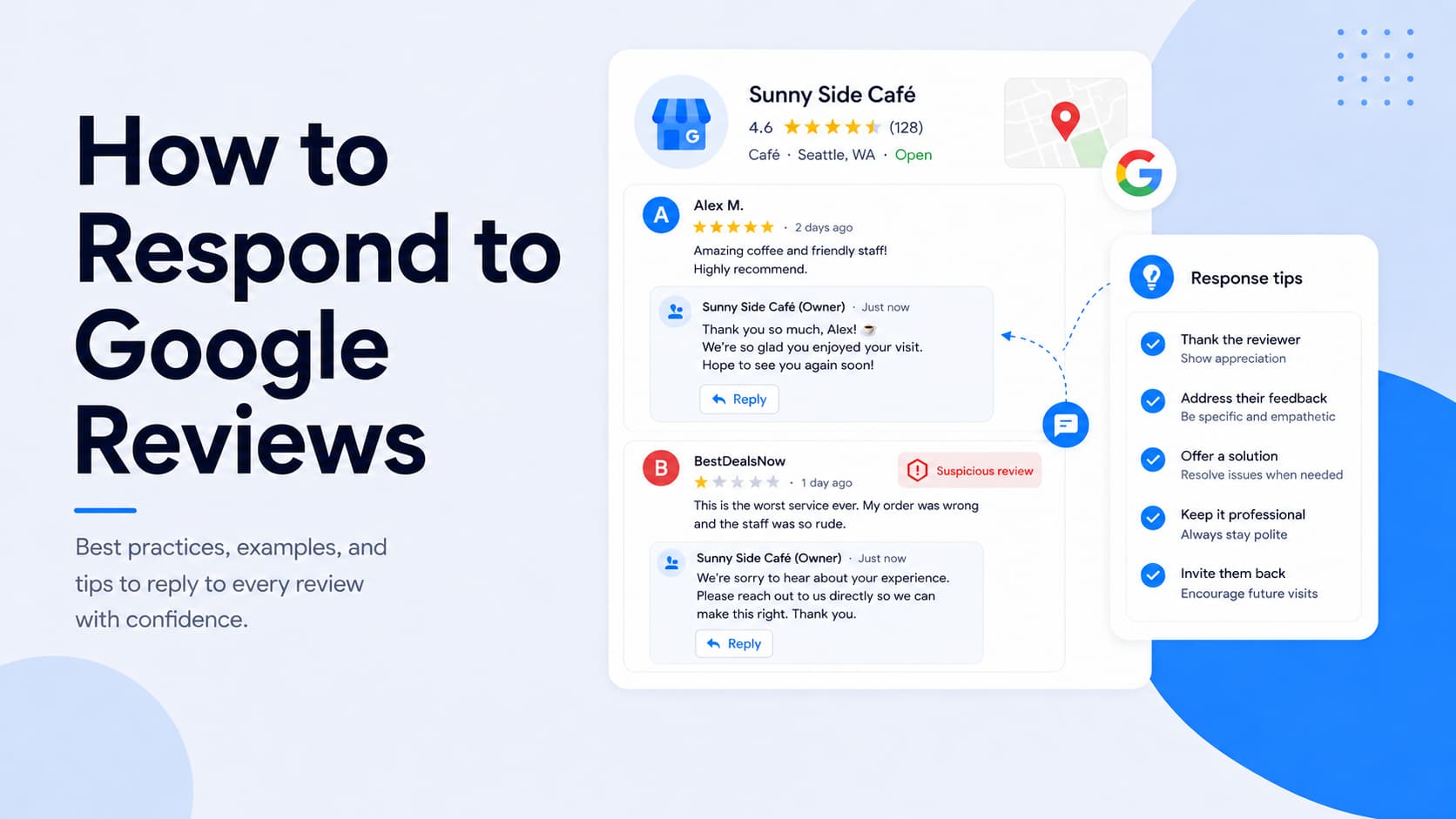
Every reply you write under a Google review is public. The reviewer reads it, sure, but so does every potential customer who lands on your profile afterward and weighs whether you're worth a call.
This guide covers how to reply to every kind of review you'll run into: positive, negative, neutral, and fake.
It also answers the questions people actually have in 2026, like how fast you should respond, whether you can let AI write your replies, and whether responding does anything for your ranking.
Why responding to Google reviews matters
Responding to Google reviews does a few jobs at once, and all of them help your business:
- Builds trust with the people reading along: A calm, specific reply tells future customers how you treat people when something goes right and when it goes wrong. Most shoppers read your responses as closely as the reviews themselves, so each one shapes the impression they form before they ever contact you.
- Strengthens your local search visibility: Replying encourages more and fresher reviews, and review count and rating both feed the prominence signal Google uses for local ranking. The act of replying works indirectly rather than as a ranking factor on its own.
- Supports AI-driven discovery: As AI tools start summarizing business reputation, your responses become part of what they read. In our research on how AI is changing the buying journey, thoughtful responses to reviews ranked highly among the things that make consumers comfortable trusting an AI-recommended business.
Responding is also becoming standard practice. Among the businesses we surveyed for our State of Online Reputation Management report, 60% reply to every review they get. If you're not responding consistently, you're falling behind the norm rather than getting ahead of it.
How to respond to a Google review
You reply to reviews from your verified Google Business Profile, which you now manage directly through Google Search and Maps. Here's the process on desktop:
- Sign in to the Google account connected to your profile, then search your business name on Google.
- In your Business Profile, select "Read reviews."
- Find the review you want to answer, select "Reply," and write your response in the box that appears.
On mobile, open the Google Maps app and tap your Business Profile. Then, go to the reviews section, find the review, and tap "Reply.
You can edit or delete any response after posting it.
Replies are screened against Google's content policies before going live, which usually takes around 10 minutes.
Get more Google reviews for your business
Generate more Google reviews for your business with LocalImpact's automated tools.
How fast should you respond?
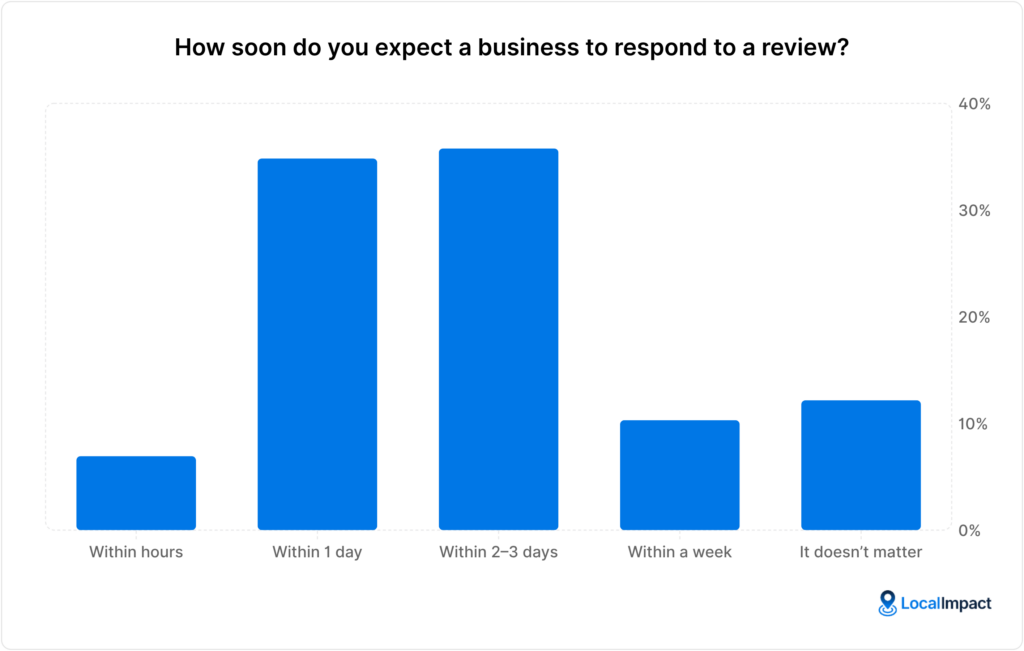
Speed matters to customers, and the bar is higher than a lot of owners assume. In our State of Online Reviews survey, 70% of consumers said they expect a business to reply to a review within one to three days.
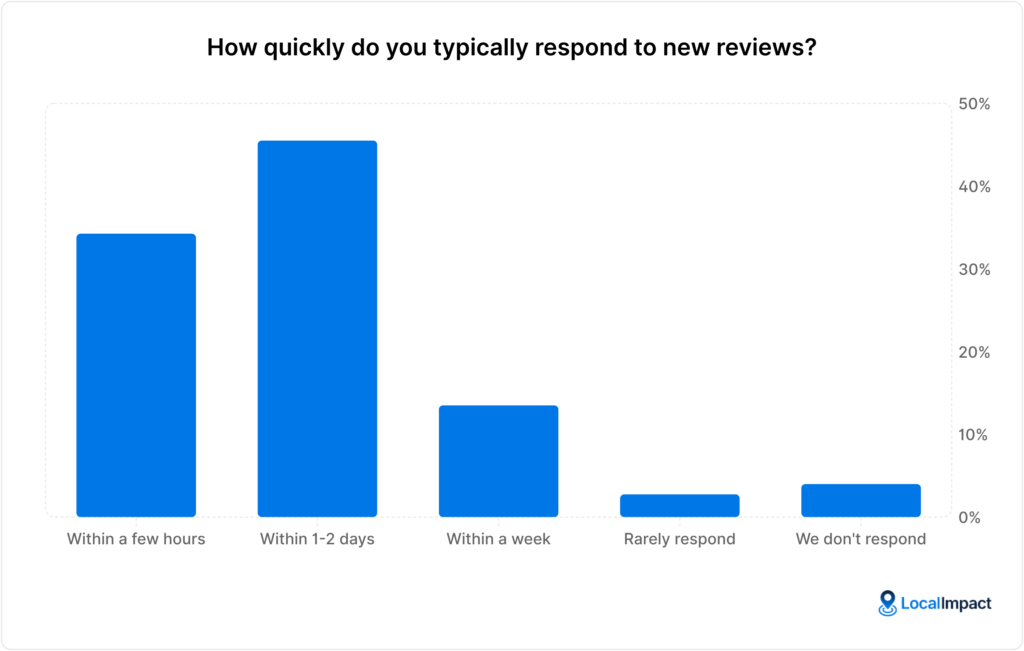
Most businesses are roughly keeping pace. 45% respond within one to two days and another 34% respond within a few hours. A consistent same-day or next-day reply puts you comfortably ahead of the slower half of the field.
Aim to respond within 24 hours, with one small caveat. Firing back a reply within seconds of a review going live can read as automated, so a short, considered gap is fine and sometimes better.
Pro tip: You can use LocalImpact to manage all the reviews your business gets across different platforms from one central location.
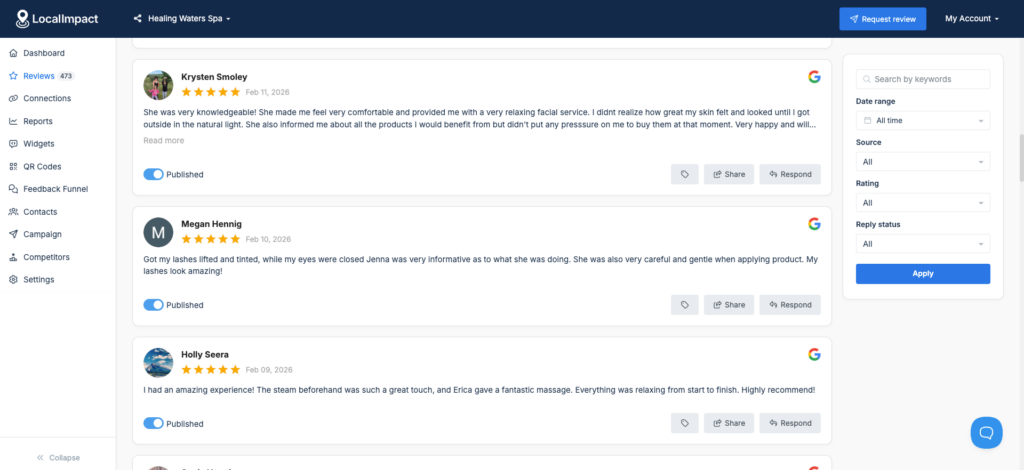
How to respond to positive reviews
A five-star review is the easiest one to answer and the easiest one to waste. A generic "Thanks for the kind words!" pasted under every rating reads as indifference to the person who took time to praise you.
It's worth getting these right. While 60% of businesses respond to every review, 20% reply only to negative ones, which leaves the simplest trust-building on the table. Three habits do most of the work:
- Use the reviewer's name: A personal greeting signals that a real person is replying, not an automated system. It's a small touch that makes the whole response feel more genuine.
- Echo a specific detail they mentioned: Picking up on something specific from their review proves you actually read it. It also shows other readers the kind of attention they can expect.
- Invite them back: A warm, low-pressure invitation gives a happy customer a reason to return. Keep it natural so it doesn't tip into a hard sell.
Those three habits look a little different depending on what the reviewer gave you to work with. Here's how they play out across the most common kinds of positive reviews.
Responding to detailed praise
When someone takes the time to describe their experience, you've got specifics to work with, so use them.
Pick the detail that clearly mattered most to the customer and reflect it back, which proves you read the review and reinforces that strength for anyone reading later.
Say a customer named Sarah leaves you this:
"Brilliant job on our bathroom remodel. The team showed up exactly when they said they would and left the place spotless. Highly recommended."
A reply that picks up on the clean-up she singled out does more than a generic thank-you:
"Thanks so much, Sarah. The bathroom was a great project to work on, and we're really glad you're happy with how it turned out.
Clean-up matters to us as much as the work itself, so it means a lot that you mentioned it. Enjoy the new space, and reach out at any time."
Why it works: It names the reviewer, picks up the specific detail she praised, and closes with a warm invitation that doesn't feel salesy.
Responding to praise for a team member
Reviews that single out an employee are a chance to do two things at once.
Acknowledge the customer, then pass the recognition to the person named, which reinforces good work internally and shows future readers the kind of service they can expect from your team.
A customer named James writes:
"Marcus walked me through every option without any pressure and answered all my questions. Best service experience I've had in a while."
Here, the reply routes the praise straight to Marcus:
"Hi James, thank you for this. Marcus genuinely cares about helping people find the right fit, so he'll be thrilled to hear his work made your day.
We'll make sure he sees your review. Thanks for trusting us, and we'd love to help again."
Why it works: It reinforces what the customer valued, passes the praise to the named employee, and signals to other readers what they can expect.
Responding to a five-star review with no comment
A rating with no text is the most common review you'll get, and it's still worth a reply.
You don't have a detail to echo here, so thank the reviewer warmly without thanking them for words they never actually wrote, and leave the door open for them to share more.
With a bare five-star rating from a customer named Mark, a short reply does the job:
"Thanks for the five stars, Mark, we really appreciate it. It was a pleasure helping out, and if you ever have a moment to tell us what stood out, we'd love to hear it."
Why it works: It thanks the reviewer warmly without inventing praise they never wrote, and gently opens the door to more detail.
Get more Google reviews for your business
Generate more Google reviews for your business with LocalImpact's automated tools.
How to respond to negative reviews
Negative reviews are where a thoughtful reply pays off most, and the data backs that up.
Our research found that 78% of buyers trust a business more after reading a considered response to a negative review, so the people reading along matter as much as the original reviewer.
Follow these tips when responding:
- Pause, then stay factual: Replying while you're frustrated rarely helps, and a calm tone protects your reputation with everyone who reads the exchange later.
- Apologize for the frustration and move it offline: Acknowledge the experience publicly, then invite the customer to continue by phone or email where you can actually fix things.
- Close the loop: Once you've sorted it out, a brief public note that the issue was resolved reassures future readers.
A few things are worth keeping out of every negative reply. Don't get defensive or argue the facts, don't admit legal fault in public, and don't repeat specifics from the review, since that just hands Google more negative content to associate with your profile.
Responding to a fair, specific complaint
When the complaint is accurate, own it plainly. Acknowledge what went wrong, apologize for the frustration, and offer a direct way to make it right, which reassures the reviewer and shows other readers you take responsibility when you slip up.
A customer named John leaves this after a missed appointment:
"Waited in all day for the technician and nobody showed up. No call either. Really disappointing."
A reply that names the failure and offers a direct line works better than a vague apology:
"Hi John, I'm sorry, that's not the standard we hold ourselves to, and I understand how frustrating it is to wait in all day. Something went wrong with our scheduling, and we should have called you.
I'd like to make it right, so please give me a ring at [phone number] and ask for me directly. Apologies again."
Why it works: It owns the specific failure, acknowledges the frustration, and offers a direct, named contact to continue offline.
Responding to a vague complaint
Sometimes a negative review gives you almost nothing to go on. Resist the urge to guess at what happened or defend yourself, and instead acknowledge the reviewer calmly and invite the detail you're missing.
A customer named Dana writes:
"Not a good experience. Won't be back."
Without specifics to respond to, the reply opens a private channel to learn more:
"Thank you for the feedback, Dana. This isn't the experience we want anyone to have, and I'd like to understand what happened so we can put it right.
Could you reach me at [email or phone]? I'd really appreciate the chance to look into it."
Why it works: It stays composed without guessing at details, and moves the conversation somewhere you can actually learn what went wrong.
Responding to a complaint you can't change
Some complaints are about things you won't or can't change, like your pricing. You don't have to concede the point, so acknowledge what the reviewer valued, explain your position calmly, and stay gracious for the benefit of everyone reading.
A customer named Ravi leaves a positive note about the work alongside a gripe about cost:
"Good service but way too expensive for what it is. Shop around before you book."
The reply holds its ground on price without getting defensive:
"Thanks for the honest feedback, Ravi, and I'm glad the service itself hit the mark. We try to price fairly for the quality and time each job takes, though I understand it won't be the right fit for every budget.
I appreciate you giving us a try, and I'm happy to talk through what's included any time at [contact]."
Why it works: It acknowledges the praise, explains the pricing calmly without arguing, and stays gracious with the reader in mind.
How to respond to neutral reviews
A three-star "it was fine" review is easy to overlook and worth answering. A thoughtful reply can nudge a lukewarm customer toward a better opinion and shows other readers that you engage with all feedback.
Treat a neutral review like a soft negative. Thank the reviewer, acknowledge the part of their experience that fell short, and invite them to share more so you can make it right.
A customer named Priya leaves a middling review that names what worked and what didn't:
"Decent spot. The food was good but service was slow. Three stars."
The reply picks up both halves, owning the slow service and asking for detail:
"Thanks for the honest feedback, Priya. I'm glad you enjoyed the food, and you're right that the service was slower than it should've been.
I'd love to know more about when you came in so we can tighten that up. Feel free to reach me at [contact], and I hope we get another shot."
Why it works: It acknowledges what the customer liked, takes the criticism seriously, and opens a path to make the next visit better.
How to handle fake reviews
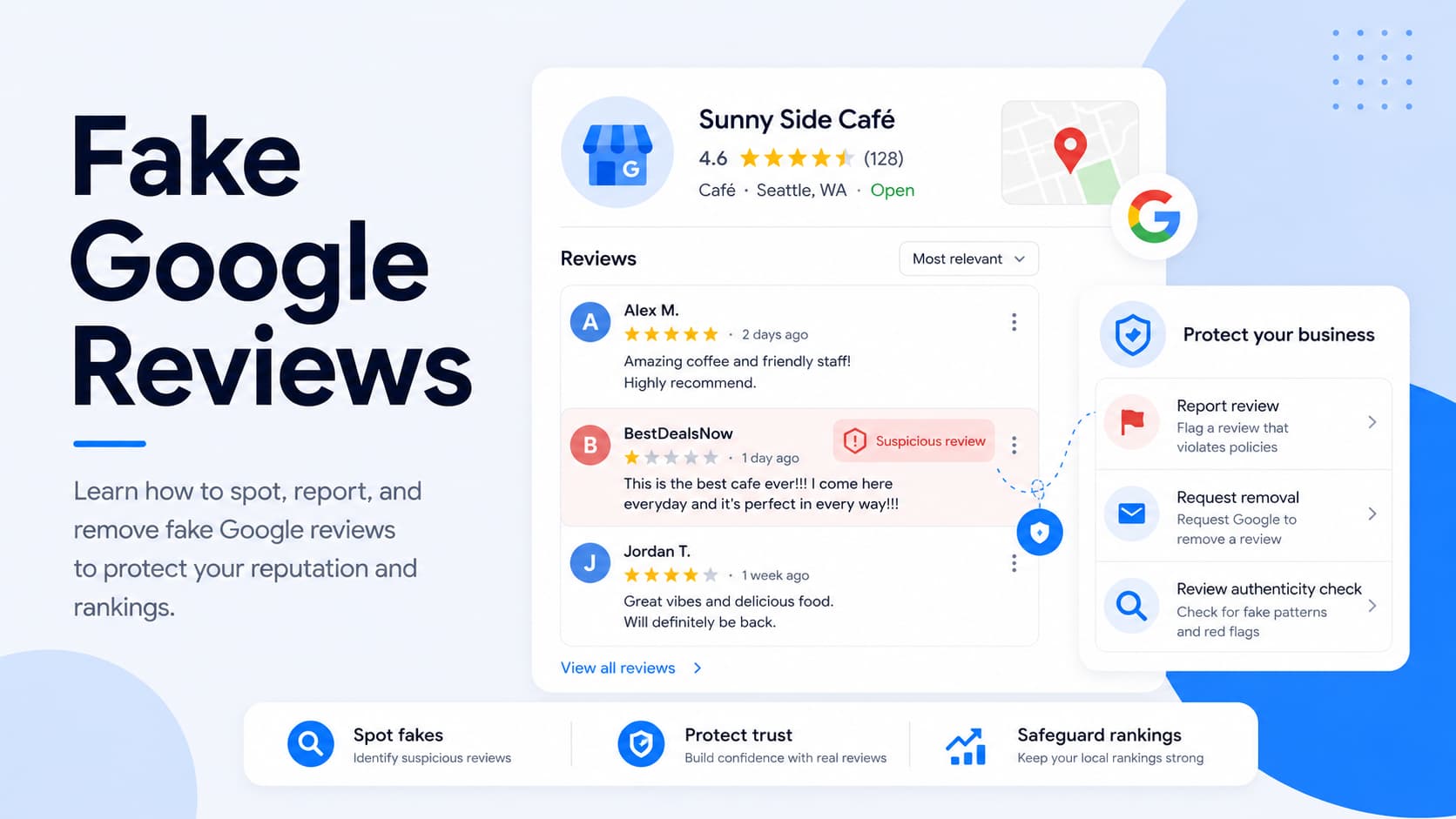
Fake reviews are a routine problem for local businesses now. In our research on fake reviews, 72% of business owners said they'd received a fake review in the past 12 months.
The frustrating part is how slowly removal works. Only 28% of owners said a reported fake review was taken down promptly, which means a calm public reply is often your main lever while you wait.
Flag the review first so Google can assess it, then respond factually without confirming any relationship with the reviewer. A measured public reply puts your side on record for everyone reading later:
"We take all feedback seriously, but we don't have any record of you as a customer. If we've got that wrong, please contact us at [contact] so we can look into it.
In the meantime, we've reported this review for Google to review."
Why it works: it states your position clearly for future readers without arguing or confirming a relationship that may not exist.
Further reading: Fake Google Reviews: How to Spot, Report, and Remove Them
What never to include in a response
A reply is a public statement from your business, so a handful of things should stay out of every one:
- A customer's personal information: Don't share anything about a customer that they didn't reveal themselves, including details about their visit or their identity. Airing private information without consent can violate Google's policies and erode the trust of everyone reading.
- Policy-violating content: Keep profanity, harassment, and anything promoting restricted goods out of your replies. Responses that cross these lines can get removed by Google before they ever post.
- Incentives to change a review: Offering a discount or freebie in exchange for editing or removing a review breaches Google's guidelines. It can also put your whole profile at risk of penalties.
- Selective solicitation: Asking only happy customers to leave reviews, a practice known as review gating, is against the rules. Every customer should get the same opportunity to leave honest feedback.
Staying factual and professional keeps you clear of all of these.
Should you use AI to respond to reviews?
This is the question a lot of owners are weighing in 2026, and the answer hinges on personalization rather than authorship.
An AI draft or a saved template makes a perfectly good starting point, while a reply that reads as copy-paste is what turns people off.
The workable approach is to scaffold first, then personalize:
- Start from a draft or template: Use an AI-generated reply or a saved template to handle the structure and tone. This gives you a solid base to work from instead of facing a blank box every time.
- Add a personal touch: Drop in the reviewer's name and one specific detail they mentioned. These small edits are what separate a reply that feels human from one that reads as copy-paste.
- Make it sound like you: Adjust the wording so it matches your usual voice, then read it once before posting. A quick final pass catches anything that sounds stiff or generic.
Pro tip: You can use LocalImpact’s AI-powered reply feature to generate personalized, on-brand review replies in seconds. There’s even an option to set up LocalImpact to respond to your reviews automatically.
Does responding affect your Google ranking?
Responding to reviews isn't a documented Google ranking factor, and it's worth being straight about that. Google's own guidance frames replying around customer value, not rankings.
What replying does is indirect and still worth the effort. It encourages customers to leave more reviews and keeps your profile looking active, and review count and rating both feed the prominence signal that influences local ranking.
So the honest version is simple. The act of replying won't move your ranking on its own, but a healthier, more active review profile over time will.
Bringing it together
Responding to Google reviews works best as a habit rather than a project you tackle once a quarter. The pieces are straightforward:
- Turn on notifications: Switch on review alerts in your profile settings so a new review reaches you right away. Nothing should sit unanswered simply because you didn't know it was there.
- Keep a few templates on hand: Save personalized starting points for the situations you see most, like five-star ratings or common complaints. They speed up replies without locking you into sounding generic.
- Edit every reply before posting: Give each response a quick pass so it sounds like a person rather than a script. A single specific detail is usually enough to make it feel genuine.
- Respond to everything within a day: Reply to positive, negative, and neutral reviews alike, ideally within 24 hours. Consistency here is what builds the habit and keeps your profile active.
Reply like the business you'd want to hire, and your responses keep working for you long after the conversation ends. They're read by your next customer, and increasingly by the next AI tool deciding whether to recommend you.