Our AI review reply feature already saved you from writing responses from scratch. You'd open a review, generate a suggestion, give it a quick look, and publish.
That's fast, but it still asks you to be in the dashboard for every single review.
When reviews come in steadily across a busy week, those small moments add up. A handful of reviews can sit waiting for a response while you're handling everything else thrown at you.
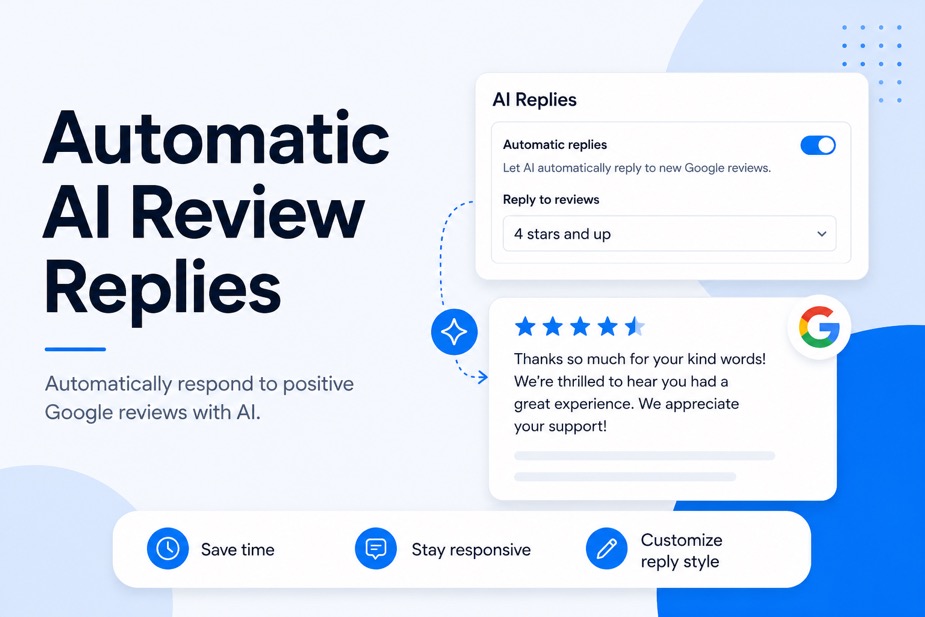
Automatic AI replies take that last step off your plate. Turn it on, pick the ratings you want covered, and LocalImpact responds to new Google reviews on its own.
How automatic replies work
Once you enable the feature, LocalImpact watches for new Google reviews that match your settings. When one arrives at or above the rating you've chosen, it writes and publishes a reply automatically.
The replies follow the same custom instructions you set for AI suggestions, so they sound like your business and keep your tone. You stay in control of the voice while the publishing happens in the background.
Turning on automatic replies
Setup takes about a minute. Here's the process:
- Go to Settings → AI Replies
- Turn on Automatic Replies
- Choose the minimum review rating that should receive an automatic reply
- Click Save
From that point on, every new Google review that meets your criteria gets an AI-generated reply without any action from you.
Make replies sound like you
Before you switch automatic replies on, it's worth setting your custom instructions so every response carries your tone.
In Settings → AI Replies, you can add guidance the AI follows on every reply. A few examples that work well:
- Keep replies short and professional
- Avoid repeating the customer's exact wording
- Reply in the same language as the review
These instructions apply to both your manual AI suggestions and your automatic replies, so your voice stays consistent everywhere.
Choosing your minimum rating
The minimum rating setting decides which reviews get an automatic reply. Choosing it carefully is what keeps the feature genuinely hands-off.
A common approach is to set automatic replies for 4- and 5-star reviews. Happy customers get a warm, timely thank-you, and you keep your attention free for anything lower.
Setting the floor higher keeps your most sensitive reviews in your hands. A 1- or 2-star review often needs a personal touch, a specific apology, or a follow-up offer that only you can make, so leaving those for manual replies lets you give them real attention.
A few things to know
A few details worth keeping in mind before you turn it on:
- Automatic replies cover Google reviews for now: You can still generate AI suggestions for reviews on other supported platforms and publish them yourself.
- Only new reviews get automatic replies: Reviews that arrived before you turned the feature on stay as they are, so you can work through those whenever you like.
- Manual replies are always available: You can write your own response or edit an AI suggestion on any review at any time, even with automatic replies running in the background.
- Turning the feature off is simple: New reviews stop getting automatic replies right away, and anything already posted stays in place.
Manage your online reputation with ease
Monitor, manage, and get more online reviews for your business with LocalImpact.
Try it out
Head to Settings → AI Replies, set your instructions, choose a minimum rating, and turn on Automatic Replies. Your next qualifying Google review gets a reply on its own.
If you're not using LocalImpact yet, you can start a free trial and get Automatic AI Replies along with everything else, including review request workflows, review widgets, and white-label options for agencies.