Your Google Business Profile is where most people form their first impression of your business.
It decides whether you show up when someone searches for what you offer nearby, how trustworthy you look at a glance, and whether AI tools include you when people ask for a recommendation.
This guide covers the full picture, from claiming your profile to ranking higher in local search.
You'll learn how to:
- Claim or create your profile and get it verified
- Optimize every section for visibility and trust
- Read your performance data and act on it
- Manage profiles across multiple locations
- Fix the common problems that keep businesses from showing up
What is a Google Business Profile?
Google Business Profile (previously known as Google My Business) is a free tool from Google that helps business owners manage their business’s appearance across services like Google Search and Google Maps.
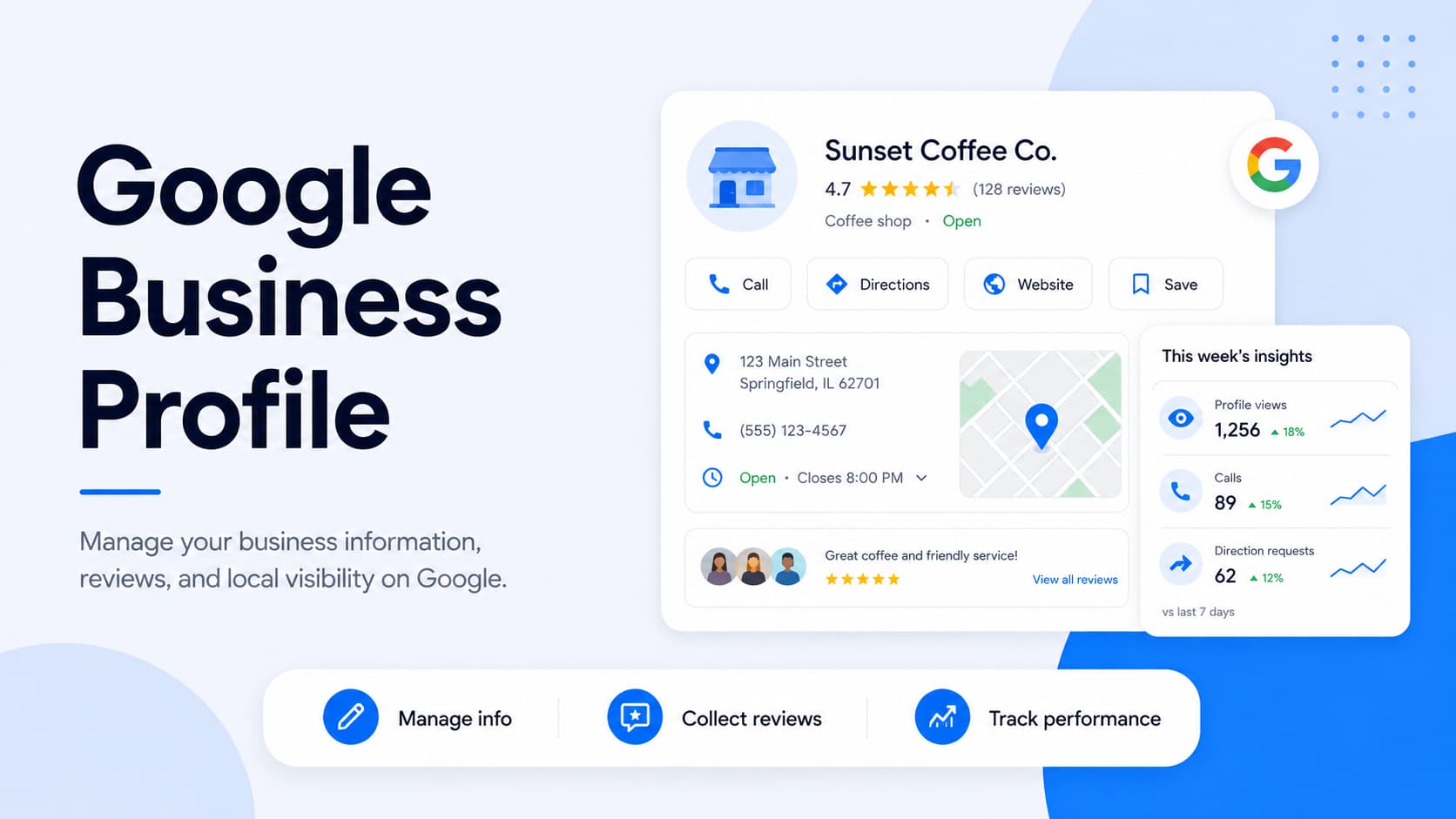
It holds your core details, like your name, address, phone number, hours, website, photos, and customer reviews, and puts them in front of people right when they're searching for what you do.
Setting one up costs nothing, and you don't need a website or any technical skill to get started.
Where your Google Business Profile shows up
Your profile isn't tucked away on one page. It surfaces across several Google properties, each catching customers at a different moment in their search.
Here's where it appears:
- The knowledge panel: When someone searches your business name directly, your profile fills the panel on the right side of the results, with your hours, photos, reviews, and contact buttons. This is the branded first impression people get when they already know who you are.
- The local map pack: For searches like "plumber near me," Google features a boxed set of three local businesses at the top of the results. Landing here puts you in front of people who are comparing options and ready to act.
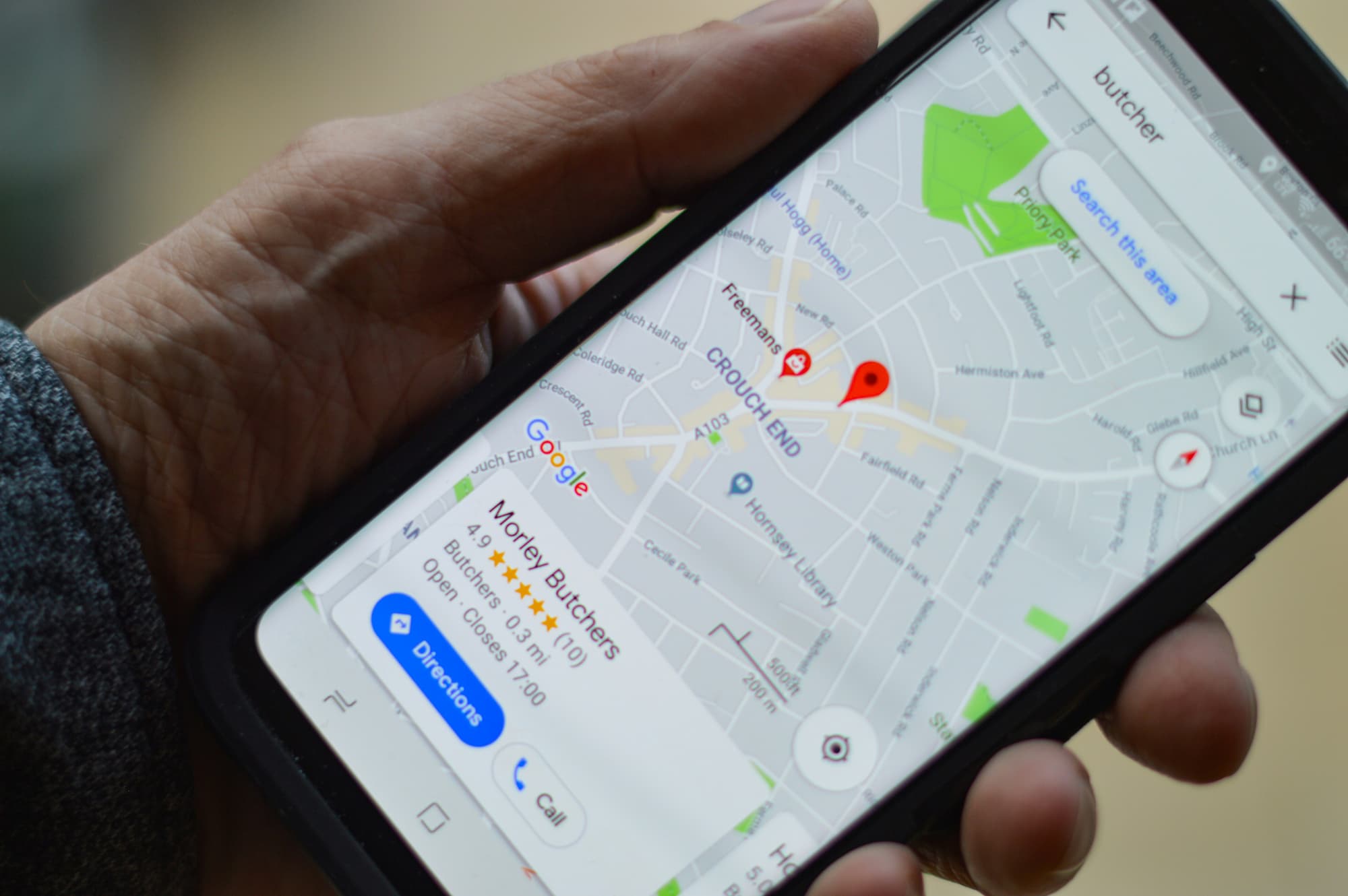
- Google Maps: Your business appears as a pin when people search within Maps, with your rating, photos, and a tap-to-call or get-directions button. A lot of "near me" searches end up here, especially on mobile.
Why your Google Business Profile matters in 2026
Your profile touches almost every part of how a local business gets found and chosen, from search visibility to the moment someone decides to call.
Here's where it makes the biggest difference:
- Google is where people start: In our State of Online Reviews report, 86% of consumers said they use Google to look up reviews of businesses, far ahead of Yelp, Facebook, or anywhere else. A strong profile meets them on the platform they already trust.
- It shapes your local ranking: Google pulls directly from your profile to decide who ranks in the map pack, weighing how relevant, close, and prominent your business looks. An incomplete or inaccurate profile gives Google less to work with and makes it harder to surface you.
- It builds trust before contact: Your rating, photos, and recent reviews reassure people before they ever reach out. Our research shows that 88% of consumers say they've avoided a business after reading negative reviews, so what your profile says carries real weight.
- It feeds AI search and recommendations: AI tools like ChatGPT and Google's AI summaries pull from public profile and review signals when they suggest businesses. A complete, active profile gives these tools the information they need to describe and recommend you.
How Google ranks your Google Business Profile
Google decides which businesses to show for a local search using three main factors: relevance, distance, and prominence.
Understanding them helps you see why each optimization step later in this guide actually moves the needle.
The three factors work together:
- Relevance: This is how well your profile matches what someone searched for. The more complete and accurate your information, the better Google can match you to the right searches, which is why your category, services, and description carry so much weight.
- Distance: This is how close your business is to the searcher or the location they used in their search. You can't change your address to game this, though setting your service area and location correctly makes sure Google places you accurately.
- Prominence: This is how well-known and active your business looks, based on signals like your review count, rating, recency of activity, and your presence across the web. A profile with steady reviews and fresh updates reads as more prominent than one that's been sitting untouched.
You control relevance and prominence directly through how you set up and maintain your profile. The sections below walk through every lever, starting with getting the profile into your hands.
How to claim an existing Google Business Profile
Before you create anything, check whether a profile for your business already exists. Google often generates listings automatically from public data, and sometimes a former employee or another person has already set one up.
Search your business name on Google or Google Maps and see what comes up. What you do next depends on which of two situations you're in.
Claiming an automatically created profile
If Google built the listing from public information and nobody manages it yet, you'll see an option to claim it directly from the search result.
Here's how to take control of it:
- Start the claim: Find your business in Search or Maps and click the "Claim this business" or "Own this business?" link. This kicks off the process of proving the listing is yours.
- Verify ownership: Google will ask you to confirm you manage the business through one of its verification methods, which we cover in detail below. Once you verify, you get full access to edit every part of the profile.
Requesting access to a profile someone else manages
Sometimes the search result shows that another account already manages your profile, with part of an email address visible. This happens when a former staff member, an old marketing agency, or someone else created and verified it.
In this case, you'll request access rather than claim it outright:
- Submit the request: Click "Request access" and fill out the form with your name, your relationship to the business, and the level of access you need. Choose ownership if you're the owner, or management if you're an employee or agency working on the owner's behalf.
- Wait for a response: The current manager has three days to approve or deny your request. If they don't respond in time, Google may let you claim the profile yourself by following the steps in the follow-up email.
Tracking down who controls an old listing can take patience, so start this early if you're working toward a launch or a campaign.
Streamline Google review management for your business
Use LocalImpact to generate and manage Google reviews more effectively.
How to set up a Google Business Profile
Ready to create a Google Business Profile for your business? Follow our step-by-step guide:
1. Visit the Google Business Profile homepage and click the “Manage now” button.
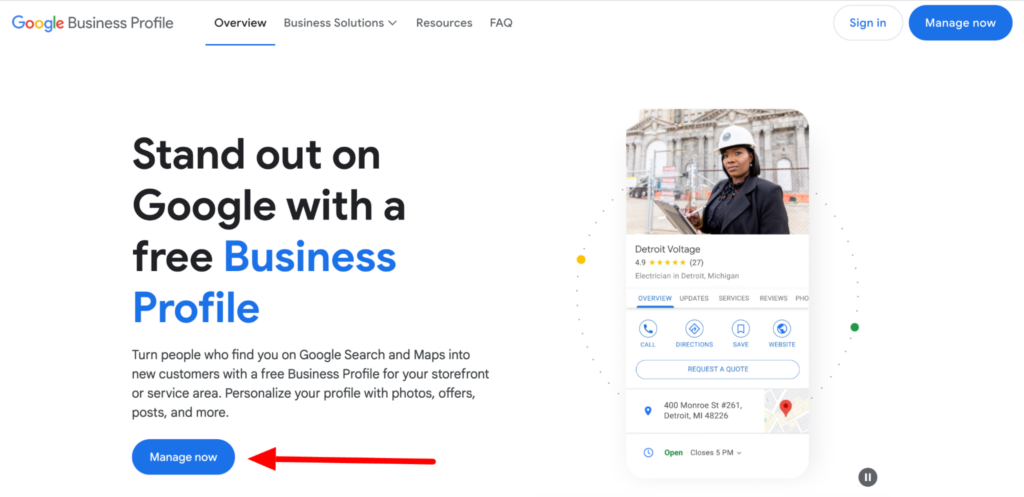
You’ll then reach the Google Business Profile account creation screen.
2. Enter your business name and choose a category. Click the “Next” button.
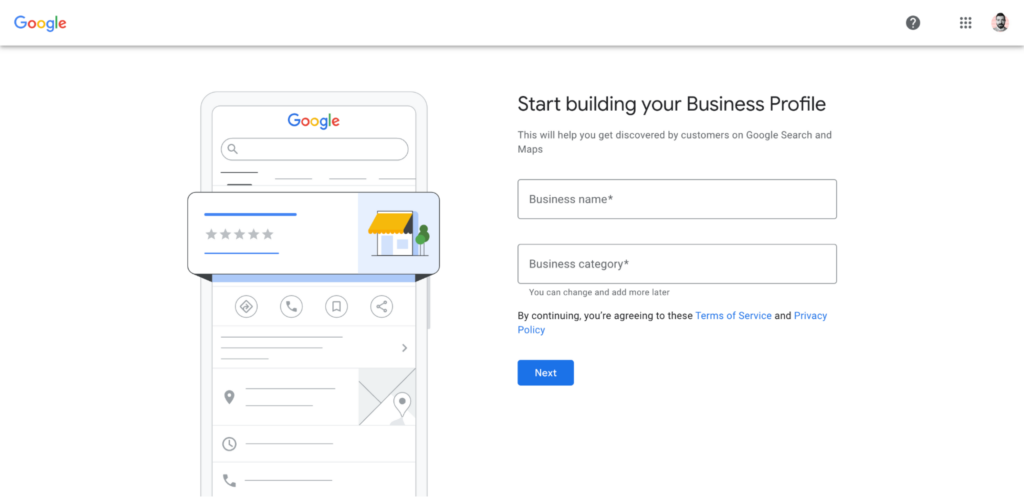
3. You’ll then be asked if you want to add your business’s physical location. Select “Yes” and click on “Next.”
Then, enter your business address. And click “Next.”
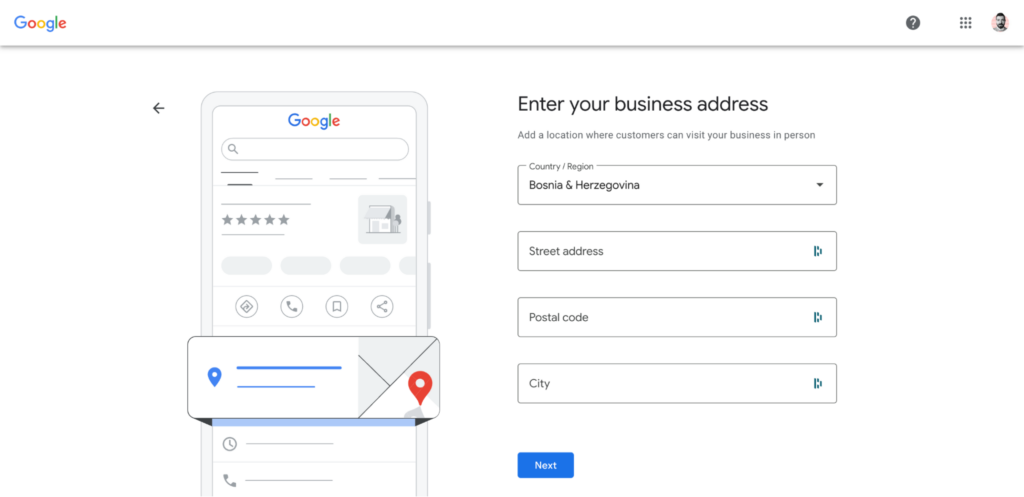
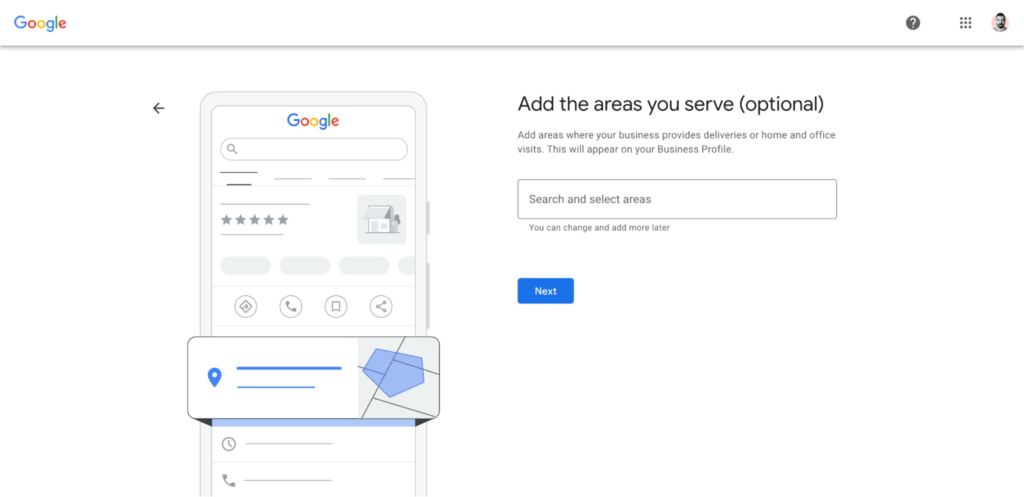
4. On the next screen, you’ll need to confirm whether your business offers deliveries or home visits. If you don’t offer either of these, simply select “No” and click the “Next” button.
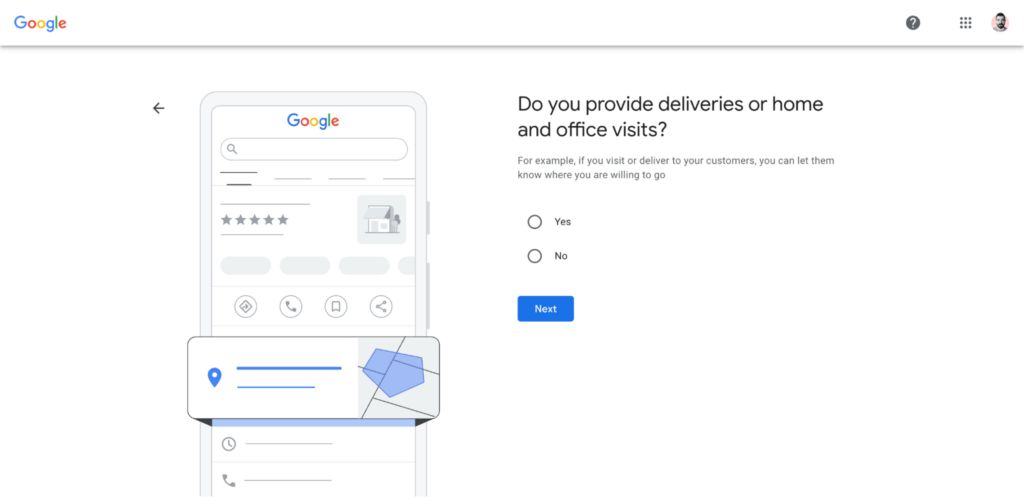
Alternatively, select “Yes” and then enter your business’s service area.
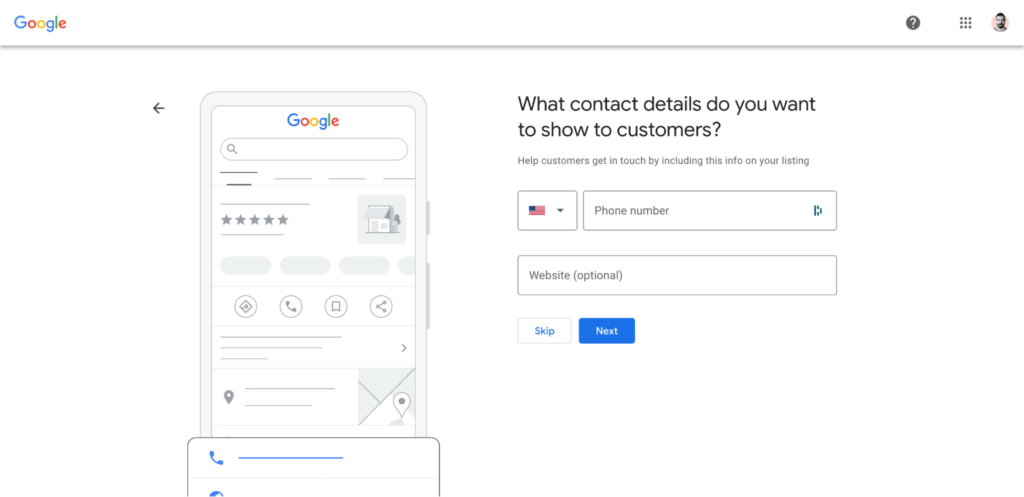
5. You’ll need to add your contact information on the next screen. Entering a phone number is mandatory. You can also add your business’s website.
6. As the last step, you’ll need to verify that you own or manage the business through either phone or video verification.
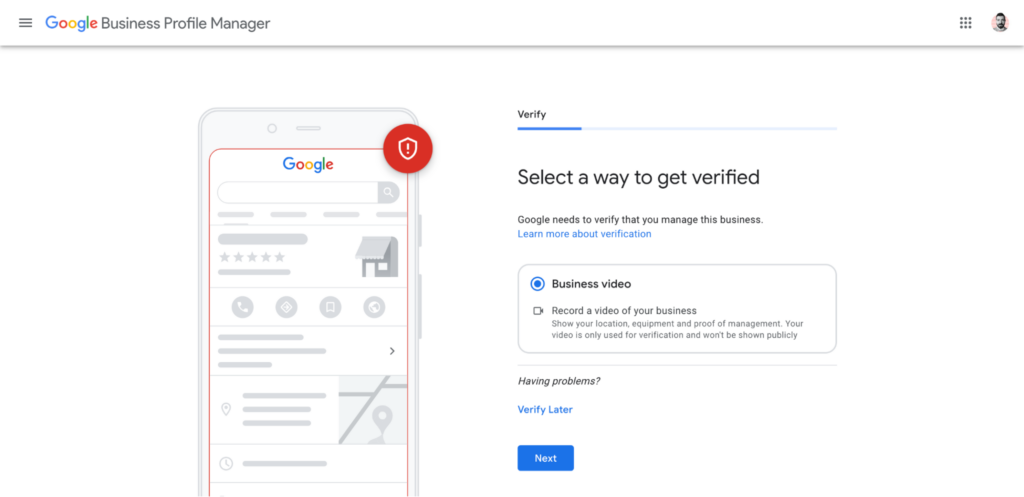
Google will send you a confirmation email once your business has been verified. This can take up to five business days.
How to verify your Google Business Profile
Verification is how Google confirms you actually own or manage the business. Until you finish it, your profile stays invisible in local search and on Maps, so it's worth getting through promptly.
Google decides which verification methods you qualify for based on your business type and category. You'll usually see one or more of these options:
- Phone or text: Google sends a verification code by automated call or SMS to your business number. You enter the code, and you're done in minutes.
- Email: A code arrives at your business email address for you to enter. This tends to be among the faster options when it's offered.
- Postcard: Google mails a postcard with a code to your registered address, which usually takes five to seven business days. Once it arrives, you enter the code to finish.
- Video recording or live video call: For some businesses, Google requires you to show proof through video, either pre-recorded or on a live call with a support agent.
What to know about video verification
Video verification trips up a lot of owners because it's stricter than the other methods, so it helps to know what you're walking into.
The video needs to prove three things in a single unedited take: that your location is real, that you have access to it as an authorized manager, and that the business is genuinely operating.
You'll typically film your exterior signage, then move inside to show your equipment, workspace, and something that demonstrates day-to-day operations like a booking system, branded tools, or point-of-sale setup.
A few practical pointers to keep it smooth:
- Plan your route before recording: Walk through what you'll film in order, from the signage outside to the operational proof inside, so you can do it in one continuous shot. Google doesn't accept edited footage or pre-existing files uploaded from your library.
- Keep sensitive details out of frame: Avoid capturing faces, customer information, or documents like bank statements that show account numbers. If you need to show a document for proof of address, cover the sensitive parts and reveal only the business name and address.
After you submit, Google reviews the video and typically gets back to you within five business days. If it's rejected, you'll get feedback and a chance to record and submit a new one.
How to optimize your Google Business Profile
A claimed, verified profile is the starting line. Optimization is what turns it into a listing that ranks well, earns clicks, and convinces people to choose you.
Each item below is a lever you control, and together they cover the full optimization picture. Work through them in order the first time, then revisit the ones that need ongoing attention, like photos, posts, and reviews.
- Choose the most precise primary category: Your primary category is the strongest signal you control, so match it to your main service rather than a broader label that sounds bigger. Add secondary categories only for services you genuinely offer.
- Keep your name, address, and phone consistent: Matching details across your website and every directory tell Google your business is real and stable. Never pad your business name with keywords, since that can trigger a suspension.
- Fill out your description, services, and products: Use the 750-character description to cover what you do, who you serve, and where, then list specific services like "walk-in shower installation" rather than vague labels. Specific entries pull you into more searches and give customers a clearer picture.
- Set your location and hours correctly: Show your address if customers visit you, or set a service area if you travel to them, and keep your hours accurate including holidays. Wrong hours send customers to a closed door, and fake 24/7 hours can get you suspended.
- Upload real photos, and keep adding them: Genuine shots of your work, team, and space build more trust than stock images ever will. Add a few fresh ones each month so your profile reads as active.
- Add the attributes that apply: Turn on details like accessibility, amenities, and identity attributes such as women-owned or veteran-led. They help customers filter to you and give them another reason to pick you.
- Publish Google Posts regularly: Share updates, offers, events, and products to keep your profile active across Search and Maps. A post every week or two is plenty, and tracked links show you the traffic each one sends.
Further reading: Google Business Profile Optimization: 7 Essential Tips
Understanding your Google Business Profile analytics
Your profile comes with a performance dashboard that shows how customers find and interact with you. Reading it regularly tells you what's working and where to focus next.
Here are the metrics worth watching:
- Searches: This shows the search terms people used to find your profile, refreshed at the start of each month. Recurring terms are a strong hint for your services list and website content.
- Views: This counts how many people viewed your profile across Search and Maps. Tracking it over time shows whether your visibility is climbing or stalling.
- Calls: This tracks how often people tapped the call button on your profile, so you'll need your phone number added to see it. A rise after you refresh photos or hours tells you the change is working.
- Directions: This counts how many people requested directions to your location, a useful signal of real intent to visit. It's most meaningful for businesses customers actually travel to.
- Website clicks: This measures how many people clicked through to your site from your profile. A low number against high views can mean your photos or description aren't pulling their weight.
- Messages: This shows how many conversations customers started through the messaging feature. You'll only see it if you've turned messaging on.
- Bookings: This counts how many appointments customers completed straight from your profile. It only appears if your bookings run through a supported booking provider.
Keep in mind that Google only shows the metrics that apply to your business, so not every profile sees every line. A retailer might also get product views, while a restaurant sees menu clicks.
Put the data to use by turning patterns into changes. A search term that shows up often is worth building a dedicated service entry or website page around, so your profile and your site reinforce each other for the searches that matter.
Check your performance dashboard monthly, note the trends, and let them guide where you spend your optimization time.
Further reading: Google Business Profile Analytics: Essential Metrics for Success
Managing profiles across multiple locations
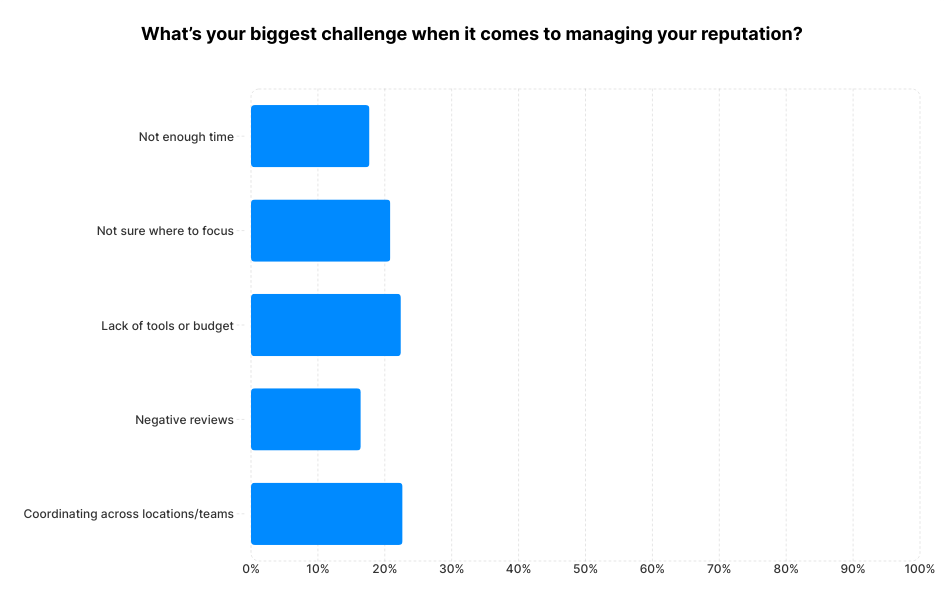
Running more than one location turns consistency into your central challenge. In our State of Online Reputation Management report, coordinating across teams and locations was the single biggest reputation management challenge owners reported.
Each location needs its own verified profile, even when they share a brand and offer the same services.
The risk is that locations drift apart, responding to reviews in different ways or at different speeds, which creates an uneven experience and lets one weak spot drag on your whole brand.
Keeping standards even across locations comes down to a couple of things:
- Set shared guidelines and training: Give every location the same playbook for responding to reviews, posting updates, and keeping information current. Consistent training keeps the customer experience steady no matter which location someone finds.
- Monitor everything from one dashboard: Watching each location through a central view lets you spot problems and trends without logging into a dozen profiles separately. It also makes it easier to keep response times consistent across the board.
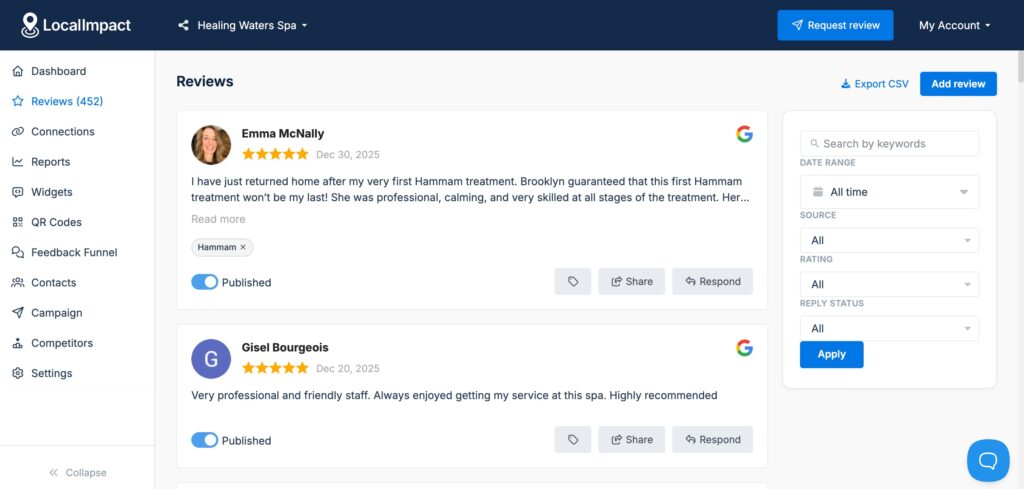
LocalImpact helps here by pulling reviews from all your locations and review sites into one place, so you can monitor, respond, and spot trends across every profile from a single dashboard.
Common Google Business Profile problems and how to fix them
Even a well-built profile can run into trouble. Knowing the usual culprits and their fixes saves you from a long stretch of lost visibility.
Here are the problems that come up most, and what to do about each:
- Suspensions: Google can suspend a profile for guideline violations like keyword-stuffed names, fake hours, or an address that doesn't match how you operate. Fix the underlying issue first, then file for reinstatement through Google's support process with evidence that your business is legitimate.
- Duplicate listings: Two profiles for the same business split your reviews and confuse both customers and Google. Search for duplicates, then report them so Google can merge or remove the extra, leaving one accurate profile.
- Unwanted edits to your listing: Anyone can suggest edits to your profile, and Google sometimes accepts them automatically. Check your details periodically and correct anything that's been changed without your say-so.
- Reviews that break the rules: Fake or policy-violating reviews can be flagged for removal, though the process moves slowly. In our fake reviews research, only 28% of owners said a reported fake was removed promptly, so a steady flow of authentic reviews is your best counterweight while you wait.
The thread running through most of these is that prevention beats cure. Accurate information, a clean business name, and regular monitoring keep the majority of these problems from ever starting.
Streamline Google review management for your business
Use LocalImpact to generate and manage Google reviews more effectively.
How your Google Business Profile feeds AI search
AI tools have moved into the research stage of how people choose businesses, and your profile is part of what they read. This is the angle most guides skip, and it's becoming one of the strongest reasons to keep your profile complete and active.
The shift is already well underway. In our research on AI and the buying journey, 6 in 10 consumers said they use AI tools often or almost always when researching purchases, and 38% use AI specifically to research local services.
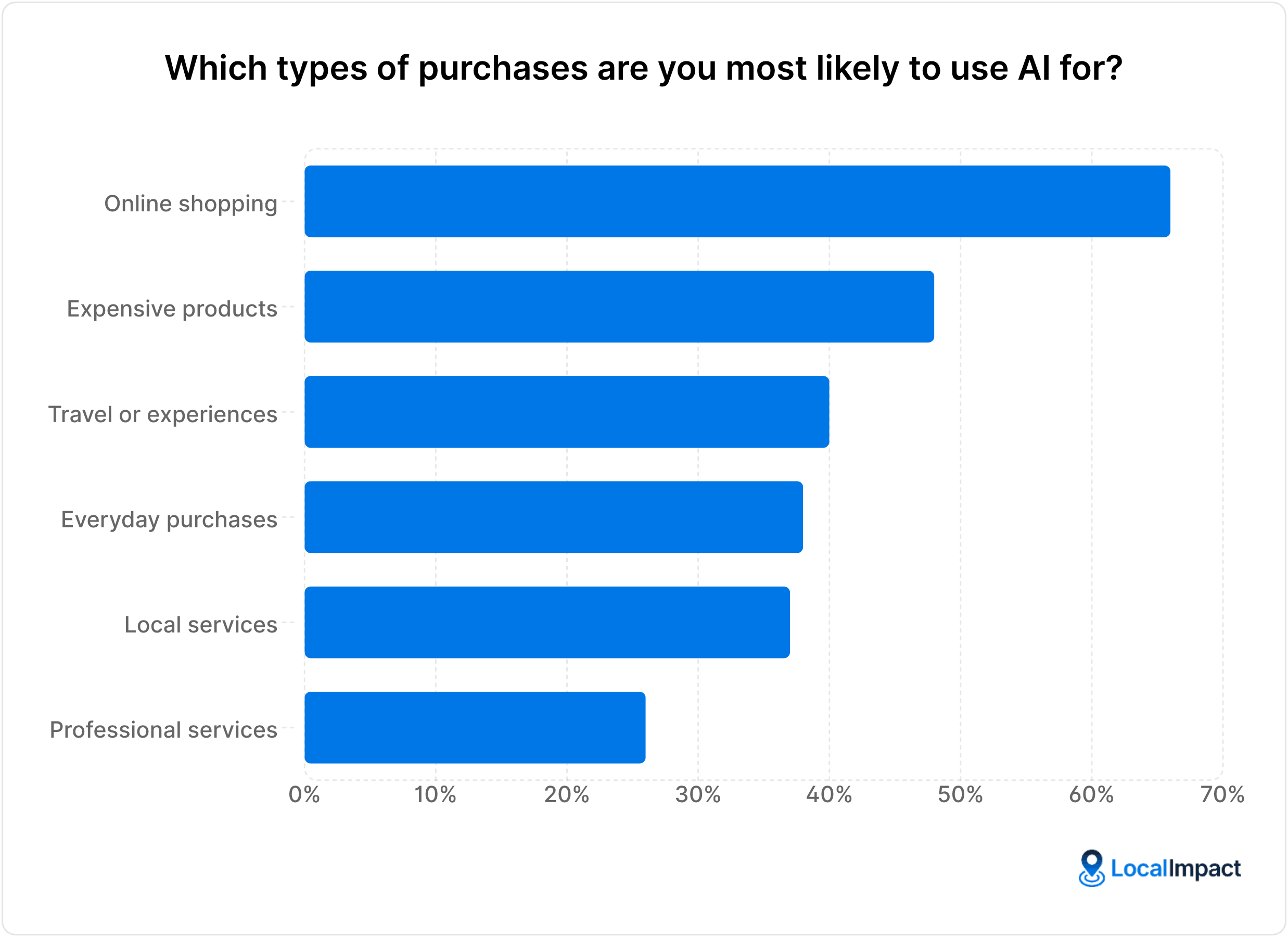
What makes this matter for your profile is how AI handles discovery. AI can surface your business to people who've never heard of you, with 44% of consumers saying they'd consider a business they didn't know if an AI tool recommended it.
Getting recommended is only half the story, though, because reviews decide whether that attention turns into a customer:
- Reviews validate the recommendation: Over half of consumers said recent reviews, strong overall reviews, and high star ratings would make them more comfortable trusting an AI-recommended business. A profile with thin or stale reviews struggles to convert the attention AI sends.
- Complete information helps AI describe you: The more accurate detail your profile carries, from category and services to hours and attributes, the better AI tools can describe and recommend you correctly. Gaps and inaccuracies give these tools less to work with.
The takeaway is that AI visibility and a well-maintained profile are tied together. Showing up in AI search brings more eyes, and a complete profile with a healthy review base is what turns those eyes into calls.
Frequently asked questions about Google Business Profile
A handful of questions come up again and again. Here are clear answers to the most common ones.
Is a Google Business Profile free?
Yes, creating and maintaining a Google Business Profile costs nothing. There's no fee to set it up, verify it, or use any of its features, and there are no premium tiers that unlock extra tools.
Every eligible business gets access to the same features regardless of size or budget. The only investment is the time you put into setting it up well and keeping it current.
How long does it take to set up a Google Business Profile?
Creating the basic profile takes around fifteen minutes once you have your details ready. Verification is what adds time, since postcard verification can take five to seven business days to arrive.
Some businesses qualify for faster verification by phone, email, or video. After you're verified, plan another half hour or so to complete your optimization, since a fuller profile performs better.
Can I have a Google Business Profile without a physical location?
Yes, service-area businesses can run a profile without showing a physical address. Plumbers, cleaners, contractors, and similar businesses that travel to customers simply choose the service-area option during setup and list the areas they cover.
Your business then appears in searches for those areas without pinning you to a storefront. Hiding the address is the right call when customers don't visit you.
What's the difference between Google My Business and Google Business Profile?
They're the same product under two names. Google My Business was the original name, and Google rebranded it to Google Business Profile in 2021.
The core features stayed the same, and the interface got simpler over time. People still use both terms, so you'll see "GMB" floating around, though Google Business Profile is the current official name.
How many reviews does my profile need?
There's no magic number, though more recent reviews generally help with both ranking and trust. A useful floor comes from how people read: most consumers look at between four and ten reviews before deciding, so you want enough fresh feedback to satisfy that scanning.
Beyond that, aim to keep pace with your local competitors and maintain a steady flow of new reviews. A profile with recent feedback reads as more active and trustworthy than one with a few old reviews.
Bringing it together
Your Google Business Profile shapes nearly every step of how a local business gets discovered and chosen in 2026, from where you rank in local search to whether AI tools put you on the shortlist.
A complete, accurate, well-maintained profile is one of the most valuable free assets you can build.
The pieces fit into a straightforward system:
- Claim and verify first: Get control of your profile and complete verification so you're visible in Search and Maps. Nothing else works until this is done.
- Optimize every section: Nail your category, keep your information consistent, and fill out your description, services, photos, and attributes. Each piece feeds the relevance and prominence signals Google ranks on.
- Stay active and consistent: Post updates, keep your hours current, answer questions, and maintain a steady flow of recent reviews. Activity is what keeps both Google and customers confident you're still the right choice.
This matters more as AI reshapes how people find businesses. AI can introduce you to people who've never heard of you, and a complete profile backed by strong reviews is what decides whether that attention turns into a customer.
LocalImpact brings the reviews side of this into one place.
You can monitor reviews across Google and dozens of other platforms, generate fresh ones automatically with email and SMS campaigns, respond using AI, and showcase your best reviews on your website.
Start your free trial today and turn your profile into your strongest local growth channel.