With hundreds of options on the market, it's difficult to know which AI tools actually deliver and which ones just look good in a demo.
We spent 300+ hours hands-on with the most-talked-about AI tools in 2026 so you can skip straight to the ones worth your time.
This article covers the 17 best AI tools across writing, productivity, video, scheduling, and more.
Best AI tools at a glance
No time to go through the entire article? Here’s a quick comparison.
| Software | Best for | Starting price |
| ChatGPT | All-purpose AI assistant | $20/month |
| Gemini | Google Workspace users | $19.99/month |
| Claude | Long-form writing and analysis | $20/month |
| Jasper | Marketing content teams | $49/month |
| Copy.ai | GTM and sales teams | $36/month |
| Synthesia | AI video creation | $29/month |
| LocalImpact | Online reputation management | $19/month |
| Softr | No-code app building on spreadsheet data | $49/month |
| Browse AI | No-code web scraping | $19/month |
| Otter.ai | Meeting transcription and notes | $16.99/month |
| Motion | AI task scheduling and productivity | $19/month |
| Rewind | Personal AI memory on Mac | $20/month |
| Mem | AI-powered note-taking | $14.99/month |
| Poised | Communication coaching in meetings | $16/month |
| Beautiful.ai | Fast professional presentations | $12/month |
| Gamma | AI-generated decks and docs | $8/month |
| Numerous.ai | AI inside Google Sheets and Excel | $8/month |
How we chose these tools
We put 300+ hours into testing, researching, and comparing AI tools to build this list. Here's what we evaluated:
- Output quality: We assessed whether the AI actually produced results we could use, not just plausible-sounding content that needed full rewrites.
- Ease of use: We considered how quickly a new user could get meaningful results, including setup time, interface clarity, and onboarding resources.
- Workflow fit: We looked at how well each tool integrates into everyday work, including third-party app compatibility and the friction involved in switching context.
- Feature depth vs. simplicity: We evaluated whether the tool's capabilities matched its complexity, with particular attention to tools that do a few things exceptionally rather than many things poorly.
- Pricing transparency and value: We compared what each plan actually includes, how pricing scales, and whether free trials allow meaningful evaluation before committing.
- User sentiment: We reviewed verified feedback from real users to surface consistent praise and recurring friction points that aren't visible in product demos.
1. ChatGPT
Best for: Teams and individuals who want a versatile, all-purpose AI assistant
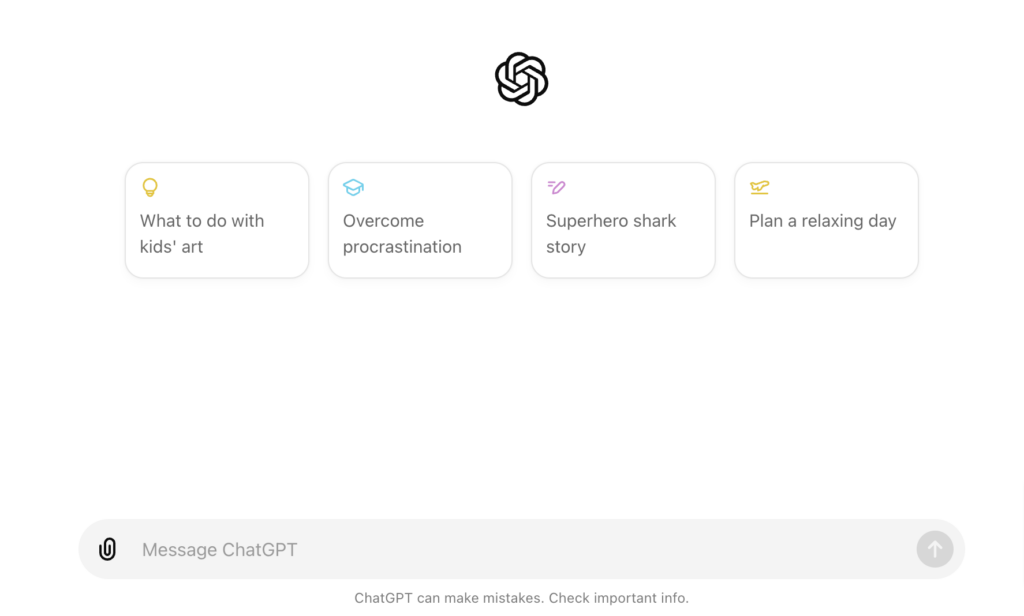
ChatGPT from OpenAI remains the most widely used AI assistant in the world, and after spending significant time with it, it's easy to see why.
It handles an unusually wide range of tasks, from writing and summarizing to coding, data analysis, and image generation, all within a single interface.
GPT-4o and later models give paid users access to reasoning-heavy modes that handle complex, multi-step tasks well. Custom GPTs let you build persistent, instruction-tuned assistants without any coding knowledge, which is particularly useful for teams who need consistent outputs across roles.
Key features
- Versatile model access: Paid plans include access to OpenAI's latest models including GPT-4o, enabling stronger reasoning and more accurate outputs across a wide range of tasks.
- Custom GPTs: Users can build tailored GPT assistants with specific instructions, personas, and knowledge files that persist across conversations.
- File and image analysis: ChatGPT can read and interpret PDFs, spreadsheets, and images, making it useful for document review and visual data extraction.
- Code interpreter: The built-in Python environment lets users run scripts, generate charts, and analyze datasets without leaving the chat interface.
- Browsing and search: ChatGPT can pull current information from the web, reducing reliance on outdated training data for time-sensitive queries.
Pros and cons
Pros
- Handles a wider range of task types than almost any other AI tool
- Custom GPTs enable repeatable, instruction-tuned workflows without coding
- Strong multimodal capability across text, images, files, and code
- Massive third-party integration ecosystem through GPT plugins and API
Cons
- Responses can be overly hedged or verbose without careful prompting
- Quality varies between model tiers, free users get a noticeably different experience
- Prone to confident-sounding errors on specialized or highly technical topics
What we like
ChatGPT's memory feature, which lets it retain context from prior conversations, is a practical differentiator for users who return to the same topics regularly. It's the kind of feature that quietly compounds value over time.
What users say
Users consistently highlight how naturally ChatGPT fits into their existing workflows. Developers, writers, and analysts all find uses for it, often without needing to change how they already work.
"I also like how well it integrates into my daily workflow. I often use it along with my projects like Python scripts, content creation and social media tasks and it fits in naturally without any friction. So I loved it a lot"
Some users note that responses can require follow-up prompting for accurate results, especially on technical topics.
"Sometimes it gives wrong or outdated answers, so I have to double check important things. Also, for very specific or advanced tasks, it may need multiple prompts to get the exact result."
Pricing
ChatGPT offers a free plan with limited access to GPT-4o. The Plus plan unlocks priority access, higher usage limits, and advanced tools.
Paid plans include:
- Plus ($20/month)
- Team ($30/user/month)
- Enterprise (custom pricing)
2. Gemini
Best for: Google Workspace users who want AI built into their existing tools
Google's Gemini is the AI assistant that makes the most sense if your work already lives inside Gmail, Docs, Sheets, or Meet.
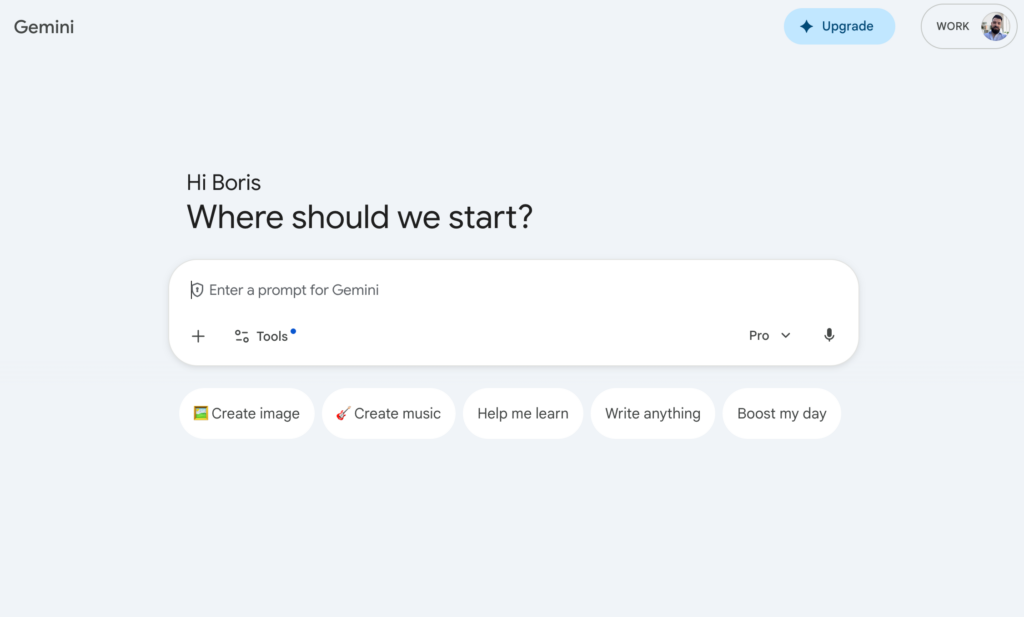
During testing, the Workspace integration felt genuinely tight, with Gemini able to pull context from emails and documents to produce outputs that didn't require a lot of re-explaining.
Gems, Gemini's version of custom AI personas, let users create reusable assistants for specific roles like career coaching or marketing strategy.
The tool handles images and audio well, and its access to real-time Google Search data gives it an edge on current-events queries.
Key features
- Google Workspace integration: Gemini works directly inside Gmail, Docs, Sheets, Meet, and Drive, letting users summarize threads, draft emails, and generate content without leaving the app.
- Gems: Custom AI experts users can create and reuse for specific use cases, such as a marketing strategist, editor, or research assistant.
- Multimodal input: Accepts text, images, and audio as input, enabling tasks like describing photos, transcribing speech, or analyzing visual data.
- Real-time Search access: Gemini can query Google Search to surface current information, which is particularly useful for research and fact-checking tasks.
- Long context window: Supports very long inputs, making it practical for reviewing lengthy documents, codebases, or meeting transcripts in a single session.
Pros and cons
Pros
- Deep integration with Google Workspace makes it the default AI for Google-heavy teams
- Real-time search access keeps responses current
- Gems enable reusable, personalized AI assistant workflows
- Strong image and audio understanding
Cons
- Less creative and more formulaic than some competing models in open-ended writing tasks
- Interface and conversation flow feel less polished than some alternatives
- Inconsistency in responses to the same question is a recurring user complaint
What we like
Gemini's ability to polish and shorten content inside Gmail is one of those features that sounds minor but saves real time for anyone who spends their day in email. The inline editing flow is noticeably smoother than switching to an external tool.
What users say
Users appreciate how fast and straightforward Gemini is for day-to-day queries, especially for those already inside the Google ecosystem.
"I can type in a question and I get an INSTANT answer. I also love how easy it was to set up, and IF I have a problem the Customer Support team is FAST and HELPFUL. I use Gemini all the time in my day to day life."
Some users find the tool more rigid than competitors, with occasional refusals or disclaimers on topics that other AI tools handle without hesitation.
"It is less creative and will also say it can't answer some questions if you phrase them in a certain way. You can get information about a physical ailment, but if you need information about your own health condition, you'll get disclaimers first."
Pricing
Gemini offers a free plan with access to the standard model. The Advanced tier is available as part of Google One AI Premium.
Paid plans include:
- Google One AI Premium ($19.99/month)
- Gemini for Google Workspace (pricing varies by plan)
3. Claude
Best for: Writers, researchers, and analysts who need precise, nuanced outputs
Built by Anthropic, Claude stands out for the quality of its prose and the depth of its reasoning.
Throughout testing, it consistently produced outputs that felt more considered and less formulaic than competitors, particularly for long-form writing, document summarization, and complex analysis tasks.

Claude's extended context window allows it to process entire books, codebases, or lengthy research reports in a single session.
Its structured approach to following complex instructions makes it a reliable choice for teams that need consistent, high-quality outputs without constant correction.
Key features
- Extended context window: Handles very large inputs, enabling users to analyze entire documents, lengthy reports, or large codebases in one session.
- Writing quality: Produces polished, natural-sounding prose with a tone that adapts well to professional, creative, and technical contexts.
- Projects: Persistent workspaces that retain context across conversations, useful for long-running tasks like drafting, research, and iterative writing.
- Document analysis: Reads and interprets uploaded PDFs and files, enabling users to extract key information, compare documents, or summarize complex material.
- Coding assistance: Supports code generation, debugging, and explanation across a wide range of programming languages, with particularly strong performance on complex reasoning tasks.
Pros and cons
Pros
- Consistently strong writing quality across professional, creative, and technical formats
- Handles long, complex instructions with a high degree of accuracy
- Extended context window makes it practical for large document analysis
- Thoughtful, well-reasoned responses that go beyond surface-level answers
Cons
- Can be cautious in ways that limit directness on certain topics
- Usage limits on lower-tier plans may be restrictive for heavy users
- Fewer native integrations than some larger AI ecosystems
What we like
Claude's ability to analyze an uploaded document and then engage in detailed follow-up conversation about it without losing context is genuinely impressive. It's the most reliable tool we tested for document-heavy research workflows.
What users say
Users frequently call out Claude's conversational quality, noting that its responses feel more natural and less robotic than competing tools.
"The answers feel natural and well-explained, especially for complex topics, documentation, and long conversations. It's particularly helpful for writing, summarizing content, reviewing documents, and brainstorming ideas."
Some users find the usage caps on lower plans limiting, particularly if they use it intensively for work.
"Sometimes Claude is a bit too cautious and may avoid giving very direct answers in certain situations. There are also limitations on usage depending on the plan, which can be restrictive for heavy users."
Pricing
Claude offers a free plan with access to the base model. Pro and higher plans unlock access to the most capable models and higher usage limits.
Paid plans include:
- Pro ($20/month)
- Team ($30/user/month)
- Enterprise (custom pricing)
4. Jasper
Best for: Marketing and content teams producing high-volume branded content
Jasper is built specifically for marketing content production, and that focus shows.
During testing, the Brand Voice feature made a real difference, with outputs that stayed consistently on-tone across different content types without needing repeated style corrections.
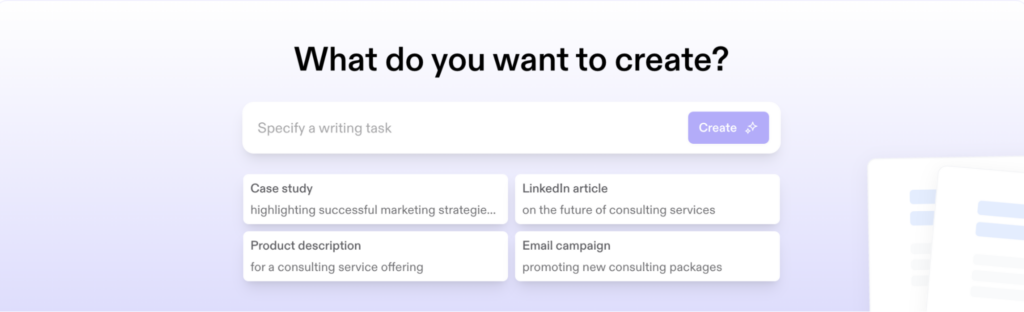
The platform's template library covers a wide range of marketing formats, from blog posts and ad copy to landing pages and email sequences.
Jasper also integrates with SEO tools like SurferSEO and Grammarly, which makes it practical for teams managing content from creation to publication.
Key features
- Brand Voice: Learns and applies your brand's tone, style, and terminology across all generated content, reducing editing time for teams managing consistent messaging.
- Template library: Pre-built templates for marketing formats including blog posts, ad copy, product descriptions, social media posts, and email sequences.
- Campaigns: Lets users plan and generate entire multi-channel marketing campaigns from a single brief, with consistent messaging across all assets.
- SEO integration: Connects with SurferSEO to provide real-time optimization guidance while writing, helping content rank without requiring a separate workflow.
- Team collaboration: Multi-seat access with shared assets, brand guidelines, and project folders for marketing teams working on content together.
Pros and cons
Pros
- Brand Voice consistently applies tone and style without repeated prompting
- Templates cover virtually every marketing content format
- Integrates with SurferSEO and Grammarly for a connected content workflow
- Campaign feature reduces the friction of creating multi-channel content
Cons
- Can produce generic or repetitive content on niche or technical topics
- Pricing is relatively high for solo users or small teams
- Pausing a subscription cuts off access immediately, which some users find frustrating
What we like
The multi-channel campaign builder is a genuine time-saver for marketing teams. Being able to generate consistent copy across email, social, and ads from a single brief, without manually recreating context in each asset, is one of Jasper's clearest advantages.
What users say
Users consistently praise Jasper for reducing the time it takes to go from a blank page to a usable first draft, particularly for SEO-focused content.
"The best AI blog creation tool that doesn't read like it was created by AI (if you use it properly)."
A recurring frustration involves the subscription pause policy, which some users discovered only after needing a break.
"CAUTION. If you choose to not use Jasper for 1-2 months and click 'Pause Subscription', it will immediately prevent you from using the product even if you have days/weeks of use paid for already. They are unwavering about this, and will refuse to help you."
Pricing
Jasper offers a 7-day free trial on paid plans. There is no permanently free tier.
Paid plans include:
- Creator ($49/month)
- Pro ($69/month)
- Business (custom pricing)
5. Copy.ai
Best for: Go-to-market and sales teams automating content workflows
Copy.ai has evolved from a simple copywriting tool into a broader GTM AI platform focused on sales and marketing workflow automation.
During testing, the workflow builder stood out for its ability to chain multiple content tasks together, generating and routing content across stages with minimal manual input.
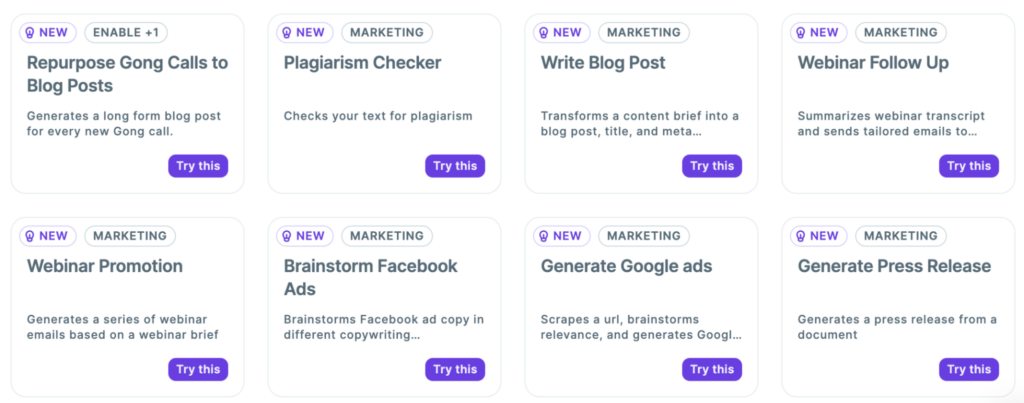
The tool is well-suited to teams that need to produce large volumes of sales and marketing content quickly.
Its integration options, including connections to CRMs and marketing platforms, make it practical for teams looking to embed AI into existing pipelines rather than running it as a standalone tool.
Key features
- GTM workflows: Automates multi-step go-to-market processes including prospecting sequences, email campaigns, and content pipelines from a single interface.
- Template library: Extensive collection of copy formats covering ads, emails, social posts, and product descriptions with tone and audience controls.
- Brand voice: Applies consistent messaging guidelines across generated content to keep outputs aligned with brand standards without repeated corrections.
- Infobase: Stores company information, product details, and messaging so the AI always has relevant context without requiring re-entry for each task.
- Integrations: Connects with tools including HubSpot, Salesforce, and Zapier to embed AI-generated content directly into existing marketing and sales workflows.
Pros and cons
Pros
- Workflow automation makes it practical for high-volume content operations
- Infobase ensures context is retained across all generated content
- Strong CRM and marketing platform integrations
- Intuitive interface that new users can navigate quickly
Cons
- AI can produce inaccurate information that requires careful verification
- Output quality varies significantly depending on prompt clarity
- Chat editing limitations mean users must restart rather than refine in place
What we like
The extensibility of Copy.ai is what sets it apart for sales and marketing teams.
Being able to orchestrate multi-step workflows that generate, route, and publish content across channels from one tool replaces what would otherwise require several separate platforms.
What users say
Users highlight how quickly the tool gets them to a usable first draft, particularly for short-form marketing copy.
"I am deeply impressed with the speed that the writing copy gets populated and how engaging the copywriting is. The writing sounds like I paid hundreds of dollars for a copywriter."
Some users note that outputs can require fact-checking, particularly on claims or data points included in generated content.
"They don't have the ability to edit the input in a chat. I need to continue in the same thread and formulate the input from the beginning again."
Pricing
Copy.ai offers a free plan with limited monthly credits. Paid plans unlock higher usage limits and advanced workflow features.
Paid plans include:
- Starter ($36/month)
- Advanced ($186/month)
- Enterprise (custom pricing)
6. Synthesia
Best for: Teams creating professional training and explainer videos at scale
Synthesia lets users generate polished, avatar-led videos from a script, without cameras, studios, or actors.
After testing it for internal training and explainer content, the combination of realistic avatars and a built-in video editor made it genuinely viable for professional use.
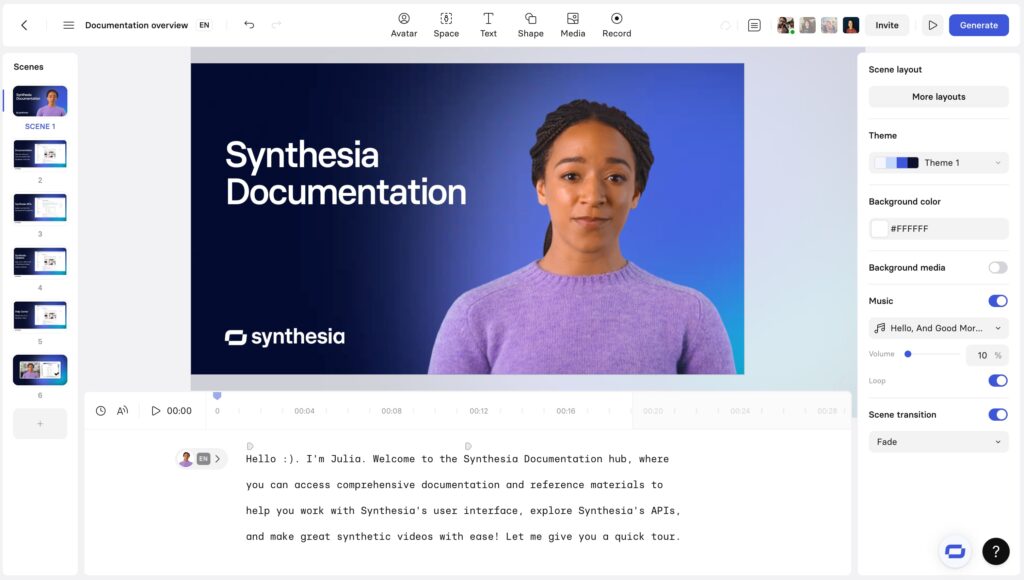
The platform is used by a large share of the Fortune 100, and its strength is particularly clear in corporate learning and development contexts.
Support resources including Synthesia Academy, live webinars, and regular feature updates give it a depth that individual creators and smaller teams may not fully utilize.
Key features
- AI avatars: Over 230 stock avatars with realistic voice sync and natural movement, suitable for professional video content without on-camera talent.
- Custom avatars: Users can create a digital avatar of themselves or a brand representative for consistent, personalized video content at scale.
- Multi-language support: Generates videos in 140+ languages with voice dubbing, making localization straightforward for global teams.
- Built-in video editor: Full editing environment including media library, templates, and screen recording, so most video production happens inside one tool.
- Collaboration tools: Multi-user workspace with sharing, commenting, and version control for teams managing video content production together.
Pros and cons
Pros
- Dramatically reduces time and cost for producing professional training and explainer videos
- Realistic avatars and voice sync hold up well for corporate and educational use cases
- 140+ language support makes localization practical at scale
- Built-in editor reduces the need for separate video production tools
Cons
- Avatar realism still falls slightly short of live video, which can affect perceived authority in high-stakes content
- Annual video minute limits on entry plans are restrictive for frequent creators
- Medical and some regulated content categories require custom avatars at additional cost
What we like
Synthesia's ability to eliminate production logistics is its core value proposition, and it delivers on it.
The fact that safety and training teams can focus on content accuracy rather than production quality, without sacrificing a professional result, is a real advantage for organizations managing large content libraries.
What users say
Users consistently highlight the quality of the avatars and the speed of production as the tool's biggest strengths.
"Synthesia is by far the best software to create videos with very realistic avatars and speech. The variety of avatars and voices is amazing and my go to for anytime I need to make a video."
Some users flag that content moderation policies can block legitimate use cases, particularly in medical or regulated industries.
"Only thing that would make this software better is a bigger library of media such as videos and images that can be used for free."
Pricing
Synthesia offers a free trial that allows users to create a limited number of videos. Paid plans are billed annually.
Paid plans include:
- Starter ($29/month, billed annually)
- Creator ($89/month, billed annually)
- Enterprise (custom pricing)
7. LocalImpact
Best for: Local businesses and agencies managing online reviews and reputation
LocalImpact is a reputation management platform built for local businesses that need to collect, monitor, and respond to customer reviews across major review sites from a single dashboard.
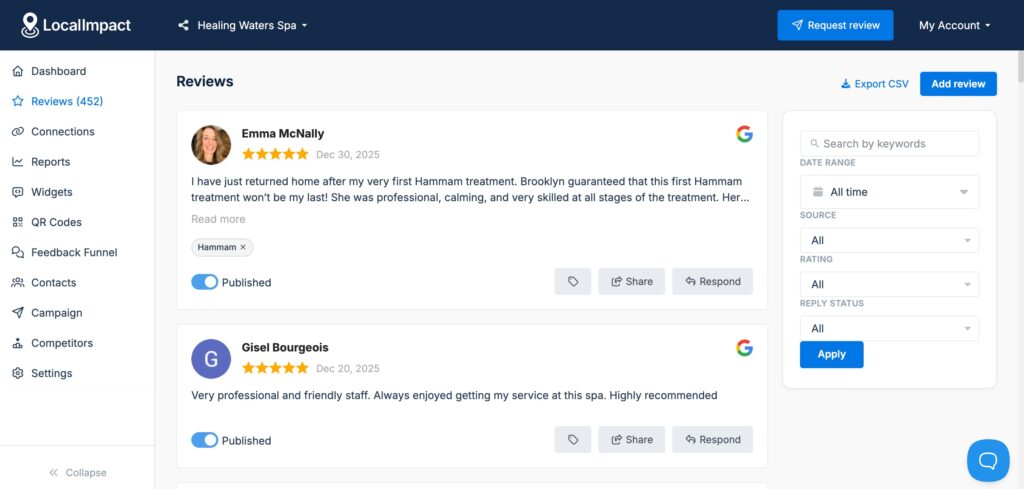
It focuses on the core tasks that matter most for local SEO and online visibility, without the complexity or cost of enterprise reputation platforms.
The platform makes it straightforward to automate review requests, display social proof on your website, and stay on top of new feedback as it comes in.
Agencies managing multiple client locations will find the white-label option particularly practical for keeping operations organized.
Key features
- Review collection automation: Sends automated review request messages to customers via email or SMS, reducing the manual effort required to grow your review volume.
- Multi-source monitoring: Tracks reviews across Google, Facebook, and other major review platforms in one dashboard so nothing slips through.
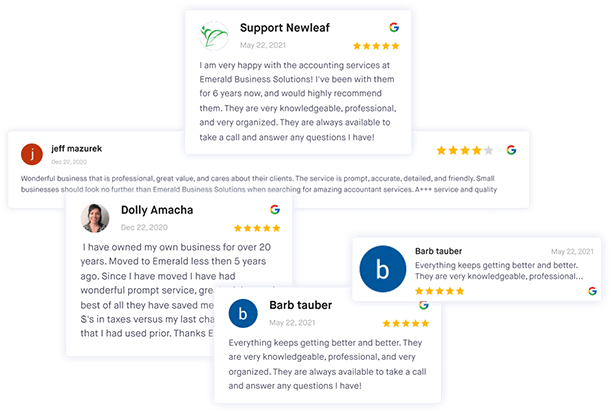
- Website review widgets: Embeds your reviews directly on your website as social proof, with display options that suit different layouts and branding styles.
- AI-powered response drafting: Generates suggested responses to new reviews that can be reviewed and sent with minimal editing, saving time on review management.
- Reporting and insights: Provides a clear view of rating trends, response rates, and review volume over time to track reputation progress.
Pros and cons
Pros
- Competitive pricing compared to enterprise reputation management tools
- Simple setup and an intuitive dashboard that doesn't require technical expertise
- Automation tools handle the most time-consuming parts of review management
- Review widgets make it easy to display social proof on any website
Cons
- Occasional delays in syncing new reviews from external platforms
- Design customization options for review widgets are more limited than some competing tools
- White-label tiering for agencies could be more flexible
What we like
LocalImpact's combination of straightforward setup, automation, and transparent pricing makes it one of the most accessible reputation management tools available for local businesses and the agencies that serve them.
It covers the fundamentals well without asking you to pay for features you'll never use.
What users say
Users highlight how quickly the platform gets them up and running and how the automation handles the heavy lifting of review collection.
"The platform is extremely easy to set up and integrate with my existing website. The dashboard is simple to navigate, and the automation tools save me time collecting and displaying reviews. Customer support is quick to respond and always helpful."
Pricing
LocalImpact offers a free trial so you can test the platform before committing. Paid plans scale by the number of locations.
Paid plans include:
- Growth ($49/month)
- Pro ($99/month)
- Agency ($149/month)
Manage your online reputation with ease
Monitor, manage, and get more online reviews for your business with LocalImpact.
8. Softr
Best for: Non-technical teams building client portals and internal tools on Airtable or Google Sheets
Softr lets anyone turn Airtable or Google Sheets data into a working web app, without writing code.
Testing it for a client portal use case, the drag-and-drop builder was fast, and the speed from initial setup to a functional, shareable interface was genuinely impressive.
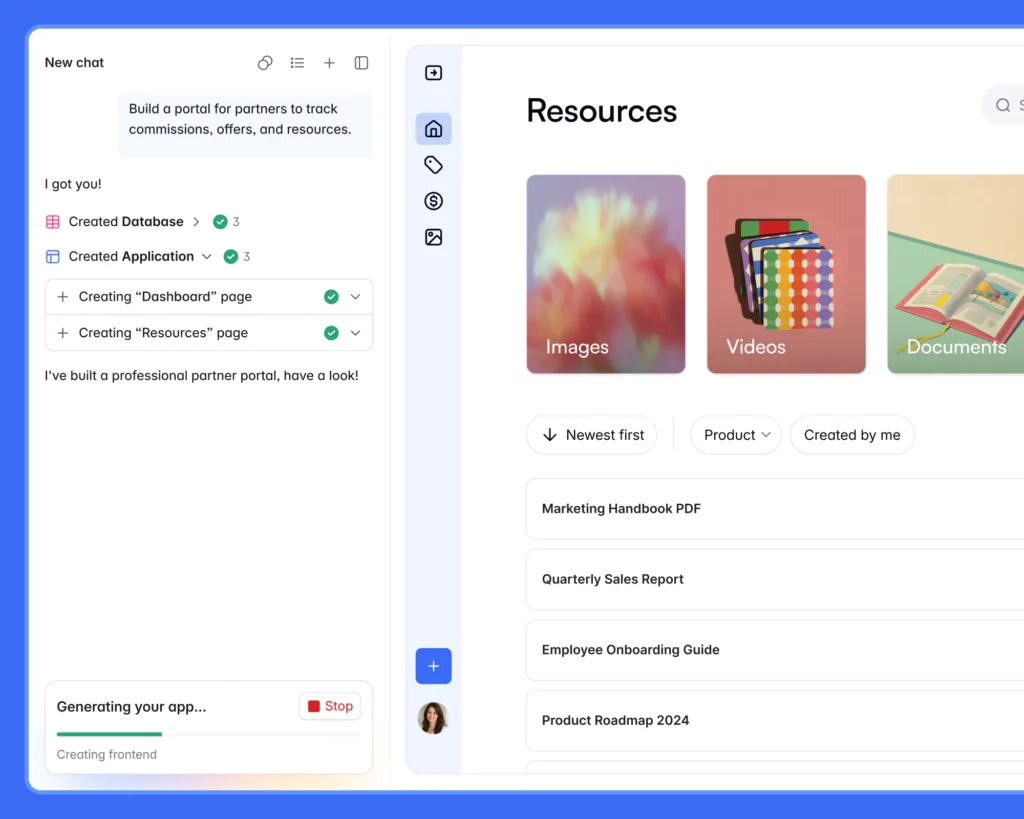
The platform is particularly strong for internal tools, client portals, and simple directories where the data already exists in a spreadsheet.
An AI app generator is available to scaffold a starting layout from a prompt, though most customization still happens in the visual builder.
Key features
- No-code app builder: Drag-and-drop builder with pre-built blocks for tables, forms, maps, and more, allowing non-technical users to assemble functional apps quickly.
- Data source integrations: Connects directly to Airtable, Google Sheets, HubSpot, Xano, and other sources, using existing data as the backend without migration.
- AI app generator: Generates an initial app layout from a text prompt, giving users a starting structure they can customize further in the visual builder.
- User authentication: Built-in login, user roles, and conditional visibility so apps can show different content to different users based on defined permissions.
- Custom domain support: Available on all plans including the free tier, making it practical to publish branded apps without upgrading.
Pros and cons
Pros
- Exceptionally fast time-to-working-app for non-technical users
- Custom domain support even on free plans is unusual and valuable
- Works with data sources teams already use, eliminating migration friction
- Intuitive enough that new users can ship their first app in hours
Cons
- Design customization is more limited than fully custom builders like Webflow
- Can slow down with very large Airtable datasets
- AI generator creates a layout scaffold only, not a fully configured app
What we like
The ability to change a layout, adjust visibility rules, or tweak styling and see the result in minutes is what makes Softr practical for iterating quickly.
For validating ideas and building MVPs without a development team, it's one of the fastest paths to a working product.
What users say
Users consistently describe Softr as one of the easiest no-code platforms they've worked with, with praise specifically for how quickly they get to something shareable.
"If I want to change a layout, adjust visibility rules, or tweak styling, I can do it in minutes and immediately see the result. That speed is huge for validating ideas and building MVPs without sinking weeks into development."
Some users find it frustrating to navigate back to Airtable frequently to troubleshoot data issues that aren't visible inside Softr.
"One challenge I've run into is that you can't easily preview or explore your full database directly inside Softr, which means I still have to jump back into Airtable pretty often to understand or troubleshoot data issues."
Pricing
Softr offers a permanently free plan for basic use. Paid plans unlock more data sources, users, and features.
Paid plans include:
- Basic ($49/month)
- Professional ($139/month)
- Business ($269/month)
9. Browse AI
Best for: Marketers and analysts who need to extract and monitor web data without coding
Browse AI makes web scraping accessible to non-developers by letting users train a robot on any website in minutes.
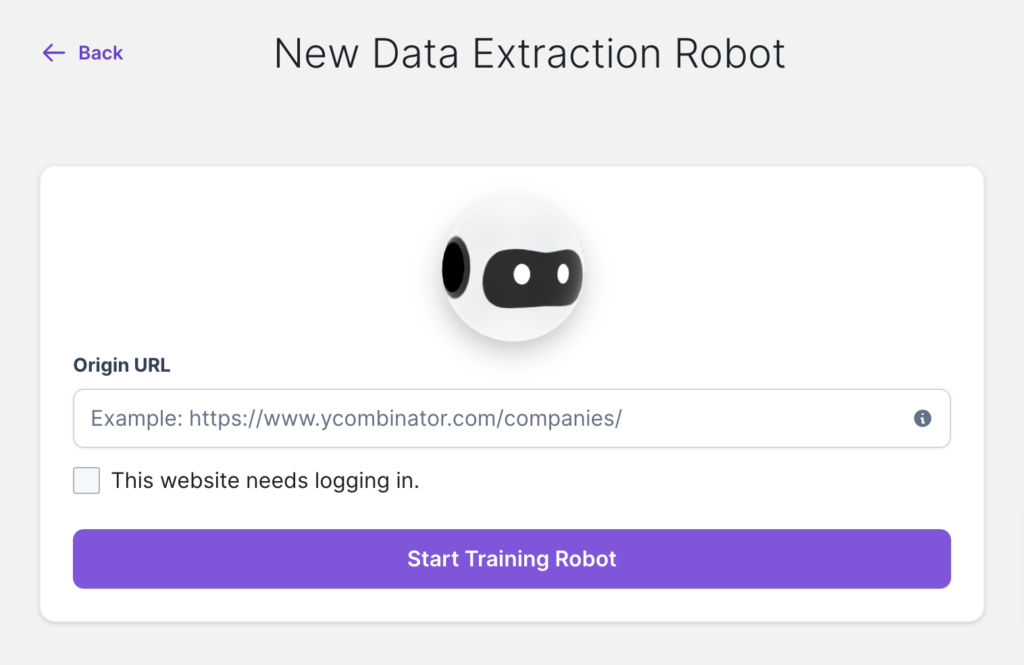
During testing, pulling structured data from competitor pages, directories, and product listings required no coding and worked reliably across a range of site structures.
The pre-built robot library covers hundreds of common use cases, from LinkedIn and Amazon to Google Maps and job boards.
For tasks not covered by existing robots, the custom training flow is intuitive enough that first-time scrapers can build functional extractors without technical knowledge.
Key features
- No-code robot training: Users click through a website to show Browse AI what to extract, and the platform builds a reusable scraper robot without any code.
- Pre-built robot library: Hundreds of pre-configured robots for popular sites and use cases, ready to run immediately without setup.
- Scheduled extraction: Robots can run on a schedule and send alerts when monitored data changes, making competitive and price monitoring practical.
- Zapier integration: Connects to Zapier for routing extracted data directly into CRMs, spreadsheets, Slack, or other tools without manual export.
- Bulk extraction: Handles list-based extraction across multiple URLs or search results, enabling large-scale data collection from a single robot run.
Pros and cons
Pros
- No-code training flow works well even for complex, paginated sites
- Pre-built robots eliminate setup time for common use cases
- Zapier integration makes data routing straightforward
- Scheduled monitoring enables hands-off competitive intelligence
Cons
- Some complex or JavaScript-heavy sites require extra configuration
- Credit-based pricing can be difficult to predict for irregular scraping tasks
- Custom robot building has a learning curve for more advanced extraction logic
What we like
Browse AI's support team is one of the more responsive we encountered among the tools on this list.
Getting help with a custom extraction task that didn't match a pre-built robot took a single message and a quick turnaround, which is not something you always get from smaller SaaS tools.
What users say
Users highlight the combination of simplicity and flexibility as Browse AI's strongest quality, noting that it handles basic tasks easily while scaling up for more complex requirements.
"Best scraping solution that links to Zapier, love the simplicity and versatility at the same time. I use this service often (daily!)"
Some users find that the learning curve increases when moving beyond simple single-page extractions.
"There is a small learning curve to it, but no issues there."
Pricing
Browse AI offers a free plan with limited robot runs per month. Paid plans increase run limits and unlock advanced features.
Paid plans include:
- Starter ($19/month)
- Professional ($99/month)
- Team ($249/month)
10. Otter.ai
Best for: Teams who need accurate meeting transcripts and automated action item tracking
Otter.ai automatically records, transcribes, and summarizes meetings across Zoom, Google Meet, and Microsoft Teams.
During testing, the real-time transcription was noticeably fast and the automated meeting summaries consistently captured the key points without requiring cleanup.
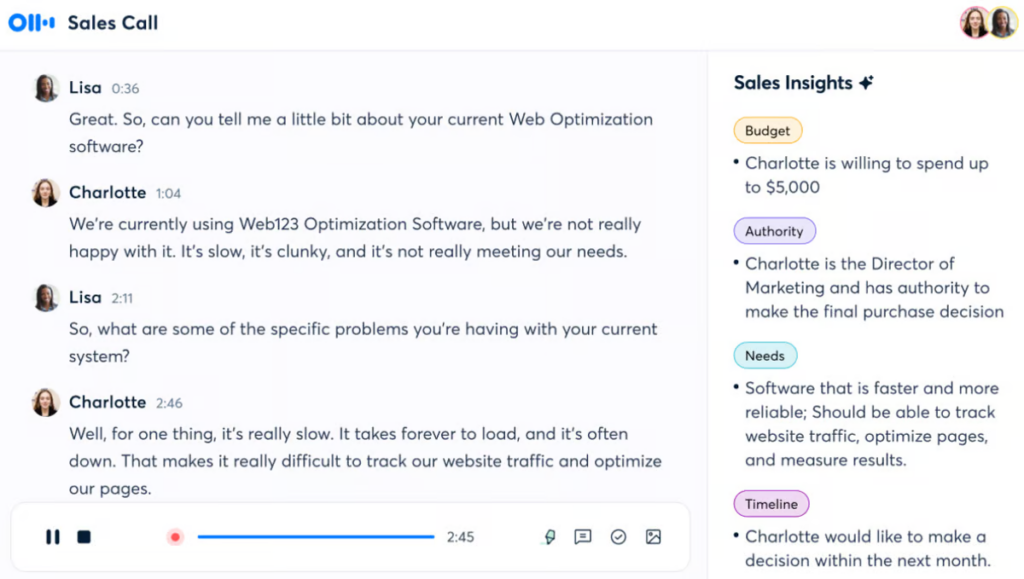
The custom vocabulary feature lets teams add industry-specific terms, nicknames, and abbreviations that the AI learns over time, reducing transcript editing for specialized teams.
The slide capture feature, which automatically attaches presentation slides to the transcript at the relevant moment, is a practical addition for teams that share decks during meetings.
Key features
- Real-time transcription: Transcribes meetings live as they happen, with speaker identification and searchable text available immediately after the meeting ends.
- AI meeting summaries: Automatically generates concise summaries with action items, key decisions, and next steps pulled from the transcript.
- Custom vocabulary: Teams can add specific terms, product names, and phrases that Otter learns to recognize and transcribe correctly over time.
- Slide capture: Detects and attaches presentation slides shared during virtual meetings to the corresponding section of the transcript automatically.
- Integrations: Connects with Zoom, Google Meet, Microsoft Teams, and calendar apps to join and record meetings automatically.
Pros and cons
Pros
- Real-time transcription is fast and accurate for standard speech
- Automated summaries and action items reduce time spent on meeting follow-up
- Custom vocabulary significantly improves accuracy for specialized teams
- Slide capture adds useful context to transcripts from presentation-heavy meetings
Cons
- Speaker attribution can be inconsistent in large group conversations or conference settings
- Technical jargon and overlapping speech can degrade transcription accuracy
- Free plan limits transcription time, which may not suit frequent users
What we like
Otter's ability to eliminate the dedicated note-taker from meetings is its core value proposition, and it delivers on that reliably.
The searchable transcript makes it practical to find specific details from past meetings without listening back through recordings.
What users say
Users consistently highlight the time savings from eliminating manual note-taking and the clarity of the automated action item summaries.
"Using Otter.ai to record the meetings, distinguish between different speakers, and generate summaries with clear action items has streamlined my workflow. It's now much easier to stay on top of what was said and what needs to happen next."
Some users in conference or large group settings find speaker attribution unreliable.
"I've noticed that when I use Otter.ai during conference talks, it doesn't always distinguish clearly between different speakers. It also frequently assigns the wrong name to a voice, so I end up spending more time than I'd like going back and editing the transcript."
Pricing
Otter.ai offers a free plan with limited monthly transcription minutes. Paid plans unlock longer transcriptions and advanced features.
Paid plans include:
- Pro ($16.99/month)
- Business ($30/user/month)
- Enterprise (custom pricing)
11. Motion
Best for: Individuals and teams who want AI to automatically organize tasks and schedules
Motion uses AI to automatically schedule tasks, projects, and meetings into your calendar based on priority, deadlines, and available time.
Testing it over several weeks, the auto-scheduler consistently reduced the manual effort of figuring out when to do what, particularly during busy periods where priorities shifted frequently.
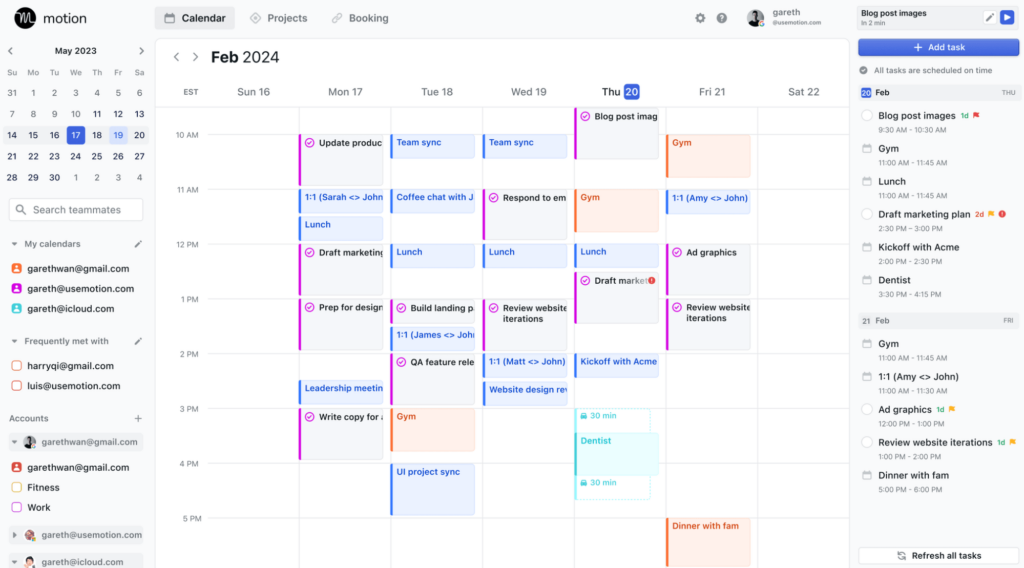
The platform has expanded significantly, now offering an AI Notetaker for meeting summaries and AI Employees, configurable AI agents that handle tasks like email management and meeting preparation.
It's one of the more ambitious productivity tools on this list, combining task management, scheduling, and AI automation in a single interface.
Key features
- AI auto-scheduler: Automatically assigns tasks to available calendar slots based on priority, deadlines, and working hours, rescheduling dynamically when plans change.
- AI Employees: Configurable AI agents that handle specific roles such as executive assistant, email organizer, or meeting preparer within the platform.
- AI Notetaker: Records and summarizes meetings with action items, integrated directly into the task and project workflow rather than as a standalone tool.
- Project management: Gantt charts, workflow automation, and time tracking for managing team projects alongside individual task scheduling.
- Calendar integrations: Syncs with Google, Outlook, and iCloud calendars, combining personal and work schedules for unified visibility.
Pros and cons
Pros
- Auto-scheduling removes the mental load of deciding when to do what
- AI Employees handle repetitive admin tasks that typically eat into focused work time
- Unified task, project, and calendar view reduces tool-switching
- Customer support is notably responsive, with human follow-up after AI interactions
Cons
- Higher price point than task management tools without AI scheduling
- Learning curve is steep enough to slow early adoption for new users
- AI Employees are still maturing and can be inconsistent on complex tasks
What we like
Motion's AI Notetaker combined with its task management means that action items from a meeting can flow directly into your scheduled workflow without a separate copy-paste step.
That connection between meeting output and task scheduling is something few tools in this space have figured out.
What users say
Users highlight how much of the daily planning burden the auto-scheduler removes, especially during weeks where priorities change frequently.
"I love the integration it does with my Google accounts, and it lets me combine my private and work accounts seamlessly. I'm very fond of a visual overview of my calendar and my tasks, and Motion does that very well."
Some users find the fixed weekly work schedule limitations frustrating when their hours vary day to day.
"I feel like some features that are intuitive and basic to me, are not thought of to be implemented by now. For example I can only set a fixed weekly work schedule, not let my work hours vs personal hours vary day by day."
Pricing
Motion offers a 7-day free trial. There is no permanently free plan.
Paid plans include:
- Individual ($19/month)
- Team ($12/user/month)
12. Rewind
Best for: Mac users who want a searchable record of everything they've seen, said, or heard
Rewind records everything that happens on your Mac, including screen activity, audio, and meetings, compresses it locally, and makes it searchable through a conversational AI interface.
The local-only storage model means your data never leaves your device, which addresses the privacy concern most users have about this category of tool.

The meeting summary feature automatically produces human-level notes from any call, whether recorded through Zoom, Teams, or in person.
For knowledge workers who frequently need to revisit what was discussed or reference something seen online, Rewind's ability to function as a searchable personal memory is a distinct capability that no other tool on this list replicates.
Key features
- Local recording and compression: Records all screen activity and audio locally on your Mac, compressing data efficiently without uploading anything to external servers.
- Searchable AI memory: Lets users query their recorded history in natural language, finding specific conversations, documents, or web content without remembering exact details.
- Automatic meeting summaries: Generates notes from any meeting captured on screen, regardless of the platform used, without requiring a bot to join the call.
- Privacy-first architecture: All data is stored, processed, and encrypted locally, with users retaining full control over what is recorded or deleted.
- Timeline interface: Provides a chronological view of recorded activity that can be browsed visually or searched by keyword, date, or topic.
Pros and cons
Pros
- Local-only storage eliminates the privacy concerns typical of screen recording tools
- Automatic meeting summaries work across all platforms without a bot
- Searchable memory genuinely reduces the time spent hunting for past information
- Compression keeps storage impact manageable over time
Cons
- Mac-only limits its usefulness for teams working across different operating systems
- Can accumulate significant storage if older recordings are not periodically purged
- AI memory feature requires building up a sufficient recording history before it becomes very useful
What we like
The experience of asking Rewind to recall something you read online weeks ago and actually getting a reliable answer is unlike anything available in standard productivity tools.
For anyone whose work involves frequently referencing past conversations or research, it closes a real gap.
What users say
Users appreciate the time-machine quality of being able to revisit anything from their screen history without having saved it explicitly.
"Whenever you try to remember something you read online, you can go back and ask Rewind. It's like a browser time machine."
Some users find that storage usage builds up faster than expected and needs periodic management.
"On my phone, it tends to occupy a large chunk of storage. I purge it once a year; then it is fine for the next. Adding a function to delete stored files older than a fixed date would do the trick."
Pricing
Rewind offers a free plan with limited recording history. Paid plans extend retention and unlock additional features.
Paid plans include:
- Individual ($20/month)
- Team (custom pricing)
13. Mem
Best for: Individuals who want AI to organize and surface notes without manual filing
Mem is an AI-powered note-taking app that automatically organizes everything you write, without folders, tags, or manual filing.
During testing, the search speed was genuinely impressive, with relevant notes surfacing almost instantly regardless of how they were captured.
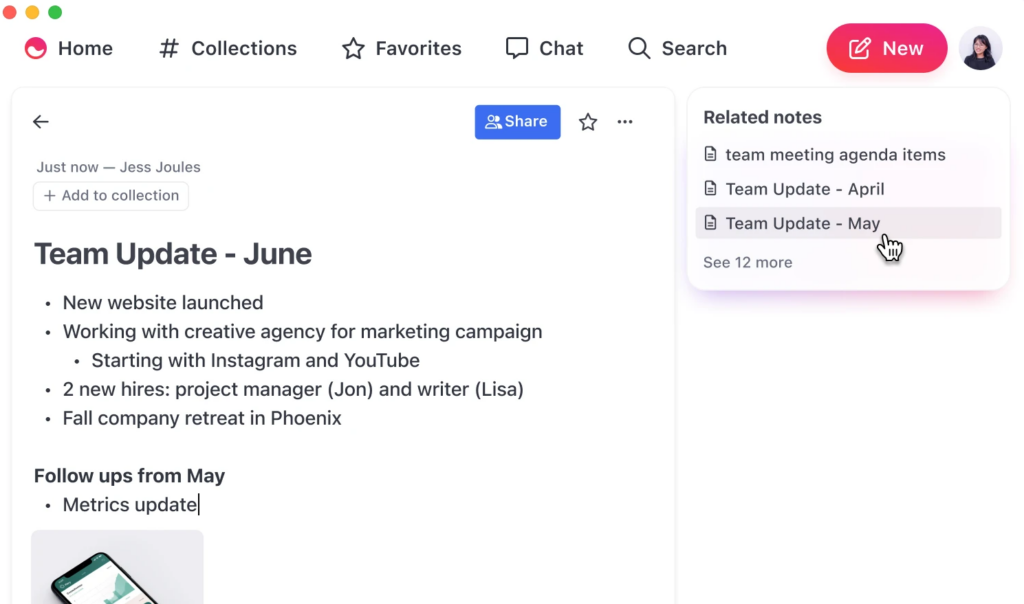
The AI layer lets you ask questions across your notes rather than just searching by keyword, which makes it practical for knowledge workers managing a large and growing personal knowledge base.
Mem's strength is in personal use, and it's best suited to individuals rather than teams with complex collaboration needs.
Key features
- AI-powered organization: Automatically surfaces related notes and suggests connections without requiring users to manually tag, sort, or file anything.
- Conversational search: Lets users ask questions in natural language and receive answers pulled from across their entire note collection.
- Smart search: Blazing-fast keyword and semantic search that returns results before you finish typing, reducing friction for frequent reference tasks.
- Note capture flexibility: Supports quick capture via web, mobile, and integrations with tools like Zapier, making it easy to get information into Mem from wherever you work.
- AI writing assistance: Drafts, expands, and refines notes directly within the interface, combining note-taking and content creation in one tool.
Pros and cons
Pros
- Search speed is noticeably faster than most competing note-taking tools
- AI organization removes the filing overhead that makes other knowledge bases hard to maintain
- Conversational search works well for vague or partial recall queries
- Unlimited notes even on the free plan allows genuine evaluation before purchase
Cons
- Limited API integrations compared to established alternatives like Notion or Obsidian
- Customer support responsiveness has been a recurring complaint from some users
- Less suited to team collaboration than to individual knowledge management
What we like
The combination of unlimited note capture on the free plan and search that works before you finish typing makes Mem genuinely easy to evaluate.
Most knowledge management tools take weeks to feel useful; Mem's speed makes the value apparent almost immediately.
What users say
Users consistently highlight the speed and organization as standout qualities, with many noting that the AI handles the filing work they used to do manually.
"Smart pricing strategy: the unlimited notes and collections allows you to get a feel for the product before having to make a purchase decision. Search is blazing fast."
Some users note that the limited integration options reduce its usefulness for teams already embedded in other platforms.
"There's also a massive lack of API integrations. This product won't work well with any of your other existing platforms."
Pricing
Mem offers a free plan with unlimited notes. Paid plans unlock AI features and additional functionality.
Paid plans include:
- Mem ($14.99/month)
- Mem Teams (custom pricing)
14. Poised
Best for: Professionals who want real-time feedback on their communication in virtual meetings
Poised is an AI communication coach that runs in the background during virtual meetings and provides real-time feedback on pace, filler words, energy, and tone.
Testing it across a range of meeting types, the passive feedback approach worked well for building awareness without requiring deliberate practice sessions.
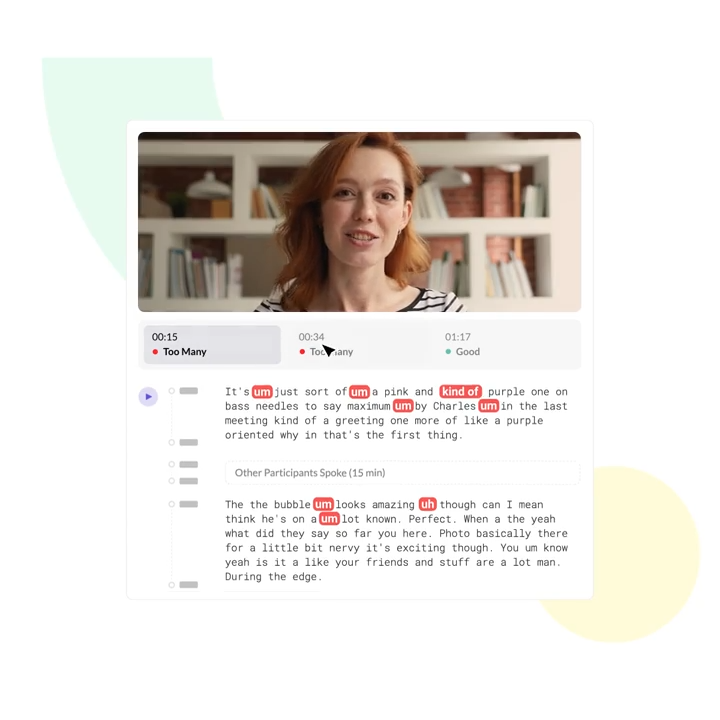
Unlike traditional coaching, Poised is present in every meeting, which gives it a much more granular data set to work with than a coach who observes you once a month.
The ongoing progress tracking makes it practical for professionals working on specific habits like reducing filler words or improving pacing over time.
Key features
- Real-time feedback: Provides live on-screen cues during meetings for metrics including pace, filler words, energy, eye contact, and sentiment.
- Progress tracking: Tracks communication scores over time, showing improvement trends across specific metrics for individuals and teams.
- Meeting analytics: Summarizes each meeting's communication performance with a breakdown of what went well and where to focus next.
- Platform integrations: Works across Zoom, Google Meet, Microsoft Teams, and Slack video calls without requiring separate setup for each platform.
- Team coaching: Enables managers and L&D teams to provide scalable communication coaching across an organization without hiring individual coaches.
Pros and cons
Pros
- Real-time passive feedback builds awareness without requiring separate practice time
- Runs across all major video conferencing platforms without additional setup
- Progress tracking makes improvement measurable and specific over time
- Scales communication coaching to entire teams at a fraction of traditional coaching cost
Cons
- Scoring methodology for some metrics lacks transparency, making it harder to understand what drives certain ratings
- Most useful for those who are already in frequent video meetings
- Limited value for in-person communication or non-video interactions
What we like
What makes Poised particularly valuable is its ability to remove the bias of self-assessment.
Most people are poor judges of their own communication habits, and having an always-on, objective record of actual meeting performance changes what's actionable about coaching feedback.
What users say
Users highlight the combination of effortless setup and the quality of real-time feedback as Poised's most appreciated qualities.
"What I like the most about Poised is that it is effortless and real time. It removes my biases from reflecting on my own speaking and listening abilities and provides real-time feedback on a variety of skillsets that are often really hard for me to evaluate on my own."
Some users find that the scoring criteria for certain communication metrics could be explained more clearly.
"It's a bit unclear what makes my performance poor, okay, or great in some of the categories. A bit more transparency behind the secret sauce will help boost confidence in the ratings."
Pricing
Poised offers a free plan with basic features. Paid plans unlock full analytics and team features.
Paid plans include:
- Pro ($16/month)
- Teams (custom pricing)
Manage your online reputation with ease
Monitor, manage, and get more online reviews for your business with LocalImpact.
15. Beautiful.ai
Best for: Business teams who want professional-looking slides without design skills
Beautiful.ai uses smart slide layouts that automatically adjust when content is added or changed, which removes the formatting work that makes PowerPoint and Google Slides frustrating for non-designers.
Working through a series of business decks during testing, the time savings over manual formatting were consistent and meaningful.
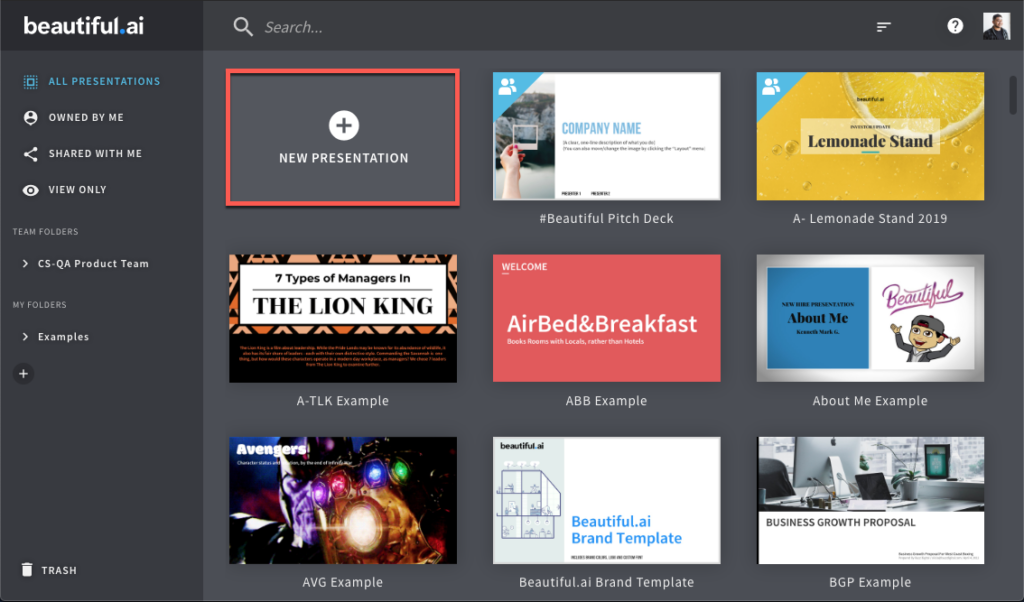
The tool maintains a library of polished templates covering common business formats, and the AI presentation builder can generate a structured deck from a brief.
It's well suited to teams that produce decks regularly and want a consistent professional look without involving a designer.
Key features
- Smart slide layouts: Automatically adjusts layout, spacing, and design as content is added, eliminating manual formatting and keeping slides visually consistent.
- AI presentation builder: Generates a full presentation structure from a text prompt or uploaded content, giving users a starting draft to refine rather than a blank slide.
- Template library: Pre-built templates for business, marketing, sales, and educational presentations with professional design built in.
- Real-time collaboration: Multiple users can work on a deck simultaneously, with shared workspaces and version history for team projects.
- Analytics: Tracks viewer engagement with shared presentations, showing time spent per slide and overall interaction patterns.
Pros and cons
Pros
- Smart layouts dramatically reduce formatting time compared to PowerPoint or Google Slides
- Consistently professional output that doesn't require design expertise
- Template library covers a wide range of standard business presentation formats
- Analytics provide useful insight into how shared decks are being consumed
Cons
- Smart layout system can feel restrictive for users who want full design control
- Heavy use can lead to decks that look similar to other Beautiful.ai users
- Team pricing scales significantly higher than individual plans
What we like
The practical benchmark for Beautiful.ai is how much time it saves against the alternative.
Users consistently report cutting design time by 50% or more compared to PowerPoint, and the output looks better. For teams producing regular business decks, that's a straightforward value calculation.
What users say
Users consistently describe the speed and quality of output as the tool's strongest points, with many noting they no longer dread putting presentations together.
"Beautiful.ai is incredibly easy to use. The tool makes every presentation look incredible, and it only takes a few minutes to format the entire deck. My team absolutely loves the product."
Some users find the team pricing structure disproportionately expensive relative to individual plans.
"Beautiful.ai is an expensive product. We have a team account and pay for ten pro licenses. It doesn't make sense why the team account is significantly more expensive than individual Pro licenses."
Pricing
Beautiful.ai offers a 14-day free trial. There is no permanently free plan.
Paid plans include:
- Pro ($12/month, billed annually)
- Team ($40/user/month, billed annually)
- Enterprise (custom pricing)
16. Gamma
Best for: Individuals and teams who want to generate polished decks and documents fast from a prompt
Gamma generates complete presentations, documents, and webpages from a text prompt in under a minute.
Working through a range of content types during testing, the quality of the initial output was high enough that most decks needed refinement rather than a rebuild, which sets it apart from tools that produce generic scaffolding.
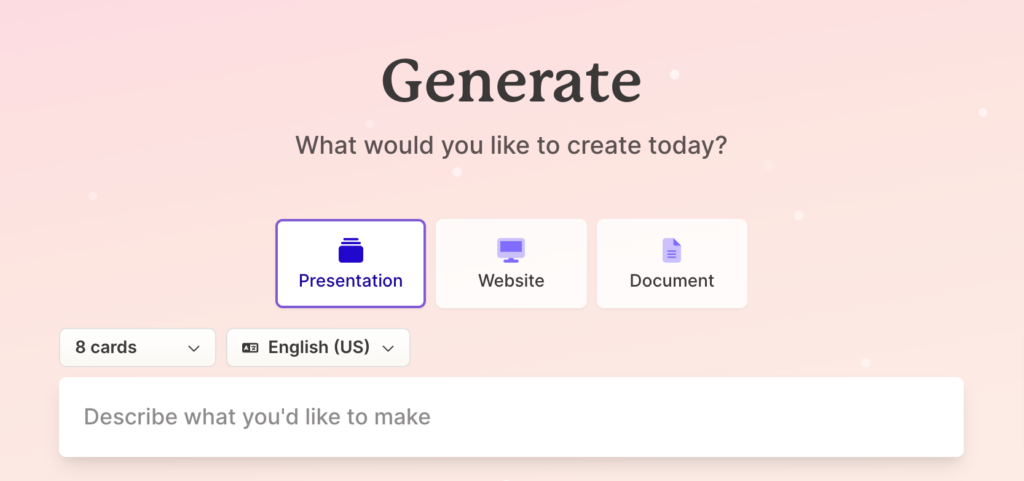
The platform's card-based format makes content easy to edit and reorder, and real-time collaboration is built in. For anyone who has stared at a blank PowerPoint at 11pm, Gamma solves the specific problem of getting from idea to structured, presentable content without the startup friction.
Key features
- AI generation from prompt: Creates a complete, designed presentation or document from a text prompt, imported file, or pasted content in under 60 seconds.
- Card-based format: Content is organized in scrollable, interactive cards rather than traditional slides, making it easy to reorder and customize.
- Multi-format output: Generates presentations, documents, and simple webpages from the same interface, covering multiple content types in one tool.
- Real-time collaboration: Multiple users can edit simultaneously with live presence indicators and a shared version history.
- Analytics: Tracks viewer engagement on shared Gamma decks, showing which cards received the most attention.
Pros and cons
Pros
- Fastest path from a text prompt to a polished, shareable presentation
- Output quality is high enough to use as a starting draft, not just a scaffold
- Multi-format capability reduces the number of tools needed for content creation
- Free plan is genuinely usable and covers the core workflow
Cons
- Export compatibility with PowerPoint can require extra steps for clients who need native .pptx files
- AI can produce generic or repetitive content on specialized topics
- Less granular design control than purpose-built presentation tools for users who need pixel precision
What we like
Gamma's analytics feature, which shows which slides or cards viewers spend the most time on after you share a deck, is a practical tool for anyone in sales or thought leadership.
Knowing which parts of a pitch deck or report hold attention the longest is actionable information that most presentation tools don't surface.
What users say
Users highlight the speed and design quality of the AI-generated output as Gamma's most valuable qualities, with many noting they use it for client proposals and last-minute decks.
"I like Gamma AI because it quickly turns ideas or outlines into polished presentations, documents, or simple webpages without needing design skills. Its clean layouts, media support, and real-time collaboration make creating and sharing content fast and professional."
Some users find that AI-generated images within slides occasionally have readability issues, particularly with small text inside generated graphics.
"While Gamma AI is very useful for creating presentations, there are a few limitations that I notice during regular professional use. One common issue I face is related to images generated or suggested within the slides. In some cases, the text inside images is not clearly visible."
Pricing
Gamma offers a free plan with a limited number of AI credits. Paid plans provide additional credits and team features.
Paid plans include:
- Plus ($8/month)
- Pro ($15/month)
- Enterprise (custom pricing)
17. Numerous.ai
Best for: Analysts and operators who want AI capabilities directly inside Google Sheets or Excel
Numerous.ai adds AI directly into Google Sheets and Excel through a simple =AI() function, letting users run text generation, categorization, data cleaning, and analysis tasks on entire columns without leaving their spreadsheet.
Testing it on a mix of data cleaning and content generation tasks, the setup was fast and the outputs were consistent at scale.
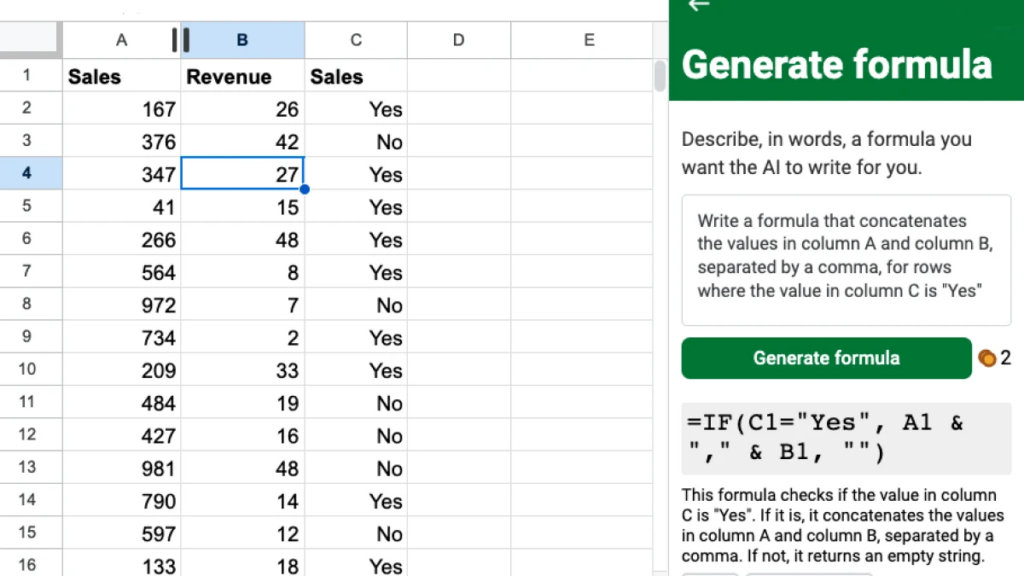
The tool is designed for people who already work in spreadsheets and want to augment what they can do there, rather than switching to a separate AI tool and copying results back manually.
It's particularly well-suited to tasks like classifying large datasets, writing variations of short-form copy at scale, or extracting structured information from unstructured text.
Key features
- =AI() function: Lets users run AI tasks directly in Google Sheets or Excel cells using a simple formula, making AI accessible to anyone who can write a spreadsheet formula.
- Bulk processing: Applies AI prompts to entire columns at once, enabling classification, summarization, and generation tasks across thousands of rows without manual work.
- Data cleaning: Standardizes, formats, and corrects inconsistent data across large datasets using natural language instructions in the formula.
- Content generation at scale: Generates product descriptions, social posts, email subjects, and similar short-form copy for large lists without leaving the spreadsheet.
- No API key required: Users don't need to manage API credentials, making it accessible to non-technical users who want AI inside their existing workflow.
Pros and cons
Pros
- Brings AI directly into the spreadsheet environment most analysts already work in
- Bulk processing makes it practical for tasks involving hundreds or thousands of rows
- No API key or technical setup required
- Cost-effective for teams that need AI-assisted data work at scale
Cons
- Limited to tasks that can be expressed as column-level operations within a spreadsheet
- Output quality on complex or nuanced generation tasks may require multiple prompt iterations
- No dedicated G2 review profile yet, so verified user feedback is limited
What we like
The =AI() formula approach means that anyone who can write a VLOOKUP can use AI at scale in their spreadsheet.
That accessibility, applied to genuinely time-consuming tasks like bulk categorization or data cleaning, is what makes Numerous.ai useful in ways that a separate AI chat interface is not.
What users say
Users working in data-heavy roles consistently highlight the time savings on bulk categorization and data cleaning as the clearest use case for Numerous.ai.
"Numerous.ai helps automate repetitive data tasks that would otherwise take hours manually. By having these processes run automatically, I save significant time and reduce errors from manual copy-pasting."
Some users find that complex generation tasks require prompt refinement to produce consistent quality across large datasets.
"Output quality can vary depending on the complexity of the task and how clearly the prompt is written. More advanced use cases may need iteration to get reliable results."
Pricing
Numerous.ai offers a free plan with limited monthly AI credits. Paid plans increase the volume of tasks you can run per month.
Paid plans include:
- Starter ($8/month)
- Pro ($29/month)
- Business ($79/month)
How to choose the right AI tool for you
The right AI tool depends more on how you work and where you spend your time than on feature checklists. Here are the most important factors to weigh before committing to a platform:
- Task specificity: General-purpose AI assistants like ChatGPT, Gemini, and Claude handle a wide range of tasks but require more prompting skill to get consistent results. Category-specific tools like Jasper for marketing, Synthesia for video, or Otter.ai for meetings are faster to use in their lane but less flexible outside it.
- Where you already work: Tools that integrate with your existing apps reduce switching friction significantly. Gemini is worth prioritizing if your team lives in Google Workspace; Motion is most valuable if you already manage tasks in a calendar; Numerous.ai delivers the most value if spreadsheets are central to your workflow.
- Team vs. individual use: Some tools on this list, including Motion, Otter.ai, and Beautiful.ai, have team features that provide meaningful collaboration value at scale. Others, like Rewind and Mem, are best suited to individual productivity and offer limited team functionality. Align your choice with the actual scope of use.
- Free trial quality: Most tools here offer either a free plan or a meaningful free trial. Take the time to run a real use-case test rather than a quick demo. Jasper, Gamma, and Softr all show their strengths quickly; tools like Rewind and Motion take longer to demonstrate value because they depend on accumulated data.
- Total cost at scale: Entry prices can be misleading. Beautiful.ai's team pricing jumps sharply from individual plans. Copy.ai's advanced workflow features are gated to higher tiers. Synthesia's video minute limits may require a plan upgrade for regular video creators. Evaluate pricing at the usage level you actually expect, not just the starting tier.
If you're unsure where to start, pick based on the problem that costs you the most time right now. The best AI tool is almost always the one that eliminates the most friction in your existing workflow, rather than the one with the most features.
Wrap-up
The 17 tools on this list cover a wide range of use cases, but the through line is the same: each one removes a meaningful amount of friction from a task that used to take significantly more time.
If you're starting out, ChatGPT or Claude are the most practical first tools for general use, while category-specific tools like Otter.ai, Gamma, or Browse AI deliver faster ROI once you know the specific problem you're solving.
For local businesses looking to build their online reputation, LocalImpact offers an accessible starting point with a free trial and pricing that scales without the overhead of enterprise platforms.
Whichever tool you try first, the most valuable thing you can do is test it on a real task within your first session.