Google Profile Audit checks your Google Business Profile for missing information and suggests ways to improve it. You can also see how your ratings and review activity compare to competitors.
Here's how to use it.
1. Run your first audit
Log in to your LocalImpact dashboard and select Profile Audit under Google Presence in the left sidebar.
If you haven't connected your Google Business Profile yet, you'll be asked to connect it first.
Your first audit will run automatically and should only take a few seconds.

2. Review your results
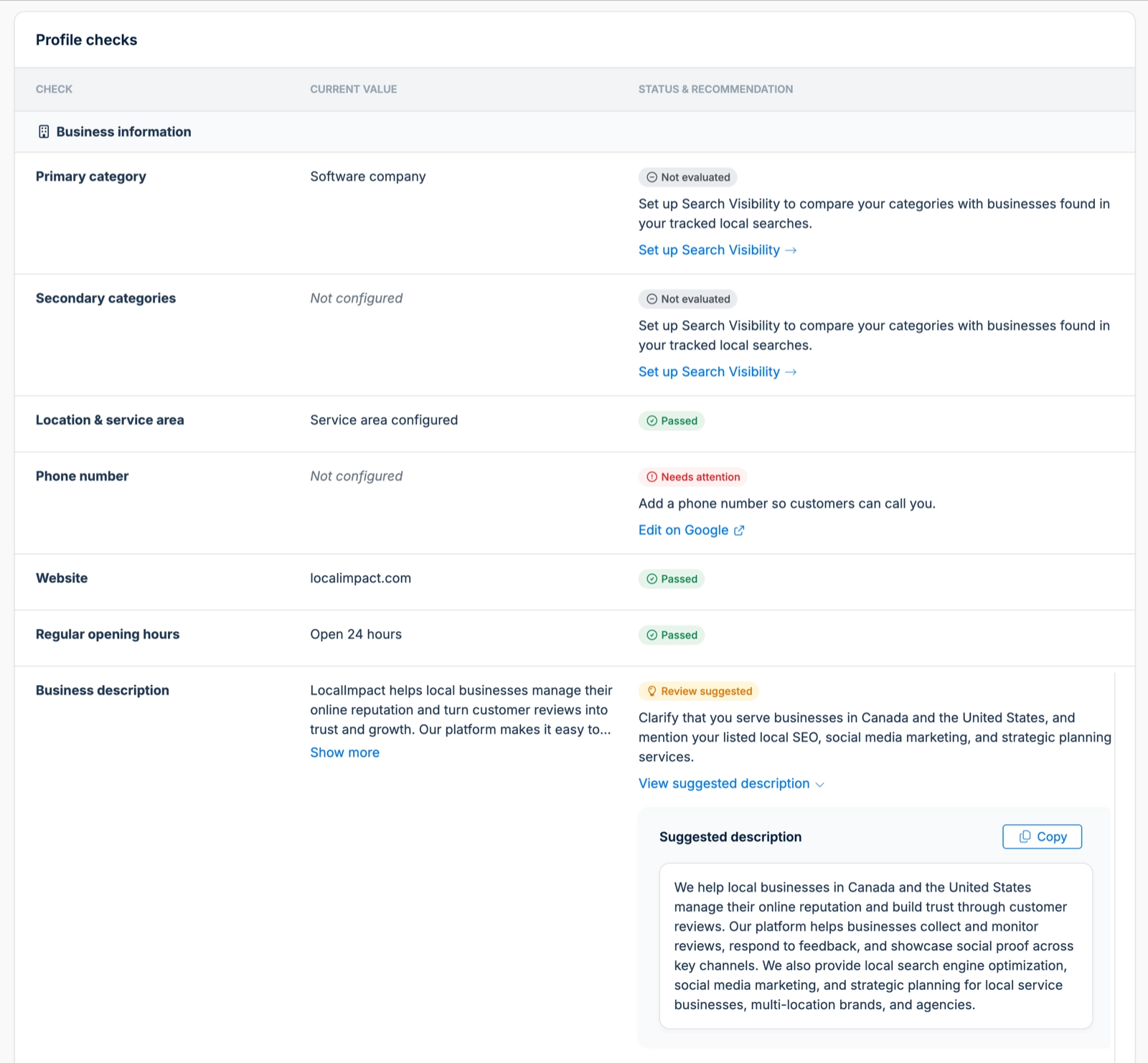
Once the audit is complete, you'll see a summary of your results, followed by a list of checks grouped into three sections:
- Business information: Categories, phone number, website, business description, opening hours, and other basic details.
- Services & profile content: Services, photos, logo, attributes, and booking link.
- Reputation: Google rating, recent reviews, and unanswered reviews.
Each check has a status:
- Needs attention: Something is missing or needs to be addressed.
- Review suggested: There's something worth reviewing or potentially improving.
- Passed: No issues were found for that check.
- Not evaluated: This check couldn't be completed because additional data or setup is needed.
You can see your current information alongside any recommendations.
3. Make improvements to your profile
For checks that need attention, follow the recommendations shown in the audit.
You may see suggested business categories, attributes, or an updated business description. Some recommendations can be expanded to see more details.
You can use the Edit on Google link to make changes directly in your Google Business Profile.
Keep in mind that not every suggestion will apply to your business. For example, only add categories or attributes that accurately describe what you offer.
LocalImpact doesn't automatically make changes to your Google Business Profile.
4. Run another audit
After updating your profile, click Run audit again to check for improvements.
LocalImpact also runs a new audit when you return to the page if your previous audit is more than 30 days old.
Frequently asked questions
Do I need to connect my Google Business Profile?
Yes. Your Google Business Profile needs to be connected to LocalImpact before you can run an audit.
How does the competitor comparison work?
If you've selected competitors in LocalImpact, the audit can compare your Google rating and review activity with theirs.
Will fixing these issues improve my Google Maps rankings?
Keeping your profile accurate and up to date is a good practice, but it doesn't guarantee higher rankings.
You can use Search Visibility to track where your business appears in Google Maps. Learn more in our How to Track Your Google Maps Rankings guide.
Which plans include Google Profile Audit?
Google Profile Audit is available on Growth, Pro, and Agency plans.