If you manage more than one location, you can now view everything in one place using the All locations option.
This view gives you a combined overview of how all your locations are performing without switching between them.
This view is for monitoring and reporting across locations. To add or remove locations, go to the Businesses page.
How to access it
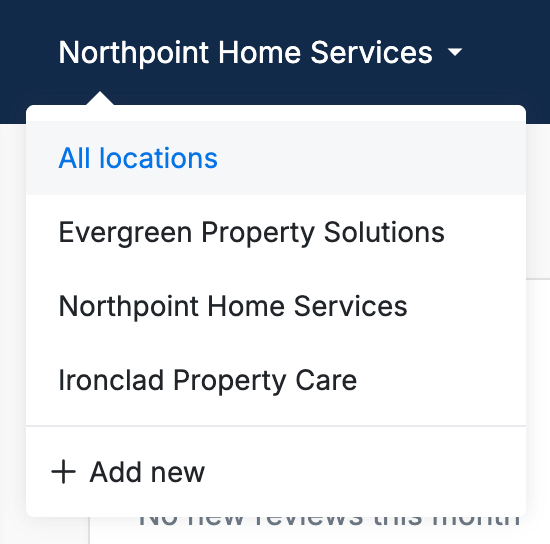
At the top of your dashboard, click on the location selector.
If you have multiple locations, you’ll see an option called All locations.
Select it to switch to the combined view.
What you can see
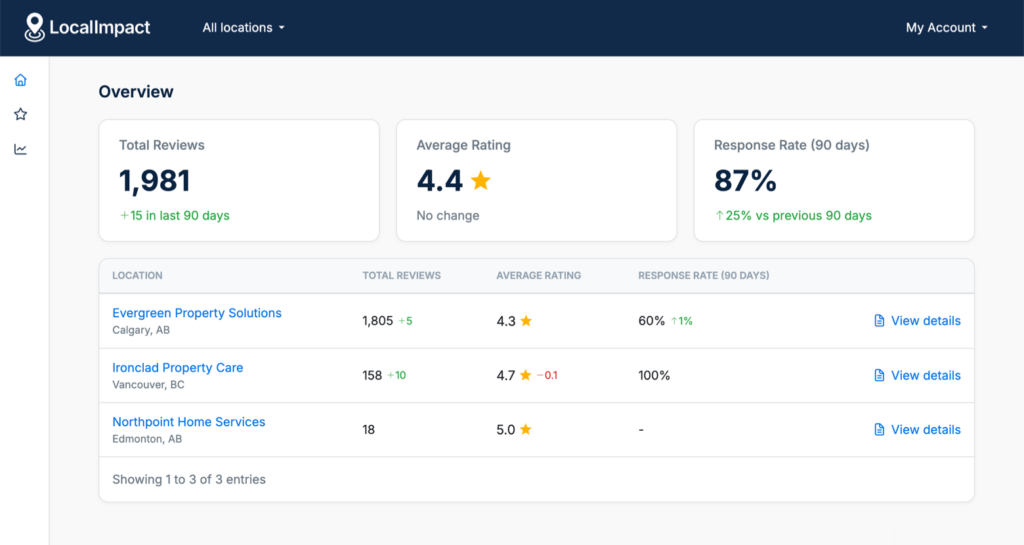
When you’re in All locations, you’ll get a high-level view across your entire business:
- Total reviews across all locations
- Average rating
- Response rate
Below that, you’ll see a table with all your locations, making it easy to compare performance at a glance.
Reviews (All Locations)
You can also view all reviews from every location in one feed.
This makes it easier to:
- Monitor incoming reviews
- Reply faster without switching locations
Reports
The Reports section shows performance across all locations.
This helps you:
- Spot trends
- Compare performance
- See how your overall reputation is improving over time
Using this with organizations
If you’re using organizations, each organization gets its own All locations view.
This is useful if you manage clients with multiple locations. You can group their locations together and monitor everything in one place.
Things to know
- This view shows combined data across all locations
- Some actions still apply to a specific location
- To manage or edit locations, use the Businesses page
If you have any questions or feedback, feel free to reach out to our support team.