
Google reviews play a huge role in how potential customers evaluate a business.
Many people check reviews before deciding whether to visit a restaurant, hire a contractor, or book an appointment with a local service provider. Because of that, responding to reviews has become an important part of managing your online reputation.
The problem is that responding to every review takes time. Even businesses that care about customer feedback often struggle to keep up once reviews start coming in regularly.
Owners are busy running the business, and staff members may not have a clear process for replying.
This is where automation can help. With the right approach, you can respond to reviews faster while keeping your responses thoughtful and consistent.
Why responding to Google reviews matters
Builds trust with potential customers
When people browse reviews, they often look at how businesses respond just as much as the reviews themselves. A thoughtful reply signals that the business is attentive and professional. It shows that the team is paying attention to customer experiences and values feedback.
For example, a simple thank you response to a positive review can reinforce a customer’s good experience. It also shows future customers that the business appreciates its clients. Even a short response helps create the impression that the business is engaged and responsive.
Automation can help ensure that these responses happen consistently. Instead of leaving reviews unanswered for weeks, you can respond quickly and maintain an active presence on your Google Business Profile.
Shows you care about customer feedback
Responding to reviews shows customers that their voices matter. When someone takes the time to write a review, they’re sharing an experience that may influence other customers. A response acknowledges that effort and makes the customer feel heard.
This is especially important when dealing with negative reviews. A calm and respectful response can show that the business takes concerns seriously and is willing to improve. In some cases, a thoughtful reply can even turn a frustrated customer into a loyal one.
Automation can help you stay consistent here as well. Even if you cannot personally reply to every review right away, having a process in place ensures that feedback does not go ignored.
Supports your local SEO
Google Business Profiles that receive steady engagement often perform better in local search. Reviews themselves are an important ranking signal, but responses also show that a business is active and involved.
When potential customers see recent responses from the business, it creates the impression that the business is current and attentive. Profiles with unanswered reviews may appear neglected, especially if the reviews are several months old.
Automating parts of the response process helps maintain this activity. Instead of letting reviews pile up, responses can happen regularly and keep your profile looking active.
2 ways to automate Google review responses
1. Use response templates
Response templates are one of the simplest ways to speed up review replies. Instead of writing a new response every time, you create a set of pre-written messages that can be reused for common situations.
These templates act as a starting point that you can quickly adjust based on the review.
A practical way to start is by identifying the most common review types your business receives.
For example, you might create templates for positive five-star reviews, neutral reviews, and negative reviews that mention service issues.
Each template should include a friendly greeting, a short acknowledgment of the feedback, and a closing line that reinforces your commitment to customers.
When a new review appears, you can paste the template and personalize it by referencing something specific from the review. Mentioning the customer’s comment about friendly staff or quick service makes the response feel more authentic.
Over time, templates dramatically reduce the effort required to respond to reviews. Instead of spending several minutes writing each reply, you can respond in seconds while still maintaining a professional tone.
2. Use AI to generate review responses
AI-powered tools can generate responses automatically by analyzing the content of the review. Instead of selecting a template, the system reads the customer’s message and produces a suggested reply that reflects what the reviewer wrote.
For example, if a customer praises fast service and friendly staff, the AI might generate a response thanking them for their feedback and highlighting the team’s commitment to great service.
If the review mentions a problem, the response may acknowledge the issue and invite the customer to reach out for assistance.
This approach allows responses to feel more personalized than simple templates. Each reply can reference details from the review, which helps the response sound natural and thoughtful.
Many businesses still prefer to review AI-generated responses before posting them. This extra step allows you to make small edits or adjust the tone if necessary. Even with a quick review step, AI dramatically speeds up the process compared to writing every response manually.
Pro tip: You can use LocalImpact’s AI-powered review response feature to generate personalized review replies in seconds.
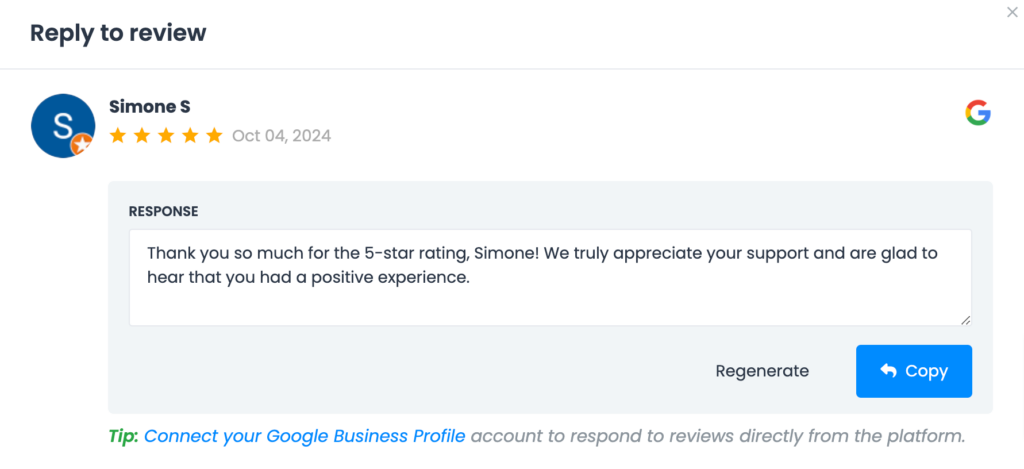
And read and reply to all the reviews your business gets across 26+ platforms. LocalImpact also offers a review widget you can use to display your top customer reviews on your website with ease.

Manage your online reviews with ease
Monitor, manage, and get more online reviews for your business with LocalImpact.
Best practices for automated review responses
Avoid overly generic replies
Automation works best when responses still feel human and relevant. If every reply looks identical, customers may feel that the business is not genuinely paying attention to feedback.
When creating templates or automation rules, include small variations in your responses. You can rotate between several different messages or include placeholders that reference details from the review.
Even small touches, such as thanking customers for mentioning a specific service or employee, can make responses feel more authentic.
Monitor negative reviews carefully
Negative reviews often require more thoughtful responses than positive ones. Customers who leave critical feedback are usually frustrated and may expect a real conversation rather than an automated reply.
Instead of fully automating these responses, consider setting up rules that flag negative reviews for manual handling. This allows a manager or owner to respond with empathy and address the specific concern.
Taking the time to respond carefully can help repair relationships and demonstrate that the business takes feedback seriously.
Keep responses clear and professional
Review responses don’t need to be long to be effective. In most cases, a few clear sentences are enough to acknowledge the feedback and express appreciation.
Focus on being polite, direct, and professional. Avoid overly formal language or lengthy explanations. A friendly tone often works best because it mirrors the conversational style that many customers use when writing reviews.
When responses are concise and easy to read, customers can quickly understand that the business values their input.
Review your automation settings regularly
Automation should not be something you set once and forget. Over time, your business may introduce new services, change messaging, or refine its brand voice.
Review your templates, AI responses, and automation rules every few months. Check whether responses still reflect how you want your business to communicate with customers.
Regular updates keep your review responses fresh and ensure that your automation continues to support your reputation rather than sounding outdated.
Final thoughts
Responding to Google reviews helps build trust, strengthen your reputation, and show customers that their feedback matters. Even short responses demonstrate that a business values its customers and pays attention to their experiences.
As review volume grows, replying to every review manually can become difficult. Automation offers a practical solution that allows businesses to stay responsive without adding hours of work to their schedule.
By using templates, AI-generated replies, or rule-based automation, you can create a system that keeps review responses consistent and timely. Over time, this approach helps you maintain an active online presence while focusing your energy on running the business.