
AI marketing tools can help you create content faster, run smarter ad campaigns, and automate tasks that used to eat up hours of your week. But with hundreds of tools on the market, it's hard to know which ones are actually worth your time.
We tested hundreds of best AI marketing tools across content creation, social media, video, advertising, and more. Here's what made the cut.
How we chose these tools
We spent 100+ hours testing AI marketing tools to put this list together.
Our goal was to cut through the noise and highlight tools where AI is genuinely core to the product, avoiding legacy platforms that slapped an “AI-powered” badge on an existing feature.
Here’s what we evaluated each tool on:
- AI-native design: We prioritized tools that were built around AI from the ground up, rather than traditional software with AI features bolted on after the fact.
- Real-world usefulness: Every tool on this list was hands-on tested by our team. We signed up, ran real workflows, and evaluated whether the tool actually delivered on its promises.
- Ease of use: A marketing tool shouldn’t require a technical background to operate. We favored tools that marketers can pick up and start using without a steep learning curve or engineering support.
- Time saved: The whole point of an AI marketing tool is to help you get more done in less time. We measured how much each tool actually reduced the manual effort involved in common marketing tasks.
- Pricing transparency: We gave preference to tools with clear, publicly available pricing and free trials so you can test them yourself before committing.
Best AI marketing tools in 2026
No time to read the full list? Here’s a quick overview of our top picks.
| Software | Category | Best for | Starting price |
| Blaze | Content creation | Solo marketers who want strategy, content, and publishing in one platform | Free; paid from $39/mo |
| BrandWell | Content creation | Producing long-form SEO content at scale | $249/mo |
| Hoppy Copy | Content creation | Automated email sequences and newsletters | $49/mo |
| Describely | Content creation | E-commerce product descriptions in bulk | $280/yr |
| Ocoya | Social media marketing | Multilingual social media content creation | $19/mo |
| Predis.ai | Social media marketing | Template-driven social posts with built-in approval workflows | Free; paid from $32/mo |
| FeedHive | Social media marketing | Fast social media scheduling with AI writing assistance | €9/mo |
| LocalImpact | Reputation management | Managing and generating online reviews | $19/mo |
| Creatify | Video creation | Turning product links into video ads | Free; paid from $39/mo |
| Pictory | Video creation | Converting blog posts and scripts into videos | $25/mo |
| Animaker AI | Video creation | Animated explainer and training videos | Free; paid from $15/mo |
| HeyGen | Video creation | Realistic AI avatar videos with multilingual dubbing | Free; paid from $29/mo |
| OpusClip | Video creation | Repurposing long-form video into short-form clips | Free; paid from $19/mo |
| AdCreative.ai | Advertising | Generating data-driven ad creatives at speed | $29/mo |
| Smartly | Advertising | Managing ad campaigns at scale across multiple platforms | Contact sales |
| Madgicx | Advertising | Autonomous Meta ad optimization and budget allocation | $39/mo |
| Fibr AI | Landing pages & personalization | Personalized landing pages tied to ad campaigns | Free; paid from $99/mo |
| Hightouch | Landing pages & personalization | Activating warehouse data for real-time marketing personalization | Free; paid from $350/mo |
| Coupler.io | Analytics & reporting | No-code cross-channel marketing reporting | Free; paid from $24/mo |
| Peec AI | Search visibility | Tracking brand visibility across AI search engines | €89/mo |
| Otterly AI | Search visibility | Lightweight, affordable AI search visibility monitoring | Free; paid from $29/mo |
AI content creation tools
1. Blaze
Best for: Solo marketers who want strategy, content, and publishing in one platform
Blaze is an AI marketing platform that handles strategy, content creation, and publishing in one place.
After connecting a brand, it generates a custom marketing strategy within minutes, then creates and schedules posts across social media, blog, video, and email channels automatically.
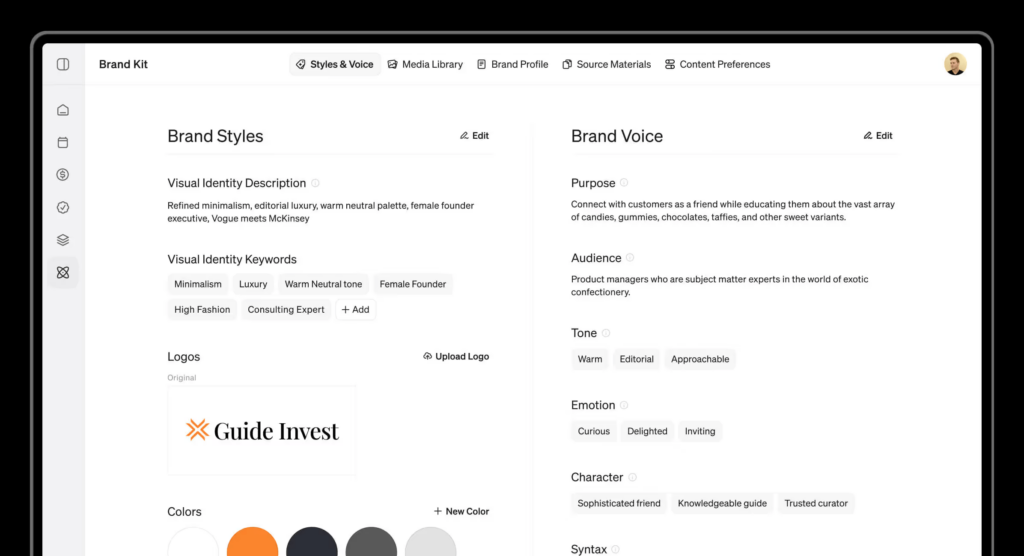
You can plan up to 12 months of content in advance, and nothing goes live without your approval.
The platform also includes a visual editor for creating graphics and short-form video without needing separate design tools.
What we like
Blaze tracks what's performing and adjusts its strategy based on real results.
Instead of just generating posts and moving on, it learns which topics, formats, and timing drive engagement for your specific audience and doubles down on what works.
What users say
Users praise Blaze for how quickly it picks up their brand voice and starts producing ready-to-post content, with many saying it saves them hours of work each week. Setup is consistently described as simple and fast.
"I like how it learns my brand voice from my website and creates high-impact socials in seconds. It saves me hours."
On the downside, several reviewers note that generated content can feel too AI-written or off-brand at times, and image generation doesn't always match the accompanying text. Some users also find the editing workflow rigid when they need to make changes.
"Some posts are too AI and not genuine. They look made up and turns customer attention away."
Pricing
Blaze AI offers a free plan with limited features. Paid plans include:
- Starter ($39/month)
- Growth ($85/month)
- Organic Growth ($999/month; done-for-you)
2. BrandWell
Best for: Producing long-form SEO content at scale
BrandWell offers a suite of AI writing tools aimed at helping brands drive growth through content.
We put the WriteWell assistant through its paces and found it solid for generating topic ideas, social posts, press releases, and short-form copy.
The standout, though, is RankWell: a long-form article writer specifically designed for SEO content.
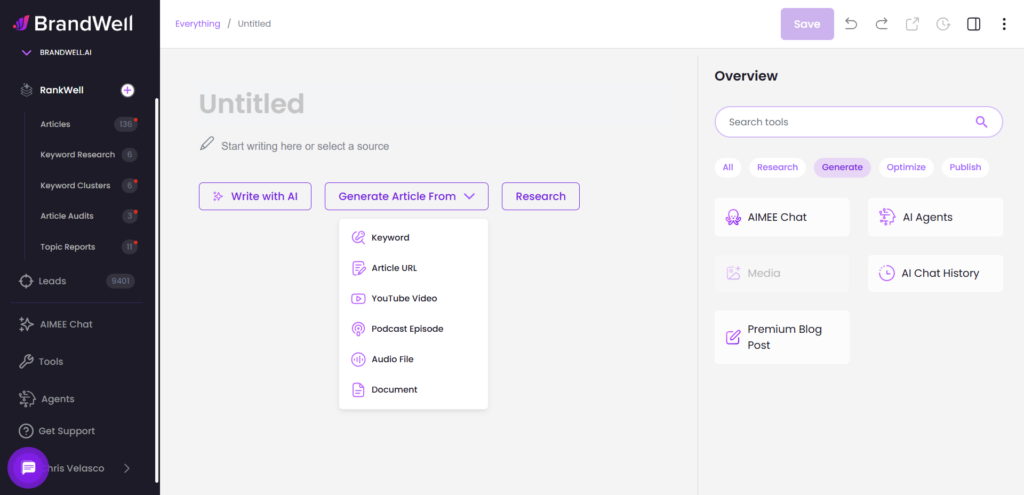
It can analyze your existing website for context and then produce full-length articles optimized for search. Once you’re happy with a draft, you can export it to Google Docs or publish directly to WordPress with a single click.
What we like
The Content Intelligence module is where BrandWell goes beyond simple content generation.
It bundles keyword research, topic clustering, content brief creation, and on-page SEO auditing into one place.
Having all of that alongside the writing tools means you can go from keyword research to published article without leaving the platform.
What users say
Reviewers appreciate BrandWell's ability to generate long-form, SEO-optimized content quickly, with several noting it handles bulk content production well. The built-in AI detection checker is also a frequently praised feature.
"It has truly changed my content creation process. One of the standout features is its ability to generate high-quality, SEO-optimized content rapidly."
On the negative side, users consistently mention that the output can feel repetitive or lack personality, requiring significant manual editing to match their brand voice.
"The content quality, despite being grammatically correct, might be dull and lack creativity with repetition of similar text patterns. It was taking me ages to edit the output to add my brand voice."
Pricing
BrandWell offers a free 7-day trial. The paid plan costs $249/month. There’s also an agency add-on ($249/month) for additional projects and users.
3. Hoppy Copy
Best for: Automated email sequences and newsletters
Hoppy Copy is a dedicated AI email marketing tool.
We gave it our brand’s voice and tone guidelines, and it started producing on-brand email copy almost immediately.
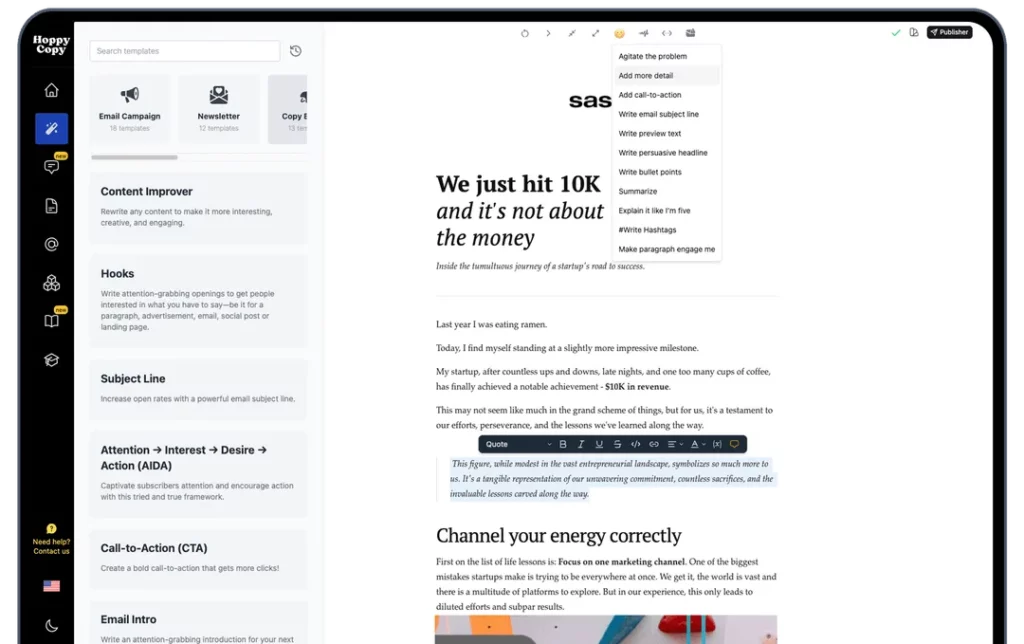
You can use it to set up welcome sequences, post-purchase flows, or generate weekly newsletters on autopilot. The interface is straightforward and intuitive.
What we like
The competitor monitoring feature is a clever addition. It lets you track what your competitors are sending in their emails and then generate campaigns designed to outperform them.
What users say
Users love that Hoppy Copy is built specifically for email marketing rather than being a generic writing tool.
The pre-built templates for sequences like welcome flows and newsletters are a consistent highlight, especially for solopreneurs with no copywriting background.
"Hoppy Copy eliminates all the prompt work by having assets and templates already optimized for sales and marketing. It already knows the purpose of each piece, all you have to do is tailor it to your widget."
The main criticism is that the brand voice feature doesn't always nail the tone, which can burn through credits when you need to regenerate multiple times. A few users also wished for more customization options when refining output.
"My brand's voice wasn't working 100%. I had to redo many times the creation to get something usable. That doesn't go super well with the credits system."
Pricing
Hoppy Copy offers a free 7-day trial. Paid plans start at $49/month.
4. Describely
Best for: E-commerce product descriptions in bulk
Describely is built specifically for e-commerce teams that need to produce product descriptions at scale.
During our test, we imported a sample product catalog, and the platform generated detailed, SEO-friendly descriptions for every item in bulk.
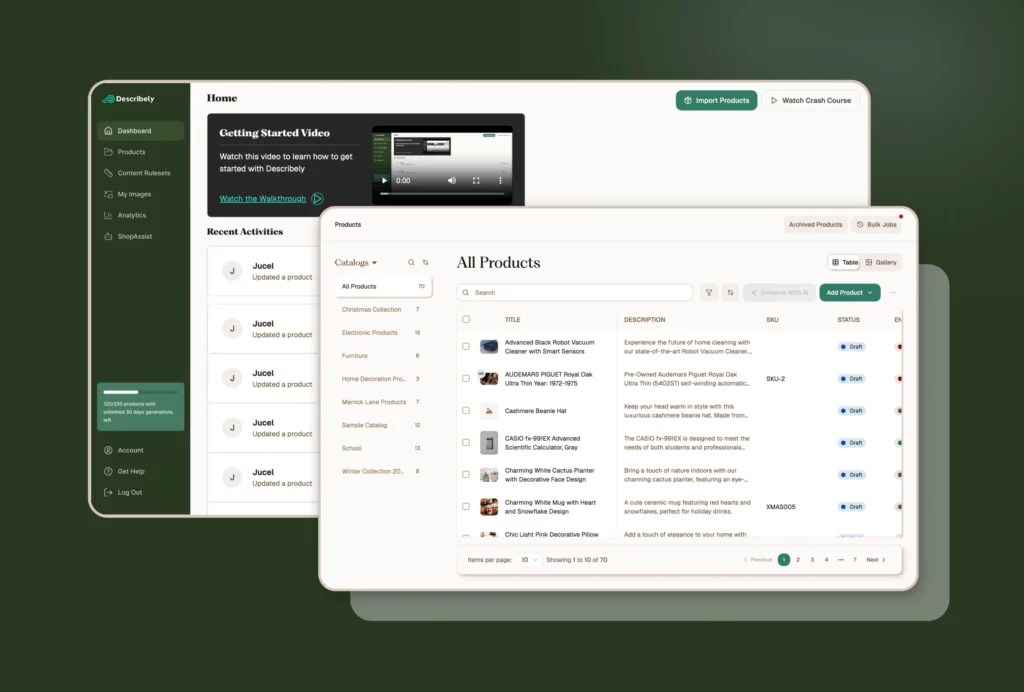
You can then sync these descriptions with your e-commerce storefront automatically, which eliminates a lot of manual copy-paste work.
What we like
The Content Audit feature stands out. It scans your existing product descriptions and checks for accuracy, brand guideline adherence, and spelling or grammatical errors.
This is useful not only for new descriptions but also for cleaning up legacy product pages that may have accumulated inconsistencies over time.
What users say
Reviewers consistently highlight the time savings when producing product descriptions at scale, with several noting that what used to take hours now happens in minutes.
Customer support gets frequent shout-outs.
"Describely's bulk content generator has transformed our product creation workflow. In just a fraction of the time, we can produce SEO-optimised content that's consistent, engaging, and ready to publish."
There aren't many recurring complaints. The main notes are that costs can add up with very large product catalogs, and a few users experienced minor bugs after a UI update.
Some also wish for more direct integrations with PIM systems.
"The cost can increase if you have hundreds or thousands of products, however when factoring in the time you save or using a third party, using Describely is vastly cheaper."
Pricing
Describely offers two plans:
- Base (starts at $280/year)
- Enterprise (custom pricing)
AI social media marketing tools
5. Ocoya
Best for: Multilingual social media content creation
Ocoya handles social media content creation end to end. We tested it across Facebook, Instagram, X, and LinkedIn, and it generated copy, graphics, and hashtags for each post.
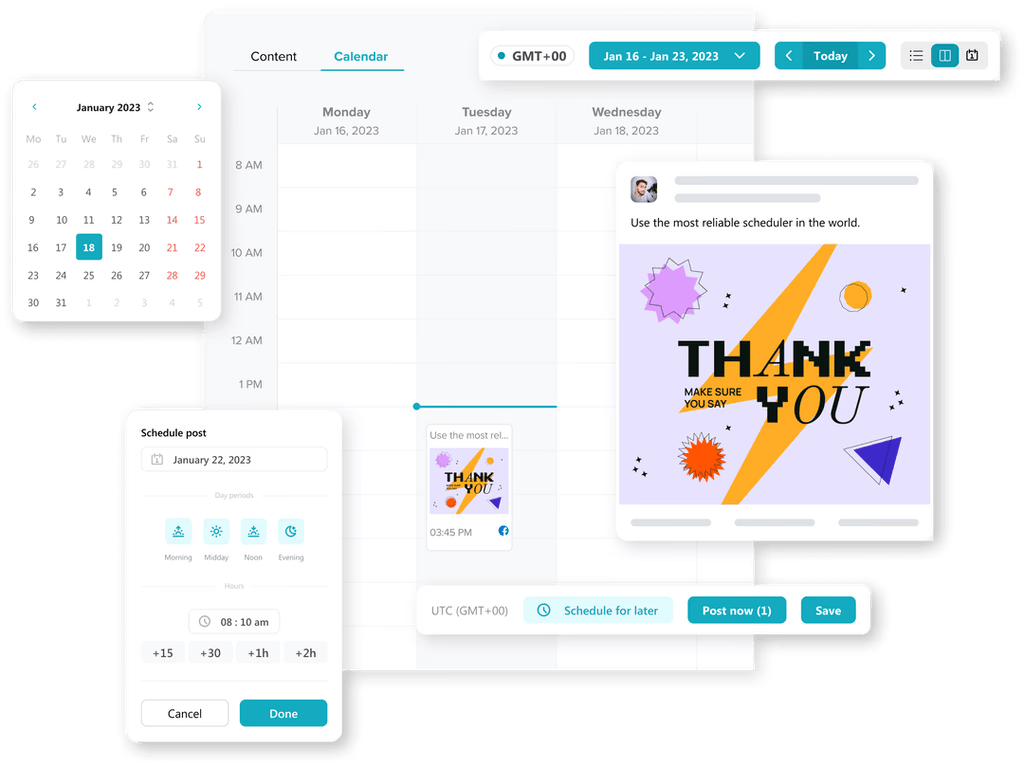
You can schedule or publish posts directly from within the platform. It also supports 28 languages, which makes it a practical option if you’re producing social content for a global audience.
What we like
Ocoya’s ability to handle both the visual and text elements of a post in one workflow is a real time-saver. Instead of bouncing between a copywriting tool and a design tool, you get everything generated together and ready to review and publish in a single step.
What users say
Users praise Ocoya's AI content writer and its ability to post across multiple platforms while tailoring images, hashtags, and messaging for each one. The Canva-like design integration and clean calendar view are also frequently mentioned.
"It's probably one of the better social media scheduling platforms I have used. Clean UI, great AI implementations, fully featured."
The most common complaints center on reliability. Several reviewers report scheduled posts failing to publish, posting with incomplete captions, or not appearing correctly on the platform.
Customer support responsiveness is another sore spot, with multiple users describing slow or unhelpful interactions when issues arise.
"It is very glitchy. Sometimes my scheduled posts just don't get posted. Sometimes they post but with only half the caption."
Pricing
Ocoya offers the following plans:
- Bronze ($19/month)
- Silver ($49/month)
- Gold ($99/month)
- Diamond ($199/month)
6. Predis.ai
Best for: Template-driven social posts with built-in approval workflows
Predis.ai is another AI-powered social media tool, but it leans more heavily into templates and visual content.
When we ran it through a few content cycles, we appreciated the variety of built-in templates for creating posts, videos, and even memes.
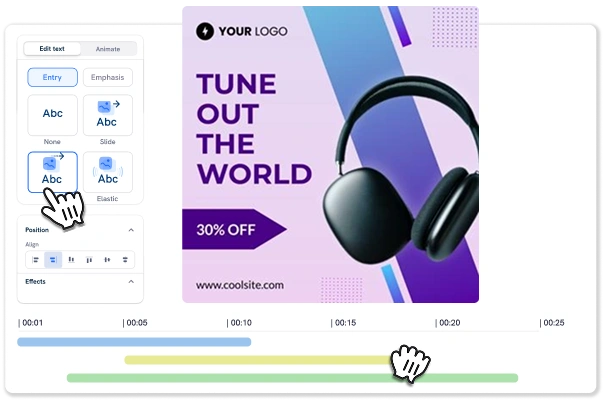
You can also upload your own templates to keep everything on-brand. It covers all the major platforms, including Instagram, Facebook, and TikTok.
What we like
The built-in approval workflow is a standout for teams and agencies. It lets internal stakeholders or clients review and approve social media posts before they go live, which streamlines the back-and-forth that often slows down social media publishing.
What users say
The auto-posting feature and the ability to generate complete posts with visuals, copy, and hashtags from a single idea are the most praised aspects. Users also highlight how smoothly it integrates with their existing websites and social accounts.
"The auto-generated posts are a time saver for my agency. We only have to input the idea, and we get everything from posts to hashtags!"
The recurring negatives are relatively minor. Some users find the generated posts can look generic, and customization options for editing output are limited. The AI avatar voiceovers also get called out for sounding robotic.
"Some of the posts appear a bit generic, and I wish they offered better posting style options."
Pricing
Predis.ai offers a limited free plan. Paid plans include:
- Lite ($32/month)
- Premium ($59/month)
- Agency ($249/month)
7. FeedHive
Best for: Fast social media scheduling with AI writing assistance
FeedHive lets you create, schedule, and publish social media posts in seconds using AI.
We tested the end-to-end workflow and were able to go from idea to published post remarkably quickly.
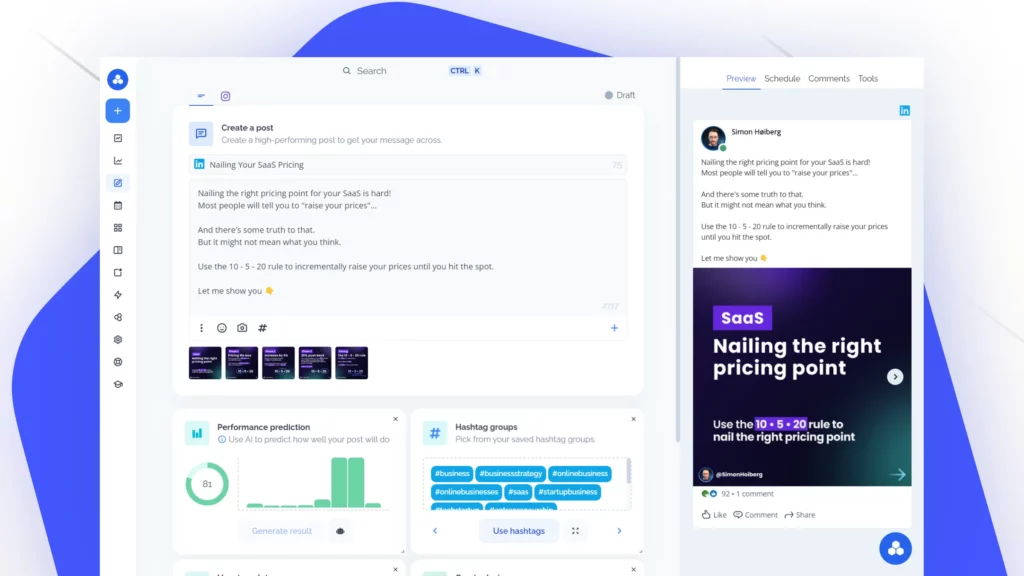
It generates relevant hashtags automatically and supports publishing to multiple platforms with a single click.
What we like
FeedHive includes a built-in AI assistant you can chat with directly to get help improving your posts or adjusting your scheduling strategy.
It feels more interactive than most scheduling tools, which tend to be fairly static once you’ve queued up content.
What users say
Users praise FeedHive's clean interface and how quickly they can go from draft to scheduled post.
The automation features and AI writing assistance get consistent positive mentions, particularly from LinkedIn-focused creators who want to stay consistent without spending hours on content.
"I can use automation to fill FeedHive with drafts and in one session plan out all my posts that are automatically scheduled on pre-defined times and dates and on multiple platforms. Getting to the publish button is quick and easy."
The biggest frustrations are around platform support gaps. Multiple reviewers note that X (Twitter) and BlueSky aren't available, and some report issues with Meta integrations.
A few users also describe billing problems and unresponsive customer support when things go wrong.
"The software doesn't work with Meta, so you can only post on LinkedIn. When you ask for your money back it is a lot of work until they just completely stop answering you."
Pricing
FeedHive offers the following plans:
- Creator (€9/month)
- Brand (€19/month)
- Business (€59/month)
- Agency (€199/month)
AI reputation management tools
8. LocalImpact
Best for: Managing and generating online reviews
LocalImpact is an online reputation management tool that helps businesses monitor, manage, and generate online reviews. It tracks reviews across 30+ popular review platforms, including Google, Facebook, and Yelp.
You can read and reply to all the reviews from LocalImpact’s review feed.
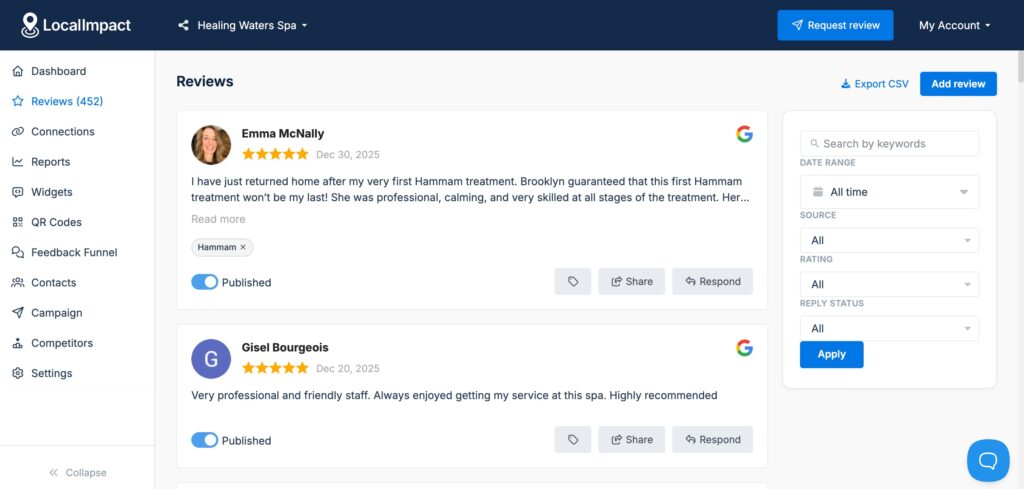
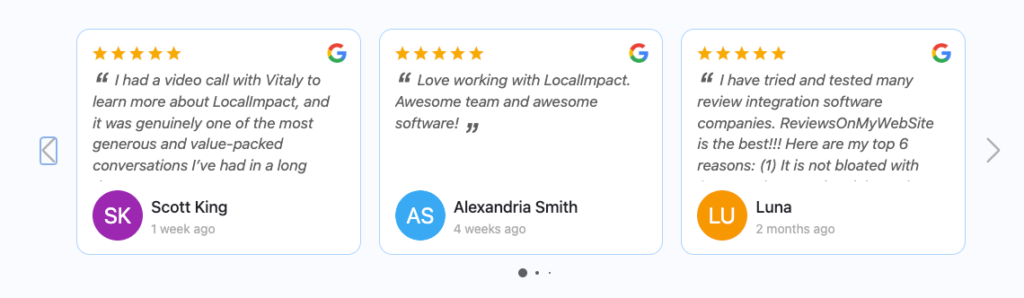
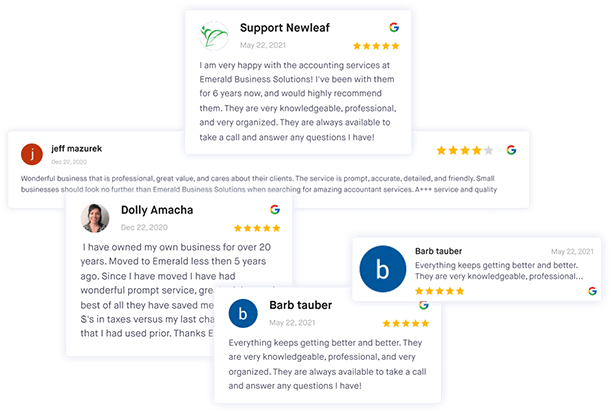
There’s also a review widget feature that allows you to showcase top customer reviews on your website with ease.
What we like
The AI-powered response feature helps you generate personalized, on-brand review replies in seconds.
What users say
Users consistently highlight how quick and easy LocalImpact is to set up.
Multiple reviewers mention going from signup to a working review widget on their site in minutes, with no technical expertise required.
"Took 5 minutes to signup and implement. Easy!"
Customer support is the other standout. Reviewers describe the team as exceptionally responsive and hands-on, with several noting that questions and suggestions are addressed quickly and thoughtfully.
"Whenever I have had a question or suggestion, they have promptly reached out to me, engaged in meaningful discussions, grasped my objectives, and delivered results. I could not ask for more than that even if I had personally hired them to work solely for me."
Pricing
LocalImpact offers a 14-day free trial. Paid plans include:
- Growth ($49/month)
- Pro ($99/month)
- Agency ($149/month)
Manage your online reputation with ease
Monitor, manage, and get more online reviews for your business with LocalImpact.
AI video creation tools
9. Creatify
Best for: Turning product links into video ads
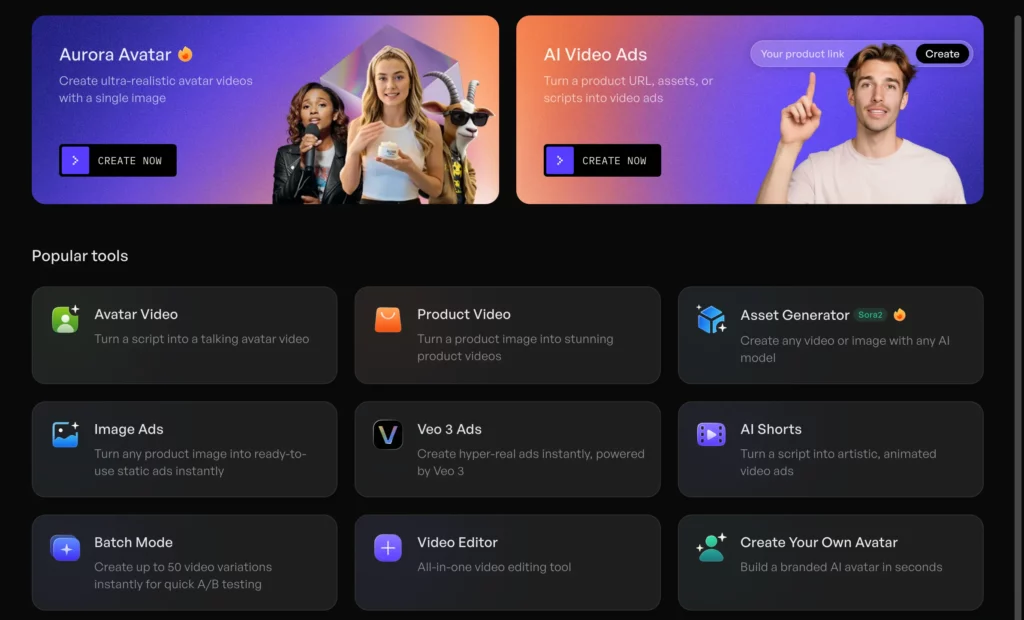
Creatify turns product links and descriptions into video ads using AI.
We tested it by dropping in a product URL and letting the platform generate a complete video, script and all.
The text-to-speech feature offers 140+ AI voices, and there’s a Batch Mode for creating multiple video variations at once, which is useful for split-testing ad creatives. A music library with 7,000+ tracks rounds out the feature set.
What we like
The ability to go from a product link to a fully produced video ad in minutes is genuinely impressive. The Batch Mode makes it practical for performance marketers who need to test dozens of creative variations without manually producing each one.
What users say
Reviewers are consistently impressed by how fast Creatify turns a product URL or simple text prompt into a polished video ad.
The AI avatar and voice options get frequent praise, particularly the variety of models available for different demographics. Setup is described as effortless across the board.
"Within 30 minutes of signing up, I was able to create my first video ad. As for the quality of the ads I created... amazing. My client loved the work. And when used for Meta ads I achieved click-through rates over 35%."
The most common criticism is that avatars can feel repetitive or not fully natural, especially in facial expressions.
Several users also mention wanting more advanced customization options for pacing, scenes, and visual details, and that scripts sometimes need manual tweaking to sound less robotic.
"Sometimes the avatars can feel a bit repetitive or not fully natural, especially in facial expressions. Occasionally, the scripts need manual tweaking to sound more authentic and less 'AI-generated.'"
Pricing
Creatify offers a limited free plan. Paid plans include:
- Creator (starts at $39/month)
- Business (starts at $195/month)
- Enterprise (custom pricing)
10. Pictory
Best for: Converting blog posts and scripts into videos
Pictory can generate videos from any text prompt you enter, and it has a particularly useful feature that turns blog posts into videos in seconds.
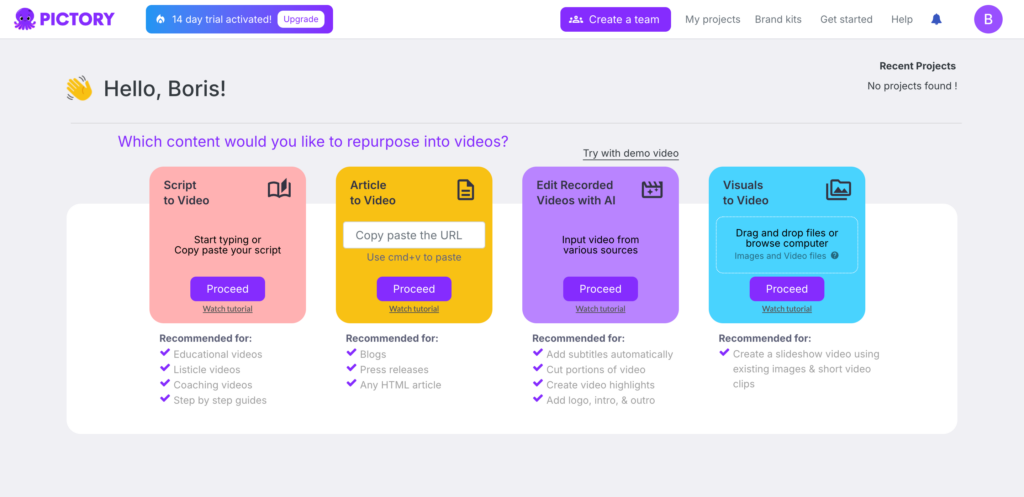
We ran a few of our own articles through it and the results were surprisingly polished.
You can customize each video with the built-in editor, add captions, voiceovers, and music.
What we like
Pictory’s highlight extraction feature is handy for repurposing long-form video content.
It can pull the most engaging segments from a longer video and turn them into short clips optimized for social media. This saves a lot of manual editing time.
Pricing
Pictory offers a 14-day free trial. Paid plans include:
- Starter ($25/month)
- Professional ($49/month)
- Teams ($119/month)
- Enterprise (custom pricing)
What users say
The Script-to-Video feature is the most praised aspect of Pictory.
Users love being able to paste text and get a complete video with relevant stock footage, captions, and voiceover in minutes. The use of Getty Images for stock clips is called out as a quality advantage over competitors.
"You literally just paste your text, and it builds the video for you. Usually, AI tools pick really weird or irrelevant stock footage, but Pictory uses Getty Images, so the clips are actually high quality and make sense with the context."
The negatives center on limited template variety and the AI voices, which several users describe as lacking flexibility or sounding synthetic.
A few reviewers also note that video rendering can be slow and that the credit system doesn't offer great value at lower tiers.
"The template selection feels limited and not very impressive compared to other video tools. The platform also doesn't feel as advanced as some alternatives, especially when converting audio to video."
11. Animaker AI
Best for: Animated explainer and training videos
Animaker AI specializes in animated videos. We gave it a prompt, selected tone, style, and duration, and it generated a script and matching animated video in minutes.
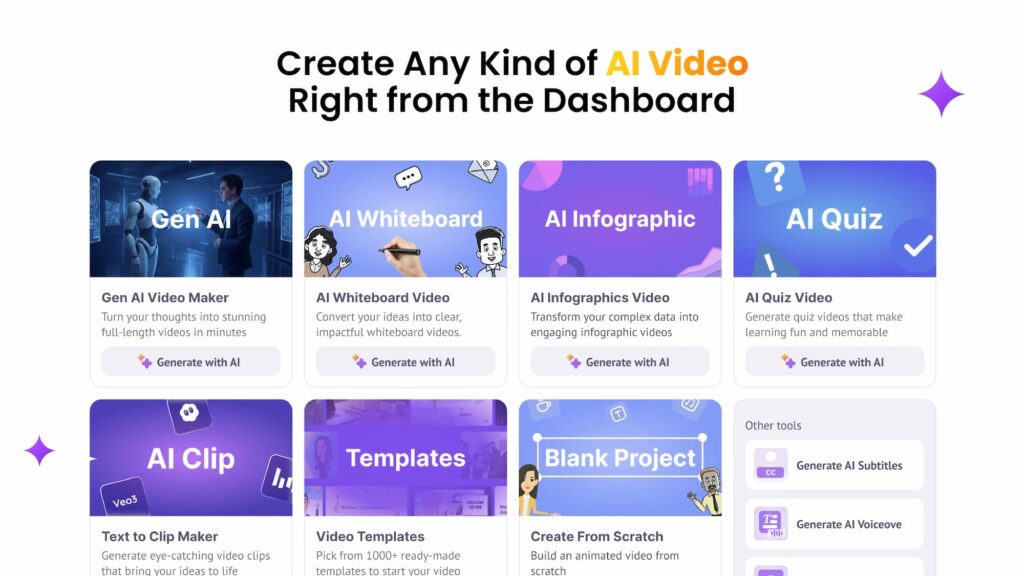
For those who want more control, advanced editing options let you customize every element. The AI voiceover feature syncs characters’ lip movements automatically, which makes the animations feel more polished and dynamic.
What we like
The lip-sync voiceover feature is what separates Animaker from generic animation tools.
Characters don’t just stand there while audio plays: their movements match the speech, which makes a noticeable difference in how professional the final product looks.
What users say
Users consistently praise how accessible Animaker is for people with no animation or video editing background.
The drag-and-drop interface, character customization, and built-in voiceover features make it a popular choice for explainer videos, training content, and presentations.
"Very user-friendly video creation tool with a wide range of templates, characters, and animations. It makes it easy to produce professional-looking videos even without advanced design skills."
The downsides are mostly around the free plan's limitations, which several reviewers say have become more restrictive over time (shorter export limits, fewer characters, less storage).
Performance lag during editing is another common thread, and some users note that animation styles can start to feel repetitive.
"I don't like how Animaker placed in a 2-minute export limit. It used to be unlimited. And some high-quality assets were restricted to a higher plan."
Pricing
Animaker offers a free plan. Paid plans include:
- Basic ($15/month)
- Starter ($25/month)
- Pro ($43/month)
- Custom enterprise plan
12. HeyGen
Best for: Realistic AI avatar videos with multilingual dubbing
HeyGen takes a different approach to AI video. Instead of generating animations or stock footage, it creates videos with realistic AI avatars that deliver your script on camera.
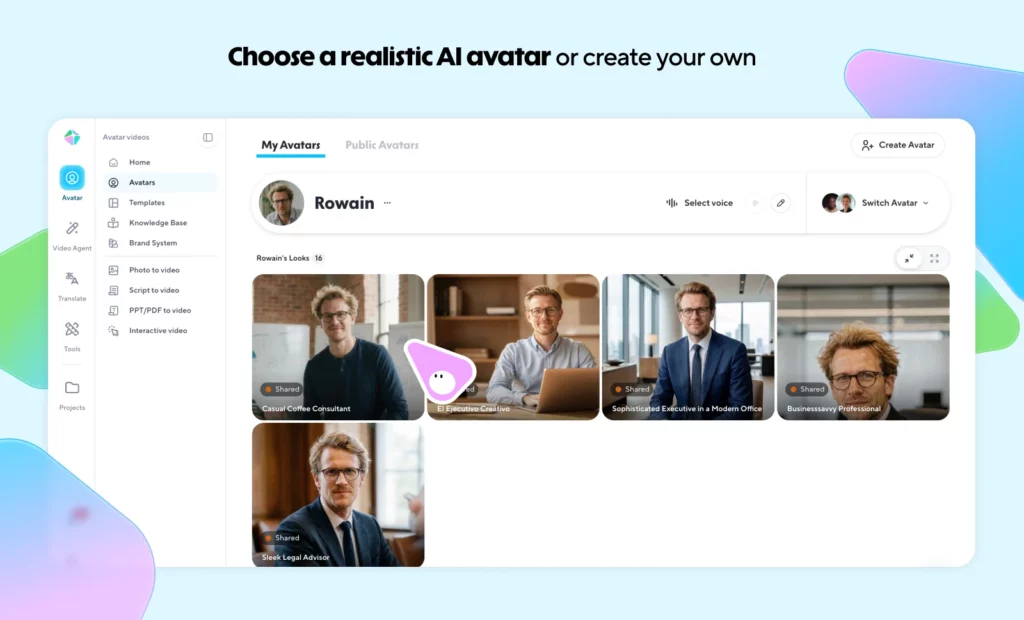
We were able to go from typing a script to having a finished presenter-style video in under five minutes. It supports 175+ languages, and you can even clone your own appearance and voice to create a personalized AI avatar.
What we like
The video translation feature is a standout. You can take a finished video and instantly produce localized versions in dozens of languages, complete with lip-synced dubbing.
For brands producing content for multiple markets, this eliminates the need to reshoot or hire voiceover artists for each language.
What users say
The realism of HeyGen's avatars is the most praised feature by far. Reviewers frequently describe them as the most lifelike they've seen across AI video tools, with natural facial expressions and accurate lip sync.
The speed of going from script to finished video without any filming equipment is another consistent highlight.
"HeyGen is the first one where I don't feel like I'm watching a 'digital puppet.' The facial expressions, along with the subtle micro-movements, come across as genuinely lifelike."
The main complaint is the credit system. Multiple users say credits get consumed quickly, especially when experimenting or regenerating videos, and that the pricing feels steep for startups and solo creators.
A few also note that AI gestures can still look unnatural in certain contexts, requiring careful script adjustments.
"Credits can be consumed quickly without realizing it. Clearer explanations or warnings around credit usage and regeneration would make the experience even better for first-time users."
Pricing
HeyGen offers a free plan (3 videos/month with watermark). Paid plans include:
- Creator ($29/month)
- Business ($149/month)
- Enterprise (custom pricing)
13. OpusClip
Best for: Repurposing long-form video into short-form clips
OpusClip is a content repurposing tool that turns long-form videos into short, social-ready clips.
We dropped in a 45-minute YouTube video and it identified 20+ potential clips within minutes.
It uses multimodal AI, analyzing visuals, audio, and sentiment to detect the moments most likely to perform well as short-form content. It also adds animated captions and reformats clips for TikTok, Reels, and Shorts automatically.

What we like
The “Virality Score” feature assigns a predicted performance rating to each generated clip, which helps you prioritize which clips to publish first.
Combined with the built-in social media scheduling tool, it covers the full pipeline from long video to published short.
What users say
The time savings are the dominant theme. Reviewers consistently report that what used to take hours of manual editing now happens in minutes.
The AI's ability to identify the strongest moments from long-form content and produce social-ready clips with captions and branding gets high marks across the board.
"We are saving 70% more time in the whole process which is incredible. Definitely worth the investment. The auto captions are great. Took me all of 2 minutes to understand."
The most common frustrations are around clip accuracy and editing control.
Several users note that out of 20 generated clips, only a handful may be truly ready to post without manual fixes.
Caption sync issues and aggressive auto-renewal billing are also mentioned.
"If it generates 20 clips, maybe two or three are ready to go. By the time I finish fixing the things that don't look right, I've spent as much time as I would have creating the clip myself."
Pricing
OpusClip offers a generous free plan. Paid plans start at $19/month (Pro).
AI advertising tools
14. AdCreative.ai
Best for: Generating data-driven ad creatives at speed
AdCreative.ai generates on-brand ad creatives and copy for Google Ads, Meta Ads, LinkedIn, and more.
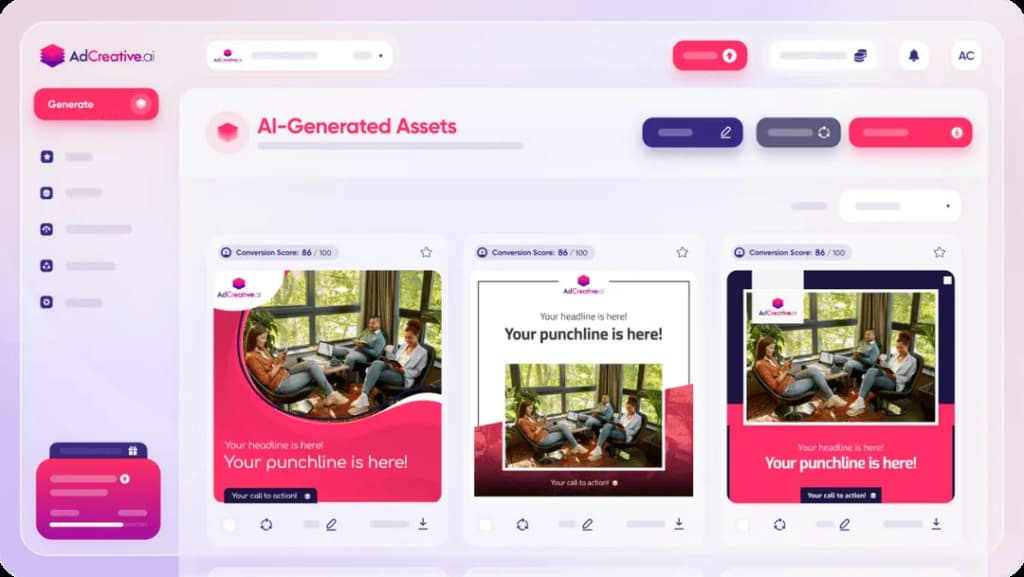
We shared a product link and the platform recommended an advertising strategy, suggested the right ad platform, and generated copy, creatives, and audience targeting for the campaign.
It can even analyze competitors’ ads and landing pages to help you understand what they’re doing.
What we like
The platform’s AI is trained on conversion data, which means the creatives it generates are optimized for performance.
The competitor analysis feature also gives you a clear window into rival strategies without needing a separate competitive intelligence tool.
What users say
Users praise the speed of creative generation and the data-driven approach to ad design.
The platform produces multiple platform-ready ad variations quickly, and the AI recommendations for visuals, headlines, and layouts are described as genuinely useful for scaling campaigns.
"I can generate dozens of professional-looking ad banners in just a few clicks. The AI suggestions actually make sense. It feels like having a mini design team in your laptop."
However, billing practices are a major red flag across reviews. Multiple users report being auto-charged for the premium tier after the free trial with no clear warning, and describe the refund process as slow or nonexistent.
On the product side, customization options are consistently called out as limited, often requiring export to another tool for final adjustments.
"They have a 7-day trial that then escalates to the premium tier, not the entry level tier. This is by design. They do not issue refunds, even if no credits were used."
Pricing
AdCreative.ai offers a free trial. Paid plans include:
- Startup ($29/month for 10 credits)
- Professional ($209/month for 100 credits)
- Ultimate ($549/month for 500 credits)
15. Smartly
Best for: Managing ad campaigns at scale across multiple platforms
Smartly helps businesses create personalized ads and manage campaigns across multiple platforms from one central dashboard.
We explored its AI-powered image and video editing tools and found them capable of producing on-brand ad variations quickly.
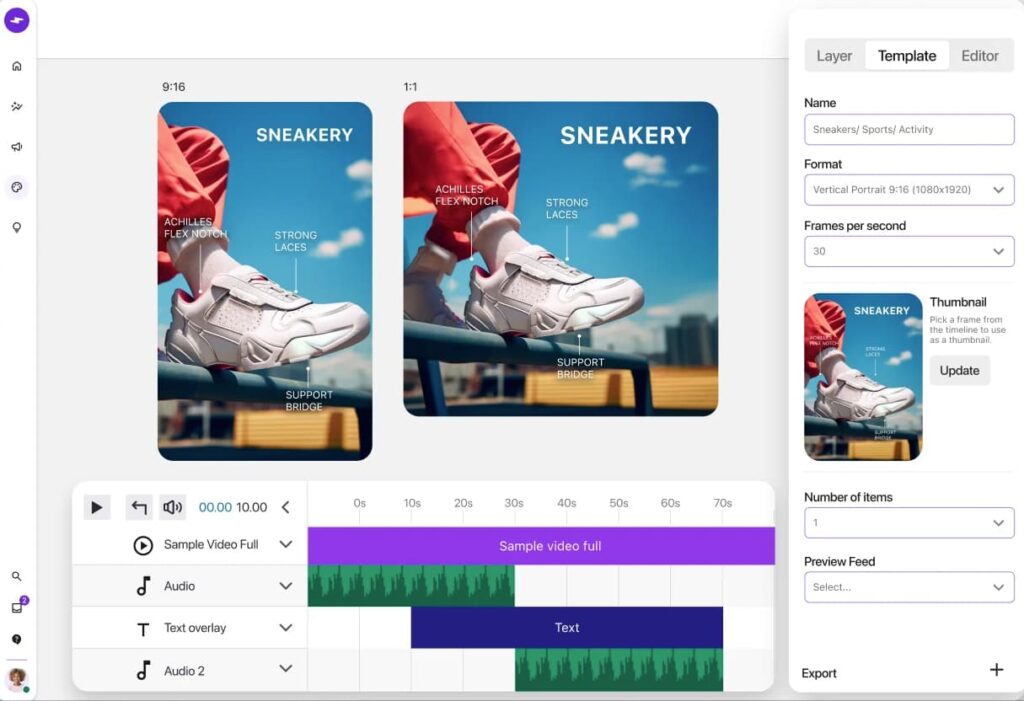
The platform supports automated campaign management, so you can launch, monitor, and adjust ads without constantly switching between ad platforms.
What we like
Smartly’s real-time creative performance analysis is its strongest suit.
You can see which ad elements are working down to the individual headline or image and optimize creatives across channels based on actual performance data rather than gut instinct.
What users say
Reviewers consistently describe Smartly as best-in-class for managing ad campaigns at scale, particularly on Meta.
The ability to control entire campaign structures through Google Sheets automation feeds, combined with powerful reporting and cross-channel support, makes it a favorite among agencies and multi-location businesses.
"Smartly is more than just a tool to manage and report on your social media campaigns.
They are also a strategic partner to your business. They have all the industry insights on best practices and think with you on how to improve your account structure and performance."
The most cited downsides are a steep learning curve and a pricing model that several reviewers describe as heavy.
The platform can also be glitchy at times, particularly around ad uploads and Facebook API issues, and the image/video template editor is seen as less robust than dedicated design tools.
"Price model is quite heavy, as is the learning curve. For Facebook, they are best in class though."
Pricing
Smartly doesn’t display its pricing publicly. Contact their sales team for a quote.
Manage your online reputation with ease
Monitor, manage, and get more online reviews for your business with LocalImpact.
16. Madgicx
Best for: Autonomous Meta ad optimization and budget allocation
Madgicx positions itself as an autonomous Meta ads management platform.
We connected a test ad account and immediately saw the AI surface audience segments and creative patterns we hadn’t considered.
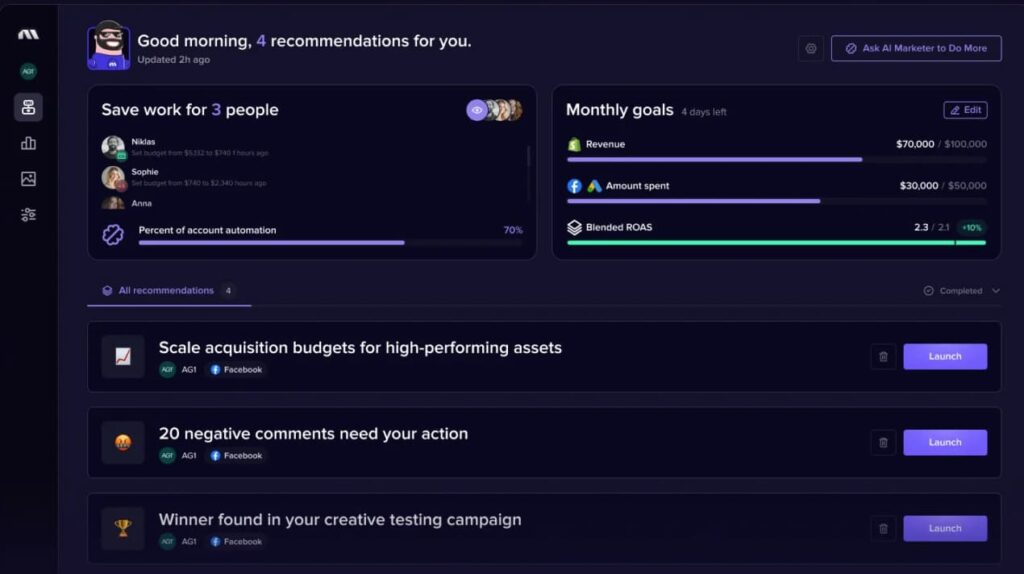
The platform goes beyond creative generation into autonomous budget allocation: it shifts spend toward your best-performing ad sets in real time based on your chosen KPIs, whether that’s ROAS, cost per purchase, or a custom metric.
What we like
The creative analytics dashboard breaks performance down by individual ad element so you can see exactly what’s driving results.
This level of granularity helps you double down on what works instead of guessing, which is something most ad platforms don’t surface natively.
What users say
Reviewers praise the AI-driven automation features, particularly the ability to automatically pause underperforming ad sets and scale winning ones based on ROAS.
The creative insights that break down performance by individual ad elements like headlines, copy length, and visuals are another consistent highlight. Setup is described as straightforward across the board.
"The full funnel breakdown and automation tactics are very helpful, especially features like stop loss and sunsetting that automatically pause underperforming ad sets and scale stronger ones based on ROAS, saving a lot of manual campaign monitoring."
The most universal criticism is the reporting dashboards. Nearly every reviewer asks for simpler high-level views and easier side-by-side comparisons between campaigns, audiences, and creatives.
The learning curve with multiple dashboards can also feel overwhelming initially, and Google Ads support is limited to reporting only.
"The biggest challenge is the learning curve with multiple dashboards. Also, Google Ads can only be used for reporting, not actual campaign management, so we still need another platform for that."
Pricing
Madgicx offers a 7-day free trial. Pricing is spend-based and starts at $39/month.
AI landing page builders & personalization tools
17. Fibr AI
Best for: Personalized landing pages tied to ad campaigns
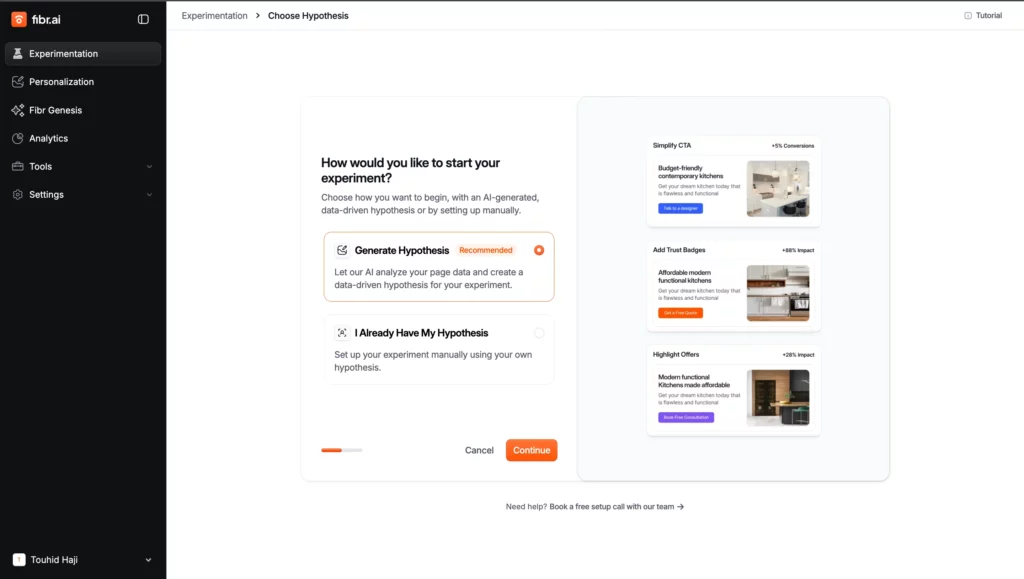
Fibr AI lets you create personalized landing pages without writing any code.
We set up a test campaign and the platform generated multiple landing page variants with a single click, each tailored to different visitor segments based on traffic source, behavior, device, and more.
There’s a built-in A/B testing tool and a no-code editor for fine-tuning any page.
What we like
The one-click variant generation is the real draw here.
Instead of manually building separate landing pages for each audience segment, Fibr AI handles the heavy lifting, freeing you up to focus on analyzing results and iterating on what works.
What users say
Users consistently highlight how Fibr AI eliminates the need to involve dev or design teams when creating and testing landing page variants.
The ability to match landing page messaging to specific ad campaigns and personalize at the account level is a recurring positive, with one reviewer reporting a 28% reduction in CPA across clients.
"The ease with which we create personalized landing pages for the ads of our clients is just phenomenal. Earlier we used to create a few pages and direct the ad traffic to those pages, but now with Fibr each of the ads have a specific landing page."
The main drawback is the learning curve. Multiple reviewers note that initial setup took longer than expected and required hands-on support from the Fibr team.
AI-generated copy suggestions are also described as occasionally generic, requiring manual adjustments to stay on-brand.
"The campaign setup process was a bit complex in the beginning. We needed support from the Fibr AI team to get everything running smoothly. Once it was set up, it worked well, but the learning curve was there."
Pricing
Fibr AI offers a limited free plan. Paid plans include:
- Basic ($99/month)
- Pro ($499/month)
- Enterprise (custom pricing)
18. Hightouch
Best for: Activating warehouse data for real-time marketing personalization
Hightouch is an AI-powered customer data platform that activates your existing data for real-time personalization.
During our evaluation, we connected it to a data warehouse and watched it sync audience segments directly to ad platforms and marketing tools.
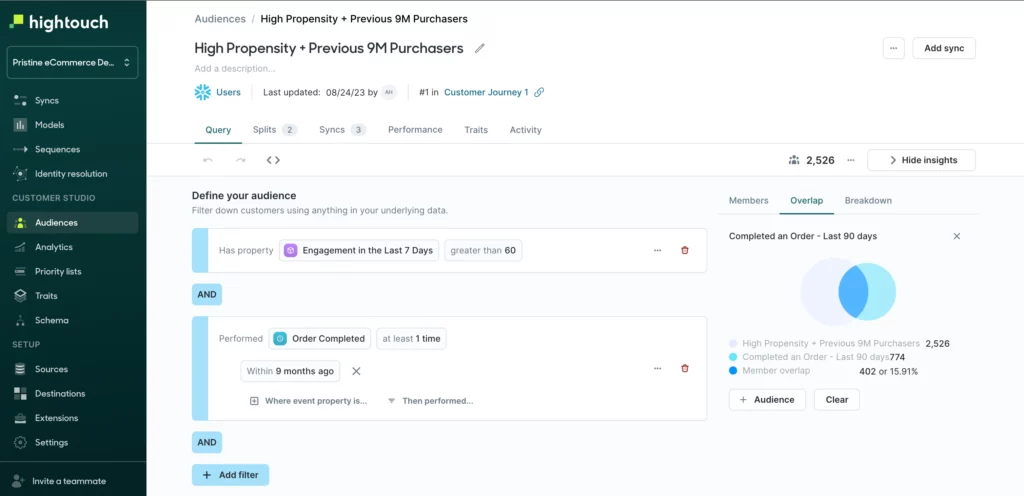
It supports automated A/B testing and detailed campaign performance analytics out of the box.
What we like
Hightouch’s deep integrations with tools like Salesforce, HubSpot, and Google BigQuery make it the connective tissue between your data stack and your marketing channels.
If you already have rich customer data sitting in a warehouse, Hightouch is one of the most effective ways to actually use it for personalization.
What users say
Reviewers praise how easily Hightouch connects data warehouses like Snowflake and Databricks to marketing tools like Meta, Google Ads, Braze, and HubSpot without needing custom pipelines.
The support team is consistently described as responsive and hands-on, and the no-code audience building is a highlight for non-technical marketers.
"I was able to connect Hightouch to our Snowflake warehouse in under five minutes. The UI is super intuitive: models and syncs are laid out in a way that just makes sense, and I never feel lost clicking around."
Pricing is the most frequent concern. Several reviewers describe it as steep or lacking transparency, especially for organizations with large contact volumes.
Initial setup can also be complex for non-standard environments, and one long-term user reported abrupt policy changes that made the platform unaffordable with little notice.
"Pricing can be steep for organizations with large contact volumes, so cost management needs to be considered early."
Pricing
Hightouch offers a limited free plan. Paid plans start at $350/month.
AI analytics & reporting tools
19. Coupler.io
Best for: No-code cross-channel marketing reporting
Coupler.io is a no-code reporting platform designed for marketers who need a clear view of performance across all channels.
It supports over 700 integrations, including Microsoft Ads reporting, making it easy to track performance across paid ads, email marketing, social media, and web platforms.
You can build real-time dashboards, blend cross-channel data, and apply transformations without writing code.
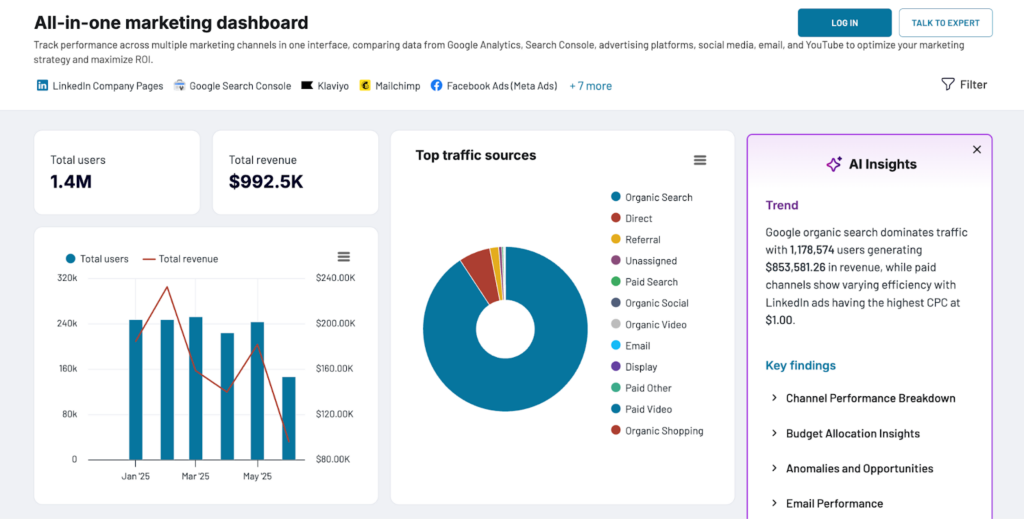
With AI Insights, Coupler.io delivers instant summaries and optimization tips based on your marketing data. Reports can be made in Looker Studio, Power BI, Google Sheets, and more, or built directly in Coupler.io.
What users say
Users consistently praise how much manual reporting time Coupler.io eliminates.
The wide integration library and no-code setup make it accessible even for teams without dedicated data engineering resources, and the automated data refresh keeps dashboards current without ongoing maintenance.
"Being able to pull customised versions of our Mailchimp reports directly into our main marketing spreadsheet has saved us a huge amount of manual work.
The dashboards are also genuinely helpful. Overall, the automation and ease of use has been game-changing."
The built-in data transformation capabilities are another frequent highlight.
Users appreciate being able to clean, merge, and format data from multiple sources before it reaches the destination, which reduces fragmented reporting and improves data consistency.
"The ability to merge multiple sources into a single destination is a standout feature. It's been highly effective for consolidating reports that would otherwise be fragmented."
What we like
The AI Insights feature delivers instant summaries and optimization tips based on your actual marketing data. Reports can be built in Looker Studio, Power BI, Google Sheets, or directly in Coupler.io.
Pricing
Start with the free plan. Paid plans begin at $24/month and include daily refreshes, AI summaries, and unlimited sources and destinations.
AI search visibility tools
20. Peec AI
Best for: Tracking brand visibility across AI search engines
Peec AI is an AI search analytics platform that tracks how your brand appears inside AI search engines like ChatGPT, Perplexity, and Google AI Overviews.
We set up prompt tracking for a test brand and within a day had visibility scores, position data, and sentiment analysis across multiple AI models.
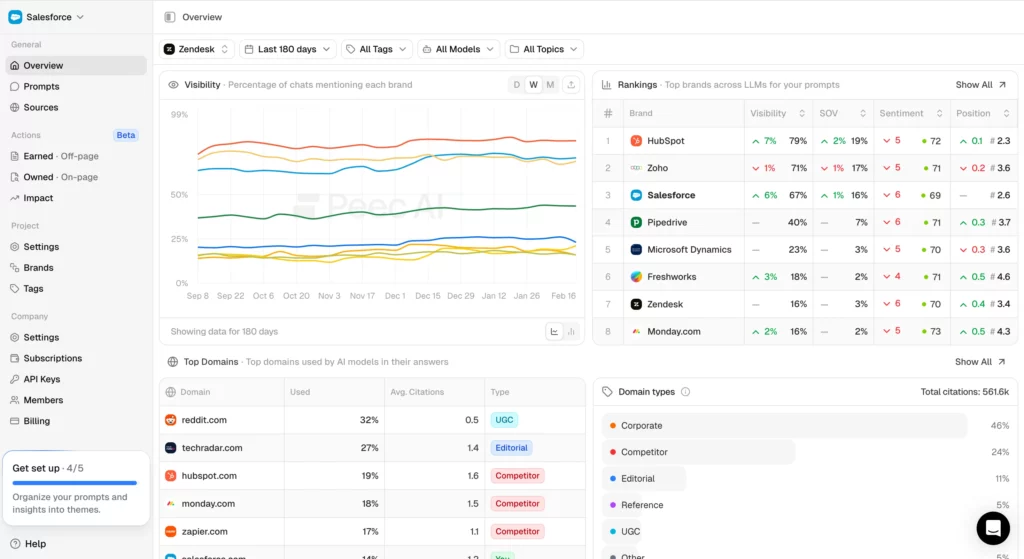
The dashboard is clean and intuitive: you can filter by model, country, or audience segment.
What we like
The source citation tracking is particularly valuable. Peec AI identifies which websites are influencing how AI models talk about your brand, so you can prioritize where to focus your PR and content efforts.
It also offers competitor benchmarking, letting you compare your AI visibility against rivals side by side.
What users say
Reviewers consistently call out the UI as the best in the AI visibility tracking space, praising how easy it makes complex LLM performance data to understand and act on.
The support team and onboarding experience are also frequent highlights, as is the use of clickstream data to surface how popular specific queries actually are.
"I think there's a lot of players in the space where it's hard to actually understand the data they're collecting, but Peec AI makes it really easy to understand performance in LLMs.
For the price point they're at, they are the best solution in the market."
There are few recurring negatives. Some users wish for deeper insights into how LLMs select their sources, and pricing, while considered fair relative to competitors, is still seen as a significant line item.
"No issues with the product. I do wish it was less expensive, but every vendor in the space is expensive."
Pricing
Peec AI offers a free trial. Paid plans include:
- Starter (€89/month)
- Pro (€199/month)
- Enterprise (€499/month)
Manage your online reputation with ease
Monitor, manage, and get more online reviews for your business with LocalImpact.
21. Otterly AI
Best for: Lightweight, affordable AI search visibility monitoring
Otterly AI monitors your brand’s visibility and URL citations within AI tools like ChatGPT, Google AI Overviews, and Perplexity.
We used it to generate a detailed competitive report comparing our test brand’s AI visibility against several competitors.
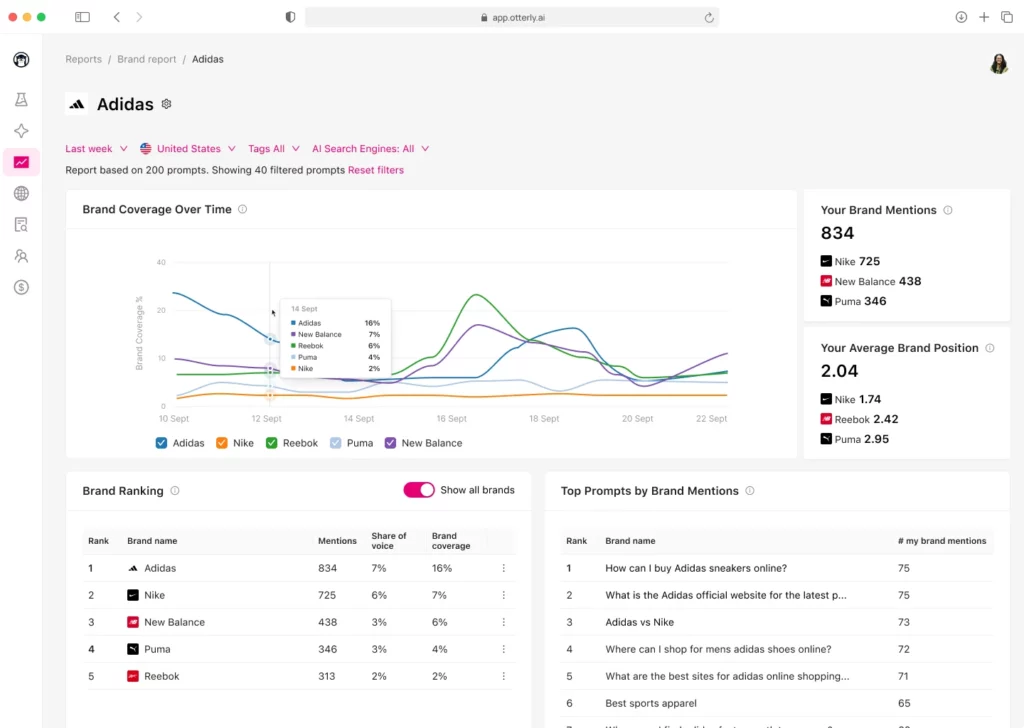
The setup was simple: we provided brand information, relevant AI search prompts, and competitor names, and Otterly AI generated a comprehensive report within minutes.
What we like
Otterly AI’s share-of-voice metrics give you a clear picture of how often your brand is mentioned relative to competitors in AI-generated responses.
It’s a lightweight, affordable entry point into AI visibility tracking for teams that don’t need enterprise-level depth.
What users say
Users love how quickly Otterly AI can be set up and integrated into existing workflows. Slack alerts, HubSpot dashboards, Looker Studio, Trello, and Power BI integrations are all mentioned as working smoothly.
Customer support is a standout, with multiple reviewers describing the team as exceptionally hands-on.
"In less than 30 minutes I had our core brand and top five service-area prompts set up and being tracked. When we get a Slack notification that someone mentions our agency in a ChatGPT answer, you absolutely cannot put a price on that."
The main adjustment is a mental one. Several reviewers note it takes time to shift from traditional keyword tracking to thinking in full prompts and conversational queries.
Sentiment analysis can also be slightly off on occasion, marking neutral mentions as positive or negative.
"It may take a bit to drop your old habits of keyword tracking and start thinking in terms of the complete queries and inputs AI engines consume. For our team, it took a few weeks to get into that mindset."
Pricing
Otterly AI offers a limited free plan. Paid plans start at $29/month.
Streamline your workflow with AI marketing tools
With 21 tools on this list, the worst thing you can do is try to adopt five of them at once.
Start by identifying the one area of your marketing that takes up the most time or produces the weakest results. Then pick a single tool from that category and give it a real test run.
Most of the tools we covered offer free trials or free plans, so you can get hands-on experience before committing.