
Effective marketing is crucial for getting more customers to your small business. But as a small business owner, you likely don't have much time to dedicate to marketing. And you might not even have a team member to delegate marketing tasks to.
Luckily, there are plenty of small business marketing tools that can help you stay on top of your marketing efforts without burning through your budget or your calendar.
We spent over 100 hours testing tools across 10 categories to find the ones that work best for small businesses. Keep reading to find out our top picks
Best small business marketing tools
No time to read the full article? Here’s a quick overview of our top picks.
| Tool | Category | Best for | Starting price |
| Canva | Content creation & design | Creating professional marketing visuals without a designer | Free (Pro from $15/mo) |
| CapCut | Content creation & design | Producing short-form social media videos quickly | Free (paid from $8/mo) |
| Descript | Content creation & design | Editing video and podcast content by editing text | Free (paid from $16/mo) |
| Semrush | SEO | All-in-one SEO and competitive research | $139.95/mo |
| Ahrefs | SEO | Backlink analysis and keyword research | Free (paid from $29/mo) |
| LocalImpact | Review & reputation management | Collecting and managing online reviews | $19/mo |
| Mailchimp | Email & SMS marketing | Email campaigns for growing contact lists | $20/mo |
| Omnisend | Email & SMS marketing | E-commerce email and SMS automation | $59/mo |
| TextNinja | Email & SMS marketing | Capturing leads through website-to-text conversations | $29/mo |
| Buffer | Social media management | Simple, affordable social media scheduling | Free (paid from $6/mo) |
| Hootsuite | Social media management | Managing social media at scale across many accounts | $99/mo |
| Later | Social media management | Visual content planning for Instagram and TikTok | Free (paid from $25/mo) |
| AdCreative.ai | Advertising & paid media | Generating ad creatives and copy with AI | $29/mo |
| Adzooma | Advertising & paid media | Optimizing ad campaigns across Google, Meta, and Microsoft | Free (paid from $99/mo) |
| Unbounce | Landing pages & lead capture | Building high-converting landing pages without code | $99/mo |
| Hello Bar | Landing pages & lead capture | Adding pop-ups and notification bars to capture leads | $39/mo |
| OptinMonster | Landing pages & lead capture | Exit-intent pop-ups and on-site lead generation | $7/mo |
| Keap | CRM & customer management | Combining CRM, email marketing, and invoicing in one tool | $299/mo |
| Close CRM | CRM & customer management | Outbound sales teams that live on calls and email | $19/mo |
| Pipedrive | CRM & customer management | Visual pipeline management for small sales teams | $14/mo |
| Zapier | Automation | Connecting apps and automating tasks without code | Free (paid from $29.99/mo) |
| Make | Automation | Complex, multi-step workflow automation on a budget | Free (paid from $10.59/mo) |
| Fathom Analytics | Analytics & reporting | Privacy-friendly website analytics with a simple dashboard | $15/mo |
How we chose these tools
For each tool, we created an account, connected it to real business data where possible, and worked through the core features to understand how it performs in a realistic small business setting.
We evaluated each tool on four criteria:
- Ease of setup: How quickly can a small business owner with no technical background get up and running?
- Small team fit: Does the tool serve the needs of a business with limited time, budget, and headcount?
- Pricing: How does the cost compare to similar tools in the same category, and is there a free plan or trial available?
- Standout value: Does the tool offer something genuinely useful that sets it apart from the competition?
We also prioritized tools that are actively maintained and regularly updated, since marketing software that falls behind on integrations or platform changes can quickly become a liability.
The result is a list of 23 online marketing tools for small business owners who want to grow without adding headcount.
Content creation & design tools
1. Canva
Best for: Creating professional marketing visuals without a designer
Canva is a graphic design tool that lets anyone create professional-looking visuals without needing design experience. It offers thousands of templates for social media posts, presentations, logos, banners, infographics, and more.
We used Canva for creating social media graphics and presentations. The drag-and-drop editor is intuitive, and the template library covers nearly every use case you'd run into as a small business.
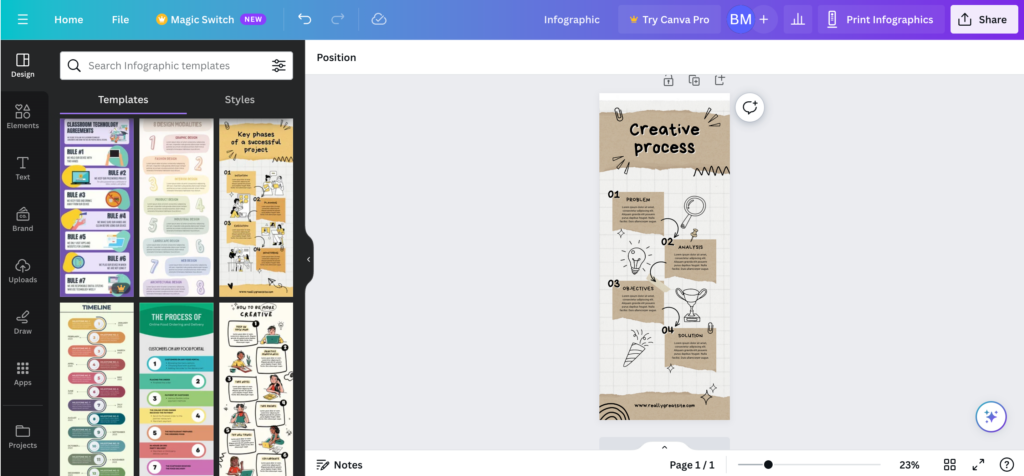
If you're working with a team, Canva's collaboration tools let multiple people edit and comment on designs in real time.
What we like
Once you've saved your brand colors, fonts, and logo in the Brand Kit, every template you open can be styled to match your brand in a few clicks.
This is a huge time saver if you're producing a lot of marketing materials and want everything to look consistent.
What users say
Users consistently praise Canva for how easy it is to pick up, even without any design experience. The template library, drag-and-drop editor, and Brand Kit feature come up frequently as major time savers.
"It's incredibly easy to use; other platforms often require technical research and learning, but with Canva, it's so easy to get started. The pre-made templates save me tons of time."
The most common complaints center around the mobile experience and the occasional frustration of discovering that a "free" template contains premium elements you can't use without upgrading.
"Some designs that are listed as free sometimes include premium elements that you can't see right away. Then, once you're halfway through, you realize your work is wasted unless you change the design."
Canva offers a limited free plan. The pricing for paid plans is as follows:
- Canva Pro ($15/month)
- Canva Teams ($10/user, with a minimum of 3 users)
2. CapCut
Best for: Producing short-form social media videos quickly
CapCut is an AI-powered video editing tool that makes it easy to create polished videos quickly, even if you don't have a background in video production.
We used CapCut to create short-form videos for social media. The template library helped us go from an idea to a finished video in under 30 minutes.
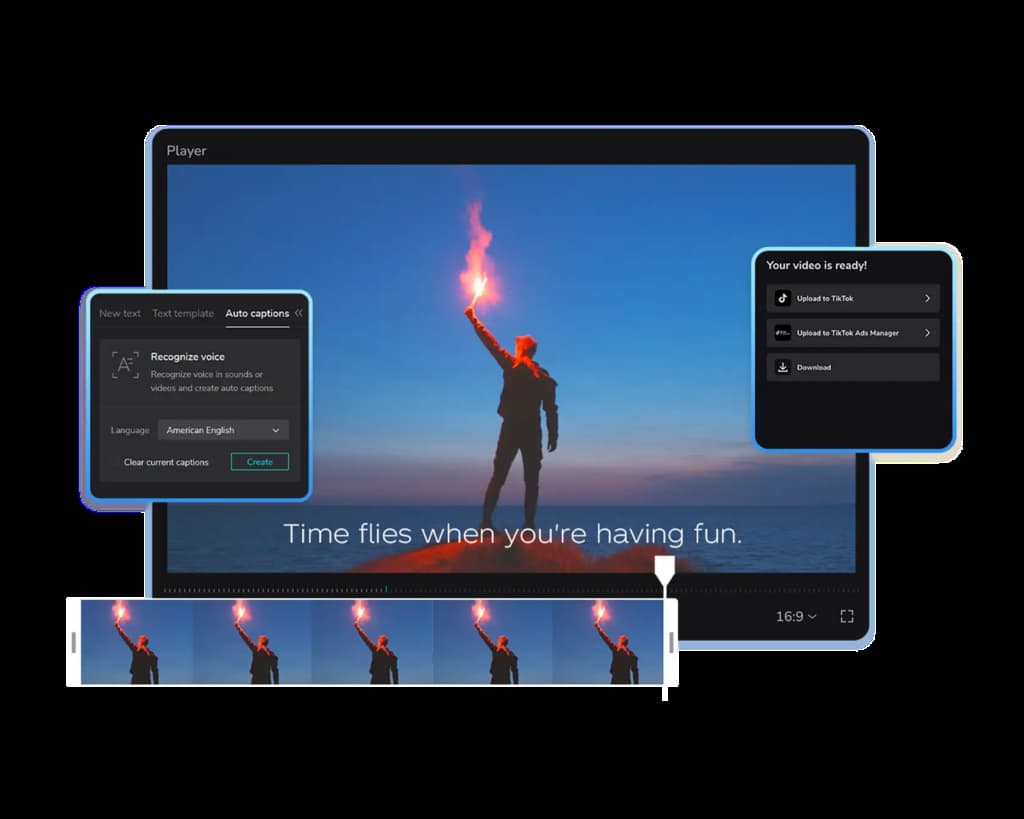
The one-click resize tool made it simple to adapt a single video for different platforms. CapCut also includes tools for upscaling video quality and removing backgrounds, which came in handy for product-focused content.
It's available as both a desktop and mobile app.
What we like
Auto-generated captions are accurate right out of the box, and you can customize the font, size, and style to match your brand. For a small business producing social media video, this removes the need for a separate transcription tool.
What users say
Users highlight CapCut's ability to produce polished, professional-looking videos without a steep learning curve. The templates, automated captioning, and easy export to social platforms are frequently mentioned as standout features.
"It combines advanced video tools with intuitive workflows, enabling me to produce high-quality, professional product videos quickly and without a steep learning curve."
On the downside, some users note that advanced editing controls feel limited compared to desktop editing software, particularly around keyframe precision and export customization options.
"Some of the more advanced tools and templates can feel a bit limited compared to desktop editing software, especially for creators who want full manual control."
Pricing
A free version of CapCut is available. The paid version costs $8/month.
3. Descript
Best for: Editing video and podcast content by editing text
Descript is a video and podcast editing tool that takes a unique approach to editing. Instead of working with a traditional timeline, you edit your video or audio by editing its transcript.
Delete a sentence from the text, and the corresponding audio and video are removed automatically.
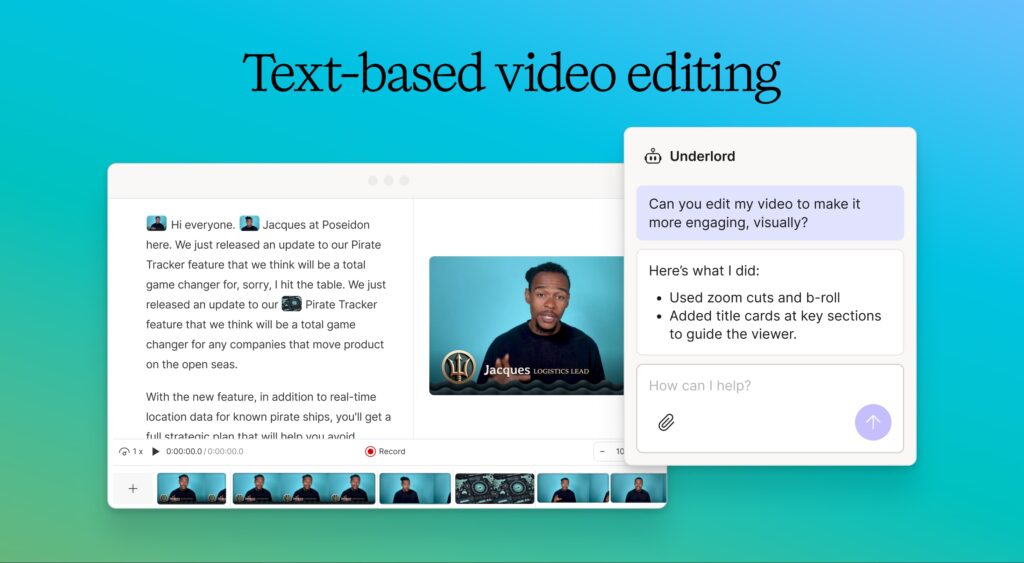
We found this especially useful for repurposing long-form content. You can record a 30-minute interview, clean up the transcript, and quickly pull out short clips for social media.
Descript also generates captions automatically and removes filler words like "um" and "uh" with a single click.
What we like
Studio Sound cleans up audio quality to near-professional levels, even if you recorded in a noisy room with a basic microphone.
For small businesses that don't have access to a recording studio, this feature alone can make your podcast or video content sound significantly more polished.
What users say
The transcript-based editing approach is the feature users bring up most often, with many noting that it makes video editing accessible even for people with no prior experience.
The filler word removal and Studio Sound features also get frequent praise for speeding up the editing process.
"You do not need to be a skilled or trained editor — you simply need good instincts and basic computer savvy."
Where users express frustration is around the credit-based pricing, which can add up quickly for teams doing high-volume work. Several reviewers also mention that the interface isn't always intuitive when you first get started.
"The subscription plans are confusing and there's no credit for unused subscriptions if I upgrade. The customer service is basically non-existent, just an AI bot."
Pricing
Descript offers a free plan with 1 hour of transcription and basic editing features. Paid plans include:
- Hobbyist ($16/month billed annually)
- Creator ($24/month billed annually)
- Business ($55/month billed annually)
Search engine optimization (SEO) tools
4. Semrush
Best for: All-in-one SEO and competitive research
Semrush offers a suite of tools designed to help businesses improve their visibility in online search. You can use it for keyword research, rank tracking, site audits, and competitor analysis.
We've used Semrush extensively across multiple projects.
The Keyword Magic Tool makes it easy to find relevant keywords and assess how difficult they'll be to rank for.
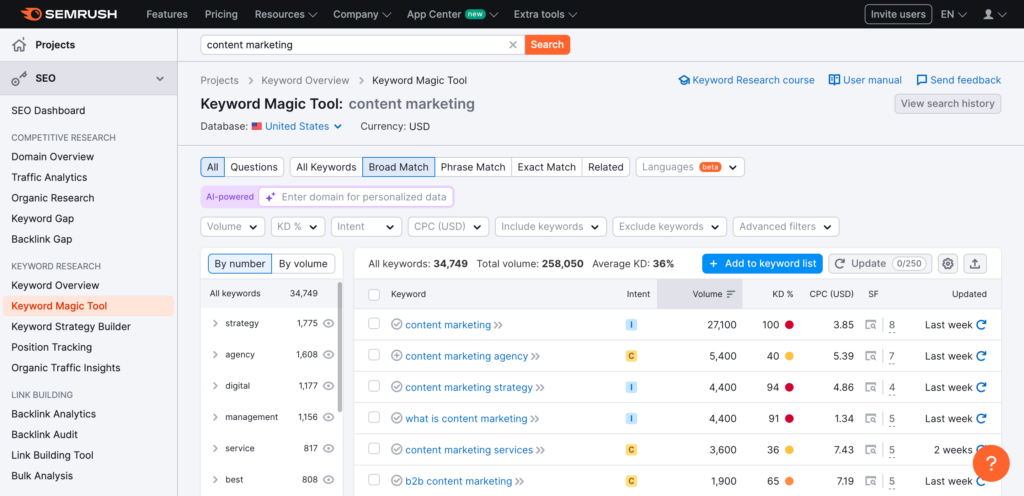
The Site Audit tool crawls your website and flags technical issues that could be hurting your rankings, with clear explanations and fix recommendations for each one.
Semrush also includes useful tools for local businesses, such as a Google Business Profile optimization tool and a Google Maps rank tracker.
What we like
The Position Tracking tool sends you daily updates on where your site ranks for your target keywords, broken down by device and location. It's an easy way to spot ranking drops early and see whether your SEO efforts are actually moving the needle over time.
What users say
Reviewers regularly describe Semrush as one of the most comprehensive SEO platforms available, with keyword research, competitor analysis, and site audits all in one place. Several users note that it saves significant time compared to piecing together data from multiple tools.
"Other tools give you numbers. Semrush gives you context and an entire arsenal to act on it."
The two recurring criticisms are price and complexity. Multiple reviewers mention that the platform can feel overwhelming at first, and several small business owners flag that the cost adds up quickly once you need additional users or projects.
"It can be both overwhelming and costly, particularly if you don't require all of its features. For smaller teams, the learning curve can be quite steep."
Pricing
Semrush offers the following plans:
- Pro ($139.95/month)
- Guru ($249.95/month)
- Business ($499.95/month)
5. Ahrefs
Best for: Backlink analysis and keyword research
Ahrefs is an all-in-one SEO platform that helps you research keywords, analyze competitors, audit your website for technical issues, and track your search rankings over time.
We used Ahrefs primarily for keyword research and competitive analysis.
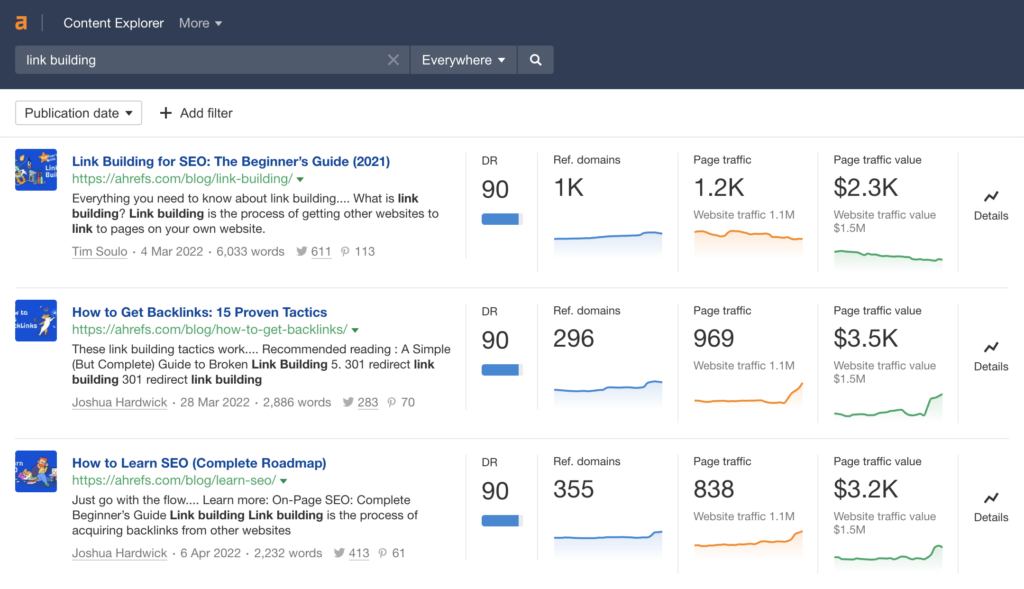
The Keyword Explorer tool shows you search volume, keyword difficulty, and click-through rate estimates for any keyword you enter.
And Site Explorer lets you see exactly which pages are driving organic traffic to your competitors' websites, which is incredibly useful when planning your own content strategy.
What we like
The Content Gap feature compares the keywords your competitors rank for against the keywords you rank for, and shows you exactly where the opportunities are.
When we ran this, it surfaced dozens of relevant keywords we weren't targeting yet.
What users say
Users repeatedly point to Ahrefs' backlink index as one of the strongest in the industry, and many reviewers appreciate how clean and fast the interface is for competitor research and keyword analysis.
"Ahrefs is insanely reliable when it comes to SEO data. Site Explorer and Keywords Explorer make it very easy to spot opportunities quickly."
The most frequent complaint is pricing. Multiple reviewers note that the credit-based usage model can feel restrictive during deep research, and the cost is a barrier for freelancers and small teams.
"The pricing can feel expensive for solo founders or early-stage teams, and the credit-based usage model sometimes limits deep exploration."
Pricing
Ahrefs offers a free Webmaster Tools plan with limited access to Site Explorer and Site Audit. Paid plans include:
- Starter ($29/month for 1 project)
- Lite ($129/month for 5 projects)
- Standard ($249/month for 20 projects)
- Advanced ($449/month for 50 projects)
Online reputation management tools
6. LocalImpact
Best for: Collecting and managing online reviews
LocalImpact helps businesses track, manage, and respond to online reviews.
It monitors 26+ popular review sites, including Google, Facebook, Yelp, and Tripadvisor. And notifies you as soon as your business receives a new review.
You can read and reply to all the reviews from the software's review feed, and set up automated email and SMS reminders to nudge customers into leaving reviews for your business.
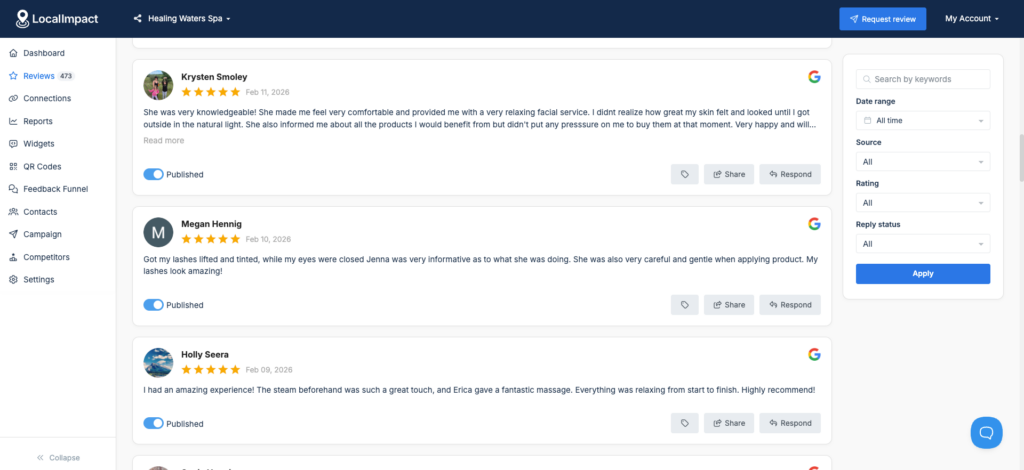
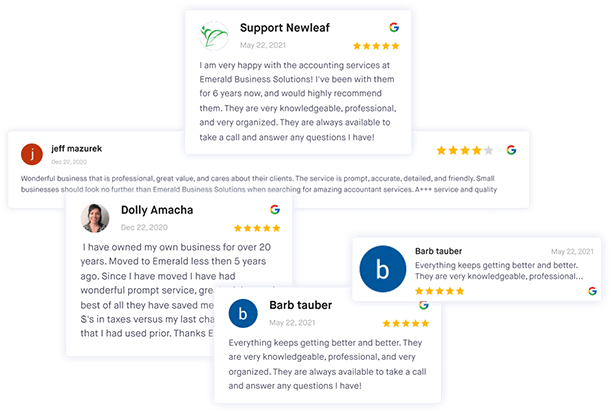
There's also the option to display top customer reviews on your website by using the review widget.
What we like
The AI reply feature generates personalized responses to reviews in seconds, so you can stay on top of every review without spending time crafting individual replies from scratch.
This is especially useful for businesses that receive a high volume of reviews and want to respond consistently without it becoming a time sink.
What users say
Reviewers consistently highlight how simple LocalImpact is to set up and start using, even for non-technical business owners. The automated review collection and responsive customer support are the two things users mention most.
"The platform is extremely easy to set up and integrate with my existing website. The automation tools save me time collecting and displaying reviews. Customer support is quick to respond and always helpful."
Pricing
LocalImpact offers the following plans:
- Growth ($49/month)
- Pro ($99/month)
- Agency ($149/month)
Get more reviews with LocalImpact
Generate more 5-star reviews for your business and take control of your online reputation with LocalImpact.
Email & SMS marketing tools
7. Mailchimp
Best for: Email campaigns for growing contact lists
Mailchimp is a popular email marketing platform that allows businesses to create and send email campaigns to their subscribers.
We've worked with Mailchimp on several accounts. The email builder is straightforward, with plenty of templates that you can customize to match your brand.
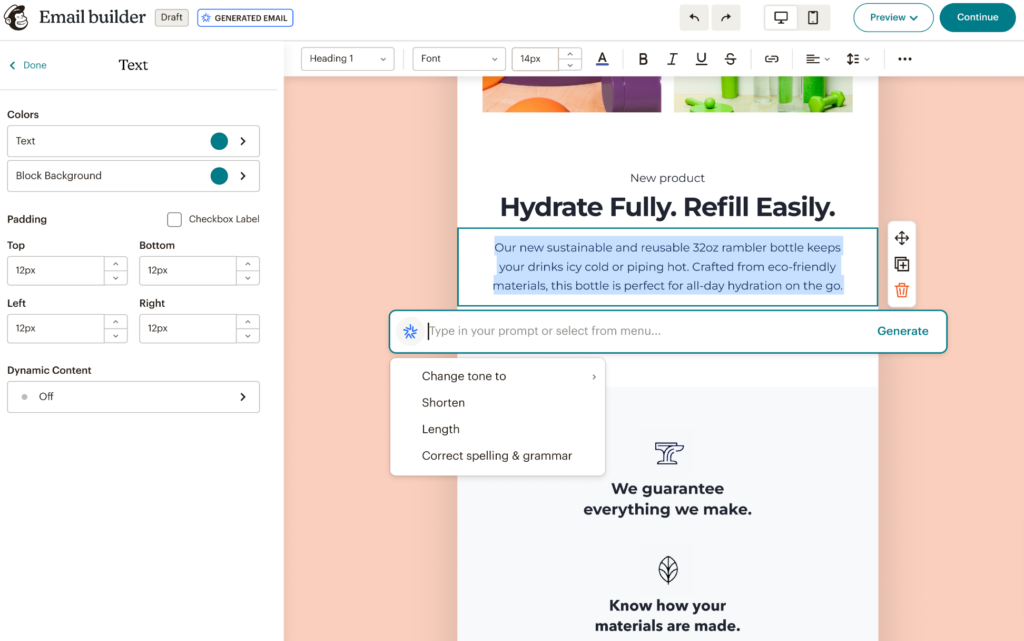
The AI copy generator can produce draft email text in seconds, which is helpful when you're short on time.
Mailchimp's audience segmentation features let you target specific groups of subscribers based on their attributes and behavior, and the automation tools allow you to set up sequences like welcome emails or post-purchase follow-ups that run on autopilot.
What we like
The Subject Line Helper analyzes your subject line before you send and suggests improvements based on what's worked in similar campaigns.
It's a small feature that can make a noticeable difference in open rates, especially if you're not sure what kind of subject lines resonate with your audience.
What users say
The drag-and-drop email builder and template library are the features reviewers mention most, with many noting they can create professional-looking campaigns quickly without any design or technical skills.
The segmentation and automation features also get consistent praise.
"Mailchimp makes it easy to launch and manage email campaigns without overcomplicating things. The templates and drag-and-drop builder help me move fast."
The biggest gripe across reviews is pricing. Users repeatedly point out that costs escalate quickly as your contact list grows, and that many useful features are locked behind higher-tier plans.
"Advanced automation and segmentation features are locked behind higher pricing plans, which can feel restrictive as a small to mid-sized team. Scaling our email strategy became more costly than we expected."
Pricing
The pricing for Mailchimp's plans is based on the size of your email list. It starts at $20/month for 500 contacts.
8. Omnisend
Best for: E-commerce email and SMS automation
Omnisend is an email and SMS marketing platform that helps businesses create and launch email campaigns quickly.
We set up Omnisend for an e-commerce business and had automated workflows running within a couple of hours.
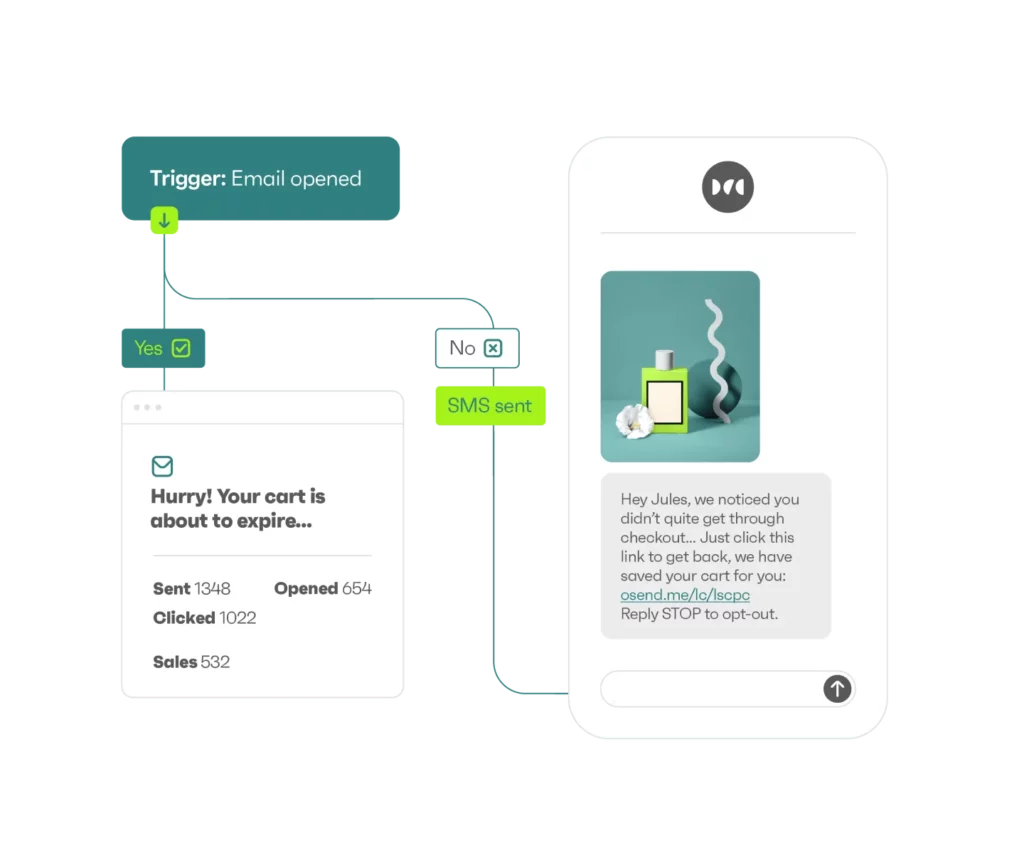
It includes pre-built workflows for popular campaign types, including welcome email series, abandoned cart emails, order and shipping confirmation emails, and more.
The reporting is clean and easy to read, showing you how your campaigns are performing and where your revenue is coming from.
What we like
The pre-built automation workflows are ready to go with just a few clicks of customization.
Most platforms require you to build automated sequences from scratch, but Omnisend gives you a head start with templates that already follow proven e-commerce email patterns.
What users say
Reviewers frequently call out Omnisend's ease of use and the pre-built automation workflows, particularly for e-commerce.
Multiple users mention that abandoned cart and welcome email sequences were up and running quickly and started generating orders almost immediately. Customer support also gets high marks.
"It's quick to set up, and they've already done a lot of hard work for you. The automations are great. Everything is really easy to navigate, even for a beginner."
The most common criticism is around template customization. Several users note that the email and pop-up builders feel rigid once you want to go beyond the basics, and that some features are gated behind higher-tier plans.
"It can feel a bit limited when it comes to deeper design control and fine-tuned customisation. Some features are locked behind higher-tier plans, which can be challenging for small businesses that are still growing."
Pricing
Omnisend's plans start at $59/month.
9. TextNinja
Best for: Capturing leads through website-to-text conversations
TextNinja is an SMS platform built around a web-to-text chat widget that you can add to your website.
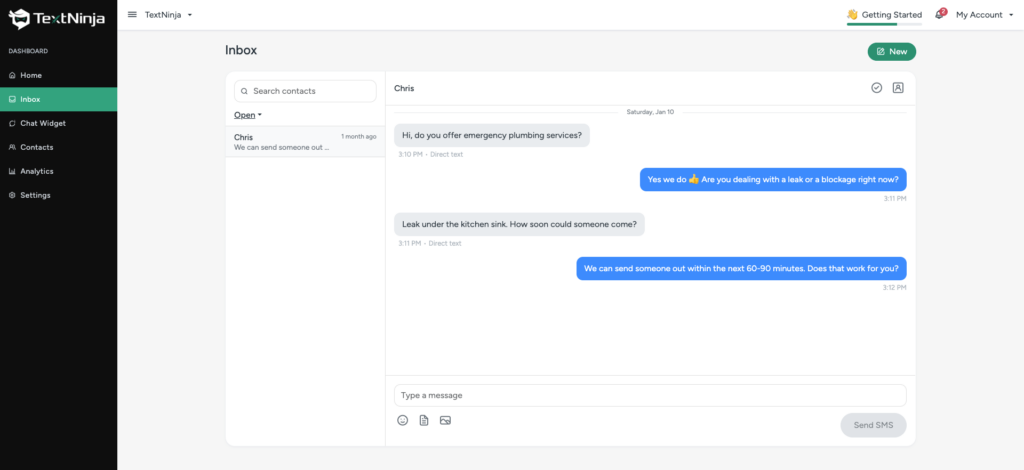
When a visitor clicks the widget, it opens a text conversation directly through SMS, allowing you to capture their phone number and start engaging with them in real time.
We set up TextNinja on a service business website and found the installation to be straightforward. You get an embed code to paste into your site, and the widget starts capturing leads right away.
From the dashboard, you can manage all your text conversations, assign responses to team members, and set up automated replies for off-hours.
What we like
The lead management dashboard lets you tag and prioritize contacts, track response times, and review conversion analytics all in one place. xIt turns what would otherwise be a scattered collection of text threads into an organized sales pipeline.
What users say
Users praise TextNinja for its simple setup and the immediate impact it has on customer engagement. One healthcare business reported a 70% increase in homepage engagement after adding the widget.
"Extremely easy to use, set up was effortless and support was great."
Pricing
TextNinja offers a 14-day free trial with no credit card required. Paid plans start at $29/month. Pricing scales based on the number of message credits you need. Each SMS counts as 1 credit, and each MMS counts as 3 credits. Incoming messages are free.
Social media marketing tools
10. Buffer
Best for: Simple, affordable social media scheduling
Buffer is a social media marketing tool that allows you to manage your social media presence across Facebook, Instagram, X, TikTok, YouTube, LinkedIn, and more.
We've relied on Buffer for scheduling content across multiple accounts. You can share content to multiple social channels with a single click, and the built-in post library lets you save ideas for future posts.
Buffer can recommend the best times to post based on historical engagement data, and the approval workflow helps ensure all your content stays on-brand before it goes live.
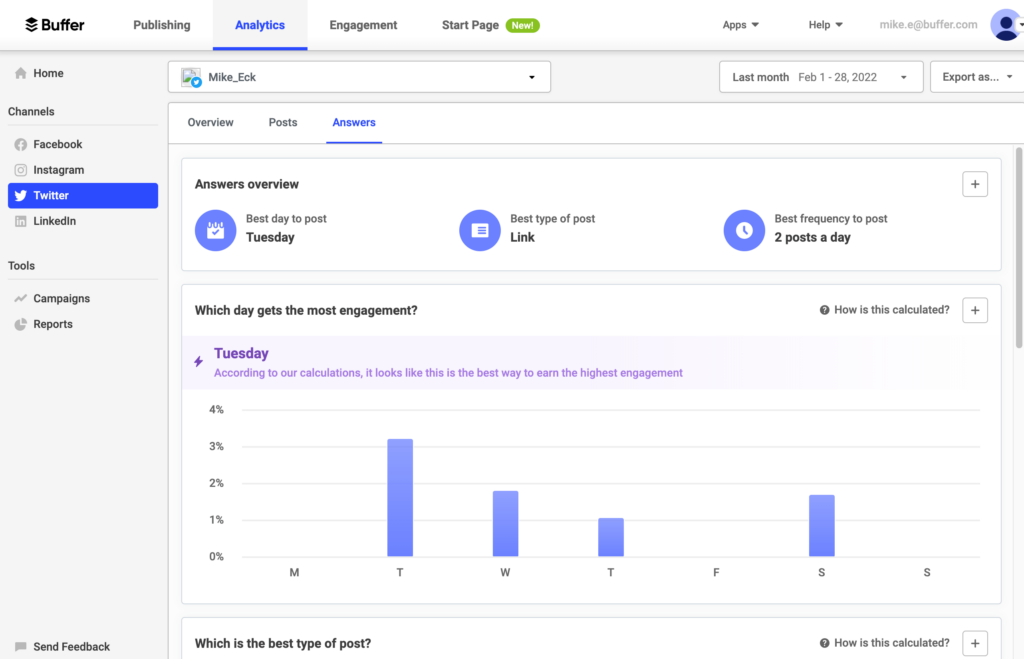
What we like
The per-channel pricing model means you only pay for the social accounts you actually use. If you're a small business that's only active on two or three platforms, you won't get locked into paying for channels you don't need.
What users say
Users love Buffer's simplicity and clean interface, with many describing it as the easiest social media management tool they've used.
The ability to schedule posts across multiple platforms from one dashboard and the generous free plan are mentioned repeatedly.
"It takes the overwhelming feeling out of social media management. You get this beautiful, easy-to-use content calendar where you can quickly see the entire week ahead."
The trade-off for that simplicity, according to reviewers, is depth. Several users note that analytics are too basic for serious reporting, and that costs climb quickly when you need to manage a large number of accounts.
"The primary downside of Buffer is its simplicity: it lacks the advanced features found in competitors. The reports are often considered too shallow for large teams that require in-depth competitive or custom reporting."
Pricing
Buffer offers a limited free plan. Paid plans include:
- Essentials ($6/month for 1 channel)
- Team ($12/month for 1 channel)
- Agency ($120/month for 10 channels)
11. Hootsuite
Best for: Managing social media at scale across many accounts
Hootsuite is one of the longest-running social media management platforms on the market. It allows you to schedule posts, monitor mentions, and review analytics across multiple social networks from a single dashboard.
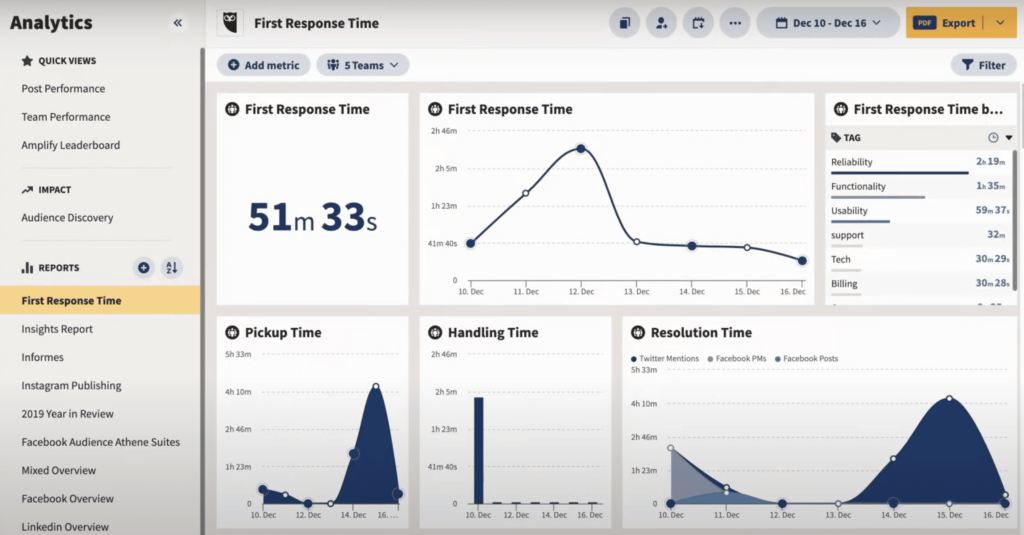
We ran Hootsuite across Instagram, LinkedIn, and Facebook accounts to see how it handled multi-platform management. The scheduling tools are solid. You can plan and queue posts using a calendar view, and the platform recommends the best times to publish based on when your audience is most active.
The unified inbox pulls in messages and comments from all your connected accounts, making it easier to stay on top of engagement.
What we like
The social listening tools track mentions of your brand, specific keywords, or industry topics across social channels.
This gives you a real-time view of what people are saying about your business or your space, which is useful for spotting opportunities and addressing issues quickly.
What users say
Reviewers value Hootsuite as a centralized command center for managing multiple social accounts, with the scheduling calendar and reporting tools getting the most praise.
Several long-time users note that the platform has evolved consistently alongside changes in the social media landscape.
"Whether social media is 10% of your job or 100% of your job, Hootsuite is a great tool to help you save time and not lose your mind while managing your brand's social presence."
Price is the most frequent pain point. Multiple reviewers mention that costs have climbed significantly, there's no longer a free plan, and key features are locked behind higher tiers. The mobile app and interface navigation also draw criticism.
"Pricing has climbed over the years and there's no real free plan anymore, which makes it harder for solo creators or very small teams to justify compared with lighter, cheaper tools."
Pricing
Hootsuite's pricing starts at $99/month per user (billed annually) for the Standard plan, which includes up to 10 social accounts.
The Advanced plan is $249/month per user and adds features like unlimited social accounts, team approval workflows, and enhanced reporting.
Enterprise plans are available with custom pricing.
A 30-day free trial is also available for Standard and Advanced plans.
12. Later
Best for: Visual content planning for Instagram and TikTok
Later is a social media scheduling tool built with a visual-first approach. It started as an Instagram-focused platform and has since expanded to support Facebook, TikTok, LinkedIn, Pinterest, YouTube, and other channels.
We spent a few weeks using Later to schedule Instagram and TikTok content. The drag-and-drop calendar makes it easy to plan your posts visually, and the Instagram grid preview lets you see how upcoming posts will look on your profile before they go live.
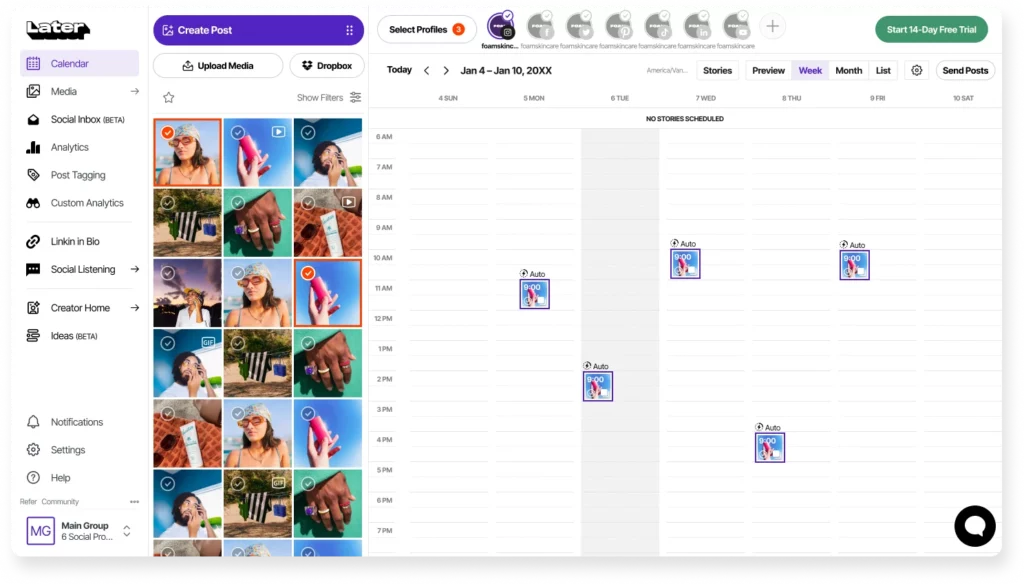
The platform supports bulk image uploads and includes a media library where you can store and organize all your visual assets in one place.
What we like
The Linkin.bio feature turns your Instagram feed into a clickable landing page, so each post can link to a specific product, blog post, or page.
It's a practical workaround for Instagram's single-link-in-bio limitation and can help drive meaningful traffic from the platform.
What users say
The visual-first approach and drag-and-drop calendar are what reviewers bring up most, along with how quickly they can get set up and start scheduling across multiple platforms.
Several users mention that Later lets them batch an entire week's content in one sitting and not think about it again.
"I can prep my social media content, drop it on the calendar, and know exactly where and when it's going to be posted. I've never had an issue with it not posting on time."
The recurring frustrations are around platform limitations, particularly with scheduling Stories and posting to X (formerly Twitter). Some users also note that the AI caption generator produces results that feel generic or impersonal.
"I wish there was an option to schedule to BlueSky or X. I found it a little tricky to add in another organization to my account."
Pricing
Later offers a free plan with basic scheduling for 1 social set (one account per platform). Paid plans include:
- Starter ($25/month for 1 social set and 1 user)
- Growth ($50/month for 2 social sets and 2 users)
- Scale ($110/month for 6 social sets and 4 users)
Annual billing saves around 20-33% depending on the plan. A 14-day free trial is available for all paid plans.
Get more reviews with LocalImpact
Generate more 5-star reviews for your business and take control of your online reputation with LocalImpact.
Advertising & paid media tools
13. AdCreative.ai
Best for: Generating ad creatives and copy with AI
AdCreative.ai helps you use AI to create ads for your online advertising campaigns. It can generate both ad copy and visuals.
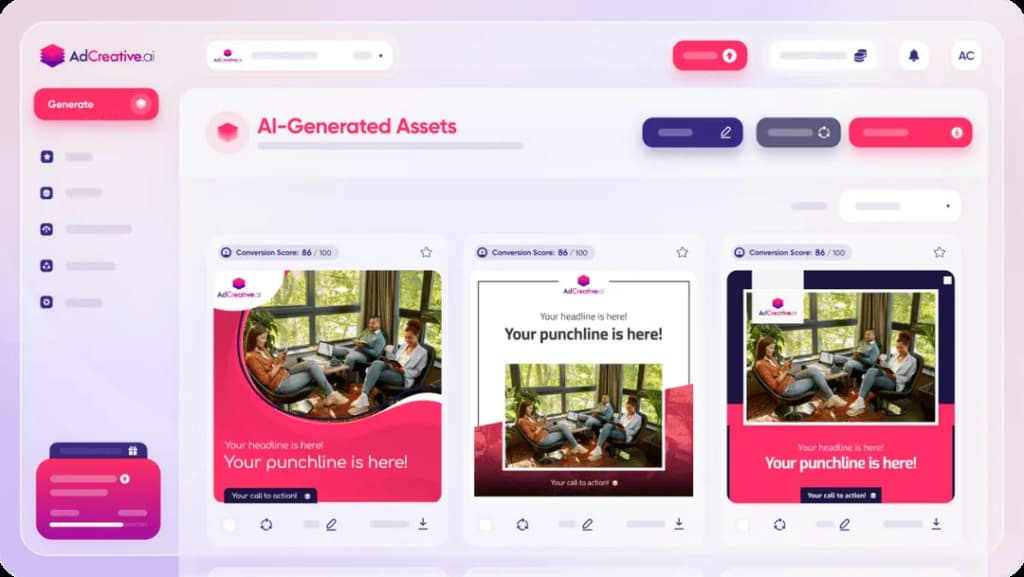
We gave AdCreative.ai a product description and let it generate a set of ad variations. The output was usable and gave us a solid starting point to work from.
There's also the option to create entire ad campaigns with AI. All you need to do is share information on your product or service, and the software will generate the ads and suggest which audiences to target.
What we like
The competitive analysis feature lets you analyze competitors' ad campaigns and see their top-performing creatives. This gives you concrete examples of what's working in your space before you spend money on your own ads.
What users say
When the tool works as intended, reviewers appreciate how quickly they can generate multiple ad variations across platforms. The AI-driven creative suggestions and fast onboarding process get positive mentions from users who stick with the platform.
"It helps me quickly produce multiple versions of social ads that align with our brand messaging and client goals. The AI recommendations save a significant amount of time."
The reviews are sharply divided, however, with billing practices being a major sore spot.
Multiple users report being unexpectedly charged the highest-tier price after a free trial, with limited success getting refunds. Customization options also come up as a limitation.
"They have a 7-day trial that then escalates to the premium tier, not the entry level tier. This is by design. They do not issue refunds, even if no credits were used."
Pricing
The pricing for AdCreative.ai's plans is as follows:
- Startup ($29/month for 10 credits)
- Professional ($209/month for 100 credits)
- Ultimate ($549/month for 500 credits)
14. Adzooma
Best for: Optimizing ad campaigns across Google, Meta, and Microsoft
Adzooma is an ad management platform that connects to your Google Ads, Meta Ads, and Microsoft Ads accounts and provides optimization recommendations from a single dashboard.
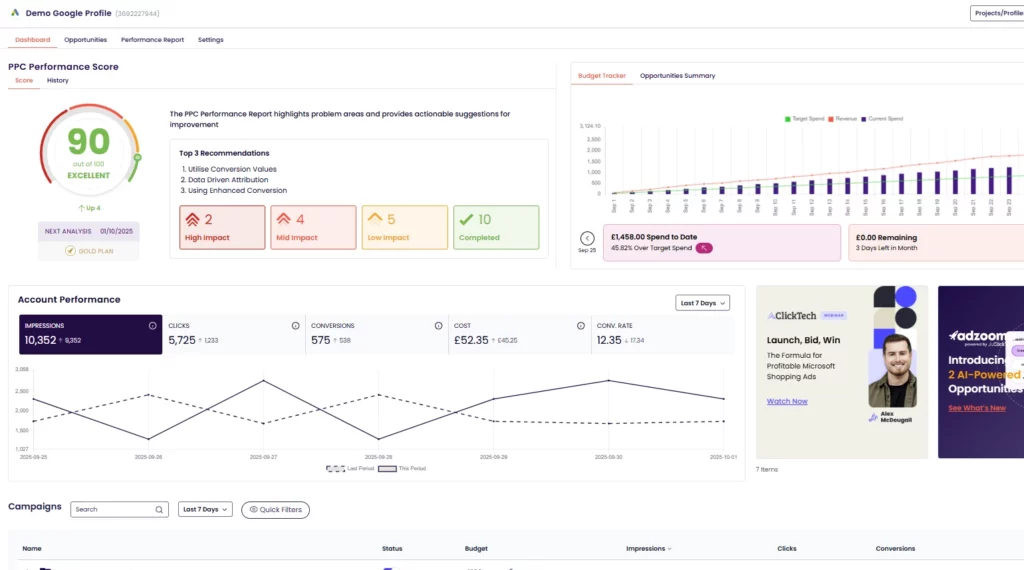
We connected a Google Ads account to Adzooma and found the Opportunity Engine to be the standout feature.
It automatically scans your campaigns and surfaces specific things you can improve, like adding negative keywords, adjusting bids, or pausing underperforming ads.
Each recommendation comes with a one-click implementation option, so you can apply changes without digging into the native ad platform.
What we like
The free plan includes campaign monitoring, optimization suggestions, and basic reporting.
Most ad management tools require a paid subscription to access core features, so having a genuinely usable free tier makes Adzooma a practical starting point for small businesses running ads on a limited budget.
What users say
Reviewers appreciate how Adzooma consolidates ad management across Google, Meta, and Microsoft into one dashboard, with the Opportunity Engine and one-click optimizations drawing the most praise.
Several users mention that the automation features free up significant time on routine tasks like bid management and scheduling.
"Being able to see where I can improve my ads and then being able to just click and optimize."
The downsides users mention include occasional data accuracy issues, some limitations with Facebook ad features, and the fact that certain tasks still require jumping into the native ad platform to complete.
"Not always accurate on data pulled from account. Limited features for Facebook at the moment. Tool can be glitchy in the meantime."
Pricing
Adzooma offers a free plan with core optimization and reporting features. The Plus plan starts at $99/month and unlocks advanced automation, custom reporting, and additional features.
Landing page builders & lead capture tools
15. Unbounce
Best for: Building high-converting landing pages without code
Unbounce is a landing page builder that allows anyone to build landing pages with no coding required.
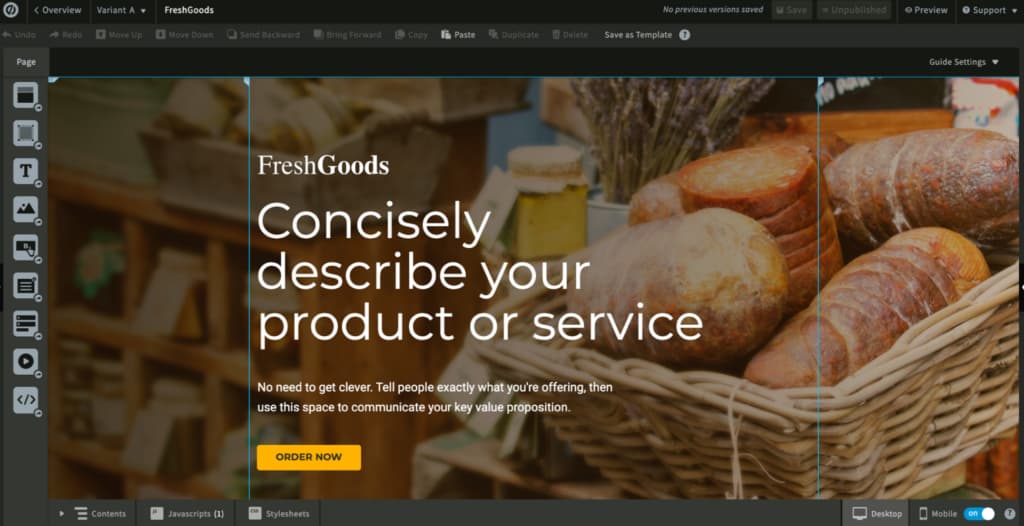
We built a campaign landing page using Unbounce and had it live within an afternoon.
It includes plenty of templates to help you get started quickly, and the drag-and-drop editor makes it easy to modify layouts, copy, and images.
There's also the option to generate landing page copy using AI, and a built-in A/B testing feature that allows you to find the highest-performing version of a page.
What we like
Smart Traffic automatically routes visitors to the landing page variant they're most likely to convert on, based on historical data from visitors with similar attributes. It takes the guesswork out of A/B testing by letting the algorithm optimize in real time.
What users say
Reviewers who enjoy the platform point to the drag-and-drop builder, A/B testing capabilities, and how quickly they can get a conversion-focused landing page live without involving a developer.
"The intuitive drag-and-drop builder lets you create beautiful, conversion-optimized pages without any coding knowledge. It's flexible, fast, and packed with features like A/B testing and dynamic text replacement."
Customer support is the biggest pain point by far, with multiple reviewers reporting multi-day waits for responses and unresolved issues. Several users also flag recent pricing increases as a concern.
"All support requests take a minimum 3-4 business days for a reply. The first few replies are always complete nonsense, so it takes a solid week to get to the meat of any issue."
Pricing
The pricing for Unbounce's plans is as follows:
- Build ($99/month)
- Experiment ($149/month)
- Optimize ($249/month)
- Concierge ($649/month)
16. Hello Bar
Best for: Adding pop-ups and notification bars to capture leads
Hello Bar is a tool designed to help you convert website visitors into leads more easily. It allows you to grab visitors' attention with different types of pop-ups, including header and footer bars, sliders, modals, and more.
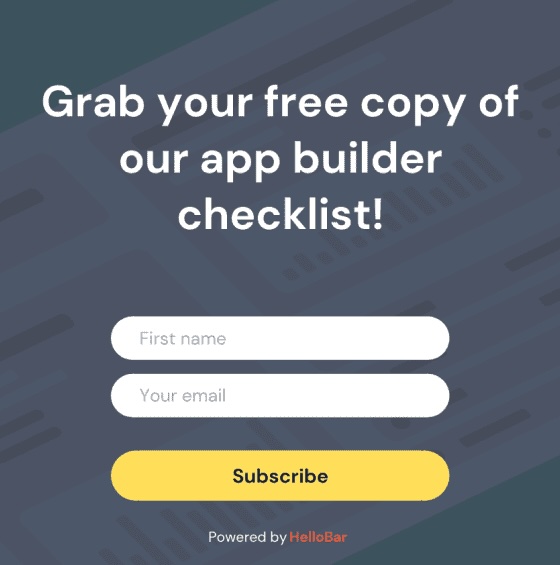
We installed Hello Bar on a website and had a header bar opt-in running within minutes.
The software includes 100+ templates and allows you to customize pop-ups to fit your website's look. There's also the option to target visitors based on location, traffic source, and more.
What we like
The targeting options let you show different pop-ups to different visitors based on how they arrived at your site.
You can create one offer for organic search visitors and a completely different one for people coming from social media, which helps you make your messaging more relevant.
What users say
Ease of use is the theme across nearly every review, with users emphasizing that they can get pop-ups and notification bars live on their site in minutes without any coding.
The template library and friendly customer support also come up frequently.
"Hello Bar is ridiculously easy to use. I bet even my kids could use it to create website popups within minutes."
The most common request from reviewers is for more advanced targeting and design customization options, particularly on the free plan. Several users also mention wanting deeper analytics and more built-in integrations.
"I feel the design customization options might feel a bit limited compared to more feature-rich competitors, especially with the free version."
Pricing
Hello Bar offers the following plans:
- Growth ($39/month)
- Premium ($69/month)
- Elite ($129/month)
17. OptinMonster
Best for: Exit-intent pop-ups and on-site lead generation
OptinMonster is a lead generation tool that allows businesses to create engaging pop-ups to capture leads through their website.
We used OptinMonster to set up an exit-intent pop-up on a client's blog. It offers plenty of pre-built templates, and the drag-and-drop editor makes customization straightforward.
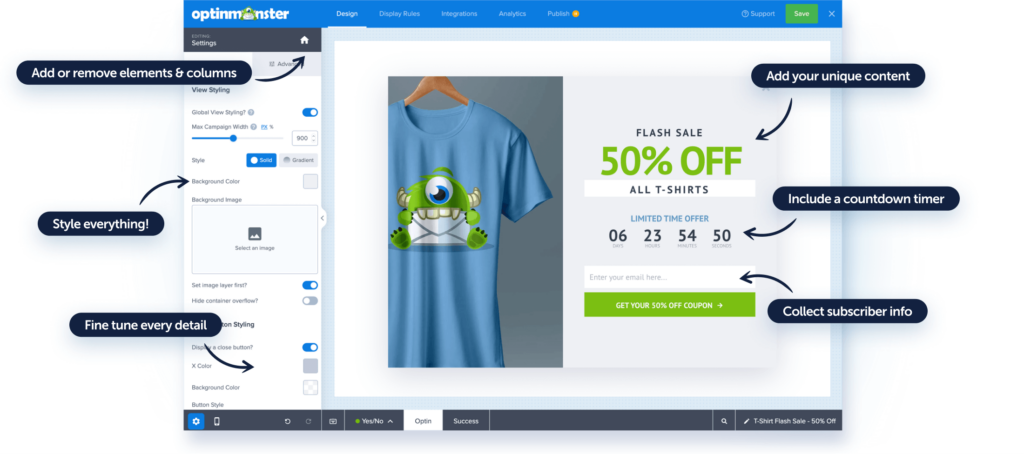
OptinMonster includes targeting and segmentation features that allow you to reach the right people at the right time, and the A/B testing feature lets you test different variations to find the highest-converting one.
What we like
The exit-intent detection triggers a pop-up at the exact moment a visitor is about to leave your site.
In our experience, this consistently captures leads that would have otherwise been lost, without disrupting the browsing experience for people who are still engaged.
What users say
Long-time users value OptinMonster for its targeting and display rules, with several noting they've relied on it for years to consistently capture leads from website traffic.
Customer support gets positive mentions for being responsive and hands-on.
"I have been using OptinMonster for several years now. The customization options are excellent, and audience segmentation has allowed me to effectively increase my conversion rate."
Pricing is the most common concern, with multiple reviewers feeling the cost is high for small businesses, particularly outside of promotional periods. Some users also note that the interface can be confusing when first getting started.
"The promotional pricing is a big plus. Outside of that, the regular pricing is too high, making it unfeasible to continue using the tool."
Pricing
OptinMonster offers the following plans:
- Basic ($7/month)
- Plus ($19/month)
- Pro ($29/month)
- Growth ($49/month)
Customer relationship management (CRM) tools
18. Keap
Best for: Combining CRM, email marketing, and invoicing in one tool
Keap is a CRM platform aimed at small businesses looking for a way to collect and manage all their customer data in one place.
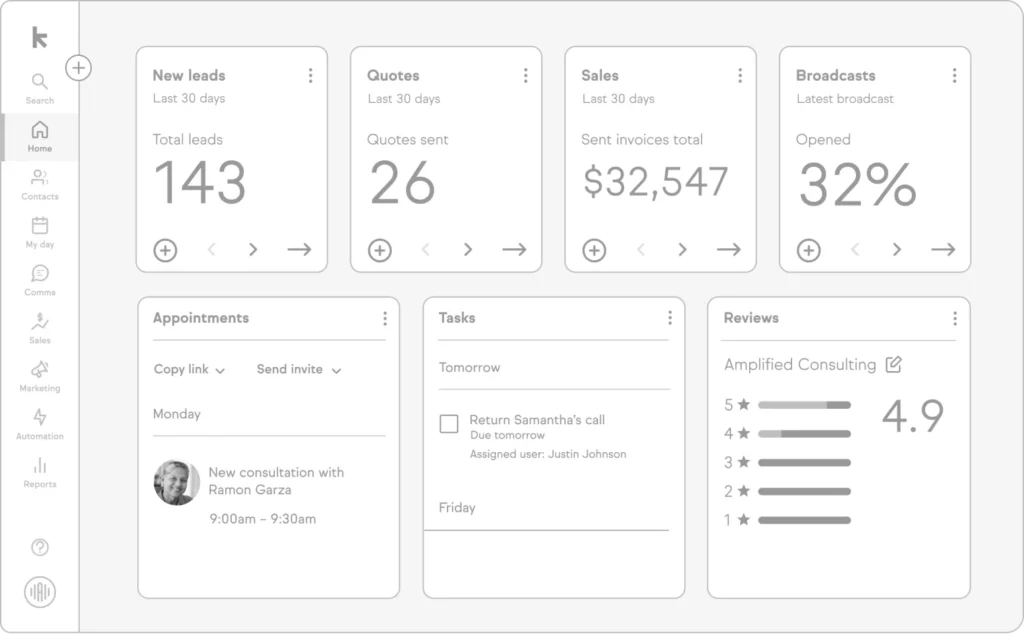
We explored Keap for a few days to understand how it works. Apart from managing customer data, you can use it to set up and run automated email nurturing sequences, create invoices, and collect payments.
It also includes a built-in appointment scheduling tool and integrates with over 5,000 apps through Zapier.
What we like
Having invoicing and payment collection built into the same platform as your CRM and email automation means fewer tools to manage.
For service businesses that want to handle client communication and billing from one dashboard, this saves a lot of time switching between apps.
What users say
Users who get the most out of Keap praise its automation workflows and the convenience of having CRM, email marketing, and invoicing combined in one platform.
Several long-time users note that once everything is configured, the time savings are significant.
"The process automation in Keap saves us a tremendous amount of time and allows us to do things for our clients that we couldn't do manually."
The learning curve and pricing are the two most cited drawbacks. Multiple reviewers describe the initial setup as time-consuming, and several small business owners feel the platform is more complex and expensive than what they need.
"Keap is quite expensive, which is my main issue with the software. Additionally, it can be complicated for new users. While it is a robust platform, this sometimes makes it difficult to use."
Pricing
Keap's pricing starts at $299/month.
Get more reviews with LocalImpact
Generate more 5-star reviews for your business and take control of your online reputation with LocalImpact.
19. Close CRM
Best for: Outbound sales teams that live on calls and email
Close is a CRM built specifically for sales teams that spend a lot of their time on outbound outreach. It combines email, calling, and SMS into a single inbox, so you can manage your entire sales communication without switching between tools.
We put Close through its paces with a pipeline of outbound leads. The setup process was fast.
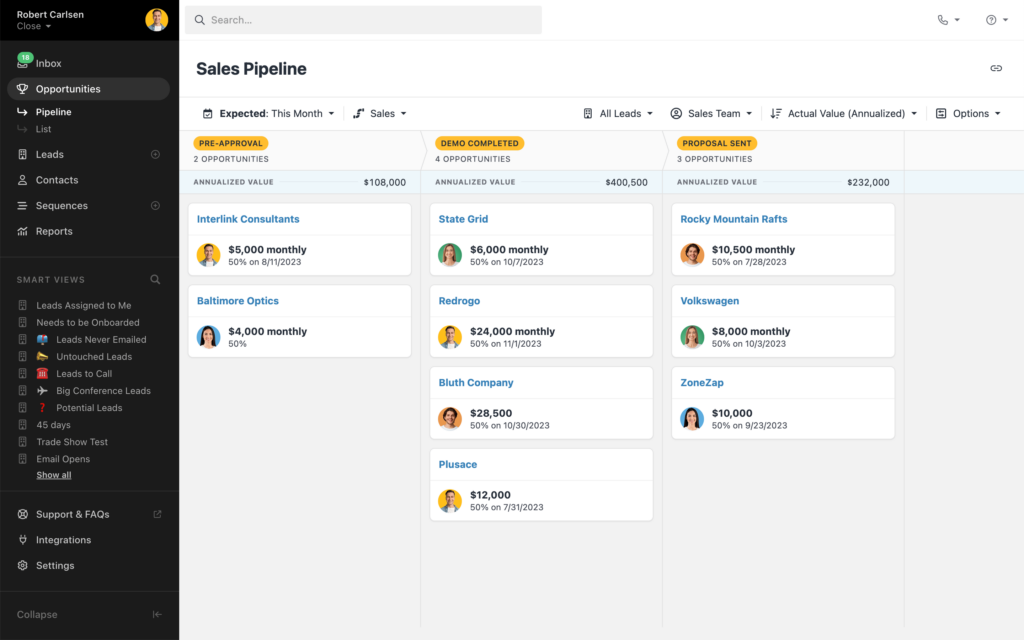
You can import leads from a spreadsheet and start reaching out within minutes.
The built-in VoIP calling is smooth, and the power dialer feature lets you call through a list of contacts automatically, which saves a lot of time when you're doing high-volume outreach.
Every call, email, and text is logged on the lead's timeline automatically.
What we like
Workflow automation lets you set up sequences of emails and follow-ups triggered by specific actions or time delays.
For a small sales team that relies on consistent follow-up, this keeps deals moving without requiring someone to manually remember every next step.
What users say
Reviewers consistently highlight how clean and intuitive the interface is, and the fact that calling, email, and pipeline management all live in one place.
Multiple users mention that they were up and running quickly with minimal setup.
"Everything I need is in one place, which makes it easy to stay organized and move quickly."
The most common criticisms are around reporting limitations and occasional rigidity when it comes to customization.
A few users also mention that getting help with more technical setup tasks like API integrations can be difficult.
"The existing reports are useful, but they can feel a bit limited when you want highly customized views or more advanced dashboards."
Pricing
Close offers the following plans:
- Solo ($19/month for 1 user)
- Essentials ($49/month per user)
- Growth ($109/month per user)
- Scale ($149/month per user)
Annual billing brings costs down. The Solo plan starts at $9/month per user when billed annually. A 14-day free trial is available.
20. Pipedrive
Best for: Visual pipeline management for small sales teams
Pipedrive is a CRM designed around a visual sales pipeline. It organizes your deals into stages that you can customize to match your sales process, and lets you move deals from one stage to the next with a simple drag-and-drop interface.
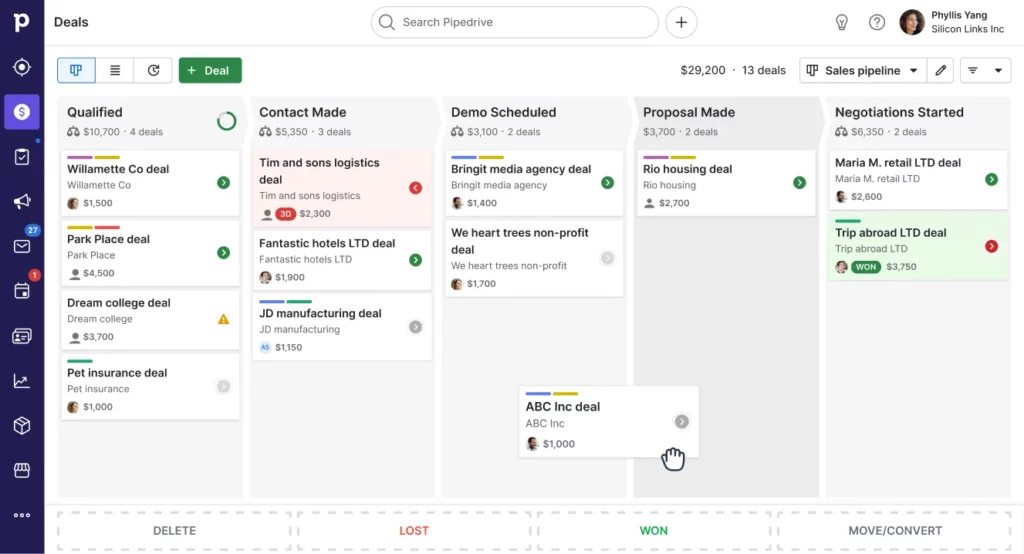
We set up Pipedrive and had the pipeline configured within an hour. The interface is clean and intuitive. Each deal card shows key details at a glance, and you can click into any deal to see the full activity history, including emails, calls, and notes.
What we like
Pipedrive sends reminders when a deal has been sitting in one stage for too long, which helps prevent leads from going cold.
It's a simple feature, but for busy small business owners who are juggling sales alongside everything else, those nudges can make the difference between a closed deal and a lost one.
What users say
The visual pipeline and drag-and-drop interface are the features reviewers mention most, with many describing Pipedrive as the most intuitive CRM they've used.
Several users note they were able to set everything up without onboarding calls or lengthy guides.
"It's the most practical CRM I've used so far. The ability to easily drag and move deals is really helpful. I find it less complicated, allowing me not to waste a lot of time."
Reporting is the most frequent criticism. Multiple users describe the built-in reports as solid for basics but too limited for advanced analysis like cohort breakdowns or custom dashboards.
A few reviewers also flag integration gaps with tools like QuickBooks and Google Drive.
"They have some cool reports, but they are mostly basic. If you want to cross some specific data and do some cohort analysis, you would need an external tool."
Pricing
Pipedrive offers the following plans:
- Essential ($14/month per user billed annually)
- Advanced ($29/month per user)
- Professional ($49/month per user)
- Power ($64/month per user)
- Enterprise ($99/month per user)
A 14-day free trial is available for all plans.
Automation tools
21. Zapier
Best for: Connecting apps and automating tasks without code
Zapier is a no-code automation builder that allows you to automate a wide variety of tasks across marketing, sales, customer support, and more.
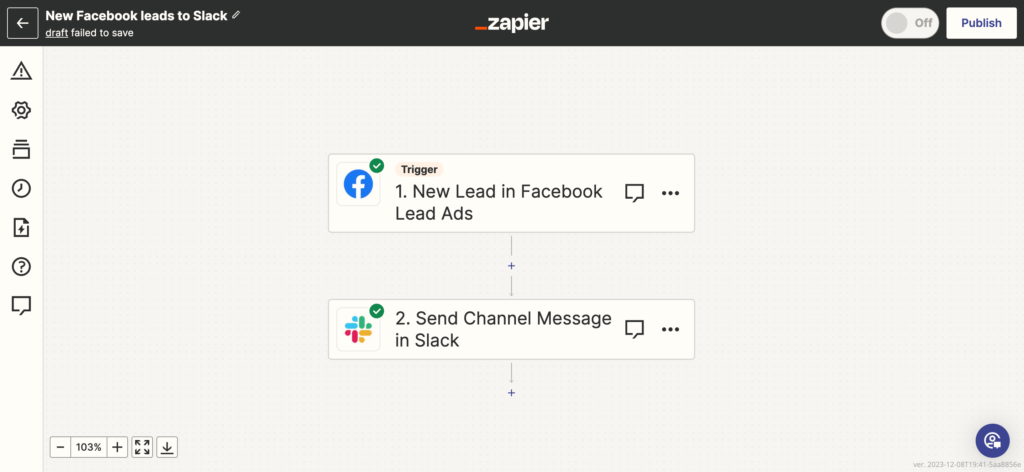
We've used Zapier across dozens of client projects to connect tools that don't have native integrations.
It integrates with more than 7,000 software solutions and includes plenty of pre-built automations for common business tasks.
The AI-powered automation builder lets you type in what you need automated in plain English, and the tool generates a working automation for you in seconds.
What we like
The pre-built automation templates cover common workflows like syncing new leads to a CRM, sending Slack alerts when a form is submitted, or adding email subscribers from a spreadsheet.
You can get a useful automation running in under five minutes without building anything from scratch.
What users say
The sheer number of integrations is what reviewers mention most, with many noting that nearly every tool they use connects to Zapier.
Users across experience levels describe it as a major time saver for eliminating repetitive manual tasks.
"It feels like having an operations assistant running quietly in the background 24/7, removing friction between the tools I rely on daily."
Pricing is the top concern, with multiple users noting that costs escalate as automation needs grow.
Several reviewers also mention that while basic automations are simple to set up, more complex multi-step workflows come with a real learning curve.
"The main downside is pricing, especially as automation needs scale and task usage increases. Some advanced features are locked behind higher-tier plans."
Pricing
Zapier offers a limited free plan. The pricing for paid plans is as follows:
- Professional (starts at $29.99/month)
- Team (starts at $103.50/month)
- Enterprise (custom pricing)
22. Make
Best for: Complex, multi-step workflow automation on a budget
Make (formerly Integromat) is a workflow automation platform that lets you connect apps and automate tasks using a visual drag-and-drop builder. It integrates with over 3,000 apps, including most of the popular marketing, sales, and productivity tools.
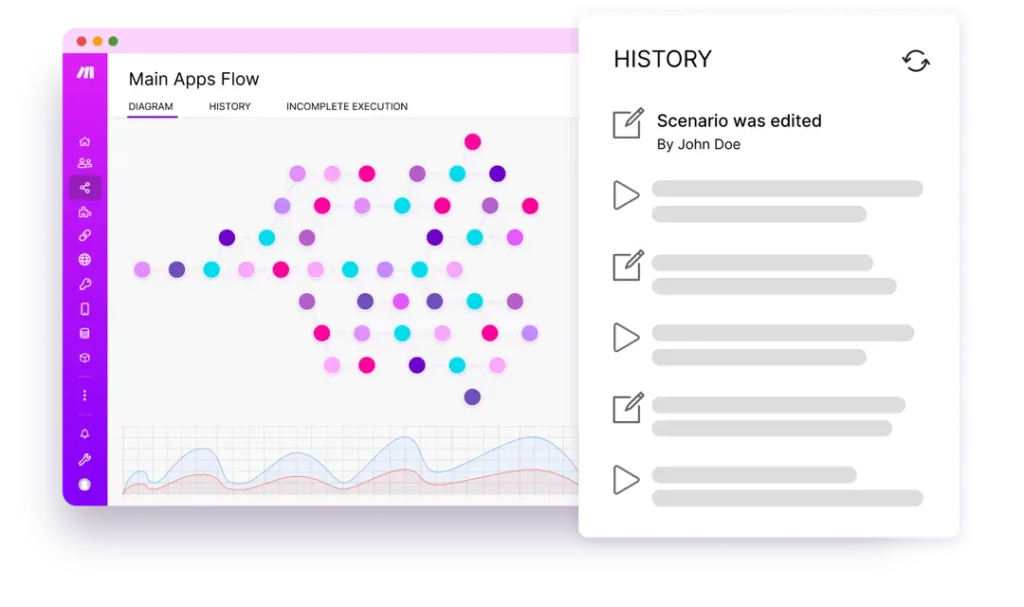
To try Make out, we built a workflow that automatically added new form submissions to a CRM, sent a Slack notification to the sales team, and triggered a welcome email sequence.
The visual builder made it easy to see exactly how data flowed between each step. Make supports advanced logic like conditional branching (called routers), loops, and error handling, which gives you more flexibility than simpler automation tools.
What we like
The credit-based pricing makes complex, multi-step automations significantly cheaper than comparable tools that charge per task.
If you're building workflows with five or six steps, each step counts as one task in most tools, but Make's pricing structure handles this more efficiently.
What users say
The visual workflow builder is what reviewers highlight most, with many noting that once you understand the logic, Make becomes an extremely powerful tool for complex multi-step automations.
The price-to-value ratio compared to competitors also comes up frequently.
"What used to take days every week is now fully automated with Make. It has saved us a tremendous amount of time."
The trade-off is a steeper learning curve than simpler automation tools. Several reviewers note that small configuration mistakes can break a scenario, and that error messages can be overly technical.
Credit consumption for AI modules is another recurring concern.
"The learning curve is a bit steeper, and it offers fewer native integrations compared to Zapier."
Pricing
Make offers a free plan with 1,000 operations per month. Paid plans include:
- Core ($10.59/month for 10,000 operations)
- Pro ($18.82/month for 10,000 operations with priority execution)
- Teams ($34.12/month for 10,000 operations with team features)
- Enterprise (custom pricing)
Operations scale up within each plan. For example, the Core plan at 40,000 operations costs around $29/month. All prices are based on annual billing.
Analytics tools
23. Fathom Analytics
Best for: Privacy-friendly website analytics with a simple dashboard
Fathom Analytics is a privacy-focused analytics software that helps you understand your website traffic better. It's very easy to set up. All you need to do is add a line of code to your website.
We switched one site to Fathom Analytics and appreciated how clean the dashboard is.
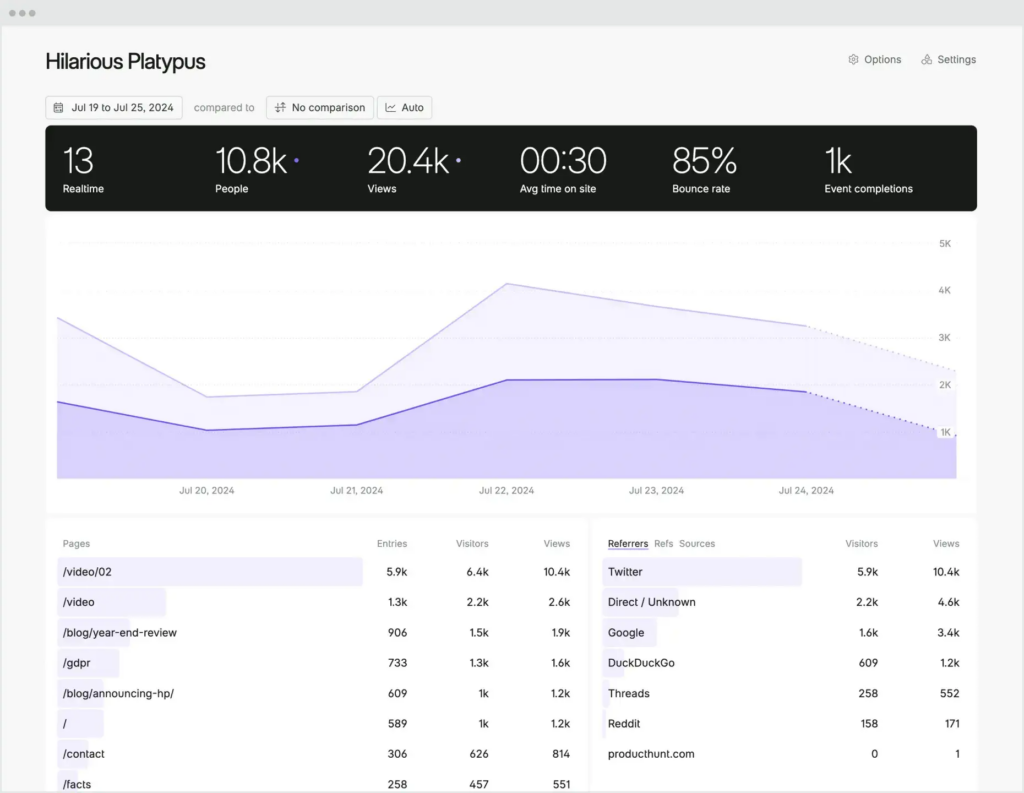
It supports event and campaign tracking, and displays all the crucial data about your website traffic in an intuitive, single-page view. It can also send detailed reports to your email inbox on a weekly or monthly basis.
What we like
Because Fathom doesn't use cookies, you don't need to show a cookie consent banner to your visitors. This keeps your site cleaner and removes a friction point that can affect user experience and even conversion rates.
What users say
Privacy and simplicity are the two things reviewers bring up in nearly every review.
Users appreciate that the lightweight script doesn't slow down their site, and that the single-page dashboard gives them everything they need without the complexity of traditional analytics tools.
"It's a privacy-focused alternative to Google Analytics, and delivers data in an easy to visualize format, without the bloat. I've been using it daily on my projects for several years and no issues at all."
The main trade-off, as multiple reviewers acknowledge, is a more limited feature set compared to tools like Google Analytics. Several users wish for more advanced filtering, customization options, and detailed reporting.
"Choosing privacy means you have to sacrifice a few key features from Google Analytics, but privacy is more important than everything else."
Pricing
The pricing for Fathom Analytics's plans depends on your website's monthly traffic and starts at $15/month.
Build your marketing stack one tool at a time
You don't need all 23 of these tools. Most small businesses can cover their bases with four or five well-chosen picks, one for each area of marketing that matters most to their business right now.
If you're not sure where to start, think about where you're currently losing the most time or leaving the most opportunity on the table.
Struggling to keep up with social media? Start with Buffer or Later. Getting traffic but no leads? Try Hello Bar or OptinMonster.
Not showing up in search results? Semrush or Ahrefs can help you figure out why.
The best marketing stack is the one you'll actually use. Start small, get comfortable with a few tools, and add more as your business grows.