The right tools can save your marketing team a significant amount of time. We've put together a list of the best digital marketing tools for 2026, covering everything from SEO and email marketing to landing page builders and reputation management.
Whether you're a solo operator or part of a larger team, there's something here for every budget and use case.
How we chose these tools
We spent 150+ hours testing and evaluating digital marketing tools across every category in this list. Each tool was assessed against a consistent set of criteria to make sure our recommendations reflect real-world usability, not just feature lists.
Here's what we looked at:
- Ease of use: How quickly can a new user get up and running, and how intuitive is the day-to-day workflow?
- Feature depth: Does the tool deliver on its core promise, and does it offer enough functionality to grow with your needs?
- Value for money: How does the pricing hold up against what you actually get, across different plan tiers?
- Integration options: How well does the tool connect with the other platforms most marketing teams already use?
- User feedback: What are real users saying about the tool's strengths and limitations based on verified reviews?
- Support quality: How responsive and helpful is the support team when issues come up?
Online reputation management tools
1. LocalImpact
LocalImpact is an online reputation management software that makes it easy to manage a business’s online reviews. It monitors online review sites and notifies you as soon as your business receives a new review.
You can then read and reply to the review right from within the software.
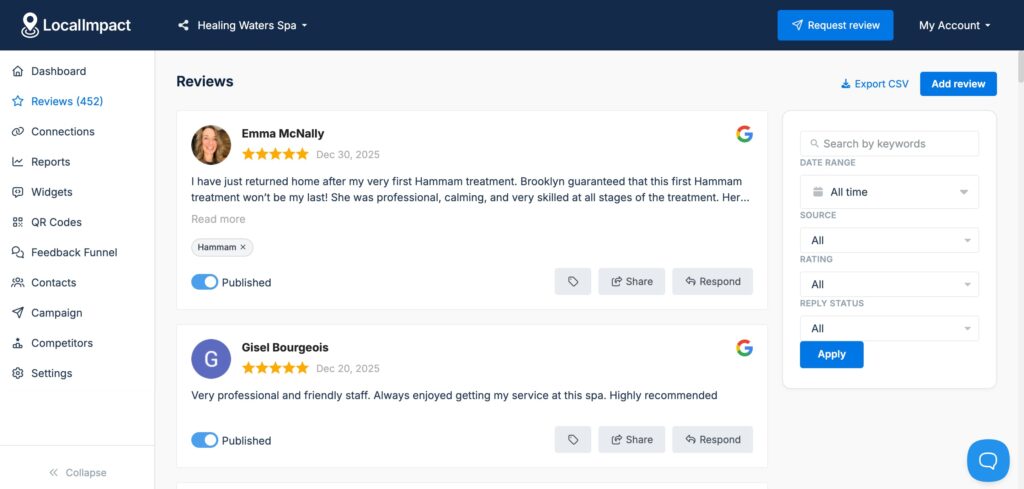
Or use the AI-powered response feature that lets you generate a personalized reply in seconds.
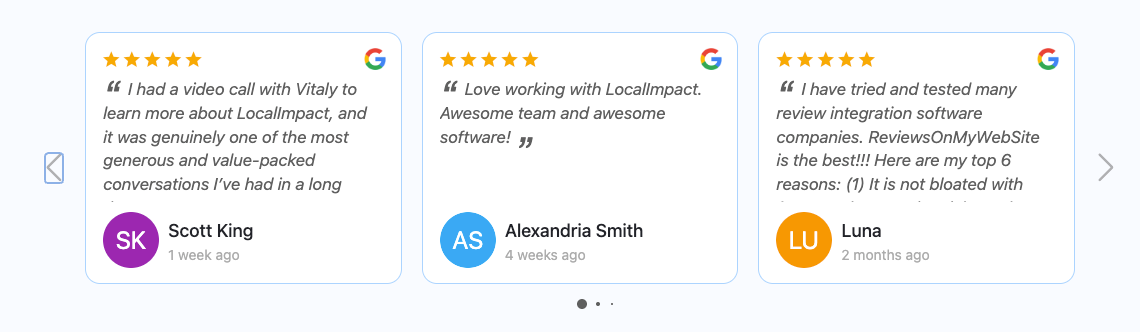
LocalImpact can also help you generate more reviews for your business through automated email and SMS reminders. And allow you to display the top customer reviews on your website by using the review widget feature.
What we like
The AI-powered response feature lets you generate a personalized reply to any review in seconds, saving you the time and mental energy of writing individual responses from scratch across dozens of reviews.
What users say
The setup process and ease of use come up consistently in reviews, with users highlighting that the automation tools take real work off their plate when it comes to collecting and displaying reviews.
"The platform is extremely easy to set up and integrate with my existing website. The dashboard is simple to navigate, and the automation tools save me time collecting and displaying reviews. Customer support is quick to respond and always helpful."
Pricing
You can use the 14-day trial offer to test out LocalImpact for free. Plans are priced as follows:
- Growth ($49/month)
- Pro ($99/month)
- Agency ($149/month)
Manage online reviews with LocalImpact
Get more 5-star reviews and take control of your online reputation with LocalImpact.
Search engine optimization (SEO) tools
2. Semrush
Semrush is one of the most popular SEO tools in the world, and after putting it through its paces, it's easy to see why. It covers all aspects of search engine optimization, including keyword research, on-page optimization, link building, and more.
The keyword research tool stood out during our testing, surfacing a depth of data that makes identifying ranking opportunities much faster than doing it manually.
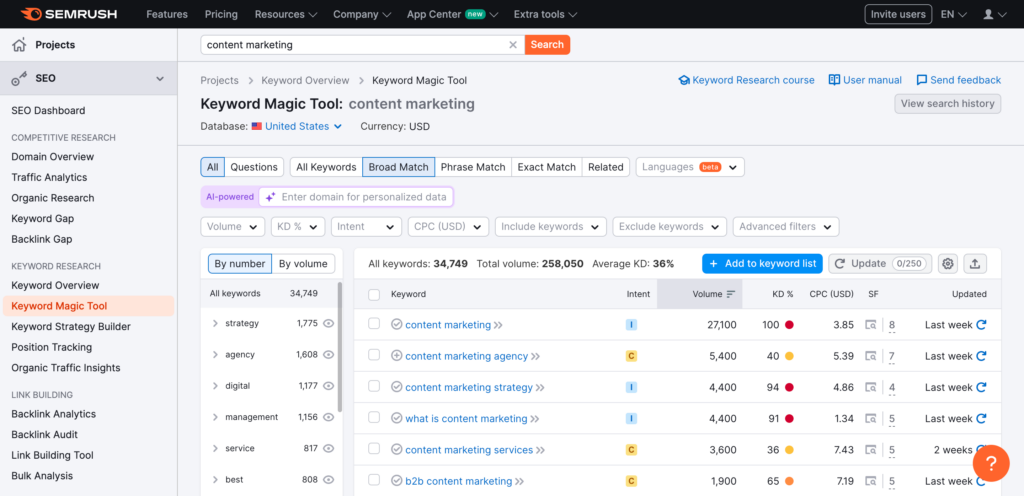
You can also use it to analyze any competitor's SEO strategy, from the keywords they target to the sites linking to them. It's one of the few tools that genuinely replaces several standalone tools without feeling like a compromise.
What we like
Beyond its core SEO capabilities, Semrush doubles as a competitive intelligence platform, giving you a detailed breakdown of what any competitor is doing across paid search, organic rankings, and backlinks, all from a single dashboard.
What users say
The platform's depth gets the most praise, with reviewers pointing to keyword research, competitor analysis, site audits, and rank tracking as capabilities that replace several standalone tools.
"Semrush provides a true 360° view of your SEO: precise competitive analysis, comprehensive keyword research, clear and actionable technical audit, reliable position tracking."
Pricing is the most consistent complaint, particularly among solo users and smaller teams who feel the cost is hard to justify against the features they actually use day to day.
"One of the main drawbacks of Semrush is its pricing, which can be quite high, especially for smaller teams or individual users."
Pricing
Semrush offers a free 7-day trial you can use to test out the software. Paid plans include:
- Pro ($139.95/month)
- Guru ($249.95/month)
- Business ($499.95/month)
3. Ahrefs
Ahrefs is an SEO toolkit built around keyword research, site auditing, rank tracking, and backlink analysis. Spending time with the platform makes it clear why its backlink data is so well regarded.
Ahrefs runs the second most active web crawler in the world after Google, which means its index is fresher and more comprehensive than most alternatives.
The Content Explorer feature was a highlight during our evaluation, making it much easier to surface top-performing content in any niche and spot link building opportunities quickly.
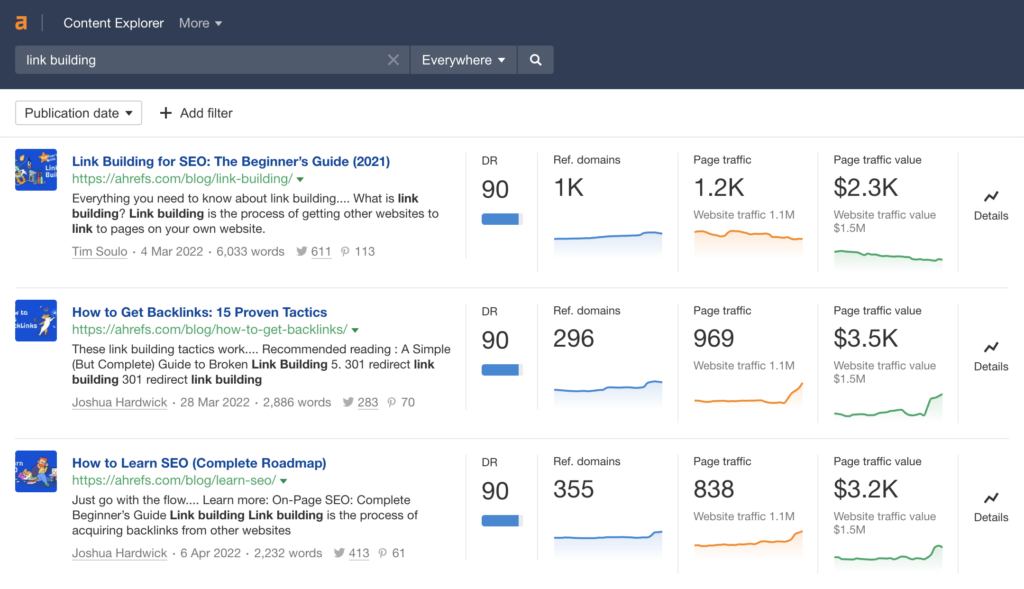
If backlink analysis and keyword research are central to your workflow, Ahrefs is one of the strongest options available.
What we like
Ahrefs runs the second most active web crawler in the world after Google, which means its backlink index is among the freshest and most comprehensive you'll find.
What users say
Data depth and accuracy are what users praise most, particularly around backlinks and keyword research, with many noting the platform works equally well for day-to-day tasks and longer-term strategic planning.
"Ahrefs is one of the most reliable and comprehensive SEO tools available. It provides deep insights into backlinks, keyword rankings, competitors, and overall search visibility. The data is well-structured, easy to analyze, and suitable for both strategic planning and day-to-day SEO work."
The most common frustration is how slowly ranking data updates, which creates a lag for users who need to monitor changes quickly after making optimizations.
"The main downside is that keyword position and ranking data sometimes updates slower than expected. For projects that require near real-time monitoring or rapid testing, the delay in position updates can limit how quickly changes can be evaluated."
Pricing
Ahrefs offers the following plans:
- Lite ($129/month)
- Standard ($249/month)
- Advanced ($449/month)
- Enterprise (starts at $14,990/year)
Content marketing tools
4. Storychief
StoryChief is a content management platform that covers everything teams need to plan, create, and publish content.
What stands out when working with it is how much friction it removes from the publishing process. You write once and distribute to your blog, social channels, and email newsletter in a single step.
The built-in approval workflow keeps collaboration moving without the usual back-and-forth, and the SEO editor provides on-page optimization suggestions as you write.
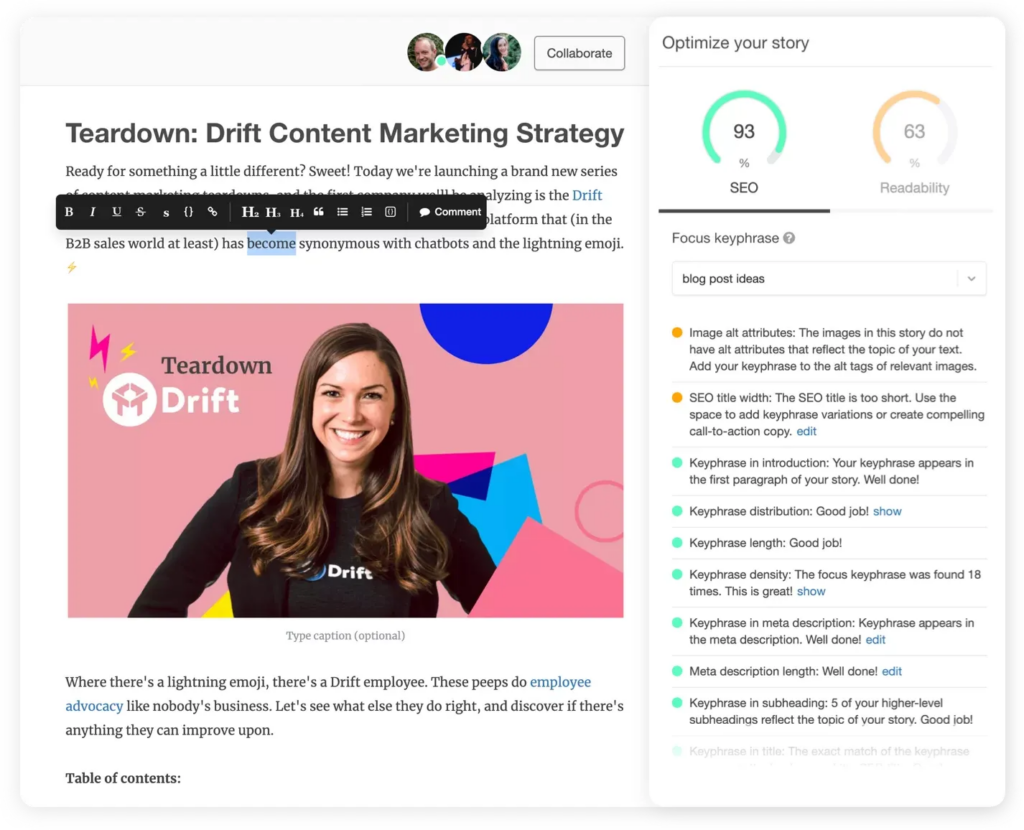
It integrates with most popular CMS and social media platforms, so publishing to your website or social channels takes a single click.
What we like
What makes StoryChief stand out is how genuinely it solves the multi-channel publishing problem: you write once and push your content to your blog, social channels, and email newsletter simultaneously, rather than copying and pasting across platforms.
What users say
The publishing system and SEO tools come up most often in positive reviews, with several users noting they cancelled subscriptions to other tools after consolidating into StoryChief.
"I have used several publishing tools for blogging and social media, and none of them compare to StoryChief. It is obvious that their number one priority is SEO and ensuring that my content is bullet proof for Google. Not only that, they make everything super seamless for me and my clients."
The most common mild criticism is that the platform's breadth can make it harder to hit the ground running for less technical users, though reviewers tend to credit the support team for closing that gap.
"The only slight question I have, is the ability to use it to the fullest given that I am not a computer savvy person. I am sure I will figure it out in time, and if not, they have a top notch support team to help me."
Pricing
Storychief offers a limited free plan. The pricing for paid plans is as follows:
- Small Business ($59/month/user)
- Agency ($99/month/customer)
- Enterprise (custom pricing)
5. Animoto
Animoto is a cloud-based video creation platform designed to make professional-quality video accessible to anyone. Getting started is straightforward: you pick a template, upload your photos or clips, and customize with text, music, and branding.
We found the licensed music library to be one of the more practical features, removing the need to source royalty-free tracks separately.
The drag-and-drop editor keeps things simple enough that you can go from raw assets to a finished video in minutes.
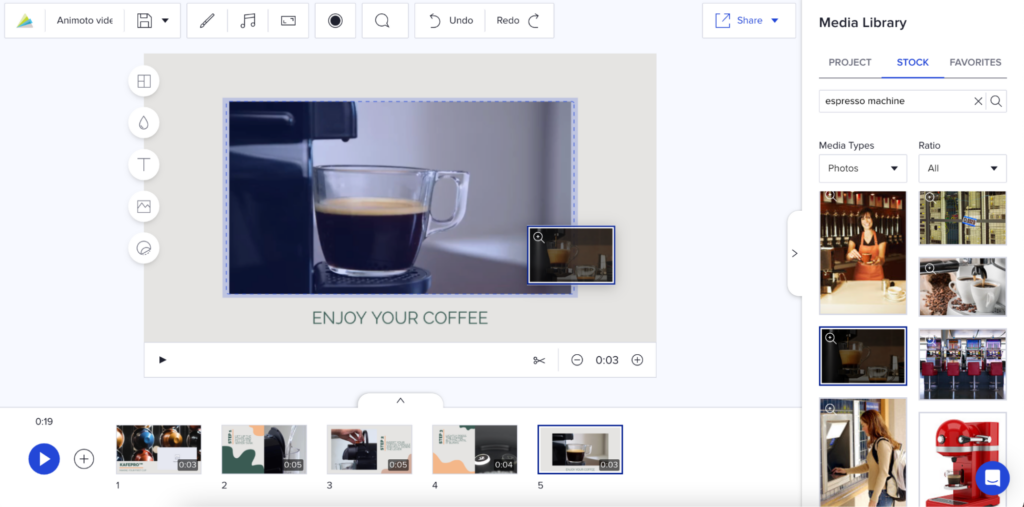
For marketers who need video content without a full production workflow, Animoto covers the basics reliably.
What we like
Animoto's licensed music library is a real time-saver. Instead of hunting down royalty-free tracks separately, you can score your videos directly inside the tool without worrying about copyright issues.
What users say
Accessibility is the theme that comes up most in positive reviews. Users with little to no video editing experience consistently highlight the free plan, drag-and-drop interface, and licensed music library as practical time-savers.
"I love the fact there is a free plan option and it is extremely user-friendly. This allows those without extensive video editing experience or those who are extremely busy covering many roles within an organization to create brief, professional-looking videos for almost any business."
The most frequent criticism is that the lower-tier plans feel limited in customization — particularly around fonts, music tracks, and branding options — which pushes users toward higher-priced tiers to get adequate creative control.
"I dislike that the only difference between the basic and $8/month plan is to remove the Animoto logo. It seems like the most cost-effective option is the third tier at $15/month. I wish more customization options were included in the $8/month plans — currently there are only 3 font options, 50 music tracks, etc."
Pricing
Animoto offers the following plans:
- Free
- Basic ($8/month)
- Professional ($15/month)
- Professional Plus ($39/month)
Social media marketing tools
6. Buffer
Buffer is a social media scheduling tool that lets you plan and publish posts across Facebook, Instagram, X, TikTok, LinkedIn, and Threads from a single dashboard.
The queue-based scheduling system proved to be one of its most practical features during our testing, letting you build out a posting schedule in advance and leave it to run.
Buffer analyzes your audience's engagement history and recommends when and how often to post, which takes the guesswork out of timing.
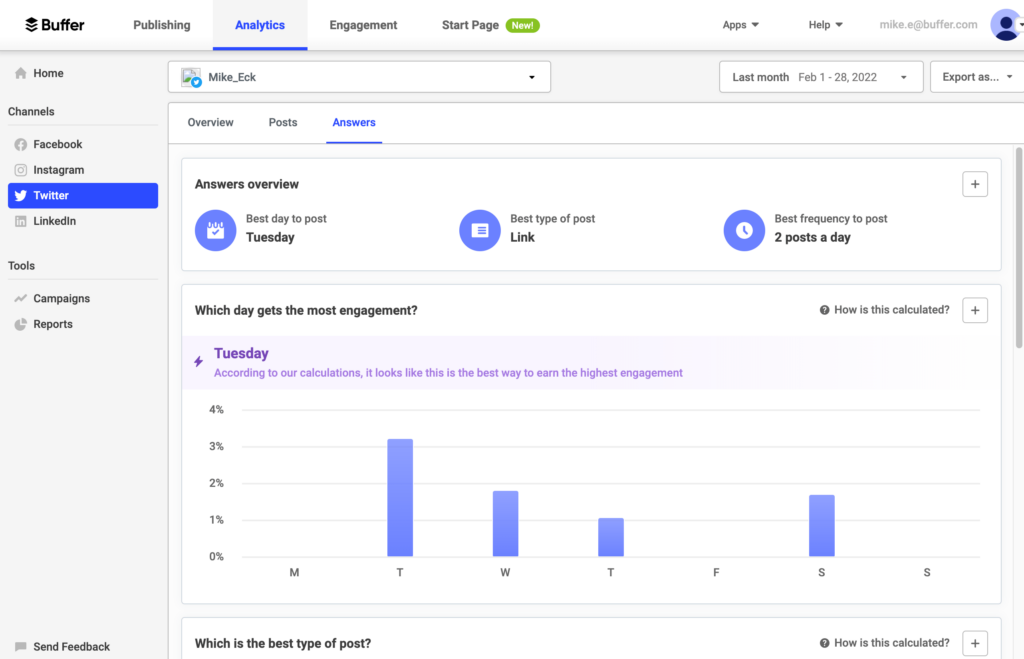
The AI assistant can generate captions, post ideas, and hashtags, and can reformat existing posts for different platforms.
There's also a unified comments inbox that pulls replies from all your connected channels into one place.
What we like
Buffer's posting time recommendations are particularly useful for growing accounts. The platform analyzes your audience's engagement history and tells you not just when to post, but how often, so you're not guessing at your schedule.
What users say
Simplicity and ease of scheduling are what users highlight most, with the clean interface and "set it and forget it" workflow drawing consistent praise from social media managers juggling multiple accounts.
"I like that Buffer is intuitive to use and feature-rich. Even though there are capabilities that are more advanced than what we need, it's really helpful for the most simple and valuable tasks. It also makes it easy to visually plan out what we're doing on different days, and I like the set it and forget it mentality it provides."
The most common frustration is occasional post failures, which users note require manual cleanup and can disrupt an otherwise smooth publishing workflow.
"Sometimes posts fail, which is frustrating. It's probably more on the social media platforms than it is on Buffer, but it's still annoying."
Pricing
Buffer offers a limited free plan. Paid plans include:
- Essentials ($6/month for 1 channel)
- Team ($12/month for 1 channel)
- Agency ($120/month for 10 channels)
Manage online reviews with LocalImpact
Get more 5-star reviews and take control of your online reputation with LocalImpact.
7. Hootsuite
Hootsuite is a social media marketing platform built for teams managing multiple channels at scale.
The bulk scheduling capability was particularly useful during our evaluation, letting you queue up posts across all your accounts in one session.
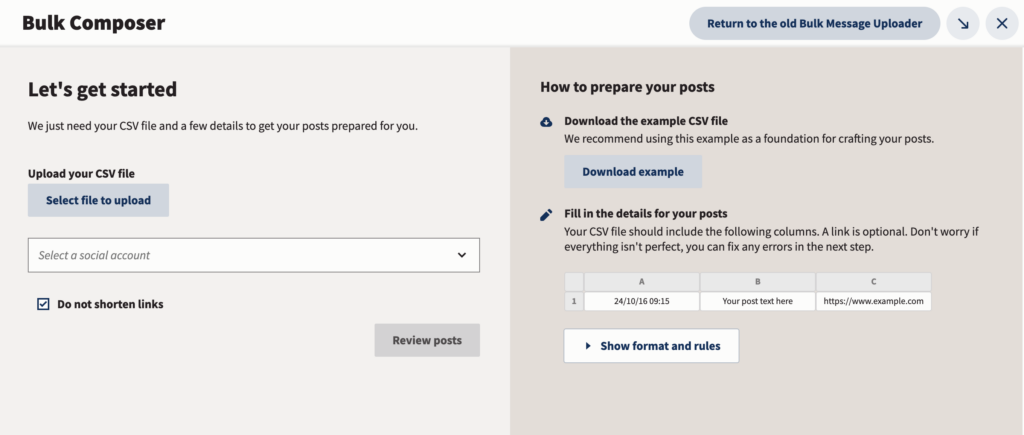
The built-in approval workflow helps keep content on-brand when multiple team members are contributing to the same channels. Reporting is a strong point too, with detailed campaign-level performance data and the ability to build custom reports.
The social listening feature lets you monitor brand and competitor mentions in real time, so you can join relevant conversations as they happen.
What we like
Hootsuite's social listening feature sets it apart from most scheduling tools. You can track mentions of your brand and your competitors in real time, which means you can jump into relevant conversations at the right moment rather than discovering them days later.
What users say
Multi-account visibility and scheduling flexibility are the strengths users point to most, with the content calendar and cross-platform management drawing regular praise from team-based users.
"Hootsuite is incredibly user-friendly and intuitive, making it easy to navigate and teach others how to use it. The platform is well-organized with a simple layout that enhances the user experience. It offers a wide range of functionalities, allowing for seamless management of social media accounts and campaigns."
Pricing is the most persistent negative, with users noting that costs add up quickly for teams, particularly once reporting and other add-on features are factored in.
"The points system is confusing and leads to expensive reports. Forced to use their proprietary URL shorteners, which are also expensive. Gets expensive for teams."
Pricing
You can use Hootsuite’s 30-day trial offer to test out the platform for free. The pricing for paid plans is as follows:
- Professional ($99/month, paid annually)
- Team ($249/month, paid annually)
- Enterprise (custom pricing)
8. Sendible
Sendible is a social media management platform aimed at agencies and brands managing multiple clients.
You can schedule posts individually or in bulk, and the calendar view makes it easy to see everything that's queued up at a glance.
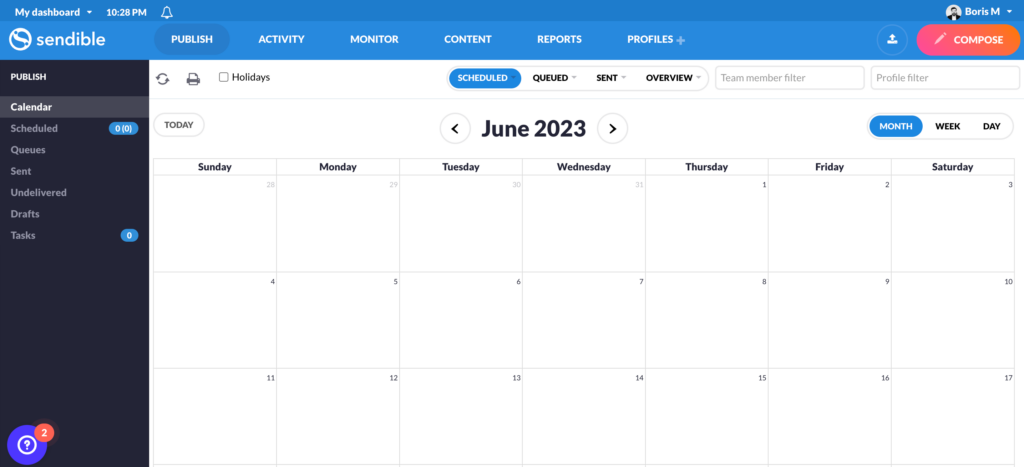
During our testing, the post preview feature proved genuinely useful, showing exactly how each post will appear on a given platform before it goes live.
The centralized inbox pulls comments and messages from all your connected platforms into one place, and you can filter by priority and assign conversations to specific team members.
The reporting suite covers the key performance metrics you'd want for client work, and you can build custom reports on top of the built-in ones.
What we like
Sendible stands out for how much it does without nickel-and-diming you. Users consistently highlight that you can connect a large number of accounts without hitting extra charges, which makes it noticeably better value than most tools at a comparable price point.
What users say
Value relative to larger competitors is what comes up most in positive reviews, with users frequently highlighting that Sendible delivers a strong feature set without charging extra for every additional account.
"I was looking for something new that wasn't as expensive as Sprout Social and found Sendible had most of the features of Sprout for a fraction of the price. The amount of accounts I have connected to Sendible without being charged extra is truly fantastic."
The most common criticism is that the interface can feel cluttered when managing a high volume of scheduled content, particularly for users new to the platform.
"What I dislike most about Sendible is that its user interface can sometimes feel a bit cluttered and overwhelming."
Pricing
You can use Sendible’s free 14-day trial to test out the platform. Paid plans include:
- Creator ($29/month)
- Traction ($89/month)
- Scale ($199/month)
- Advanced ($240/month)
- Enterprise ($750/month)
Sendible not working for you? Check out this list of Sendible alternatives.
9. SocialPilot
SocialPilot is a social media management tool built to handle high-volume scheduling across Facebook, Instagram, LinkedIn, X, TikTok, and Pinterest.
The bulk scheduling via CSV upload was one of the standout features during our testing, letting you load up to 500 posts at once. The content calendar gives you a clear view of everything that's planned, and the built-in image editor lets you polish assets without switching tools.
The social inbox consolidates messages, comments, and posts from all your connected networks into a single dashboard, with sentiment analysis to help you prioritize responses.
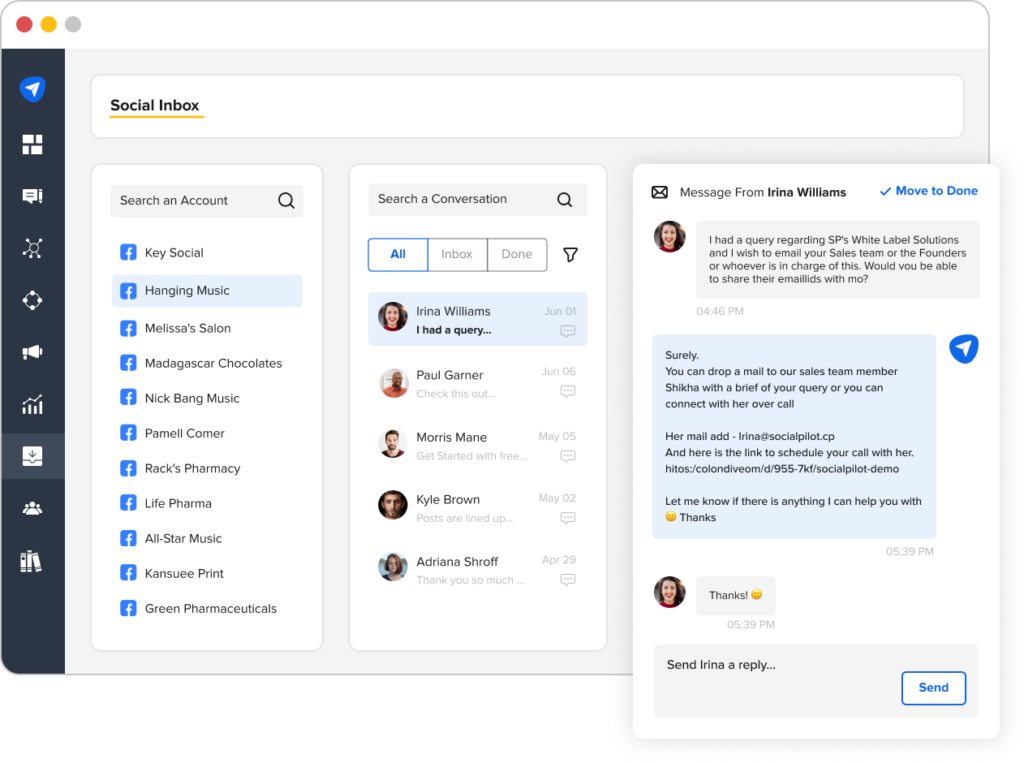
What we like
SocialPilot's bulk scheduling via CSV upload is a genuine differentiator for agencies. You can load up to 500 posts in one go, which saves hours of manual work when you're planning content across multiple client accounts.
What users say
Scheduling efficiency and value for money are what users highlight most, with centralized account management and bulk scheduling drawing strong praise from agency users.
"We use SocialPilot for managing our socials and it has been awesome. From creating posts, scheduling, and content creation, it has all the great features including analytics and reporting capabilities."
The most consistent criticism is that reporting feels limited compared to more enterprise-focused tools, with some users noting they'd like deeper analytics without having to move to a higher-priced plan.
"Reporting customisation is somewhat limited compared to larger enterprise tools."
Pricing
SocialPilot offers the following plans:
- Professional ($30/month)
- Small Team ($50/month)
- Agency ($100/month)
- Enterprise (custom pricing)
Email marketing tools
10. CampaignMonitor
CampaignMonitor is an email marketing tool built around a drag-and-drop editor and a solid library of responsive templates.
Working with it, the emphasis on clean design and ease of use is immediately apparent.
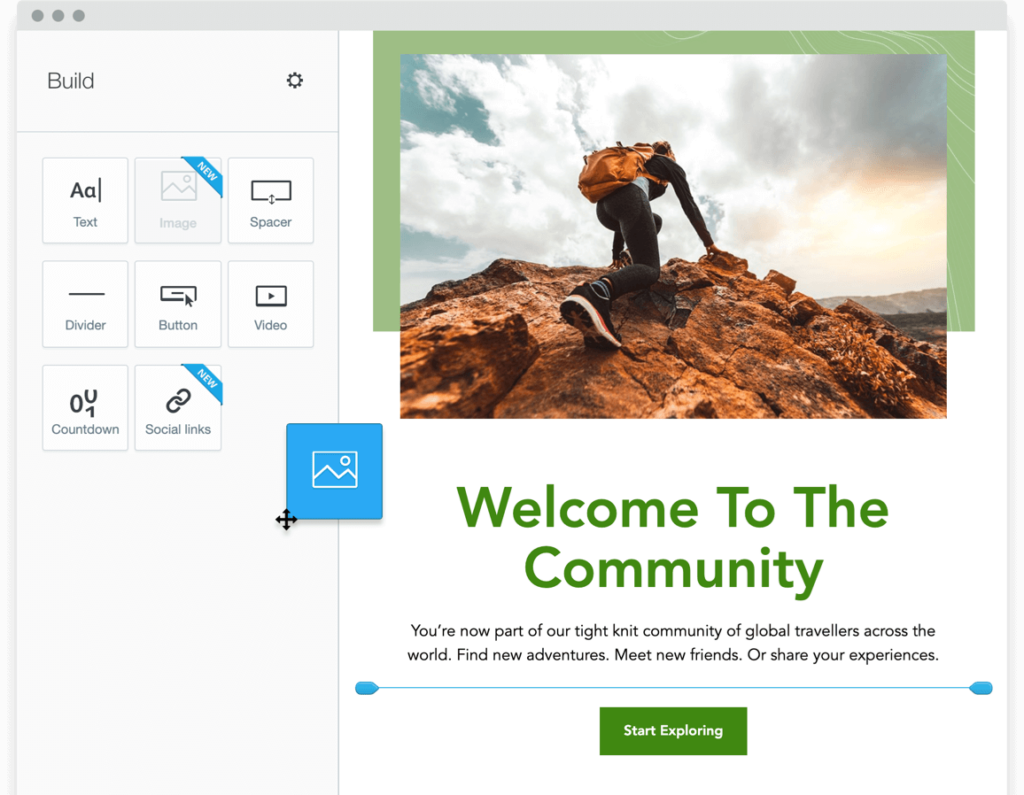
Subscriber data feeds into segmentation and personalization tools that let you send targeted campaigns based on a range of criteria.
The A/B testing feature makes it straightforward to test email variants and identify what performs best with your audience.
Detailed analytics cover campaign performance, nurture sequences, and transactional emails, giving you a clear picture of what's working.
What we like
CampaignMonitor has been around long enough to build a strong reputation for deliverability, and that matters more than most marketers realize. Getting into the inbox consistently is the foundation every other email metric depends on.
What users say
Ease of use and the quality of customer support are what positive reviewers mention most, with many highlighting that the platform makes professional email creation accessible even for non-technical teams.
"Not only does Campaign Monitor make sending highly-customized emails easy and fun, their support team is phenomenal."
The most common frustration is that pricing climbs noticeably as subscriber lists grow, and that some of the more useful features are gated behind higher-tier plans.
"On the downside, the pricing can get a little high if you're growing a larger subscriber list, and some of the advanced features are only available on higher-tier plans."
Pricing
CampaignMonitor offers the following plans:
- Lite (starts at $12/month)
- Essentials (starts at $29/month)
- Premier (starts at $159/month)
11. Mailchimp
Mailchimp is one of the most widely used email marketing platforms available, and it's easy to see why after spending time with it. The drag-and-drop editor and extensive template library let you put together professional-looking campaigns quickly, even without a design background.
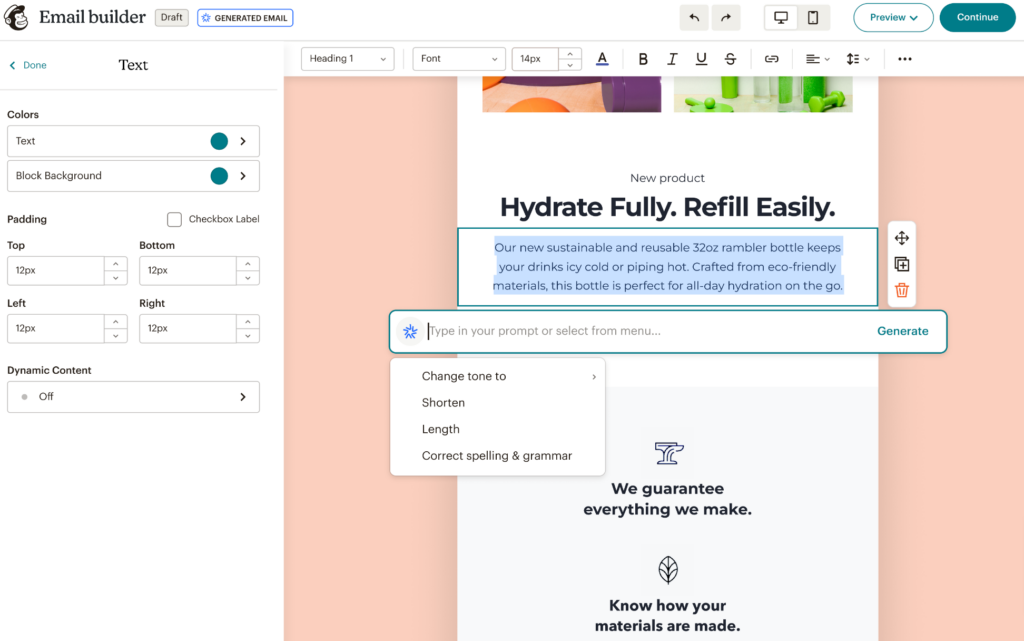
Pre-built automations cover the most common nurture scenarios, including welcome sequences, abandoned cart reminders, and re-engagement campaigns.
The A/B testing tool lets you test subject lines, sender names, content, and send times to find the highest-performing variants. With over 300 native integrations, it connects directly to most of the tools businesses already have in their stack.
What we like
Mailchimp's 300+ native integrations mean it connects directly to the tools most businesses already use, from Shopify and WooCommerce to HubSpot and Salesforce, so you're not rebuilding your stack to make it work.
What users say
The drag-and-drop editor and template library get the most praise, with users consistently noting that Mailchimp lets non-technical marketers put professional-looking campaigns together quickly and without much of a learning curve.
"It is very user-friendly to use. Creating emails and sending them is a piece of cake."
Cost scalability is the most persistent complaint, with users pointing out that prices climb fast as contact lists grow and that key automation features sit behind more expensive tiers.
"Pricing can also become a concern as our usage expands. Mailchimp's tiered model means costs can rise quickly as we add more contacts or features."
Pricing
Mailchimp offers a limited free plan. Paid plans include:
- Essentials ($13/month for 500 contacts)
- Standard ($20/month for 500 contacts)
- Premium ($350/month for 10,000 contacts)
12. ActiveCampaign
ActiveCampaign is an email and marketing automation platform with one of the most powerful automation builders we've come across.
The AI-powered builder lets you create complex email sequences quickly, with tags, segments, and dynamic content blocks giving you precise control over who sees what and when.
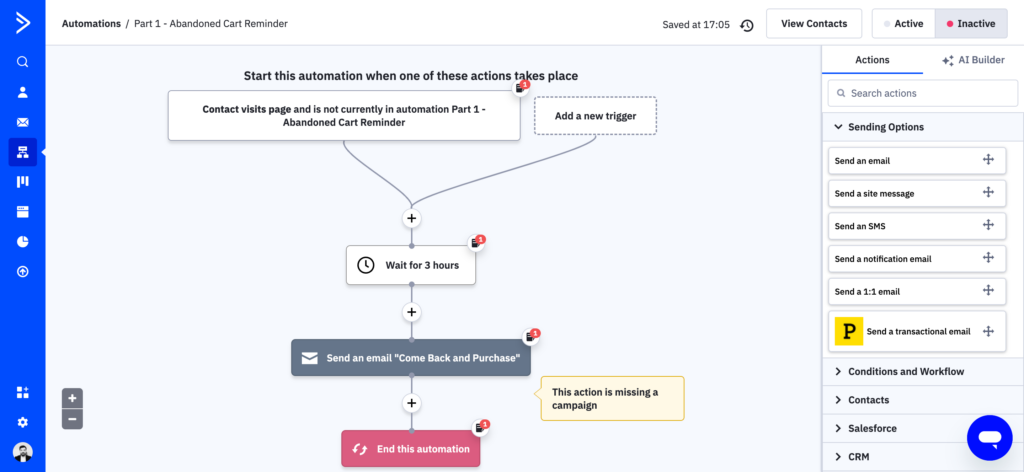
The predictive sending feature goes further than a standard send time picker, analyzing each individual contact's behavior to determine when they're most likely to open your email.
An AI assistant is also on hand to help generate subject lines, headlines, content blocks, and calls-to-action. For teams that want deep control over how their email marketing behaves, ActiveCampaign is one of the most capable platforms available.
What we like
ActiveCampaign's predictive sending feature is genuinely useful. Rather than just letting you choose a send time, it analyzes each individual contact's behavior and delivers your email when that specific person is most likely to open it.
What users say
The automation system is what users consistently single out as ActiveCampaign's biggest strength, with reviewers praising the level of control it gives them over building personalized, behavior-driven email journeys.
"What I like most is how powerful and flexible the automation system is. I can build highly personalized email sequences based on user behavior, which makes my marketing feel much more relevant and effective. It's not just email marketing — it's a complete system to guide leads through a structured journey."
The most consistent criticism is that the platform isn't intuitive out of the box, and users without a marketing background often need significant time to understand how the different components work together.
"You need a bit of marketing knowledge to understand the logic of the tool and to find and build all the different building blocks for an optimized customer journey."
Pricing
You can use ActiveCampaign’s 14-day trial offer to test out the platform for free. The pricing for paid plans is as follows:
- Starter (starts at $15/month)
- Plus (starts at $49/month)
- Pro (starts at $79/month)
- Enterprise (starts at $145/month)
Conversion rate optimization tools
13. Convert
Convert is an A/B testing tool that supports standard A/B tests, multivariate tests, and multipage tests.
Setting up an experiment is straightforward, with both a visual editor and a code editor available depending on how much control you want.
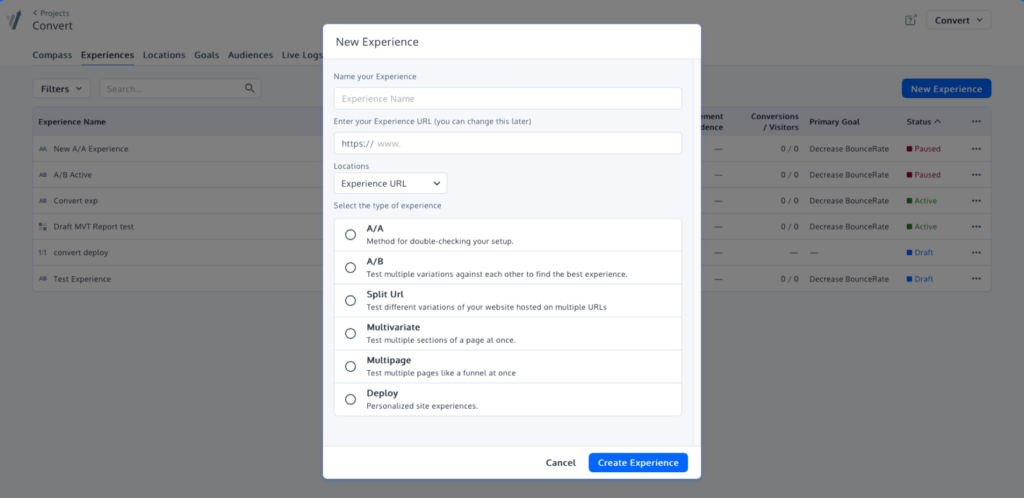
You can target specific audience segments or open tests to all visitors, with segmentation options covering traffic source, behavior, device, and more.
During our evaluation, the privacy-first architecture stood out as a genuine differentiator: Convert is fully GDPR and CCPA compliant by design and doesn't rely on third-party cookies.
Detailed reporting makes it easy to interpret results and identify the best-performing variant.
What we like
Convert's privacy-first approach is a meaningful differentiator. It's fully GDPR and CCPA compliant by design and doesn't rely on third-party cookies, making it a solid choice for businesses operating in privacy-sensitive markets.
What users say
Customer support is what users point to most as a differentiator, with reviewers regularly noting that responsiveness and technical help are noticeably better than what they've experienced with other A/B testing platforms.
"I really like the easy way to set up a test in Convert Experiences, which makes the process much smoother for me. The diversity in segmentations is something I really appreciate, as it offers me many options to segment and thus find more accurate results. Additionally, the support is excellent."
The most common criticism is that goal setting and tracking can feel limiting for more complex tests, which creates friction for teams running sophisticated experimentation programs.
"The limitation in tracking and goal setting, which can hinder the execution of more complex tests and more advanced analyses."
Pricing
Convert offers the following plans:
- Entry (starts at $399/month)
- Specialist (starts at $999/month)
- Pro (starts at $1,699/month)
- Enterprise (custom pricing)
14. VWO
VWO is a digital experience optimization platform that supports A/B tests, multivariate tests, and site-wide experiments.
The breadth of what it covers impressed us during testing: you can go from user research and hypothesis building all the way through to running experiments and analyzing results, all within a single platform.
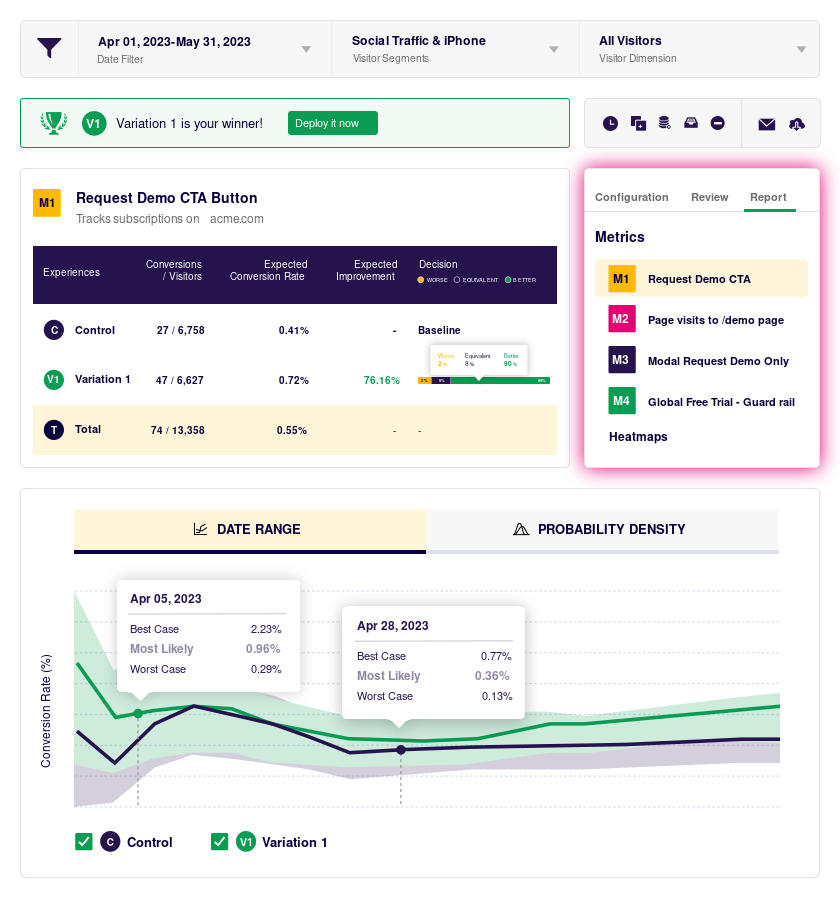
The drag-and-drop editor lets you build experiments without developer involvement, though a code editor is also available for more complex changes. AI-powered features let you generate personalized experimentation ideas and website copy directly within the tool.
Built-in widgets for pop-ups, banners, forms, and countdown timers mean you can run a wide range of experiment types without needing additional tools.
What we like
VWO covers the entire experimentation workflow in one place, from user research and hypothesis building through to testing and results analysis, so you're not stitching together multiple tools to run a proper optimization program.
What users say
Ease of setup and strong customer support are what reviewers mention most, with many highlighting how quickly their teams were able to start running tests and getting actionable results.
"Gathering user insights, prioritizing hypotheses, planning a roadmap, conducting tests, analyzing results — VWO lets you cover the whole 9 yards."
The visual editor is the most common source of criticism, with users noting it can behave unpredictably on complex page layouts, and that report loading times slow down with larger data sets.
"Sometimes the visual editor can act a little quirky, especially if I'm working on a page with a more complex layout — it doesn't always match exactly how things look on the live site. I've also noticed that reports can take a bit longer to load when there's a lot of data."
Pricing
VWO offers a limited free plan. The pricing for paid plans is as follows:
- Growth ($190/month, billed annually)
- Pro ($456/month, billed annually)
- Enterprise ($1,014/month, billed annually)
15. Hotjar
Hotjar is a behavior analytics platform that gives you a clearer picture of how visitors actually interact with your website.
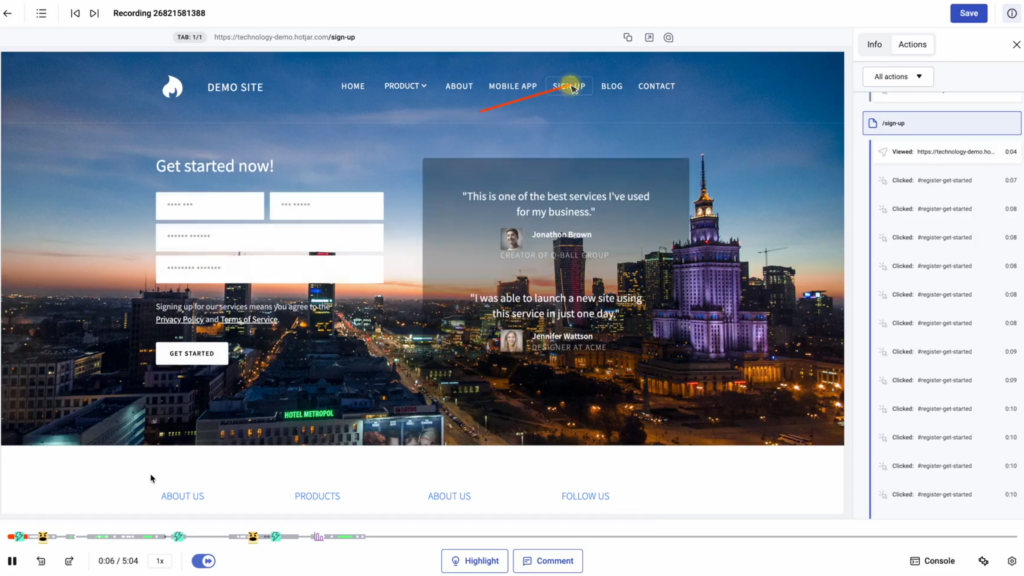
The heatmaps show you where users click, scroll, and move on each page, making it easy to spot areas of friction or underperforming elements. Session recordings let you watch real user journeys, and the AI-powered tagging automatically flags patterns like rage clicks, u-turns, and form abandonment so you don't have to review footage manually.
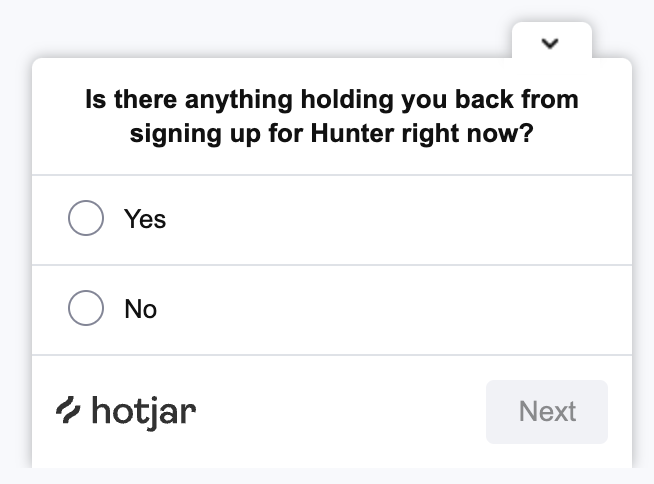
The Ask product lets you collect on-site feedback and run surveys directly, adding a qualitative layer to the behavioral data.
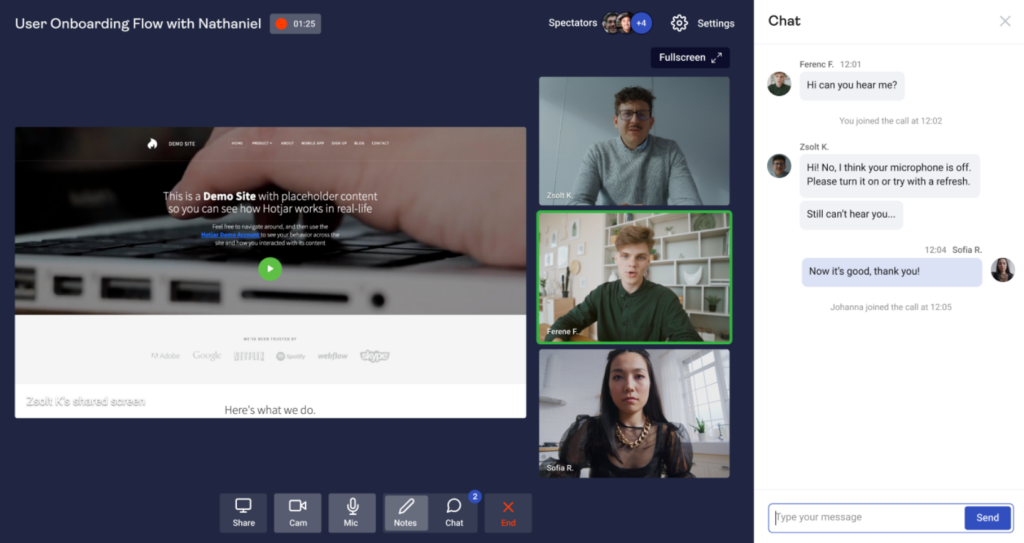
And if you want to go deeper, the Engage product lets you organize and run 1:1 interviews with your own users or recruit from Hotjar's pool of 200,000+ participants.
What we like
Hotjar's AI-powered session tagging automatically flags patterns like rage clicks, u-turns, and form abandonment in your recordings, so you can spot friction points without watching hours of footage manually.
What users say
Heatmaps and session recordings are what users praise most, with many noting that Hotjar surfaces user behavior insights that traditional analytics tools simply can't provide.
"Hotjar helps us understand how users interact with our website and find and fix UX issues that with using only Google Analytics previously we missed. Seeing how people actually move through our pages helps us quickly spot where they get stuck or drop off. The visual data gives qualitative insights that using only numbers can't provide."
Session recording limits are the most frequent frustration, with users noting that visibility drops sharply once they hit their quota and that upgrading feels necessary sooner than expected.
"The session recording limits can be restrictive, and once you hit your quota, visibility drops unless you upgrade. Filtering and segmenting data could also be smoother and occasionally recordings miss interactions on dynamic pages."
Pricing
Hotjar offers separate pricing for each of its three products:
Observe:
- Basic (free)
- Plus ($32/month)
- Business ($80/month)
- Scale ($171/month)
Ask:
- Basic (free)
- Plus ($48/month)
- Business ($64/month)
- Scale ($128/month)
Engage:
- Basic (free)
- Plus ($39.2/month)
- Business ($440/month)
- Scale (custom pricing)
Competitive intelligence tools
16. Visualping
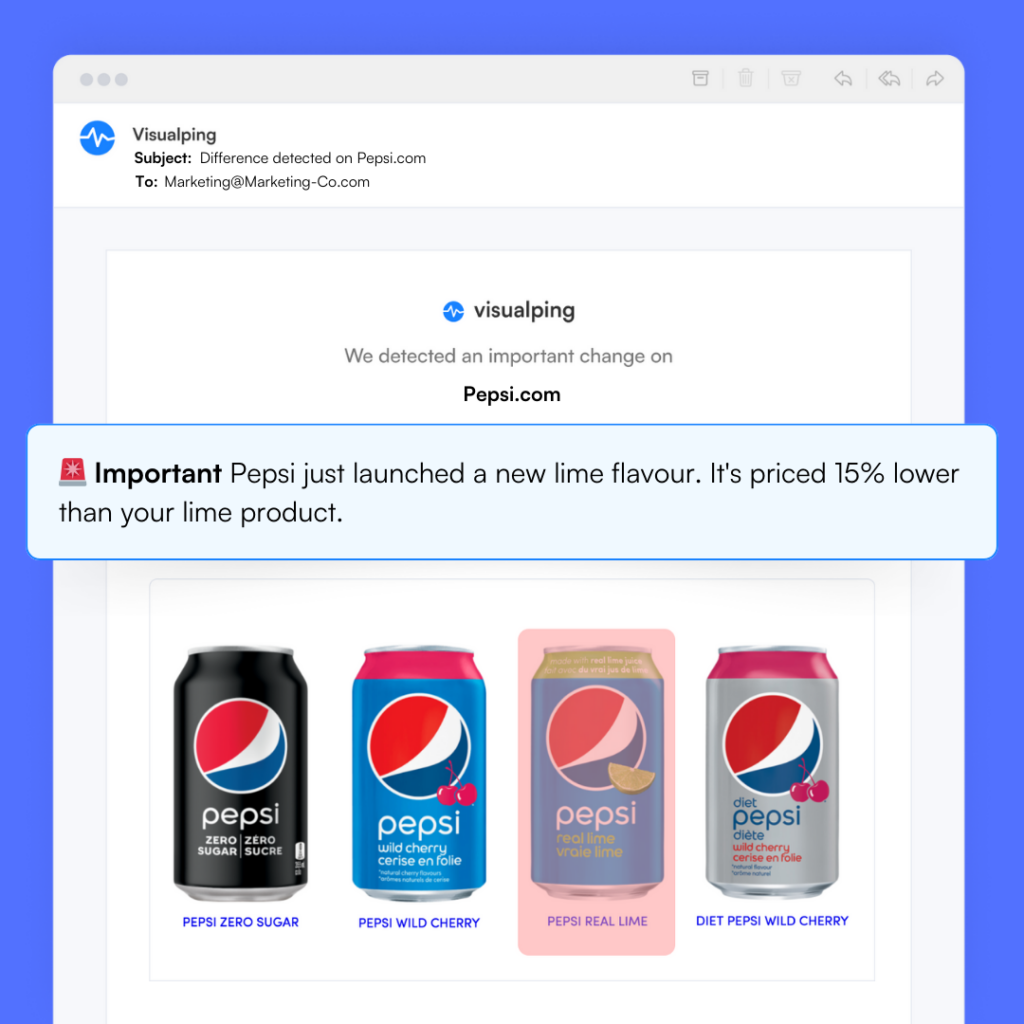
Visualping offers a unique approach to competitive intelligence by allowing users to track changes on specific web pages. This tool lets marketers closely monitor their competitors' online activities, from pricing updates to product launches.
By leveraging such technology, marketers can provide the rest of the business with intelligence about competitor activities, help their teams make informed decisions, and quickly adapt their strategies in response to market shifts.
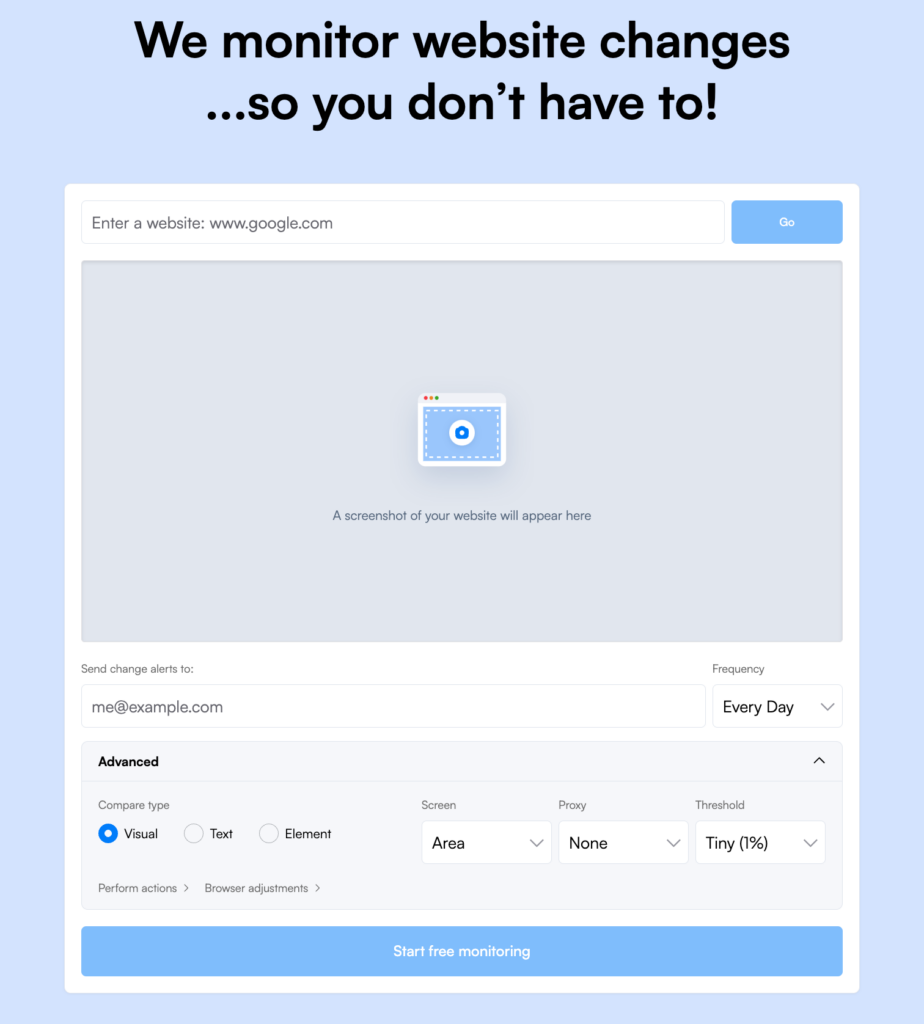
There are various use cases for competitive monitoring where you can use Visualping, including tracking competitor pricing changes, spotting UX/UI overhauls, detecting new product launches, and more.
What we like
Visualping monitors visual changes on any public web page, so you'll catch a competitor's site redesign or pricing page update from a screenshot comparison rather than a keyword alert, which makes it harder for changes to slip through unnoticed.
What users say
Precision and reliability are what users highlight most, with many specifically praising the ability to monitor a targeted section of a page rather than the whole thing, which cuts down on unnecessary alerts.
"Visualping is incredibly reliable and user-friendly. I love how precisely I can select specific areas of a page to monitor, which prevents 'false alarm' notifications. It has become an essential tool for our team to stay updated without manual checking."
The most common mild criticism is that the dashboard can feel crowded once a large number of monitors are active, with users noting that more advanced filtering or tagging would help manage alerts at scale.
"There isn't much to dislike, though the interface can feel a bit crowded once you have dozens of active monitors running. I'd love to see even more advanced filtering or tagging options to help organize large volumes of alerts more efficiently."
Pricing
You can try Visualping’s enterprise features with a 14-day free trial, or you can use their free plan forever. Paid plans are priced as follows:
- Starter (starts at $10/month)
- Business (starts at $100/month)
- Enterprise (custom pricing)
Landing page tools
17. Unbounce
Unbounce is a landing page builder that comes with over 100 templates and a drag-and-drop editor that requires no coding. Building a page from scratch during our testing took significantly less time than expected, with the editor giving you enough flexibility to get to a polished result quickly.
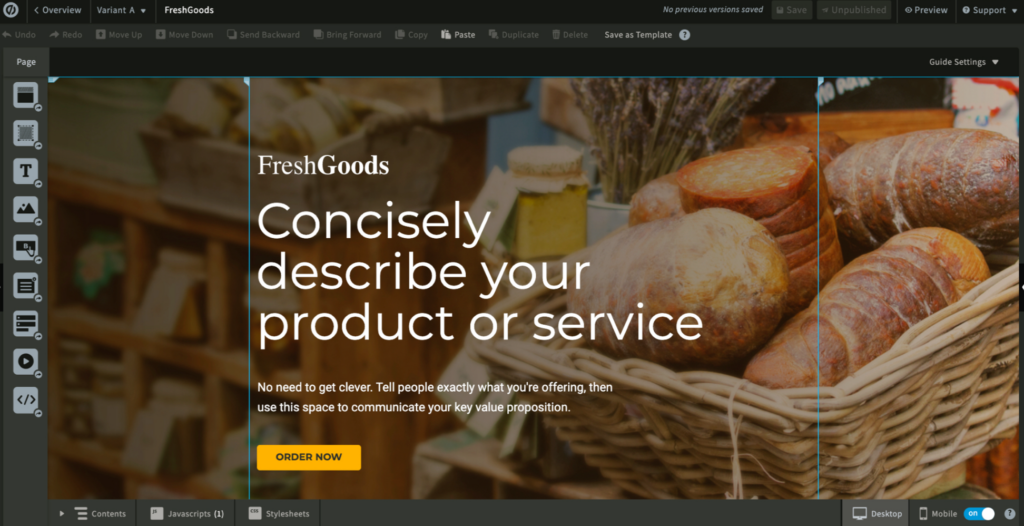
The dynamic text replacement feature is particularly useful for paid search campaigns, automatically swapping out page copy to match a visitor's search query.
A/B testing is built in, and the Smart Traffic feature routes visitors to the page variant they're most likely to convert on based on historical data. For teams running paid campaigns at volume, those two features together make a meaningful difference to conversion rates.
What we like
Unbounce's dynamic text replacement feature is particularly powerful for paid search campaigns. It automatically swaps out copy on your landing page to match a visitor's search query, keeping your message consistent from ad click to conversion.
What users say
The drag-and-drop builder and A/B testing capabilities draw consistent praise, with users highlighting how quickly they can build and iterate on landing pages without needing developer support.
"What I value the most is the intuitive drag-and-drop builder that lets you create beautiful, conversion-optimized pages without any coding knowledge. It's flexible, fast, and packed with features like A/B testing, dynamic text replacement, and integrations with all the major marketing tools."
Pricing is the most prominent negative in recent reviews, with multiple users reporting that Unbounce's revised pricing model resulted in significant cost increases with no corresponding improvements to the product.
"Unfortunately, everything changed with their new pricing model. Our subscription was increased by 415% in under a year, with no added features or benefits to justify it."
Pricing
You can use Unbounce’s free 14-day trial to test out the platform. Plans are priced as follows:
- Build ($99/month)
- Experiment ($149/month)
- Optimize ($249/month)
- Concierge ($649/month)
Manage online reviews with LocalImpact
Get more 5-star reviews and take control of your online reputation with LocalImpact.
18. Instapage
Instapage is a landing page builder with a strong emphasis on personalization and team collaboration.
The editor is flexible enough to build professional-quality pages without any coding knowledge, and the mobile optimization tools make it straightforward to ensure pages look good across devices.
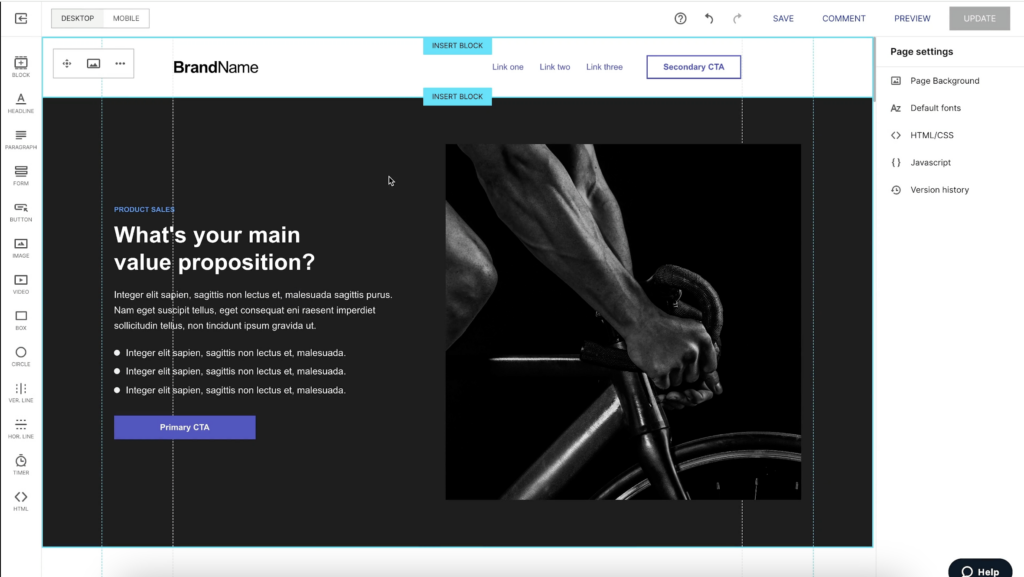
During our evaluation, the collaboration features stood out: team members can leave comments, tag specific page elements, and work on pages simultaneously, which speeds up review cycles considerably.
The platform also supports A/B testing, heatmap analysis, and AI-powered experiments, giving you multiple ways to optimize page performance. Generative AI tools help you produce landing page copy, headlines, and calls-to-action quickly when you need to move fast.
What we like
Instapage's collaboration features are more developed than most landing page tools. Teams can leave comments, tag specific elements, and work on pages simultaneously, which cuts down the back-and-forth that typically slows down creative review cycles.
What users say
Flexibility and mobile optimization get the most positive mentions, with users regularly noting how quickly they can customize pages to a professional standard without writing a line of code.
"The interface is user-friendly, mobile-optimized, and easy to customize — even without any coding skills."
Navigation is the most common source of frustration, with some users noting the interface can feel disorienting during configuration — particularly for smaller teams or solo marketers who need to move fast.
"A bit confusing user interface. Sometimes getting lost during configurations."
Pricing
Instapage’s 14-day trial offer lets you test out the software for free. Plans include:
- Create ($99/month)
- Optimize ($199/month)
- Convert (custom pricing)
19. Leadpages
Leadpages is a landing page builder designed specifically for small businesses that need to get pages live quickly without a designer or developer.
The collection of 250+ templates covers a wide range of use cases, and the drag-and-drop editor makes customization straightforward.
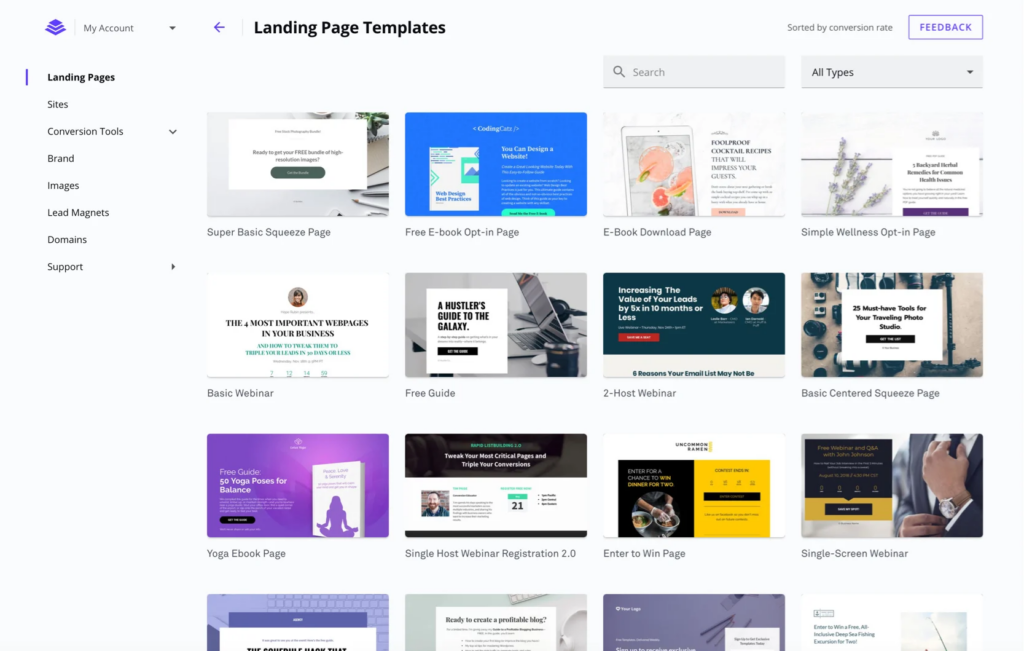
One feature that stood out during our testing is the real-time conversion meter, which gives you live feedback on how your page is likely to perform as you build it.
The Leads Library lets you manage and track leads generated through your pages, with integrations available for most popular CRM platforms. Weekly group coaching sessions give users direct access to marketing experts, which is an unusually generous level of support for a tool at this price point.
What we like
Leadpages includes weekly group coaching sessions where users can ask questions and get feedback directly from marketing experts, a level of ongoing support that goes well beyond what you'd expect from a tool at this price point.
What users say
The template library and real-time conversion meter are what users point to most, with reviewers consistently praising how quickly they can get a high-quality landing page live without needing a designer.
"I love that Leadpages allows you to easily create unlimited landing pages, no matter which plan you're on. Their landing page templates are nicely designed and proven to convert with a real-time meter providing feedback as you use their drag-and-drop builder. Their marketing resources are plentiful and robust."
Some users note that Leadpages works well as a dedicated landing page tool but falls short when they need more flexibility for full website creation or more sophisticated design customization.
"Despite its success in the realm of landing pages, Leadpages falls short when it comes to building complete websites. The platform offers basic features for site creation, lacking the depth and complexity required for more intricate websites."
Pricing
You can try out Leadpages for free by taking advantage of the 14-day trial offer. Plans are priced as follows:
- Standard ($49/month)
- Pro ($99/month)
- Conversion ($697/month)
Grow your business with the top digital marketing tools
You’ve reached the end of our list of the top tools for digital marketing—now, it’s time to take action.
Pick a few tools from our list and use the free trial offers to test them out and see if they’re the right fit for your business.
While you’re here, make sure to also check out our guide to the top small business tools.