Running a small business means wearing a lot of hats, and AI tools can take some of them off your head.
Whether you need help managing your online reputation, planning your week, creating videos, or writing ad copy, there's a purpose-built tool for it.
The best AI tools for small businesses at a glance
No time to go through the entire list? Here’s a quick comparison:
| Software | Best for | Starting price |
| LocalImpact | Review management for local businesses | $19/month |
| Claude | AI assistant for writing and research | $20/month |
| Upmetrics | AI-powered business plan creation | $9/month |
| Reclaim AI | Automated calendar and time-blocking | $10/seat/month |
| Motion | AI task scheduling and work planning | $34/month |
| Notta | Meeting transcription and summaries | $14.99/month |
| Storydoc | Interactive presentations and proposals | $40/user/month |
| Pictory | Turning scripts and blog posts into video | $25/month |
| Lumen5 | Converting written content into social video | $29/month |
| Ocoya | AI social media content and scheduling | $19/month |
| AdCreative.ai | AI ad creative generation and testing | $39/month |
| FeedHive | Social media scheduling with AI assistance | €9/month |
| Quickads | High-volume ad creation with competitor research | $79/month |
| Synthesia | AI avatar video production at scale | $29/month |
| Fireflies.ai | Automatic meeting transcription and summaries | $18/seat/month |
| Clockwise | AI calendar optimization and focus time | $6.75/user/month |
How we chose these tools
We put in 150+ hours of hands-on testing to build this list. Here's what we evaluated:
- Core functionality: Whether the tool actually delivers on its primary promise, tested across real small business workflows rather than demo conditions.
- Ease of setup: How quickly a non-technical user can get from signup to first useful output, without needing a developer or lengthy onboarding.
- AI quality: The accuracy, relevance, and usability of AI-generated outputs, from text to video to scheduling recommendations.
- Pricing transparency: Whether plans are clearly explained, whether credits and limits are obvious upfront, and whether the entry-level tier offers genuine value.
- Integration depth: How well the tool connects with the other apps small businesses are likely already using, including Google Workspace, social platforms, and common CRMs.
- User feedback patterns: Verified reviews on G2 and Capterra were used to cross-check real-world experience against our own testing findings.
1. LocalImpact
Best for: Local businesses that need to monitor, respond to, and generate online reviews without managing multiple platforms separately.
LocalImpact is an online reputation management platform built specifically for small and medium-sized local businesses.
Once you connect your profiles across Google, Facebook, Yelp, and Tripadvisor, the platform notifies you the moment a new review comes in and lets you manage responses from a single dashboard.
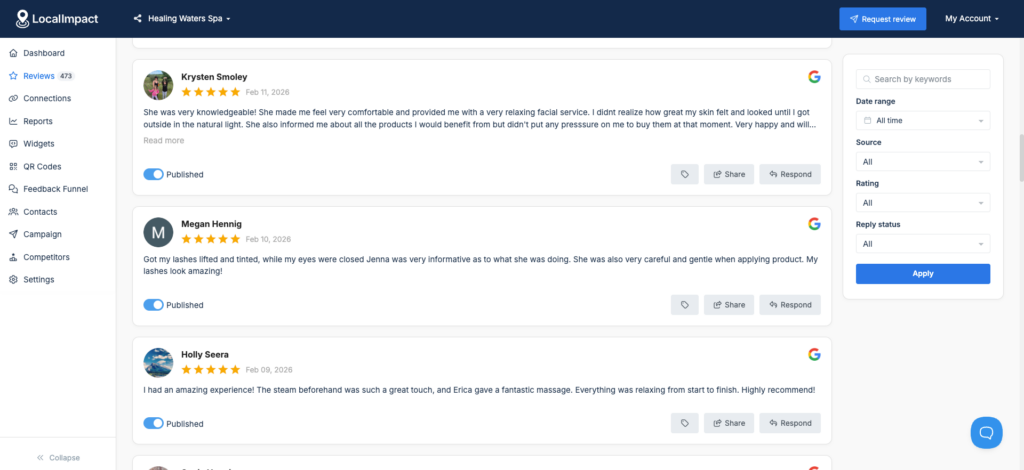
The AI review reply generator produces personalized responses that match the tone of each review, so you're not starting from scratch every time.
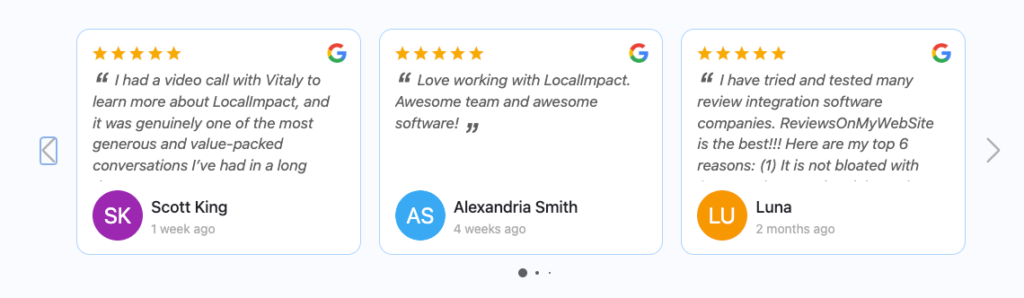
The platform also handles review generation, letting you send automated email and SMS reminders to customers after a transaction or service. And includes a review widget that lets you display your top customer reviews on your website.
Key features
- Multi-platform review monitoring: Tracks incoming reviews across Google, Facebook, Yelp, Tripadvisor, and other platforms from one dashboard.
- AI review replies: Generates personalized response drafts tailored to the content and tone of each review.
- Review request automation: Sends email and SMS reminders to customers to prompt new reviews without manual follow-up.
- Review widgets: Embeds review feeds directly onto your website to build social proof at the point of consideration.
- White-label option: Lets agencies manage reputation for multiple clients under their own branding.
- Social sharing: Turns positive reviews into shareable social media posts automatically.
What we like
LocalImpact's review request automation stands out for how little setup it requires. You can upload a customer list, connect an existing tool like Jobber, QuickBooks, or HubSpot via Zapier, or hand staff a standalone link they can use on the spot without logging in.
Once it's running, requests go out automatically by SMS and email, with follow-ups for anyone who didn't respond the first time.
Pricing
LocalImpact offers a free 14-day trial. Paid plans include:
- Growth ($49/month)
- Pro ($99/month)
- Agency ($149/month)
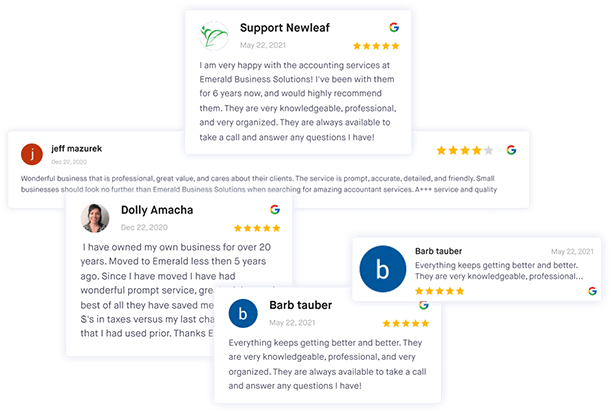
Get more reviews with LocalImpact
Generate more 5-star reviews for your business and take control of your online reputation with LocalImpact.
2. Claude
Best for: Small business owners who need a capable AI assistant for writing, research, and document work without switching between multiple specialized tools.
Claude is a general-purpose AI assistant developed by Anthropic.
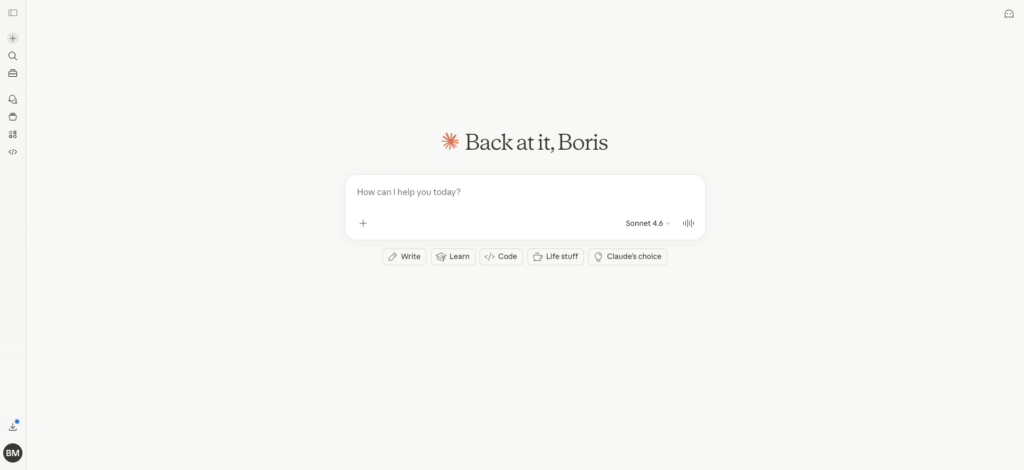
In our testing, it handled a wide range of small business tasks well, including drafting emails and proposals, summarizing long documents, researching topics, and generating structured content like outlines, FAQs, and social copy.
It's available as a web app, a mobile app, and a desktop app, so you can use it across your workflow without being tied to one device.
The platform also handles image transcription and multi-language translation, which makes it useful for businesses dealing with handwritten notes, scanned documents, or international communication.
Key features
- Content drafting: Writes emails, proposals, blog posts, social captions, and other business content from a prompt or brief.
- Document analysis: Reads and summarizes uploaded documents, extracting key information quickly.
- Research assistance: Answers complex questions, compiles background information, and helps think through problems.
- Image transcription: Converts photos and handwritten notes into editable text.
- Multi-language translation: Translates text to and from a wide range of languages.
- Cross-device availability: Available on web, iOS, Android, and desktop for consistent access across devices.
Pros & cons
Pros
- Handles a genuinely broad range of tasks well, reducing the need for multiple specialized tools
- Free plan available with meaningful functionality for occasional users
- Strong at nuanced writing tasks that require adjusting tone or audience
- Document upload and analysis is fast and accurate on structured files
- Cross-platform availability means it fits into most existing work setups
Cons
- Output quality is sensitive to prompt quality, and vague or underspecified requests tend to produce generic results that need significant editing before they're usable
- Free plan has message limits that may feel restrictive for heavy daily use
What we like
Claude's ability to maintain context across a long conversation makes it particularly useful for iterative tasks like refining a proposal or working through a content strategy.
You don't have to re-explain the background every time you ask a follow-up question.
What users say
Users consistently praise Claude for the quality of its writing output and its ability to handle complex, multi-step tasks without losing context mid-conversation.
"Claude is very good at understanding context and responding in a clear, structured, and thoughtful way.
The answers feel natural and well-explained, especially for complex topics, documentation, and long conversations.
It's particularly helpful for writing, summarizing content, and reviewing documents."
A common limitation users flag is around message caps, particularly on the paid Pro plan.
"Claude's built-in limitations for its $20/month paid version are too numerous to count.
If you want to troubleshoot web programming, Claude has a character limit on chat conversations, so you will find yourself quickly needing to start multiple chats."
Pricing
Claude offers a limited free plan. Paid plans include:
- Pro ($20/month)
- Team ($25/member/month, 5-member minimum)
- Enterprise (custom pricing)
3. Upmetrics
Best for: Entrepreneurs and small business owners who need to create a professional, investor-ready business plan without starting from scratch.
Upmetrics is an AI-powered business planning tool that guides you through creating a complete business plan via a question-and-answer flow.
The AI co-pilot helps you draft each section, then you can refine the output manually or continue using AI assistance throughout.
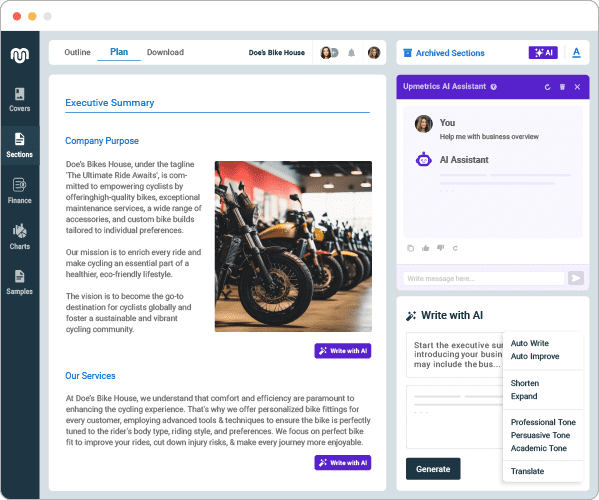
With 400+ sample business plans available as reference material, it's a strong starting point even if you're not sure how to structure your plan.
Beyond the written plan, Upmetrics includes financial forecasting tools that generate projections based on your inputs.
Collaboration features like approval workflows and version control make it practical for working with advisors, investors, or co-founders, and the platform supports multiple languages for sharing with international stakeholders.
Key features
- AI business plan generator: Walks you through a structured Q&A to produce a first-draft business plan in minutes.
- Financial forecasting: Generates revenue, expense, and cash flow projections based on your business model and assumptions.
- 400+ sample plans: Provides reference business plans across industries to guide structure and content.
- Collaboration tools: Includes approval workflows and version control for working with co-founders, advisors, or investors.
- Multi-language support: Translates your business plan into multiple languages for international sharing.
- AI refinement: Lets you continue iterating on any section with AI assistance after the initial draft is generated.
Pros & cons
Pros
- The AI co-pilot gets you to a solid first draft quickly, which is the hardest part of writing a business plan
- Financial forecasting is genuinely useful and removes the need for custom spreadsheets
- 400+ sample plans make it easy to see what a strong plan looks like in your industry
- Support team is responsive and well-reviewed across multiple platforms
- Multi-language support is practical for businesses with international investors or partners
Cons
- Template variety for cover page designs is limited compared to what some users expect
- Accounting software integrations are thin, which means manual data entry for financial inputs
- No dedicated mobile app
What we like
The fact that financial forecasting is built directly into the same platform where you're writing the plan is genuinely useful.
Most business plan tools make you handle projections in a separate spreadsheet and manually copy figures across.
What users say
Users consistently highlight how much time Upmetrics saves on structure and formatting, and how the financial tools reduce the stress of building projections from scratch.
"Upmetrics' AI business plan generator gives me a strong draft right away, and the forecasting tools take the stress out of the financials.
Since all my work stays in one place, I can just focus on finishing my plan instead of messing around with spreadsheets."
The most common criticism is around integration depth, particularly with accounting software.
"It would be helpful if they could integrate with accounting software and CRM. Can really be a force multiplier."
Pricing
Paid plans include:
- Starter ($9/month)
- Premium ($19/month)
- Professional ($49/month)
4. Reclaim AI
Best for: Individuals and small teams using Google Calendar who want to automate time-blocking and protect focused work time without manual scheduling.
Reclaim AI is a smart scheduling tool that integrates with your calendar and automatically finds the best times for tasks, habits, meetings, and focus blocks.
Rather than requiring you to manually arrange your day, it runs in the background and builds a time-blocked schedule based on your actual availability and priorities.
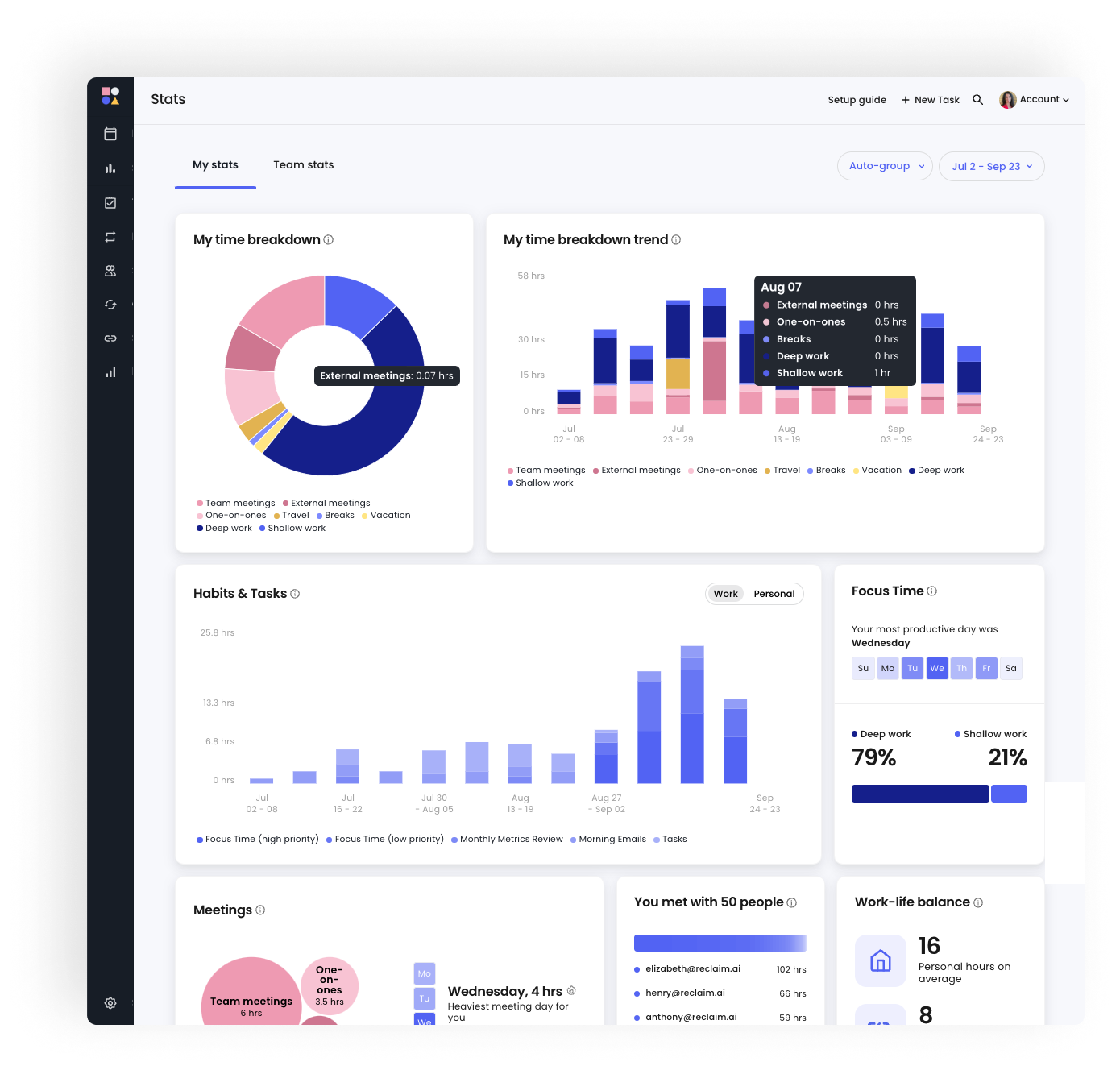
The result is a calendar that reflects how you actually want to spend your time, not just when other people have booked meetings.
Reclaim also offers scheduling links for both internal and external bookings, a time tracking feature with reporting, and an AI daily planner that builds each day's plan automatically.
It works with Google Workspace and has added Outlook integration for teams using Microsoft tools.
Key features
- Automatic time-blocking: Schedules tasks, habits, and focus time around your meetings without manual input.
- Smart meeting scheduler: Finds optimal meeting times that suit all attendees based on their real availability.
- Scheduling links: Generates shareable booking links with pre-configured availability rules for internal and external stakeholders.
- AI daily planner: Creates a time-blocked daily schedule that includes all your tasks, meetings, and breaks.
- Habit scheduling: Blocks recurring time for personal habits like lunch breaks, exercise, or focused reading.
- Time tracking and reporting: Tracks how you actually spend your time and generates reports to identify patterns.
Pros & cons
Pros
- Works silently in the background once set up, without requiring ongoing manual adjustments
- Time-blocking for habits and deep work is more flexible and automatic than most competing tools
- Scheduling links are fast to set up and reduce back-and-forth booking emails
- Genuinely useful for anyone with ADHD or difficulty prioritizing tasks without structure
- Free plan available, making it accessible without upfront cost
Cons
- Works best when your whole team is using it; calendar optimization is less effective when colleagues aren't on the platform
- Free plan has been scaled back over time, with limits on calendars and habits that may frustrate light users
- Primarily optimized for Google Calendar; Outlook users have a more limited experience
What we like
Reclaim's approach to focus time protection is practical rather than aspirational.
It doesn't just block time on your calendar and hope for the best; it actively shifts low-priority items when higher-priority work comes in, and adjusts your schedule in real time as things change throughout the day.
What users say
Users praise Reclaim for how it shifts time management from reactive to proactive, particularly its ability to protect focus blocks in busy calendars.
"Reclaim.ai is particularly valuable for protecting focus time in crowded calendars.
Its ability to automatically prioritize and reschedule tasks and routines based on my real availability makes time management much more intentional and easier, without requiring constant manual adjustments on my end.
It supports my time management efforts, shifting it from reactive to proactive."
Some users note that advanced features are gated behind higher tiers and the lack of a mobile app is a gap.
"Some advanced features are locked behind higher-tier plans, which can be a limitation depending on how deeply you want to integrate it into team workflows.
Also, a companion app would be nice although it works really well even just using it on my iPhone from a browser so not a complaint but rather just a wish for a dedicated app."
Pricing
Reclaim AI offers a limited free plan. Paid plans include:
- Starter ($10/seat/month)
- Business ($15/seat/month)
- Enterprise (custom pricing)
5. Motion
Best for: Busy professionals and small teams who want a single tool to handle task management, project planning, and calendar scheduling with AI prioritization.
Motion is an AI-powered work planning tool that takes your tasks, projects, and meetings and builds an optimized weekly schedule automatically.
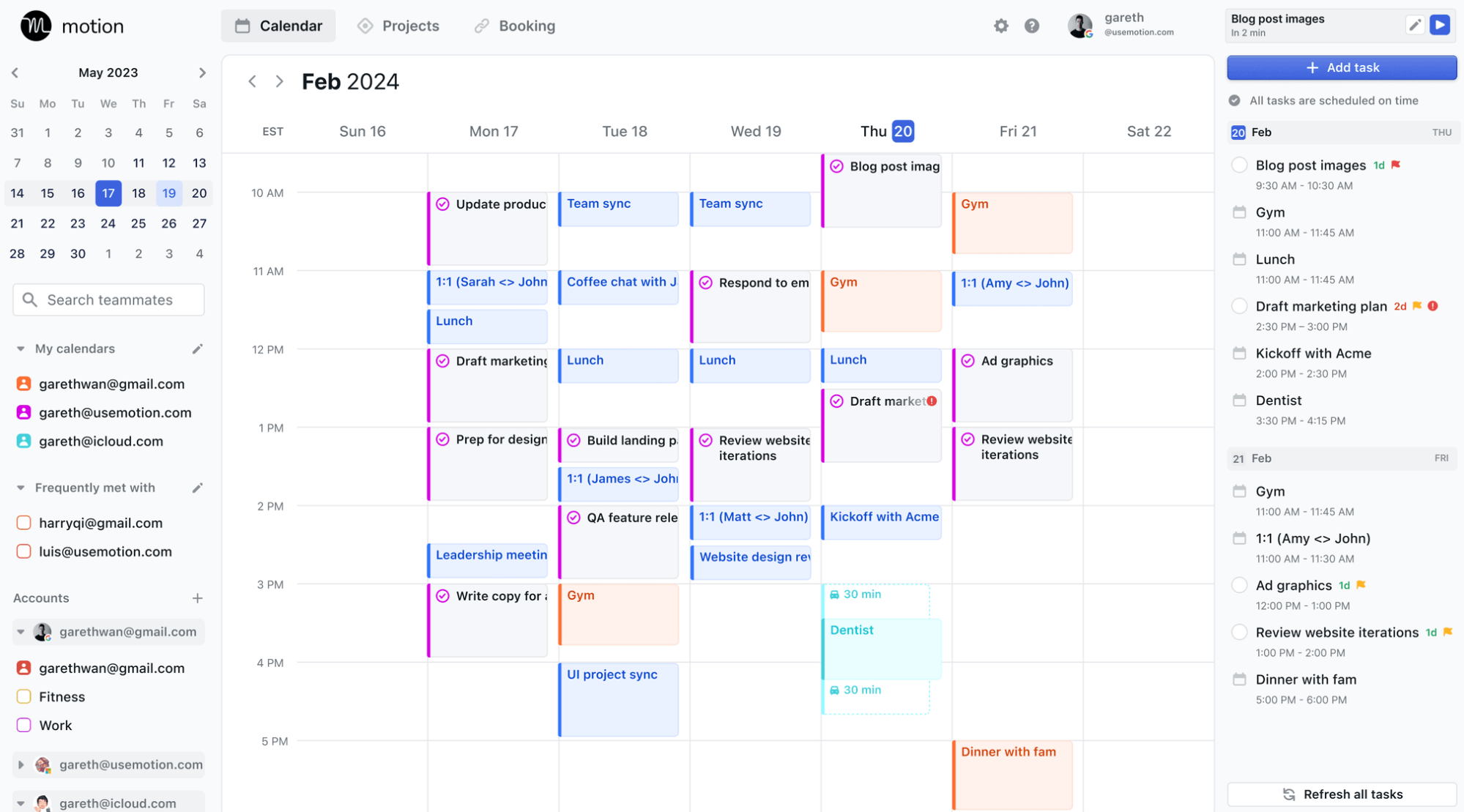
It handles the prioritization logic for you, so instead of deciding what to work on next, you open the app and your schedule is already laid out. When something changes mid-day, Motion dynamically adjusts the rest of your plan rather than leaving you with a broken schedule.
The platform also includes project management features, team workload reporting, and meeting booking tools, making it a practical alternative to running separate apps for task management and scheduling.
Key features
- AI task scheduling: Automatically places tasks in your calendar based on priority, deadline, and available time.
- Dynamic replanning: Adjusts your daily schedule in real time when meetings shift or tasks take longer than expected.
- Deadline alerts: Notifies you when you're at risk of missing a deadline based on your current schedule.
- Project management: Lets you build projects with tasks, timelines, and dependencies for more complex work.
- Team workload reporting: Shows each team member's current task load to identify over or under-utilization.
- Booking links: Provides Calendly-style scheduling links for external and internal meetings.
Pros & cons
Pros
- Removes the daily mental overhead of deciding what to work on and when
- Dynamic replanning is genuinely useful rather than just rearranging blocks
- Combines task management, project planning, and scheduling in one subscription
- Deadline alerts help you catch problems before they become emergencies
- Integrates with Outlook and Google Calendar, so it fits into existing setups
Cons
- No free plan; the 7-day trial is a limited window to evaluate a tool that takes time to configure properly
- Initial setup is time-consuming, especially if you're importing tasks from another system
- Higher price point compared to most tools on this list
What we like
Motion's approach to workload visibility across a team is underrated. The reporting feature gives you a quick read on who has capacity and who's overloaded, which is the kind of information that usually requires a team standup to surface.
What users say
Users highlight how much cognitive load Motion removes from daily planning, and how it handles the constant reshuffling that comes with a busy calendar.
"Motion has elevated my productivity to the max. I am able to enter tasks for different projects and have an organized and timely calendar to follow. I use Motion every single day and it has been instrumental to improving my workflow."
Some longer-term users have flagged that the product's direction has drifted toward feature bloat over UI polish.
"The calendar unification and auto-scheduling capabilities were truly revolutionary when they came out. The product's aimless development over the last year, leading to terrible bloat... the UI is still just as janky/crusty/clunky as it was when I signed up two years ago."
Pricing
Motion offers a free 7-day trial. Paid plans include:
- Individual ($34/month)
- Business Standard ($20/user/month)
- Business Pro (custom pricing)
6. Notta
Best for: Teams who need accurate meeting transcription and multilingual support, with summaries they can share immediately after a call ends.
Notta is an AI-powered meeting recorder and transcription tool that captures audio and video from Zoom, Google Meet, Microsoft Teams, and Webex calls.
It identifies speakers automatically, generates summaries with action items, and makes transcripts searchable so you can locate specific discussions from past calls in seconds.
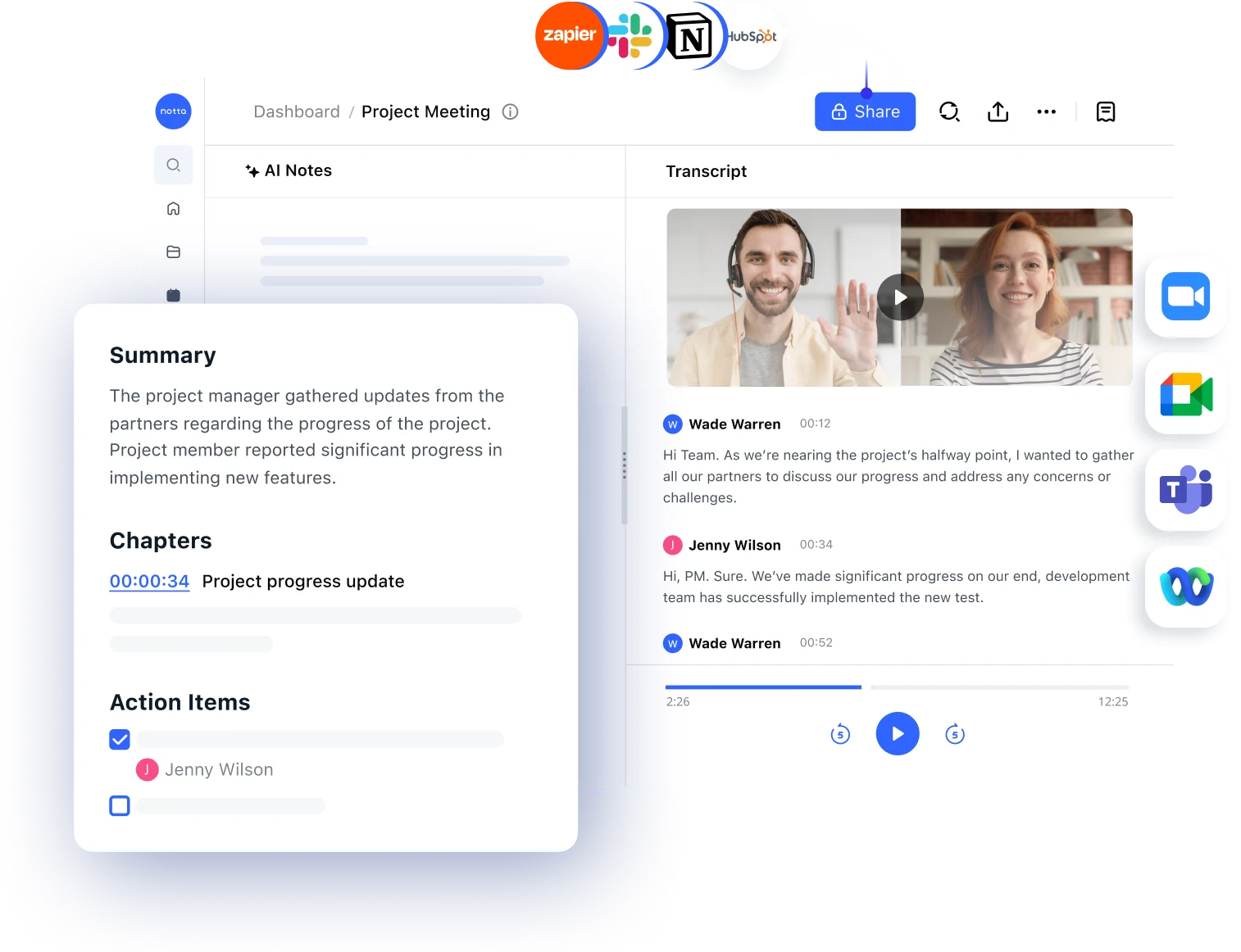
The platform supports transcription in 58 languages and can translate transcripts, which makes it practical for teams working across language barriers.
Beyond standard transcription, Notta includes a mindmap feature that converts meeting notes into visual diagrams, a meeting scheduler with shareable links, and a media library for organizing past recordings.
You can share summaries with participants directly from the platform rather than exporting to a separate tool.
Key features
- Real-time transcription: Captures spoken content accurately across Zoom, Google Meet, Teams, and Webex.
- Speaker identification: Labels different speakers in the transcript automatically.
- AI summaries: Generates concise meeting summaries with action items after each call.
- Multilingual transcription: Supports 58 languages and provides automatic translation of transcripts.
- Mindmap generation: Converts meeting notes into visual mindmaps useful for brainstorming sessions.
- Meeting scheduler: Provides shareable meeting links to simplify booking with contacts.
Pros & cons
Pros
- Multilingual transcription and automatic translation are standout features that most competing tools don't match
- Summaries are fast, consistent, and generally accurate enough to share without heavy editing
- Searchable transcripts make it easy to find specific moments from past calls
- Mindmap output adds a useful alternative format for note review and brainstorming
- Free plan allows up to 120 minutes of transcription per month
Cons
- Accuracy drops with multiple simultaneous speakers, heavy accents, or noisy audio
- Speaker labeling can be inconsistent in fast-moving conversations with overlaps
- Pricing is considered high by some users, particularly at the Business tier
- Free plan limits have frustrated some users who signed up expecting more from the trial period
What we like
Notta's multilingual transcription capability is genuinely differentiated.
For businesses with non-English-speaking staff or international clients, the ability to transcribe and translate in the same workflow removes a significant manual step.
What users say
Users consistently cite Notta's transcription quality and multilingual support as its strongest features, and highlight how much time it saves on meeting follow-up.
"I like how quickly Notta turns audio and video into readable text. As a designer, it saves me from replaying long calls. I can pull exact user quotes, capture pain points, and find wording that is useful for UX copy and messaging.
It's also nice for sharing notes with a team without making everyone watch the whole recording."
The most common criticism relates to accuracy when audio conditions aren't ideal.
"I find that accuracy can dip with multiple speakers, accents, or noisy audio, so I still have to do a quick cleanup pass.
Also, the way speakers are labeled isn't always consistent, which makes the transcript a little harder to skim when I'm in a rush."
Pricing
Notta offers a limited free plan allowing up to 120 minutes of transcription per month. Paid plans include:
- Pro ($14.99/month)
- Business ($27.99/month)
- Enterprise (custom pricing)
7. Storydoc
Best for: Sales and marketing teams that need to create interactive, trackable presentations and proposals that stand out from static PDFs and slide decks.
Storydoc turns the traditional presentation format into an interactive web experience. You build your deck using its AI-powered builder and drag-and-drop editor, choosing from a library of templates, then share it via a URL rather than a file attachment.
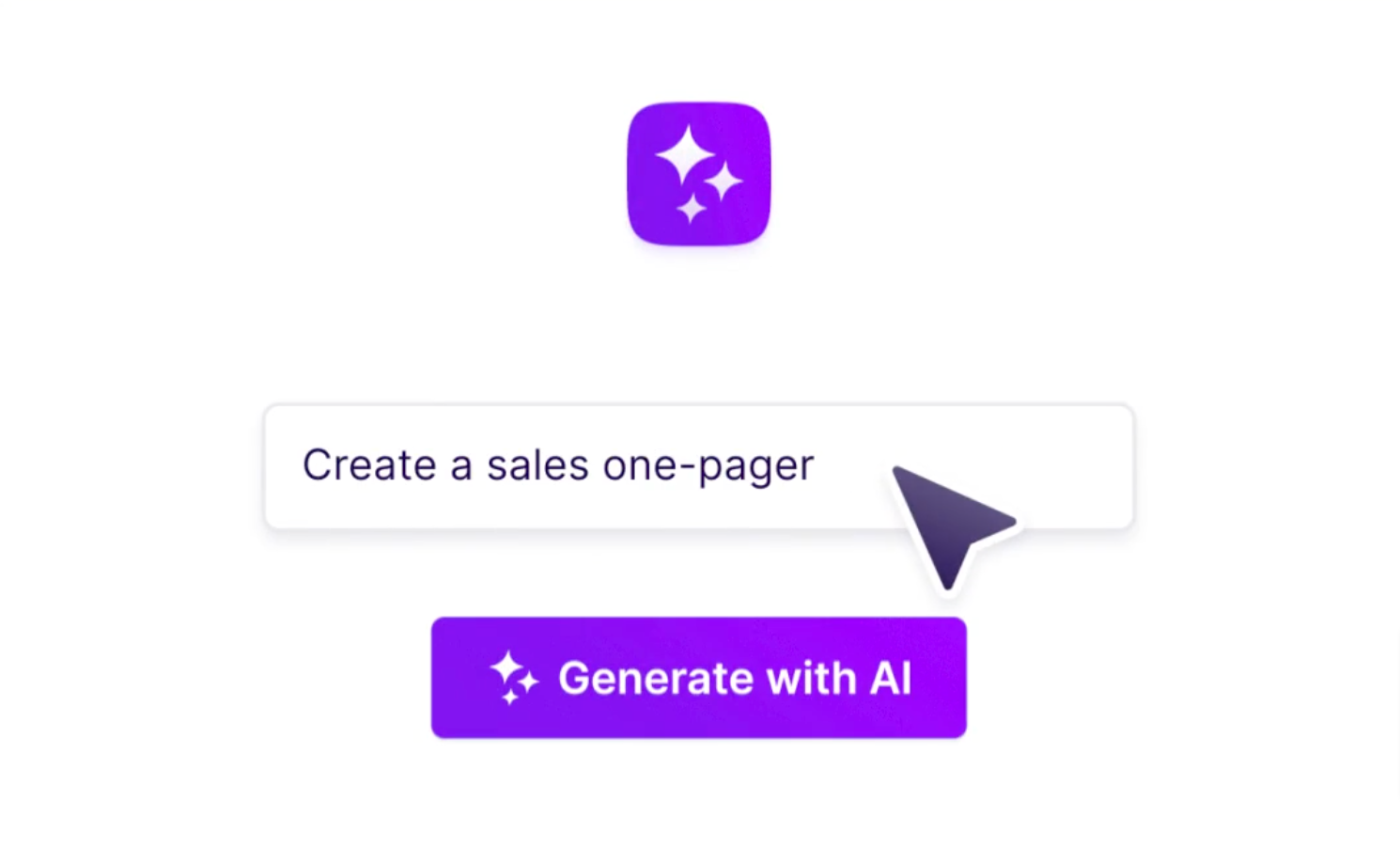
Stakeholders view it in their browser, and you get real-time analytics showing who opened it, which slides they lingered on, and where they dropped off.
The platform is designed for business use cases like sales proposals, investor decks, and marketing one-pagers rather than general-purpose presentations.
Key features
- AI presentation builder: Generates a presentation draft from a prompt, which you can then edit using the built-in editor.
- Drag-and-drop editor: Lets you customize layouts, swap content blocks, and embed media without design skills.
- Engagement analytics: Shows real-time data on who viewed your presentation, how long they spent on each slide, and where they dropped off.
- Interactive elements: Supports embedded video, forms, calculators, and other interactive components within the deck.
- Instant update syncing: Changes made to a published deck are reflected automatically for anyone who has the link, so clients always see the latest version.
- One-click approval: Lets proposal recipients approve your submission directly from the deck without needing a separate signature process.
Pros & cons
Pros
- Engagement analytics give you visibility into how prospects interact with your proposal, which is useful for sales follow-up
- The visual output is consistently premium compared to standard slide decks
- Interactive elements and one-click approvals streamline the proposal-to-close process
- Automatic deck updates mean you never have to re-send a revised version
- Mobile responsiveness is reliable, which matters since many stakeholders view documents on their phones
Cons
- No free plan; the entry price is high compared to general-purpose presentation tools
- Template variety in the standard library is more limited than some users expect
- Chart types and series editing options are restricted compared to dedicated data visualization tools
What we like
The real-time engagement notifications are more useful than they sound.
Knowing when a prospect opens your proposal (and how deeply they read it) gives you a natural and well-timed prompt to follow up, without guessing.
What users say
Users praise Storydoc's visual output and the competitive edge that interactive, trackable proposals give them in sales contexts.
"I really like that Storydoc is the most important tool among all my GTM tools today. It allows me to easily create custom proposals that are beautiful and engaging.
I get a lot of good feedback from clients, which helps them remember us more. I love that I can track activity and receive notifications when a client opens my story, making my sales cycle work smarter."
The main criticism centers on template options and the absence of a free plan.
"There isn't much to dislike. If I had to pick something, it would be a desire for even more pre-set, high-tier templates in the standard library.
Their custom design team does incredible work, but having more ready-to-go layouts that offer that same bespoke feel would help us scale our smaller projects even faster."
Pricing
Storydoc doesn't offer a free plan. Paid plans include:
- Starter ($40/user/month)
- Pro ($60/user/month)
- Business (custom pricing)
- Premium (custom pricing)
- Enterprise (custom pricing)
Get more reviews with LocalImpact
Generate more 5-star reviews for your business and take control of your online reputation with LocalImpact.
8. Pictory
Best for: Content creators and marketers who want to turn scripts, blog posts, or long-form videos into short, shareable clips without video editing experience.
Pictory is an AI video creation tool designed for non-editors. You feed it a script, a blog post URL, or a long video file, and it produces a finished video with matched footage, AI voiceovers, subtitles, and background music.
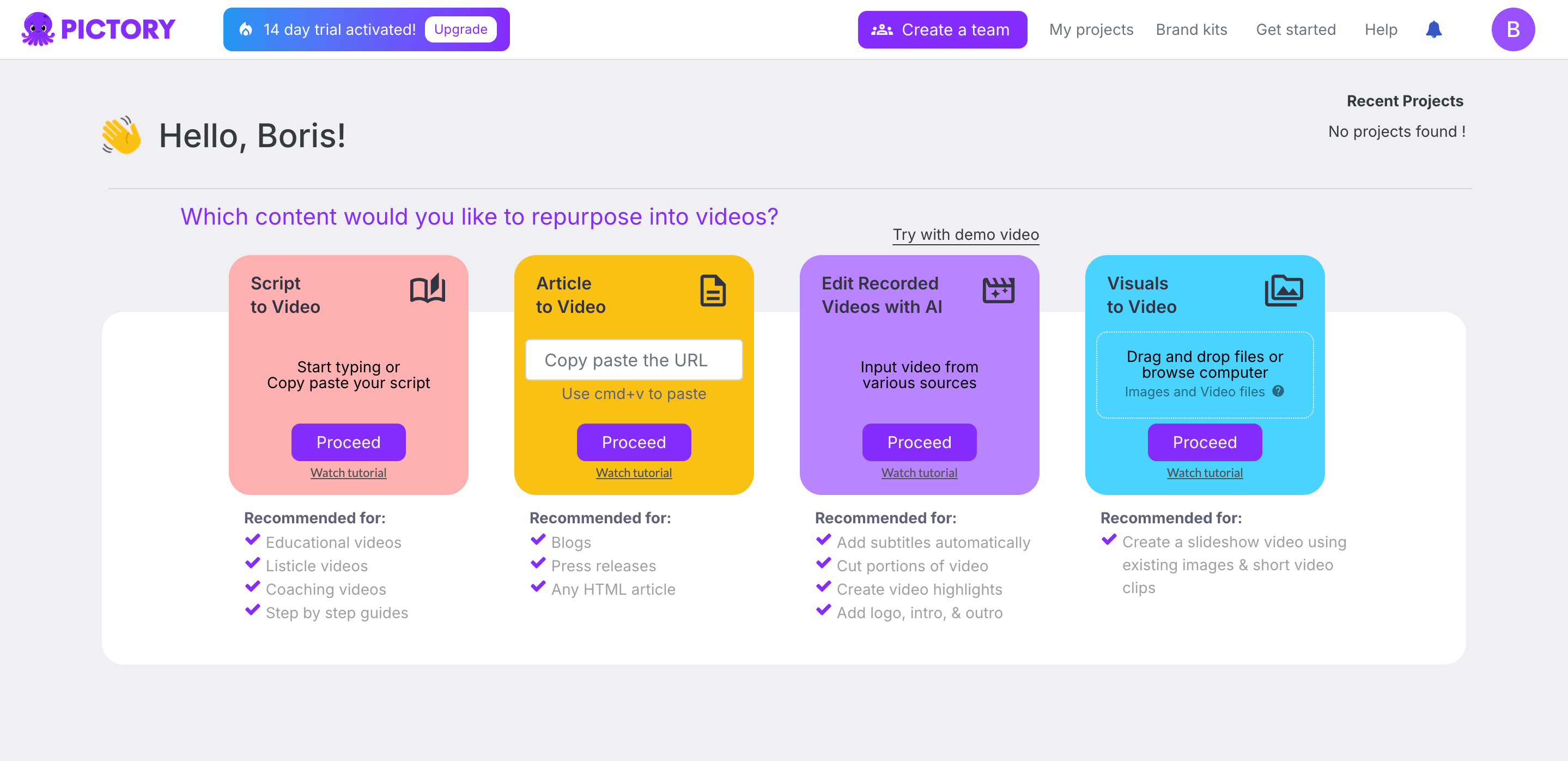
The output isn't cinematic, but it's polished enough for social media, email marketing, and website use, and the process takes minutes rather than hours.
The platform is particularly useful for content repurposing. A long webinar or YouTube video can be automatically cut into highlight clips, each formatted for the aspect ratio you choose.
The brand kit feature lets you save your colors, fonts, and logo so every video your team produces looks consistent.
Key features
- Script-to-video: Converts a written script into a video with auto-matched stock footage, voiceover, and music.
- Blog-to-video: Turns a blog post URL into a video with matched visuals automatically.
- Long-form video highlights: Extracts short clips from longer videos for use on social media platforms.
- AI voiceovers: Generates narration in multiple voices and languages without recording.
- Brand kit: Stores your brand colors, fonts, and logo to ensure consistent output across videos.
- Aspect ratio reformatting: Resizes videos for specific social media platforms in one click.
Pros & cons
Pros
- The script-to-video workflow is fast and intuitive even for complete beginners
- Excellent for content repurposing, particularly turning long recordings into shorter clips
- Large stock media library with 3M+ video clips, images, and 15,000+ royalty-free music tracks
- Auto-generated subtitles save significant post-production time
- Brand kit ensures visual consistency across all team-produced content
Cons
- Template selection is considered limited and less distinctive than some competing tools
- AI-selected footage doesn't always match the scene context accurately, requiring manual swaps
- Aspect ratio reformatting can produce inconsistent results and may need manual cleanup
- Customization options for frame timing and editing logic have some known bugs
What we like
Pictory's blog-to-video feature is a genuinely underused capability. For businesses publishing regular written content, being able to convert existing articles into social-ready videos with minimal effort adds a distribution channel without adding to the content creation workload.
What users say
Users consistently highlight how accessible the platform is for people with no video editing background, and how much time it saves on short-form video production.
"Pictory AI makes video creation extremely easy, even for non-technical users. The ready-to-use templates help quickly turn ideas, scripts, or text into engaging videos without spending too much time on editing.
I first used Pictory about a year ago, and it has become more advanced and polished since then."
The main criticism is around template quality and limited customization options.
"One thing I dislike about Pictory AI is that the template selection feels limited and not very impressive compared to other video tools.
While the core features are useful, the lack of strong, creative templates is noticeable."
Pricing
Pictory doesn't offer a free trial. Paid plans include:
- Starter ($25/month)
- Professional ($49/month)
- Teams ($119/month)
- Enterprise (custom pricing)
9. Lumen5
Best for: Marketing teams and content creators who want to convert existing written content into social-ready videos using a simple, template-based workflow.
Lumen5 takes your existing content and turns it into video. You can paste in a URL, upload a PDF, or type text directly, and the platform uses AI to match your content to relevant footage and music from its media library.
The interface is drag-and-drop, and the platform is designed specifically for marketers rather than video professionals. Templates can be saved to ensure brand consistency across everything your team produces.
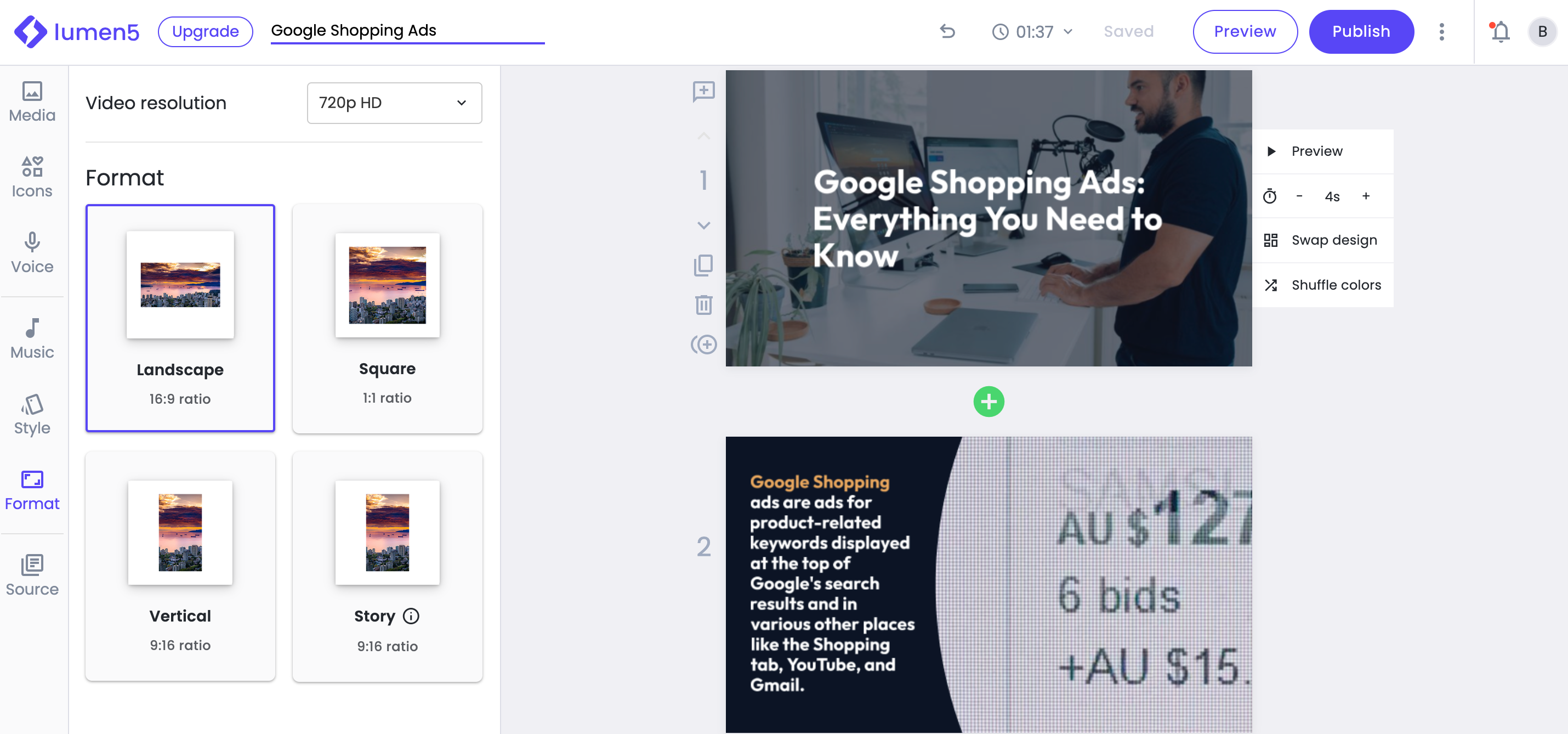
The platform is especially useful for teams already producing regular written content, like blog posts or newsletters, who want to extend that content into video format without hiring a video editor or buying into complex software.
Key features
- Text-to-video: Converts blog posts, articles, PDFs, or pasted text into videos with matched footage and music.
- URL import: Pulls content directly from a web page URL without manual copy-paste.
- AI voiceover: Adds AI-generated narration to your video in multiple languages.
- Brand templates: Saves branded templates with your colors, fonts, and watermark for team-wide consistency.
- Media library: Provides access to a large library of licensed stock video, images, and music.
- Multi-aspect ratio export: Formats finished videos for different social media platforms.
Pros & cons
Pros
- Minimal learning curve; the interface is intuitive enough to get started without training
- Strong for repurposing existing written content into social video quickly
- Brand template feature is well-implemented and easy to use across a team
- Genuinely time-saving compared to manual video editing for short-form content
- URL import makes it easy to start without copy-pasting from your CMS
Cons
- AI footage selection is sometimes too generic, requiring manual replacements for more specific topics
- Video length and customization are limited on lower-tier plans
- Pricing is considered high by some users relative to the feature set
- 1080p export requires upgrading from the base $29/month plan
What we like
The team template feature is more useful than it initially appears. Once you've set up your brand colors, fonts, and preferred layouts, anyone on your team can produce an on-brand video in minutes without design review, which removes a common bottleneck in content production.
What users say
Users praise Lumen5 for how quickly it can convert written content into video and highlight the time savings compared to manual production.
"It allowed me to create something almost tremendously useful when I tried the free version. I loved the way their scene composition worked. I like the edit feature of the script.
While it is time consuming, this is way better than working with a professional marketing firm and the cycle time."
Some users mention that the AI footage selection requires more editing than expected.
"Sometimes the extracts from posts that I wish to convert to short videos requires more editing but that's okay."
Pricing
Lumen5 doesn't offer a free trial on paid plans. Paid plans include:
- Basic ($29/month)
- Starter ($79/month)
- Professional ($199/month)
- Enterprise (custom pricing)
10. Ocoya
Best for: Small business owners and solo marketers who want to handle content creation, scheduling, and publishing across social platforms from a single tool.
Ocoya is an AI-powered social media platform that brings copywriting, visual creation, and scheduling into one place. Its built-in AI assistant, Travis, generates captions, hashtags, and full post copy in 20+ languages.
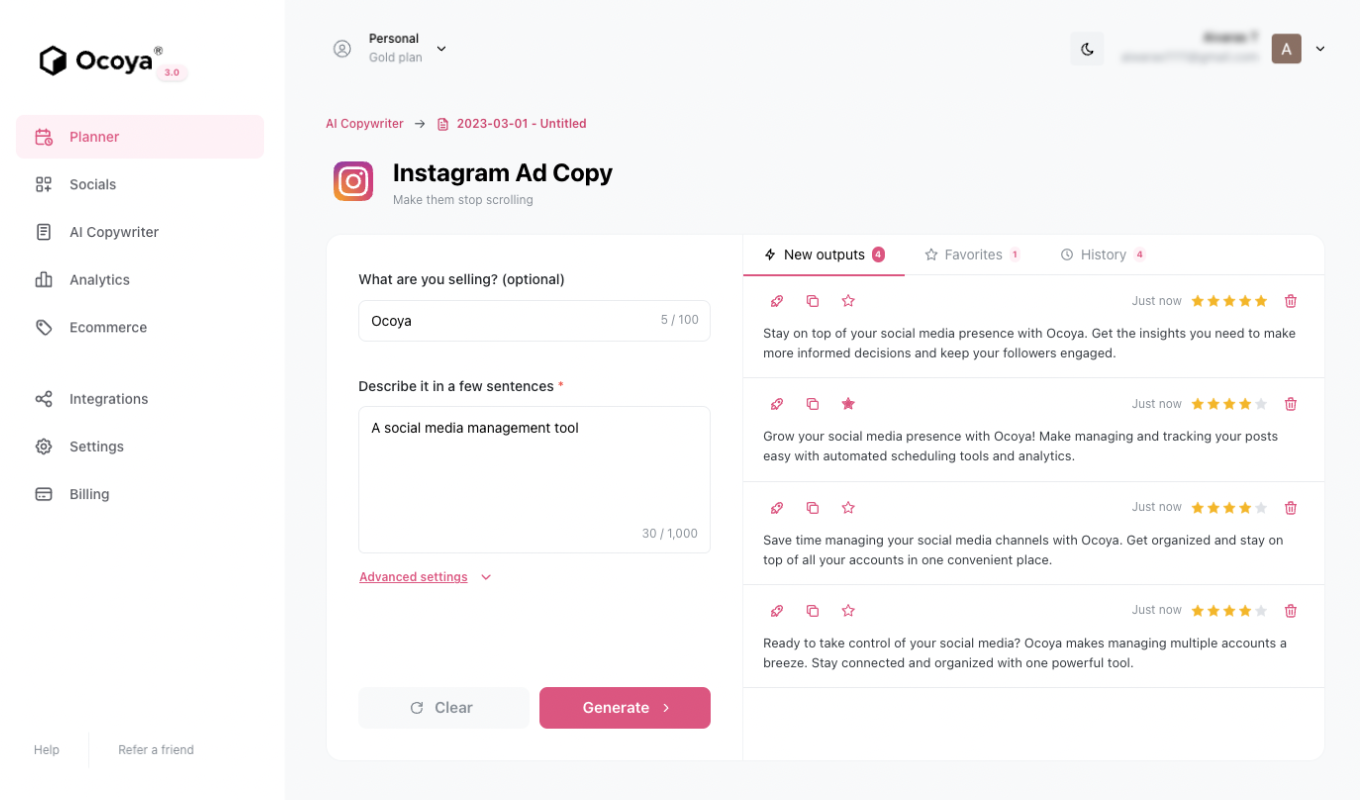
You can design graphics directly in the platform, connect your Canva account for more advanced visuals, and schedule posts to go out automatically across Facebook, Instagram, X, and LinkedIn.
The social calendar gives you a clear view of all scheduled content, and the analytics dashboard tracks post performance, though some users have noted the analytics are more basic than they'd like.
Key features
- AI content generation: Travis AI writes captions, hashtags, and full social post copy in 20+ languages.
- Built-in visual editor: Lets you design graphics for social posts within the platform, with Canva integration for more complex visuals.
- Multi-channel scheduling: Schedules and publishes posts automatically to Facebook, Instagram, X, and LinkedIn.
- Social calendar: Displays all scheduled content in a calendar view for easy planning and oversight.
- Analytics dashboard: Tracks post performance metrics including reach, engagement, and publishing success.
- AI-generated visuals: Creates images and short video content to accompany social posts.
Pros & cons
Pros
- Consolidates copywriting, design, and scheduling into one subscription, replacing multiple tools
- Travis AI caption generation is fast and handles multiple languages well
- Clean, intuitive interface that requires minimal onboarding
- Canva integration works smoothly for teams already using Canva for visual content
- 7-day free trial available to test the platform before committing
Cons
- Analytics are basic at lower tiers; audience demographics and competitor tracking require higher plans
- Approval workflow for team content is limited, which creates friction for agencies or teams with review processes
- Notification reliability for failed posts has been flagged by some users
What we like
The all-in-one consolidation is genuinely useful for solo operators. Instead of paying separately for a caption tool, a design tool, and a scheduler, Ocoya covers all three in one interface.
The workflow from writing to designing to scheduling to publishing happens without leaving the platform.
What users say
Users highlight the breadth of what Ocoya covers in a single subscription and how useful the Travis AI tools are for fast content creation.
"The app is straightforward to navigate and has a lot of different tools you can use to generate and plan campaigns rapidly and their Travis AI is pretty great.
I also like how the images and templates are so easy to pull together solid posts with plenty of external integrations and graphics tools."
The most consistent criticism is around features that have been listed as coming soon for extended periods without shipping.
"They still list everything as 'coming soon' and never add it. I no longer use it all the time to manage social media content planning and management for clients and their campaigns."
Pricing
Ocoya offers a 7-day free trial. Paid plans include:
- Bronze ($19/month)
- Silver ($49/month)
- Gold ($99/month)
- Diamond ($199/month)
11. AdCreative.ai
Best for: Paid advertising teams and digital marketers who need to generate and test large volumes of ad creatives quickly without a dedicated designer.
AdCreative.ai uses AI to generate ad copy, images, and full campaign creatives for Facebook, Instagram, Google, and other channels.
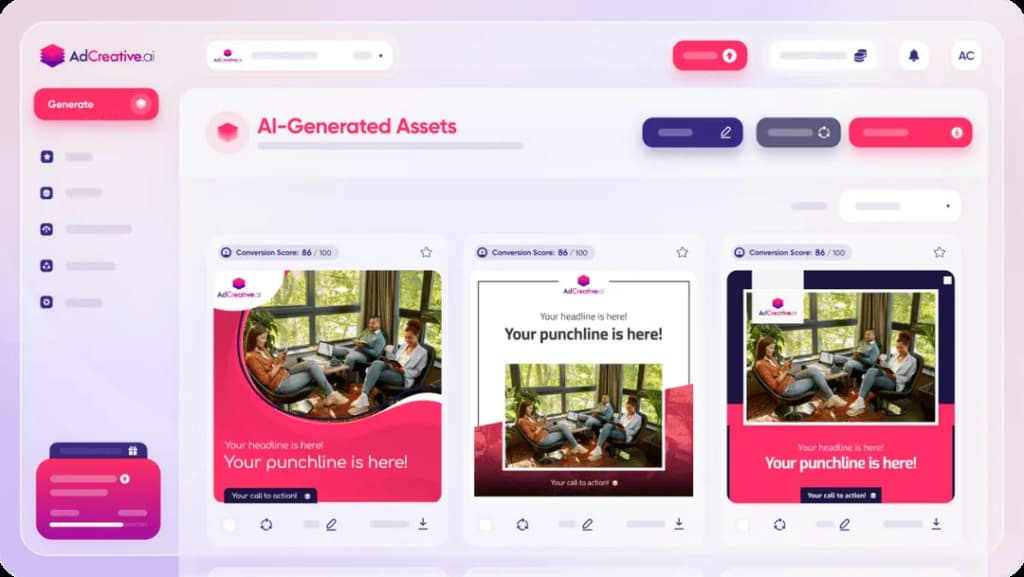
The standout feature is its creative scoring system, which predicts which ad variants are most likely to perform well based on past data before you spend any budget testing them.
You can generate hundreds of variations from a single brand input, which makes A/B testing faster and less expensive.
The platform also includes a competitor ad library and a Template Builder for maintaining brand consistency across campaigns. Setup is fast; connecting your ad accounts and uploading brand assets takes a few minutes, and you can start generating creatives immediately.
Key features
- AI ad creative generation: Produces image, copy, and video ad variants from your brand inputs and campaign brief.
- Creative scoring: Rates each generated creative by predicted performance before you publish it.
- Template builder: Creates branded ad templates to ensure consistency across campaigns and team members.
- Competitive analysis: Lets you research competitors' top-performing ads directly within the platform.
- Multi-platform support: Generates creatives sized and formatted for Facebook, Instagram, Google Display, and other channels.
- Ad account integration: Connects directly to Meta and Google Ads accounts for seamless publishing.
Pros & cons
Pros
- Onboarding is fast; you can be generating creatives within minutes of setup
- Creative scoring gives you a data-backed starting point for A/B testing without spending test budget first
- Useful for quickly generating multiple format variations of the same creative concept
- Competitor ad analysis saves time that would otherwise go into manual research
- Template builder makes brand consistency achievable across a team without a designer
Cons
- Customization options after generation are limited; you can't edit individual elements of a generated creative in detail
- Pricing is considered high for small businesses, particularly given the credit limits on lower tiers
- Trial-to-paid billing transitions have been a source of user complaints
What we like
The creative scoring system is the feature that genuinely differentiates AdCreative.ai.
Rather than publishing ad variants and waiting for performance data, you get a predicted ranking upfront, which means you can allocate budget more confidently from day one.
What users say
Users highlight the speed of creative generation and the utility of data-driven ad design for campaign testing.
"I love AdCreative.ai for its AI precision, which creates data-driven, high-performing ad designs that are essential in my ads marketing strategy.
The automated image generation is another standout feature, as it produces professional brand visuals instantly, saving considerable time and effort."
The main criticism centers on limited post-generation editing flexibility.
"What I dislike about AdCreative.ai is that the customization options can feel somewhat limited once the AI generates the initial creatives."
Pricing
AdCreative.ai offers a 7-day free trial. Paid plans include:
- Starter ($39/month)
- Professional ($249/month)
- Ultimate ($599/month)
12. FeedHive
Best for: Founders, content creators, and small marketing teams who want to plan, schedule, and optimize LinkedIn and other social media content with AI assistance.
FeedHive is a social media management platform built around ease of use and AI-assisted content planning.
The drag-and-drop scheduling interface is clean and fast, and the AI writing assistant helps you draft captions and overcome blank-page moments without taking over your voice. With 5,000+ post templates available, there's a solid library to work from across formats and topics.
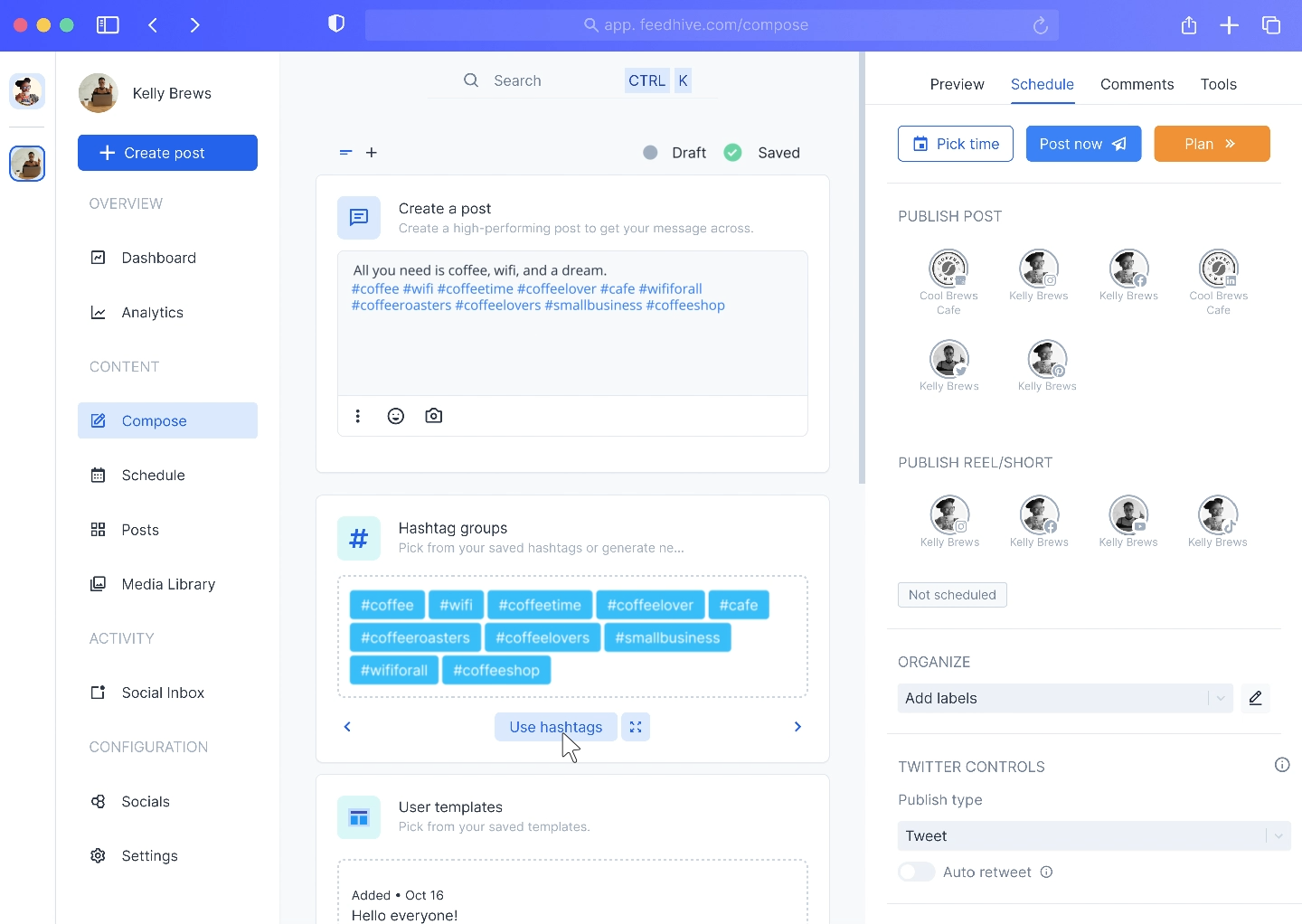
The platform's AI engagement predictor scores your posts before you publish them, and the content recycling feature automatically re-queues evergreen posts at optimal times, so content that performs well keeps working without manual management.
Multiple workspaces are included in a single subscription, which makes FeedHive practical for anyone managing content for more than one brand or client.
Key features
- AI writing assistant: Suggests and refines captions and post copy to match your tone and platform.
- Drag-and-drop scheduler: Plans and schedules posts across platforms using a clean visual calendar interface.
- 5,000+ post templates: Provides a large library of pre-built post formats to accelerate content planning.
- AI engagement predictor: Scores your posts before publishing to help prioritize the strongest content.
- Content recycling: Automatically re-queues evergreen posts at optimal times for continued reach.
- Multiple workspaces: Lets you manage separate social media accounts or brands within one subscription.
Pros & cons
Pros
- Clean, modern UI that makes scheduling fast and enjoyable
- Multiple workspaces in a single subscription is a strong value advantage for multi-brand users
- Content recycling reduces manual effort for evergreen content significantly
- AI engagement predictor helps prioritize which posts to publish and when
- Responsive support team that's engaged with user feedback
Cons
- Platform support doesn't currently include X (Twitter) or Bluesky
- The Creator plan's 30-post scheduling limit is restrictive for active content calendars
- No dedicated mobile app; mobile use relies on the browser version
What we like
The workspace structure is FeedHive's most underappreciated feature.
Being able to run separate social strategies for multiple brands or clients within one subscription, with clean separation between them, is something most competing tools charge extra for.
What users say
Users praise the platform's clean interface and how well it fits into an efficient solo content workflow, particularly for LinkedIn-focused strategies.
"As a founder who uses LinkedIn strategically to build trust and spark conversations, what I like best about FeedHive is how it lets me stay consistent without sounding robotic.
The UI is clean, the AI helps spark better writing without taking over, and the scheduling just works."
The most common complaint is around platform coverage, particularly the absence of X.
"I don't like that FeedHive doesn't support X and BlueSky."
Pricing
FeedHive offers a 7-day free trial. Paid plans include:
- Creator (€9/month)
- Brand (€19/month)
- Business (€59/month)
- Agency (€199/month)
13. Quickads
Best for: Growth-stage businesses and agencies that need to produce large volumes of image and video ad variations quickly, with a built-in ad library for competitive research.
Quickads is an AI ad creation platform that generates image and video ad variations from your website URL or a brief.
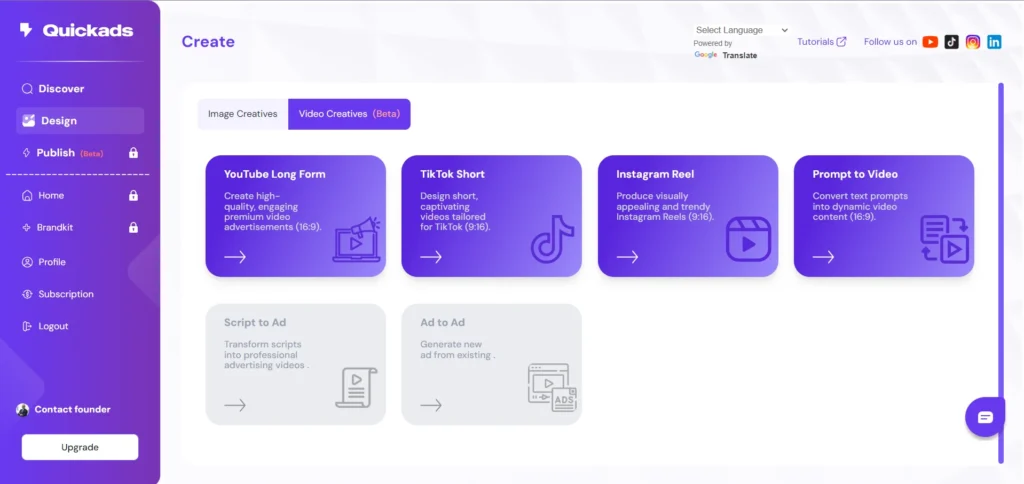
The platform combines AI generation with a human-oversight layer, involving strategists and video editors in the process rather than relying solely on automated output. This hybrid approach tends to produce more polished results than fully automated alternatives.
A standout feature is the built-in ad library of 10M+ ads from across platforms, each scored by predicted performance.
You can browse competitor ads for inspiration, see what's working in your category, and benchmark your own creatives before publishing. Direct publishing to Meta and Google is available from within the platform.
Key features
- AI ad generation: Creates image and video ad variations from your website URL, brief, or uploaded assets.
- 10M+ ad library: Provides a searchable database of ads across platforms, scored by predicted performance.
- AI plus human production: Pairs automated generation with human strategists and video editors for more polished output.
- Direct publishing: Publishes ads directly to Meta and Google from within the platform.
- Ad scoring: Rates each generated creative by expected performance before you run it.
- Multi-format output: Generates ads sized and formatted for different platforms and placements.
Pros & cons
Pros
- The ad library is one of the most comprehensive available in any ad creation tool
- The AI plus human hybrid approach produces more polished video ads than fully automated alternatives
- Cross-platform ad search (not just Meta) is a genuine advantage for research
- Creative scoring helps you prioritize spend on the strongest variants
- Direct Meta and Google publishing removes an extra step from the campaign setup process
Cons
- AI-generated text and images sometimes need manual adjustment to fit your specific brand voice
- Support response times have been flagged as slow by some users, particularly for urgent issues
- Some billing complaints have appeared in G2 reviews related to trial-to-paid transitions
What we like
The ad library's performance scoring stands out. Being able to search 10M+ real ads, filtered by category and platform, and see each one rated by likely performance is a research workflow that would take hours to replicate manually across individual platform libraries.
What users say
Users highlight Quickads' utility for competitive ad research and the speed at which it can generate usable creative variations.
"I love that Quickads lets me find ads across all platforms in one clean dashboard, not just the Instagram and Facebook ads I get from the Meta ads library.
The image and video creations are just a few clicks away, which is super convenient."
Some users note that AI-generated output still requires editing before it's fully on-brand.
"A couple of things could be better. Occasionally, the AI-generated text or images might not be an exact fit, so a little manual adjustment is required."
Pricing
Quickads offers a $1 five-day trial. Paid plans include:
- Starter ($79/month)
- Pro ($99/month)
- Agency ($149/month)
Get more reviews with LocalImpact
Generate more 5-star reviews for your business and take control of your online reputation with LocalImpact.
14. Synthesia
Best for: Businesses that need to produce regular video content at scale, particularly for training, onboarding, or product explainers, without on-camera talent or a video production setup.
Synthesia is an AI video generation platform that lets you create videos by typing a script or submitting a URL.
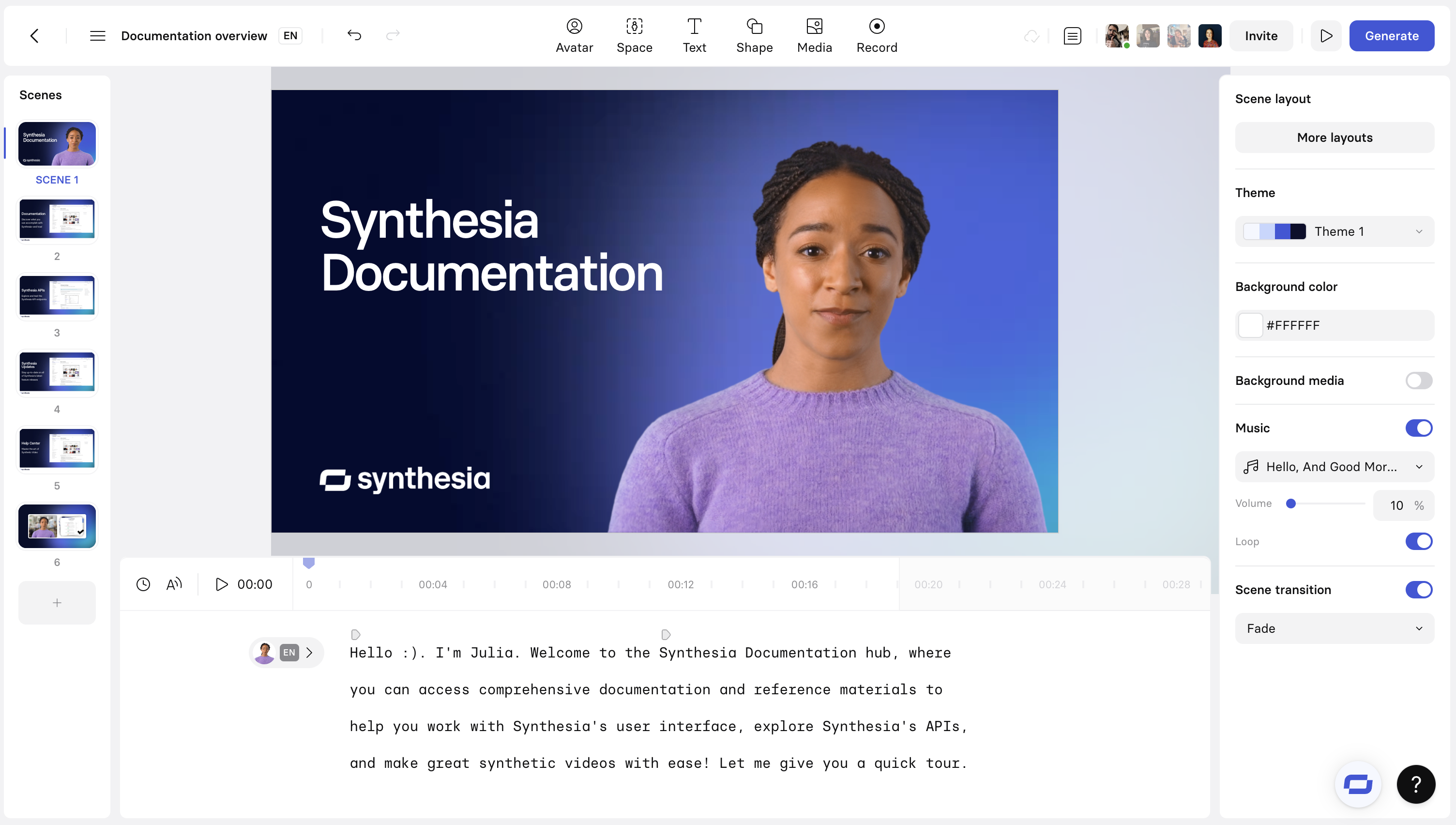
The platform renders a video with an AI avatar delivering your script, with 200+ avatars available across different styles, ages, and ethnicities.
Videos can be translated into 29+ languages, which makes Synthesia practical for businesses communicating with a multilingual audience.
The brand kit feature stores your logo, fonts, and colors so every video maintains visual consistency. Synthesia also offers a personal avatar option that lets you create a digital version of yourself for use in video content.
Key features
- Script-to-video: Converts a written script into a finished video with an AI avatar presenter.
- 200+ AI avatars: Provides a large library of avatar options across demographics and styles.
- 29+ language translation: Translates and dubs finished videos into more than 29 languages with matching avatar lip sync.
- Brand kit: Stores brand assets (logo, fonts, colors) for consistent video styling.
- Personal avatar: Creates a custom AI avatar based on a short video recording of yourself.
- Built-in editor: Lets you adjust layouts, swap scenes, and fine-tune timing within the platform.
Pros & cons
Pros
- Strong for producing training and explainer videos at scale without filming equipment
- Multi-language translation with synchronized lip-sync is technically impressive and saves significant dubbing cost
- No filming required, so new videos can be produced and updated quickly
- Personal avatar feature adds a more authentic feel to customer-facing content
- Free plan available with meaningful functionality for testing the tool
Cons
- Some users find the avatars sit in an uncanny valley that doesn't translate well to certain audiences
- Lip-sync accuracy varies by language, with some non-English languages requiring extra rework
- Rendering times can be slow for longer videos; small edits require a full re-render
- Pricing scales up quickly as usage grows, which can reduce ROI for high-volume teams
What we like
The multi-language translation capability is particularly valuable for businesses selling into international markets.
Translating and re-dubbing a video in 29 languages without re-recording is a capability that would otherwise require a significant outsourced production budget.
What users say
Users praise Synthesia's ability to produce professional-looking video content without any on-camera talent or production setup.
"We have used Synthesia to record slide decks using a personal avatar. Being able to edit my text and having access to easy-to-use animations and transitions all in one easy dashboard have been game-changers.
I'm surprised at the small learning curve and very impressed by the quality of the personal avatar."
A recurring criticism is around avatar realism and the uncanny valley effect.
"The avatars feel too close to real without being real enough. The consistent feedback I get is that they come across as 'creepy,' and the mouth movements don't always match up well."
Pricing
Synthesia offers a limited free plan. Paid plans include:
- Starter ($29/month)
- Creator ($89/month)
- Enterprise (custom pricing)
15. Fireflies.ai
Best for: Teams that run a high volume of meetings and need automatic transcription, summaries, and action items delivered immediately after every call.
Fireflies.ai joins your Zoom, Google Meet, Microsoft Teams, and other video calls automatically and records, transcribes, and summarizes them without any manual setup.
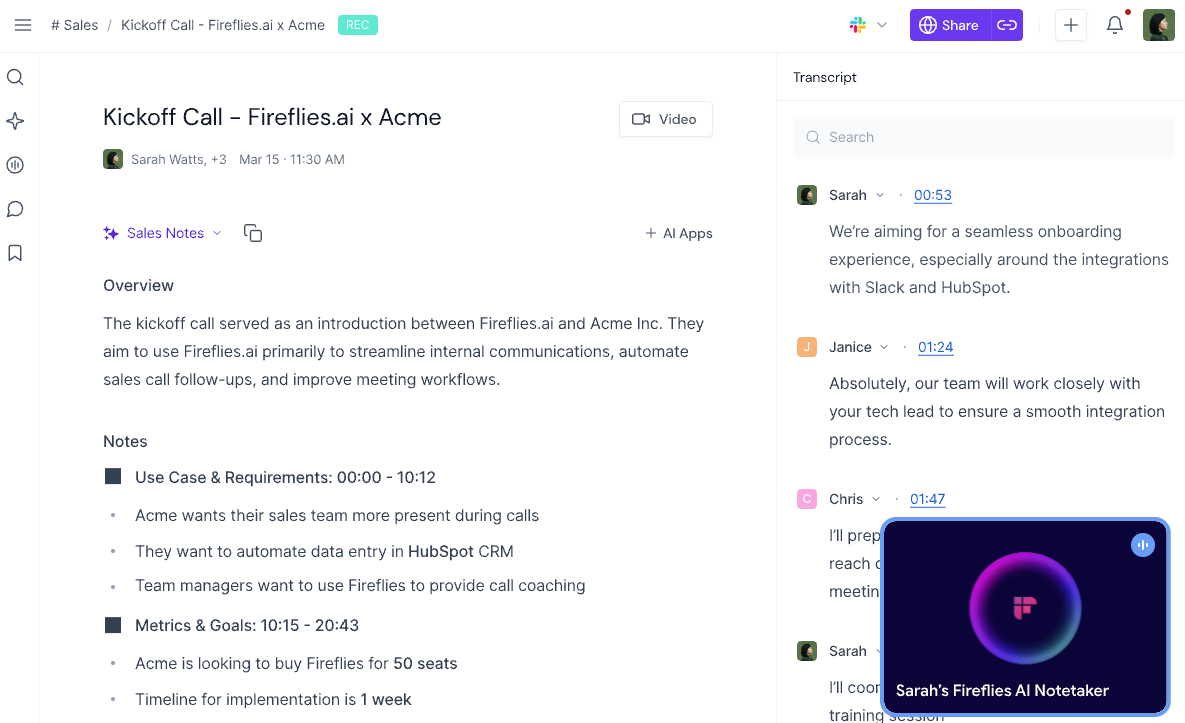
It supports 100+ languages, identifies different speakers, and generates summaries with action items that can be shared with attendees right after the meeting ends.
The searchable transcript archive lets you find specific discussions from weeks or months of past calls in seconds.
Beyond transcription, Fireflies includes an AI chatbot called AskFred, which lets you ask natural language questions about any meeting in your archive, pull specific data points, or draft follow-up emails directly from the transcript.
Integration with CRMs and project management tools makes it useful in sales and customer success workflows.
Key features
- Automatic meeting recording: Joins calls and records audio automatically without requiring manual initiation.
- 100+ language transcription: Transcribes meetings in more than 100 languages with speaker identification.
- AI meeting summaries: Generates structured summaries with action items immediately after each call.
- Searchable transcript archive: Makes past meeting transcripts fully searchable by keyword or topic.
- AskFred AI chatbot: Lets you ask questions about any meeting in plain language to extract specific details or draft content.
- CRM and tool integrations: Connects with popular CRMs and project management tools to push meeting data into existing workflows.
Pros & cons
Pros
- Setup is fast; connecting to your calendar and video platform takes a few minutes
- Summaries are reliable enough to share with attendees immediately after a call
- Searchable archives are genuinely useful for teams that reference past conversations regularly
- AskFred makes extracting specific details from long meetings much faster than scrubbing through transcripts
- Free plan available with meaningful transcription functionality
Cons
- Transcription accuracy drops with overlapping speakers, technical jargon, or multiple languages in the same meeting
- Summaries can occasionally be too general and miss important nuance from complex discussions
- Pricing is considered high by some users, particularly when AI credit costs are factored in
- Post-meeting notes delivered in a foreign language still require manual translation
What we like
AskFred turns your meeting archive into something genuinely useful rather than just a storage repository.
Being able to ask "what did we decide about pricing on the March call?" and get an answer without scrubbing through an hour of audio is a qualitative change in how meeting information can be used.
What users say
Users highlight Fireflies' accuracy and the time savings from automated summaries and action item generation.
"I use Fireflies.ai to record, transcribe, and summarize my meetings automatically. I like the AI-generated meeting summaries the most because they help in meetings where I can't join, but I still get the discussion details.
These summaries provide the crux of long meetings in just a few paragraphs."
The most common criticism is around transcription accuracy when audio or speaker conditions aren't ideal.
"Sometimes the transcriptions are totally wrong and change the correct meaning of the things discussed in the meeting."
Pricing
Fireflies.ai offers a limited free plan. Paid plans include:
- Pro ($18/seat/month)
- Business ($29/seat/month)
- Enterprise (custom pricing)
16. Clockwise
Best for: Individuals and teams using Google Calendar who want AI to automatically optimize their schedule for focus time and meeting efficiency without constant manual rearranging.
Clockwise is an AI calendar assistant that works within your existing Google Calendar to find and protect blocks of focused work time.
It analyzes everyone's schedules on a team and automatically moves flexible meetings to create longer, uninterrupted work blocks where possible.
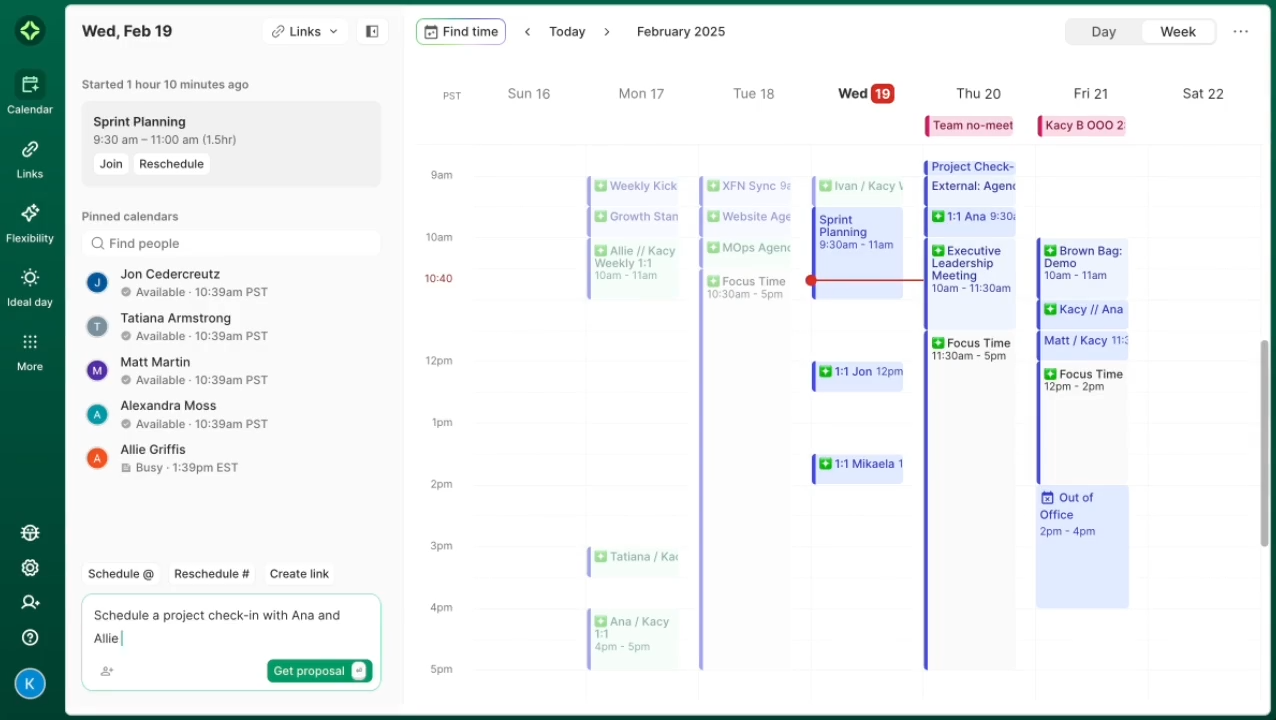
The more team members using Clockwise, the more effective the optimization becomes, since the tool can coordinate across everyone's calendars simultaneously.
Beyond focus time protection, Clockwise provides scheduling links for external bookings, meeting time suggestions for groups, and a time analytics dashboard that shows how your week is actually being spent versus how you want to spend it.
Key features
- Automatic focus time protection: Identifies and blocks open time for deep work by moving flexible meetings intelligently.
- Meeting time optimization: Analyzes team schedules to find optimal meeting times that minimize fragmentation across the group.
- Scheduling links: Generates shareable availability links for external booking without back-and-forth emails.
- Time analytics: Shows how your working hours are distributed across meetings, focus work, and other categories.
- Slack integration: Syncs your focus time status to Slack so teammates know when you're unavailable.
- Flexible meeting detection: Identifies meetings that can be moved and reschedules them automatically to create better calendar flow.
Pros & cons
Pros
- Focus time protection runs automatically once set up, without ongoing manual intervention
- Scheduling links are fast to set up and eliminate back-and-forth booking emails
- Time analytics dashboard gives useful visibility into how your calendar is actually structured
- Free plan available with meaningful functionality for individual users
- Slack status sync keeps team communication aligned with your availability
Cons
- Optimization is significantly more effective when your whole team is using Clockwise
- Automatic rescheduling can occasionally confuse colleagues who weren't expecting a meeting to move
- Works primarily with Google Calendar; Outlook integration is more limited
What we like
Clockwise's focus time protection feels different from manual time-blocking because it's dynamic rather than static.
When a new meeting gets added, Clockwise adjusts your focus blocks in response rather than leaving you with a fragmented calendar you have to fix by hand.
What users say
Users consistently highlight how Clockwise removes the mental overhead of calendar management and how it transforms their ability to protect productive working time.
"Clockwise has completely transformed how I manage my time. No more back-and-forth messages to figure out when people are free.
I love that Clockwise takes care of that by automatically finding the best meeting times for everyone. One of my favourite features is how it intelligently moves meetings to create larger blocks of focus time, which has seriously boosted my productivity."
The most common limitation is around team adoption dependency.
"Sometimes the automatic rescheduling can throw off colleagues as they might have been expecting a meeting at a certain time and it gets moved, or they feel a meeting has sprung up on them earlier than expected, because it's been moved."
Pricing
Clockwise offers a limited free plan. Paid plans include:
- Teams ($6.75/user/month, billed annually)
- Business ($11.50/user/month, billed annually)
- Enterprise (custom pricing)
How to choose the right AI tools for your small business
Not every tool on this list will be right for your business, and that's fine. The goal is to find one or two that fit your workflow and actually get used.
Here's what to think about before you commit:
- Start with your biggest time drain: The tools on this list cover very different problems, from scheduling to video production to ad creation. Pick the one that addresses the task you're most likely to skip or outsource because it takes too long.
- Test before committing: Most tools here offer a free plan or trial period. Use it with a real workflow, not a toy example, so you can judge whether the output quality meets your actual standards.
- Check what's included at the entry level: Several tools on this list restrict their most useful features to higher-priced tiers. Read the pricing page carefully before assuming the cheapest plan will work for your use case.
- Think about your team size: Some tools price per seat, which can make them expensive quickly. If you're a solo operator, prioritize individual plans; if you have a team, look for tools with generous per-seat pricing or shared workspace features.
- Consider the learning curve: A powerful tool that takes a week to set up may not be the right fit if you need results now. Many of the tools here are designed specifically for non-technical users, so ease of use matters as much as capability.
The right AI tool is the one you'll actually use consistently. Start narrow, get results, then expand from there.
Get started using AI tools for small business
The 16 tools on this list cover a wide range of use cases, and most offer a free plan or trial period to test before committing. Start with the one that addresses your most pressing problem, get results, then expand from there.