
Managing reviews your business gets across multiple review sites can be stressful and time-consuming. But the right software can make this process a lot easier.
Here’s our list of the best review management tools in 2026.
Top review management tools at a glance
No time to go through the entire list? Here's a quick comparison.
| Software | Starting price | Free trial available |
| LocalImpact | $19/month | Yes |
| Reputation | Custom pricing | No |
| Broadly | $399/month | Yes |
| ReviewTrackers | Custom pricing | No |
| Podium | Custom pricing | No |
| GatherUp | $99/month | Yes |
| Yext | Custom pricing | No |
| Reviewshake | $79/month | Yes |
| Grade.us | $110/month | Yes |
| Birdeye | Custom pricing | No |
| TrueReview | $49/month | Yes |
| EmbedMyReviews | $99/month | Yes |
| NiceJob | $75/month | Yes |
| Synup | $34.99/location/month | Yes |
| Chatmeter | Custom pricing | No |
How we chose these tools
Putting together this list required significant hands-on time with each platform. We spent 150+ hours testing, evaluating, and comparing review management tools across a wide range of criteria, from day-to-day usability to pricing transparency to the depth of features on offer.
Every tool on this list was evaluated against the same set of criteria:
- Ease of use: How quickly can a business owner or small team get up and running without technical support?
- Review generation: Does the platform make it genuinely easy to request reviews from customers via email and SMS, with automation and follow-up sequences?
- Review monitoring: How many platforms does the tool monitor, and how quickly does new review data appear in the dashboard?
- Response tools: Does the platform offer AI-generated replies, response templates, or both, and how useful are they in practice?
- Review display: Can businesses showcase their best reviews on their website, and how flexible are the display options?
- Reporting and analytics: How much insight does the platform provide into review trends, sentiment, and performance over time?
Tools that didn't meet a reasonable standard across most of these criteria didn't make the list, regardless of brand recognition or marketing presence.
1. LocalImpact
Best for: Small businesses and agencies wanting an affordable, full-featured review management solution
LocalImpact is a review management platform designed to help local businesses collect, monitor, and respond to customer reviews across 27+ popular review sites, including Google, Facebook, Yelp, and Tripadvisor.
The review feed pulls incoming reviews from all connected platforms into one inbox, making it easy to stay on top of new feedback without logging into each site separately.
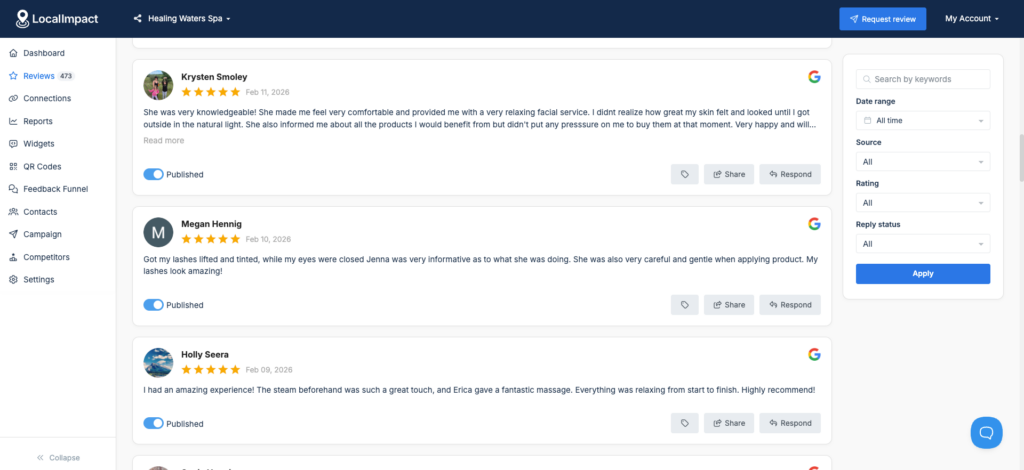
AI-generated reply suggestions speed up the response process for teams that handle a high volume of reviews.
For generating new reviews, LocalImpact sends automated email and SMS requests to customers, with follow-up sequences that run in the background without any manual effort.
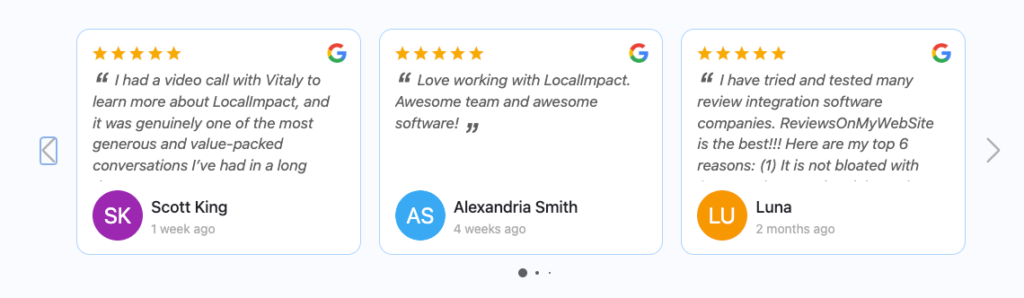
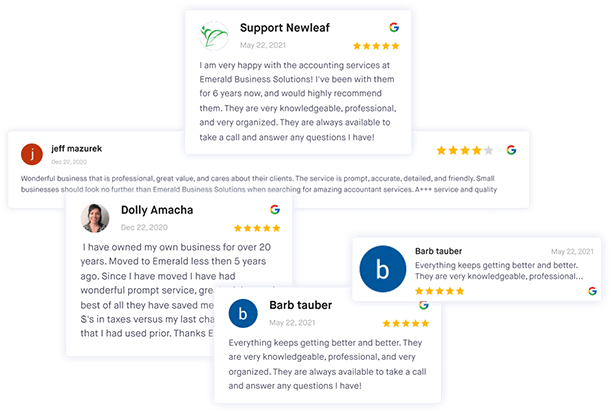
A handful of small but practical tools round out the feature set: a Google review link generator, a QR code generator, and a review widget that lets you embed top reviews on your website with a short code snippet.
Key features
- Review feed: Aggregates reviews from 27+ platforms into a single inbox so you can read and reply to all incoming feedback from one place.
- Automated review requests: Sends email and SMS review requests to customers automatically, with follow-up sequences to increase response rates.
- AI review replies: Generates response suggestions for incoming reviews, with the option to edit before publishing.
- Review widgets: Embeds your top customer reviews on your website using a short code snippet, with display styles you can customize to match your branding.
- Google review link generator: Creates a direct link to your Google review page that you can share with customers via email, text, or social media.
- QR code generator: Generates a scannable QR code that takes customers straight to your review page, useful for in-person or print-based prompts.
Pros & cons
Pros
- Significantly more affordable than most tools on this list, with a starting price of $19/month
- Simple setup and easy to navigate, even without a technical background
- Covers review generation, monitoring, responding, and website display in one platform
- Practical helper tools like the Google review link and QR code generators add real everyday value
Cons
- Widget customization options are more limited compared to some competing tools
- Review syncing can occasionally lag behind real-time updates
- White-label functionality is not available on current plans
What we like
LocalImpact hits a sweet spot that most tools on this list don't: it covers the full review management workflow, from generating reviews to displaying them on your website, at a price point that's accessible for small businesses.
For local businesses that want a capable, no-fuss solution without paying enterprise prices, it's a strong first choice.
What users say
Users consistently highlight LocalImpact's ease of use and value for money as standout strengths. One G2 reviewer said:
"Software is simple to use and implement to websites, capture and follow up to reviews, onboard clients and from multiple review sources. Affordable for businesses that need reviews on their website. Customer support is outstanding!"
Pricing
You can try out LocalImpact for free with the 14-day trial offer. Plans are priced as follows:
- Growth ($49/month)
- Pro ($99/month)
- Agency ($149/month)
Manage online reviews with LocalImpact
Track, manage, and grow your online reviews with LocalImpact.
2. Reputation
Best for: Large multi-location businesses needing advanced sentiment analysis and enterprise-level reporting
Reputation is built for multi-location businesses that need centralized control over customer feedback across platforms. After spending time inside the product, the review inbox, sentiment analysis, and custom reporting features stood out as the strongest parts of the platform.
Review request setup supports both email and SMS, and you can use built-in templates or build your own from scratch.
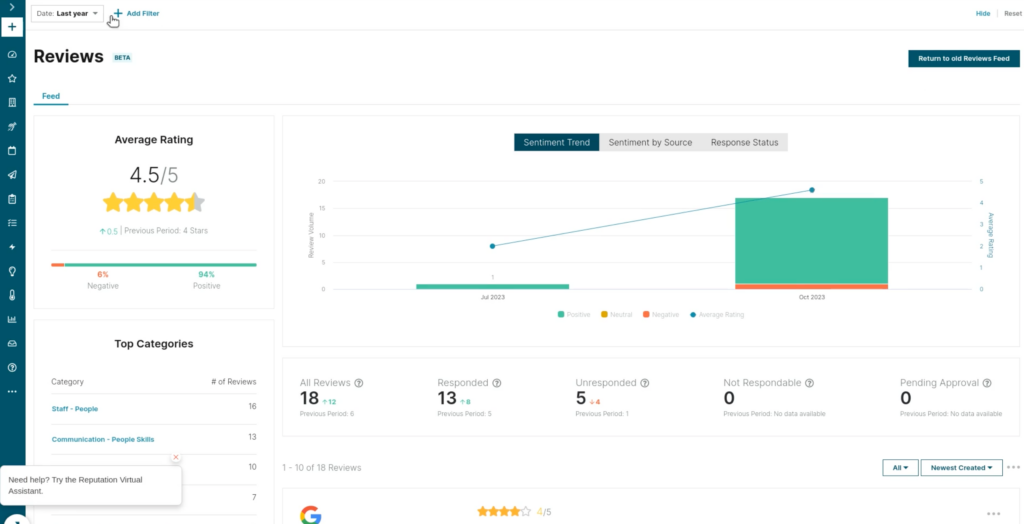
Real-time sentiment categorization makes it easy to triage incoming reviews at a glance without reading each one in full. Brand-level and location-level reporting lets you track review volume, average ratings, and sentiment trends from one dashboard.
You can also set up custom dashboards and automated email digests so your team stays informed without logging in constantly.
Key features
- Centralized review inbox: Pulls reviews from Google, Facebook, and other platforms into one feed, with filtering by site, rating, date, and sentiment.
- Sentiment analysis: Automatically classifies incoming reviews as positive, negative, or neutral so you can prioritize responses without reading every review manually.
- AI-generated responses: Drafts replies to reviews in seconds, with options to rewrite or adjust tone before publishing.
- Custom reporting dashboards: Track review performance at the brand or individual location level, with flexible chart formats including line graphs, bar graphs, and word clouds.
- Review request automation: Sends branded email and SMS review requests to customers after interactions, with customizable templates.
- Social suite: Includes a content calendar for scheduling social media posts alongside your reputation management workflow.
Pros & cons
Pros
- Strong analytics and reporting make it easy to track reputation trends across large numbers of locations
- Real-time monitoring means you can catch and respond to negative reviews quickly
- Centralized inbox eliminates the need to log into each review platform separately
- Customizable dashboards let teams focus on the metrics most relevant to them
Cons
- Pricing isn't publicly available, so you'll need to go through the sales team for a quote
- The social suite lacks the advanced scheduling functionality some users expect
- Maintaining the platform's internal reputation score can feel difficult, since many variables are outside your control
What we like
The combination of brand-level and location-level reporting in a single view is genuinely useful. You can move from an enterprise-wide snapshot to a single location in a few clicks, which is something smaller tools rarely offer.
What users say
Users consistently highlight how much Reputation simplifies managing feedback across multiple channels. One G2 reviewer put it this way:
"I really appreciate how easy Reputation is to use, which makes it a pleasure to manage our customer satisfaction follow-ups and reviews.
Having everything in one place is a significant advantage because it streamlines the process of sending surveys and addressing reviews efficiently.
This centralization saves time and effort by eliminating the need to switch between multiple platforms, thereby enhancing productivity."
On the downside, some users find parts of the platform harder to stay on top of. One G2 reviewer noted:
"I find the whole reputation score aspect challenging. It's possible to increase our score, but maintaining it is difficult due to numerous variables beyond our control.
Furthermore, it's hard to encourage customers to leave detailed reviews when happy, which impacts our sentiment scores negatively."
Pricing
Reputation's pricing isn't available publicly. You'll need to reach out to the company's sales team to get a custom quote.
3. Broadly
Best for: Local service businesses wanting simple review generation combined with a shared customer inbox
Broadly is a review management and customer communication platform built with local service businesses in mind.
Having put the platform through its paces, the review request workflow, shared inbox, and negative feedback management features were the highlights of the experience.
Setting up automated SMS and email review requests was quick, and the ability to write custom request messages made it easy to tailor tone for different business types.
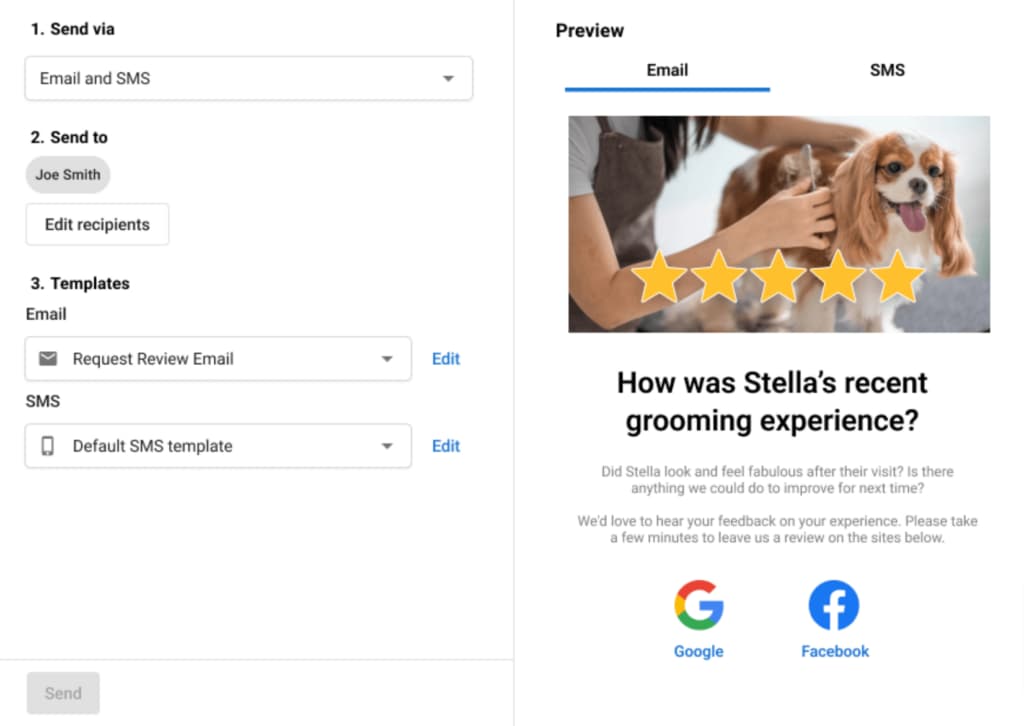
The shared inbox consolidates messages from Google, Facebook, Instagram, and web chat into one place, keeping customer conversations organized.
Broadly's negative feedback routing feature intercepts dissatisfied customers before they reach public review sites, directing them to a private channel instead. This is one of the more practical features for service businesses that want to address issues quietly before they become public.
Key features
- Automated review requests: Sends email and SMS requests to customers automatically after service completion, with customizable messaging.
- Shared team inbox: Consolidates incoming messages from Google, Facebook, Instagram, web chat, and website contact forms into a single feed.
- Negative feedback routing: Catches dissatisfied customers before they leave a public review, directing them to a private feedback channel first.
- Review monitoring: Tracks incoming reviews across Google, Yelp, Facebook, Nextdoor, and Tripadvisor from one dashboard.
- Reputation dashboard: Provides an at-a-glance summary of review volume, average rating, and recent activity.
- Mobile invoicing: Lets service businesses send invoices and collect payments via text, with an option to offer customer financing.
Pros & cons
Pros
- Simple setup and easy to use, even for business owners with no technical background
- Negative feedback routing helps prevent poor experiences from turning into public reviews
- Shared inbox keeps all customer communication in one place, reducing missed messages
- SMS-based review requests tend to generate higher response rates than email alone
Cons
- Automation features are more basic compared to enterprise-level platforms
- Plans are priced significantly higher than many competing tools with similar core features
- Integration with some booking and CRM systems requires additional configuration
What we like
The negative feedback routing feature is genuinely useful for service businesses. Rather than letting a frustrated customer go straight to Google, Broadly gives you a chance to resolve the issue privately first, which can meaningfully protect your star rating over time.
What users say
Users frequently praise how simple Broadly makes the review collection process. One Capterra reviewer shared:
"Broadly makes capturing reviews a simple and painless process. It is just the right customer contact without being overburdensome.
As a business, being notified immediately of a negative review could be imperative to salvaging a client relationship and Broadly enables us to do that.
The dashboard is easy to navigate and the reviews are captured by the system in the background without us having to do anything extra."
A common complaint involves the platform's automation limitations. One G2 reviewer noted:
"Not enough auto features. I wish it auto-sent out appointment reminders, etc."
Pricing
Broadly offers the following plans:
- Standard ($249/month)
- Pro ($349/month)
- Elite ($449/month)
- Enterprise (custom pricing)
4. ReviewTrackers
Best for: Businesses wanting clear visibility into review distribution across 100+ platforms
ReviewTrackers is a review monitoring and management platform focused on helping businesses track customer feedback across a wide range of sites.
The review aggregation dashboard, response tools, and email-based review request features all held up well during our hands-on evaluation.
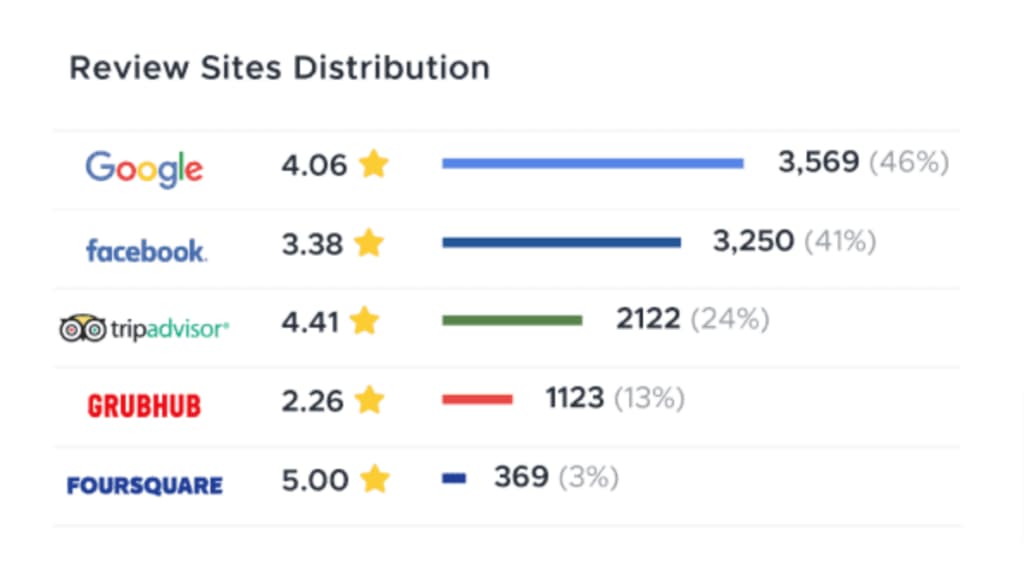
The interface is clean and well-organized, making it easy to see where your reviews are coming from and how they're distributed across platforms.
The AI-powered response generator and pre-built response templates speed up the process of replying to reviews without sacrificing consistency.
The "Ask" tool automates review requests via email and works well for steady-state review generation, though the limited customization of request emails is a notable constraint worth knowing about before you commit.
Key features
- Multi-platform review aggregation: Monitors reviews across Google, Facebook, Tripadvisor, Grubhub, Foursquare, and more than 100 other sites from one dashboard.
- Review site distribution reporting: Shows a breakdown of where your reviews are coming from so you can identify which platforms matter most to your business.
- AI-powered review responses: Generates reply suggestions in seconds, with the option to use pre-built templates for consistent brand voice.
- Automated review requests: Sends email requests to customers asking for reviews, with campaign performance tracking built in.
- Keyword and sentiment tracking: Flags recurring themes in customer feedback to surface issues worth addressing.
- Mobile app: Lets you check and respond to reviews on the go, though functionality is more limited than the desktop version.
Pros & cons
Pros
- Aggregating reviews from 100+ sites into one place saves significant time for multi-location businesses
- Clean, intuitive interface with a short learning curve compared to enterprise alternatives
- Good value for the price relative to larger, more expensive platforms
- Solid response tools including AI-generated suggestions and customizable templates
Cons
- Review request email content can't be fully customized, limiting how personalized outreach can feel
- The mobile app lacks much of the functionality available on desktop
- Review sync from some platforms like Yelp can take close to 24 hours
What we like
ReviewTrackers' site distribution view makes it easy to see exactly which platforms are driving the most review activity. For businesses that want to focus review generation efforts where they'll have the most impact, that kind of clarity is hard to find in many competing tools.
What users say
Users regularly call out ReviewTrackers for its time-saving value and ease of use. One G2 reviewer said:
"Having aggregated review data saves me a lot of time. Plus, the response generator is a big time-saver. The email portion has helped in getting reviews from customers, too.
Overall, the tool is simple but effective. The price is right, so that helps, too. Other platforms are too cumbersome, but ReviewTrackers is easy to set up and use."
Some users have run into friction with the review request tools. One Capterra reviewer noted:
"I've had little luck getting my clients to act upon receiving the request email from ReviewTrackers to leave an online review for me.
ReviewTrackers doesn't allow the email subject or the actual content of the email invite to be customized. Currently it's 'follow up' which will not get the client's attention."
Pricing
ReviewTrackers offers the following plans:
- Data Only
- Essential
- Custom
Pricing for these plans isn't publicly available. You'll need to reach out to the sales team for a quote.
5. Podium
Best for: Local businesses wanting SMS-first review requests combined with customer messaging and payments
Podium is a customer communication and review management platform that combines SMS messaging, a unified inbox, and review generation tools under one roof.
In practice, the review request workflow is one of the fastest and most frictionless on this list: sending a text-based request takes seconds, and Podium's direct integration with Google means customers can leave a review in just a couple of taps.
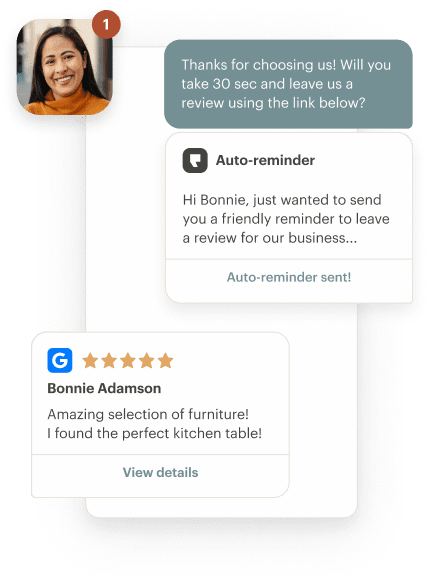
The unified inbox consolidates text messages, Facebook messages, web chat, and review alerts so your team doesn't have to jump between tools.
The platform's AI agents handle routine customer inquiries automatically, which helps businesses managing high message volumes stay on top of things without additional headcount.
Podium also includes text-to-pay links, which is a useful addition for local businesses that want to handle payments alongside customer communication.
The combination of all these features in one place is what sets Podium apart from more narrowly focused review management tools.
Key features
- SMS review requests: Sends text-based review invitations to customers, with a two-click experience that removes friction from the review process.
- Unified inbox: Consolidates customer messages from SMS, Facebook Messenger, web chat, and review platforms into one organized feed.
- AI agents: Automates responses to common customer inquiries, reducing manual effort for teams managing high message volume.
- Text-to-pay: Lets businesses send payment links via SMS, making checkout more convenient for customers.
- Review monitoring across 24+ sites: Tracks incoming reviews from Google, Facebook, BBB, DealerRater, and more.
- Analytics dashboard: Tracks review volume, average ratings, and trends over time so you can monitor how your reputation is evolving.
Pros & cons
Pros
- SMS-first approach to review requests produces strong response rates from customers
- Unified inbox keeps all customer communications organized and easy to manage
- Intuitive setup with a short learning curve for most teams
- Combines reviews, messaging, and payments in a single platform
Cons
- Pricing is not publicly listed and tends to be on the higher end, particularly for small businesses
- Some advanced features are only available on higher-tier plans
- Customization options for automated messaging can feel restrictive
What we like
The two-click review experience Podium creates for customers is hard to beat. By pulling reviews directly from Google on the backend, the platform removes nearly all friction from the process, which is one of the most practical ways to sustainably increase review volume.
What users say
Users frequently highlight how much Podium simplifies day-to-day communication and reputation management. One reviewer said:
"Podium centralizes customer communication, simplifying the process by keeping reviews, messages, and feedback in one place.It helps me quickly respond and request reviews, maintaining my online reputation.
I appreciate its simple interface and automation for review requests, which saves time and ensures consistent follow-ups."
Pricing comes up as a recurring concern, particularly for smaller businesses. One reviewer noted:
"Podium is easy to use, but there are a few things I don't like. It can be expensive compared to similar tools, especially for small businesses. Some features feel limited unless you upgrade to a higher plan.
Also, customization options are not very flexible, and integrations with other tools can be restrictive."
Pricing
Podium doesn't publish its pricing publicly. You'll need to contact the company's sales team to receive a custom quote based on your business size and needs.
6. GatherUp
Best for: Agencies managing reviews for multiple clients with a private feedback capture flow built in
GatherUp is a reputation management platform that focuses on collecting reviews through automated requests, first-party surveys, and NPS scoring.
The multi-step feedback process is one of the more thoughtful approaches you'll find in this category: satisfied customers get routed toward public review sites, while unhappy ones are directed to an internal survey first.
During our evaluation, the private feedback capture flow and dashboard reporting stood out as particularly well-executed.
The dashboard is clean and easy to navigate, with weekly email summaries that give location managers a quick read on performance without logging in.
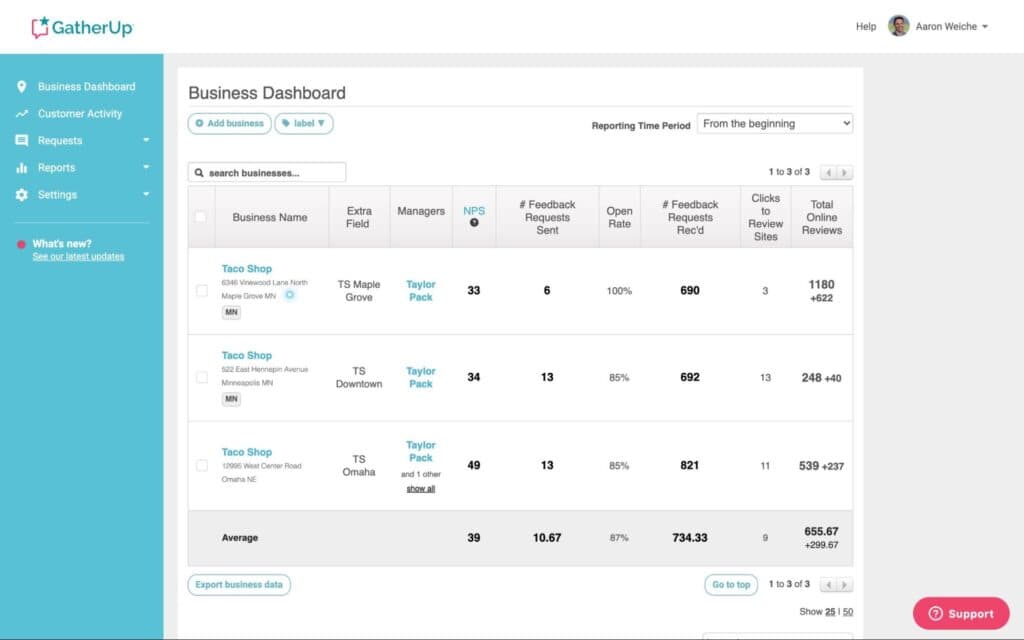
The onboarding experience is also notably strong, with dedicated support during setup that goes well beyond what you'd typically expect at this price point.
For agencies managing multiple clients, the white-label dashboard and client-level reporting make it easy to demonstrate value.
Key features
- Private feedback capture: Collects internal survey responses before routing customers to public review sites, helping intercept negative experiences early.
- Automated email and SMS requests: Sends review requests on a schedule after customer transactions, with customizable messaging and timing.
- NPS scoring: Gathers Net Promoter Score data alongside review requests for a fuller picture of customer satisfaction.
- Multi-platform review monitoring: Tracks reviews from Google, Facebook, Yelp, and dozens of other sites in a centralized dashboard.
- Review widgets: Embeds selected customer reviews on your website using a short code snippet.
- Agency and multi-location support: Manages reviews and reporting across multiple clients or locations from a single account, with white-label options available.
Pros & cons
Pros
- Private feedback capture gives businesses a chance to fix problems before they become public reviews
- Strong onboarding support with dedicated, hands-on setup assistance
- Well-suited for agencies managing reviews across multiple clients and locations
- Weekly reports and dashboard make it easy to stay on top of review activity without constant check-ins
Cons
- Some longer-term users have reported price increases and a decline in support quality over time
- CSV upload for importing contacts can be particular about formatting
- Some UI elements feel clunky and certain features can be hard to find
What we like
GatherUp's feedback-first approach to review collection is genuinely smart. Asking customers how they feel before sending them to Google gives businesses a real opportunity to fix problems quietly, which tends to produce a healthier public review profile over time.
What users say
Agency users in particular tend to be enthusiastic about GatherUp. One G2 reviewer shared:
"GatherUp is an extremely useful SEO tool that I would highly recommend. Their reputation management services have become a staple for our business. Our clients love the portal and the ability to manage their reviews from one spot.
Customer service is also incredibly stellar — very quick to respond, very educational, professional, and friendly. They're never too busy to take time out for a quick consult call to educate you on what you're having issues with."
On the downside, some users have noticed changes in value over time. One Capterra reviewer noted:
"Customer support quality has decreased, and the price has gone up steadily, so I no longer feel I am receiving good value for money."
Pricing
GatherUp offers the following plans:
- Small Business ($99/month for 1 location)
- Multi Location (starts at $60/month/location for 2-10 locations)
- Agency (custom pricing)
Manage online reviews with LocalImpact
Track, manage, and grow your online reviews with LocalImpact.
7. Yext
Best for: Enterprise and multi-location brands needing review management alongside listings management
Yext is a broad digital presence management platform with a solid suite of review management tools built in. The Reviews Inbox, AI response generation, listing sync, and bulk editing capabilities all performed well across our hands-on evaluation with multiple locations.
The ability to filter reviews by date, rating, site, and keywords makes it much easier to prioritize responses at scale, especially for large teams.
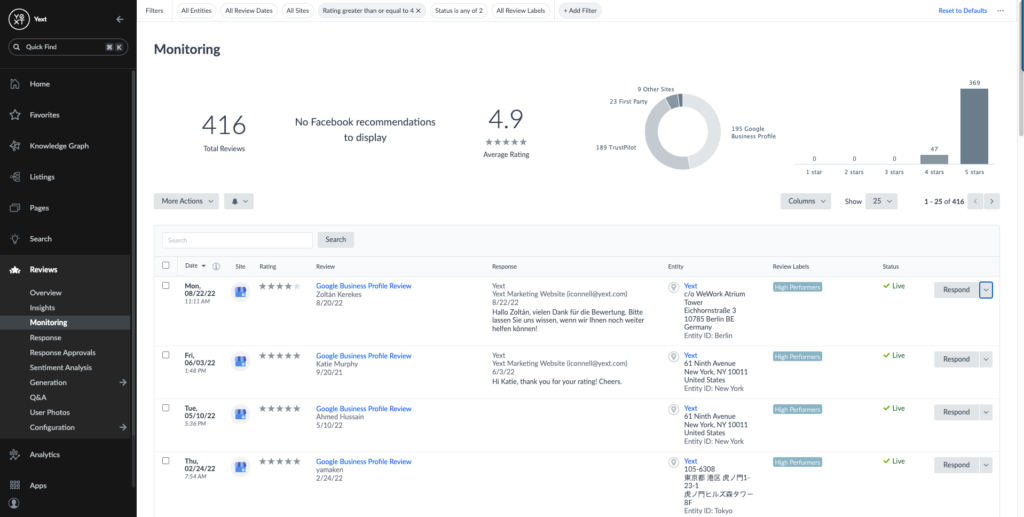
Custom labeling rules let you auto-categorize incoming reviews, which is useful when you're dealing with high volumes across many locations.
The platform lets you set custom brand guidelines for AI-generated replies, so responses stay on-tone even when your team isn't writing them manually.
For businesses that need both listings management and review management in a single tool, Yext handles both at a depth that few other platforms match.
Key features
- Reviews inbox with advanced filtering: Filter reviews by date, rating, site, and keyword, and assign them to specific team members for follow-up.
- AI-generated review responses: Suggests replies using custom brand guidelines, keeping responses consistent across large teams and multiple locations.
- Automated labeling rules: Categorizes reviews automatically based on keywords, ratings, or source to reduce manual triage work.
- Listings management integration: Syncs business information across 200+ publishers and directories from the same platform used for review management.
- Sentiment analysis and theme detection: Surfaces recurring patterns in customer feedback to help businesses identify issues worth addressing.
- Review management services: Offers a fully managed option where Yext's team handles review responses on your behalf.
Pros & cons
Pros
- Combines review management with listings management, reducing the need for multiple tools
- Advanced filtering and labeling make high-volume review management much more manageable
- AI response tools support custom brand guidelines, keeping replies on-brand across large teams
- Particularly useful for enterprise and multi-location brands
Cons
- Pricing is not publicly available and can be expensive for businesses with many locations
- The AI response tool can produce repetitive replies without much variation
- Reporting can be tricky for end users without support from the Yext team
What we like
Yext's integration of review management and listings management in a single platform is genuinely useful for multi-location brands.
Being able to push a business information update to 200+ directories and manage incoming reviews from the same interface removes a lot of unnecessary platform-switching from the workflow.
What users say
Users managing large numbers of locations frequently highlight how much time Yext saves them. One G2 reviewer noted:
"I use Yext to manage 2000 locations and sync data across platforms. The user-friendly platform and connector feature save us from manual work.
It automatically syncs updates, allows bulk data management, and lets us analyze performance metrics in one platform."
Some users have flagged inconsistencies with the AI response tools. One G2 reviewer shared:
"I find that the AI tool for review responses could be improved. Sometimes the responses seem similar, even when I try to decrease the length, and it doesn't change as expected. It can be glitchy in these ways."
Pricing
Yext's pricing isn't available publicly. You'll need to reach out to the company's sales team to get a custom quote.
8. Reviewshake
Best for: Businesses wanting affordable review management with built-in competitor benchmarking
Reviewshake is a review management platform that covers monitoring, generation, display, and competitive benchmarking from one dashboard.
The setup process was quick during our evaluation, and the interface is intuitive enough to launch a review campaign without much onboarding time.
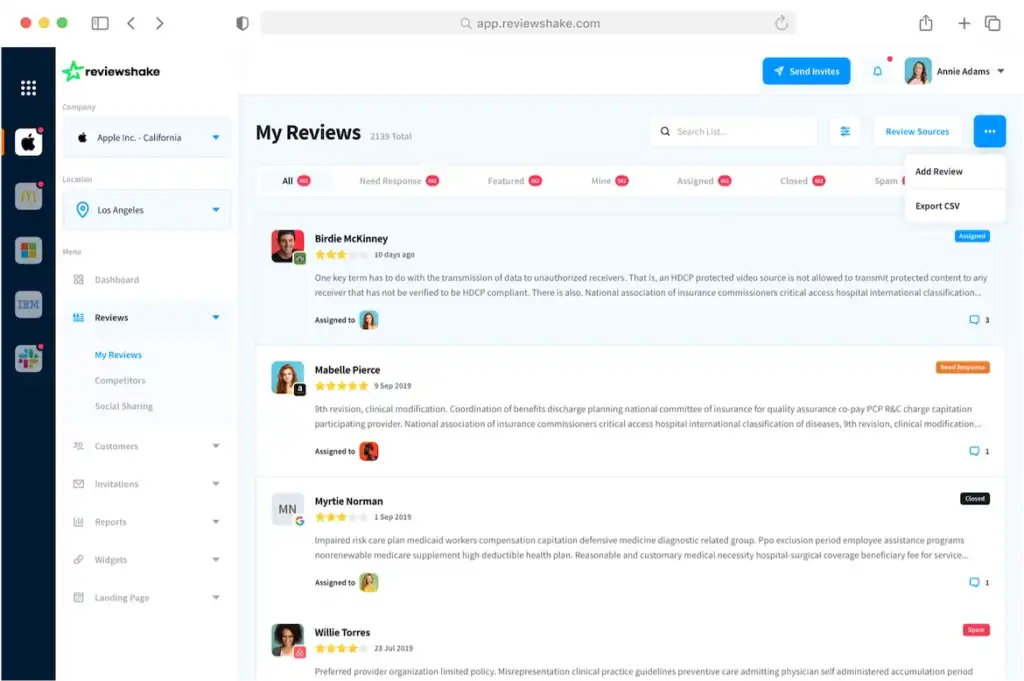
One feature that stood out was competitor benchmarking, which lets you track rival businesses' review counts, star ratings, and sentiment trends alongside your own.
The widget builder lets you embed reviews on your website in a range of styles, though design customization is more limited than some users would like.
The social sharing feature lets you post reviews directly to social media from within the dashboard, which is a nice touch for businesses that actively promote customer feedback.
Key features
- Unified review inbox: Consolidates reviews from 120+ sites into one dashboard, with filtering by source, rating, and sentiment.
- Automated review request sequences: Sets up email and SMS drip campaigns to request reviews from new and existing customers.
- Competitor benchmarking: Compares your review volume, average rating, and sentiment against competitors in your area or industry.
- Review widgets: Embeds customer reviews on your website with customizable display styles.
- Social review sharing: Posts reviews directly to your social media channels from within the platform.
- Detailed campaign reporting: Tracks how your review request sequences are performing, including open rates, click rates, and review conversion.
Pros & cons
Pros
- Competitor benchmarking gives useful context for evaluating your own review performance
- Covers review monitoring, generation, display, and social sharing in one tool
- Affordable pricing compared to many enterprise-level alternatives
- Quick setup with an interface that's easy to navigate without technical knowledge
Cons
- Widget design customization is limited, and getting a specific look may require custom code edits
- No real-time social proof notifications on your website
- Fewer public reviews on G2 than more established platforms, making third-party validation harder to find
What we like
Reviewshake's competitor benchmarking feature is one of the more practical tools in its category.
Being able to see how your review count and average rating stack up against nearby competitors gives you a concrete target to aim for, rather than just tracking your own numbers in isolation.
What users say
Users consistently praise Reviewshake's ease of use and value for money. One G2 reviewer said:
"It's a very easy to use platform, we can access all our customer feedback in one place, we can easily 'show off' our good reviews on our website and across socials."
On the downside, some users find the widget options a bit restrictive. One G2 reviewer noted:
"There is not much to dislike about ReviewShake. If I had to pick one thing that I dislike it would be the current review widgets. However, they are adding new review widgets to enhance the platform."
Pricing
Reviewshake offers the following plans:
- Individual ($79/month)
- Professional ($139/month)
- Business ($179/month)
9. Grade.us
Best for: Agencies wanting a white-label review management platform to resell to clients
Grade.us is a reputation management platform aimed squarely at agencies that want to resell review management services to their clients.
The white-label configuration, drip campaign builder, QR code generator, and automated client reporting features all came together well during our hands-on time with the product.
Adding a custom domain, logo, and brand colors is straightforward, and the end result looks genuinely polished rather than a lightly skinned third-party tool.
The Command Center aggregates all client reviews into one view, with options to filter by site, leave internal notes, and assign follow-ups to team members.
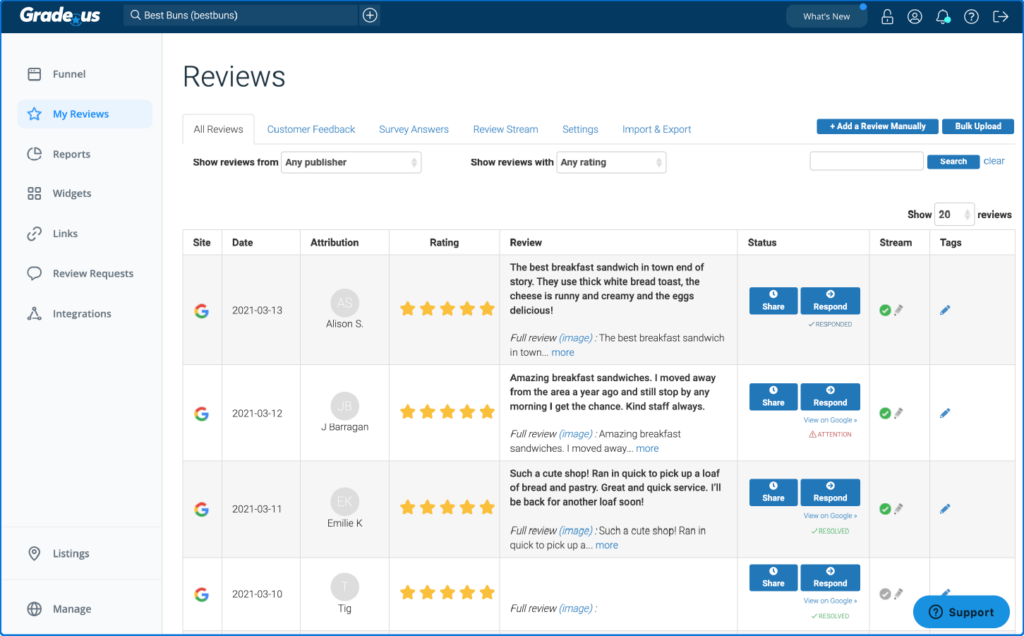
Automated client reports can be scheduled to go out daily, weekly, or monthly, which saves agencies the time of manually pulling performance data for each client.
The review request system supports both email and SMS drip campaigns, and the QR code generator gives clients a simple offline tool for directing customers to a review landing page.
Key features
- White-label platform: Lets agencies add their own domain, logo, and brand colors so the product appears as their own software to clients.
- Command Center: Aggregates all client reviews into one view with filtering, internal notes, and team assignment options.
- Automated client reporting: Schedules performance reports to go to clients at predefined intervals, showing review counts, average ratings, and top review sites.
- Email and SMS drip campaigns: Automates multi-step review request sequences for each client's customers.
- QR code generator: Creates codes that direct customers to a review landing page, useful for in-person or print-based review prompts.
- Custom subscription plans: Lets agencies set their own pricing tiers and free trial offers for reselling the service.
Pros & cons
Pros
- White-label setup makes it easy for agencies to offer review management as a branded service
- Automated client reporting reduces the manual work of keeping clients updated on performance
- Multi-client dashboard makes managing reviews across a large client portfolio manageable
- Competitive pricing for the feature set, especially compared to enterprise-focused alternatives
Cons
- Review landing pages don't appear in search results and reviews don't show up in Google's knowledge panel
- The dashboard UI feels dated compared to newer tools on the market
- Some users have reported unexpected pricing changes without adequate notice
What we like
Grade.us's automated client reporting is a standout feature for agencies. Being able to schedule a branded performance report to go directly to each client's inbox means less time on manual reporting and more time on actual work.
What users say
Agency users consistently highlight Grade.us's value and ease of use for managing multiple clients. One G2 reviewer said:
"It is a great tool to get reviews and share reviews on clients websites. Solving my clients need to increase their reviews. Reviews are very important to business owners and to potential customers and can increase their sales."
Some users have flagged limitations in the platform's overall innovation. One Capterra reviewer noted:
"This is a convenience tool, not a tool you can't live without. You can do everything you can do with GradeUs in other tools. GradeUs just brings features together. It saves us some time but doesn't provide overwhelming innovation for the price."
Pricing
You can try out Grade.us for free for 14 days. Paid plans are priced as follows:
- Solo ($110/month)
- Professional ($180/month)
- Agency ($400/month)
- Partner ($2,500/month)
10. Birdeye
Best for: Multi-location brands wanting AI-powered review management with multilingual response support
Birdeye is an AI-powered reputation management platform that helps businesses collect, respond to, and promote reviews across multiple channels.
The AI features are woven throughout the platform rather than bolted on as an afterthought, which made routine tasks like drafting review replies noticeably faster during our evaluation.
The platform integrates with your CRM to trigger automated review requests after customer interactions, with full control over message content and timing.
Automated response rules based on star rating or review source mean that low-effort reviews with no text can be handled without any manual intervention.
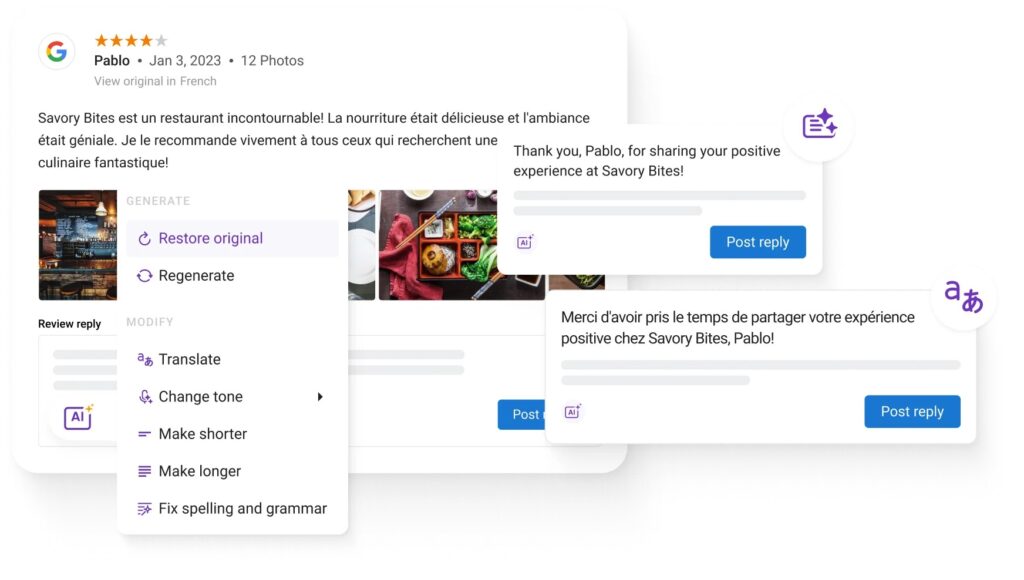
For multi-location brands, the ability to manage reviews, listings, messaging, and social media from one platform is a genuine advantage. Birdeye also lets you generate AI responses in multiple languages, which is a capability most competing tools haven't matched.
Key features
- AI-generated responses: Drafts review replies in seconds, with options to rewrite, adjust tone, or translate responses into multiple languages.
- Automated response rules: Triggers pre-set responses based on star rating or review source, handling high volumes of simple reviews automatically.
- CRM-connected review requests: Sends personalized review invitations automatically after customer interactions, synced with your existing CRM.
- Review website widget: Embeds customer reviews and AI-generated review summaries on your website using a short code snippet.
- Microsite builder: Creates a dedicated page showcasing all your customer reviews across platforms.
- Multi-location management: Manages reviews, listings, messaging, and social media across multiple locations from a single dashboard.
Pros & cons
Pros
- AI features are genuinely useful across the platform, from response generation to sentiment analysis
- Automated response rules reduce manual effort for high-volume review management
- Strong multi-location support makes it well-suited for franchise and enterprise brands
- Multilingual AI response generation sets it apart from most competing tools
Cons
- Pricing is not publicly available and tends to be on the higher end, especially for smaller businesses
- Cancellation processes have been flagged as a pain point by a number of users
- Some CRM integrations can require additional troubleshooting to get working reliably
What we like
Birdeye's ability to generate AI responses in multiple languages is a standout feature that most competitors haven't matched. For businesses serving multilingual communities or operating across different regions, that capability alone can save significant time.
What users say
Users frequently highlight how much Birdeye simplifies reputation management across multiple locations. One G2 reviewer shared:
"What I like most is how Birdeye centralizes everything — reviews, listings, messaging, and social — into one clean platform. It makes it much easier to manage our online reputation across multiple locations without jumping between tools."
Pricing comes up as a recurring concern for smaller teams. One Capterra reviewer noted:
"Birdeye can be a bit pricey, especially for smaller teams or businesses on a tighter budget. Some of the most useful advanced features are only available on higher-tier plans, which may not be ideal for everyone."
Pricing
Birdeye's pricing isn't available publicly. You'll need to contact the company's sales team to get a quote.
11. TrueReview
Best for: Small businesses wanting fast, simple SMS and email review generation with minimal setup
TrueReview is a review management platform focused on making it easy for small businesses to collect reviews via SMS and email without complicated setup.
Getting a campaign live is genuinely fast: the platform is designed so you can send your first review request within minutes of signing up, which came through clearly during our evaluation.
The tool tracks each customer's interactions with your review requests and sends follow-up messages automatically to increase engagement.
The AI-powered review response generator drafts replies to incoming reviews directly from the dashboard, and you can respond to Google and Facebook reviews without leaving the platform.
The social post generator turns customer reviews into branded image posts you can share across social media channels, which is a useful bonus for businesses that want to get more mileage from positive feedback.
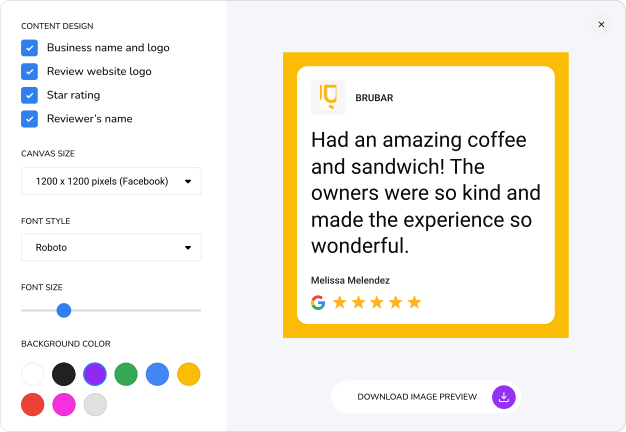
For small teams that want straightforward review generation without a steep learning curve, TrueReview is a strong option.
Key features
- SMS and email review requests: Sends personalized review invitations via text or email, with automated follow-ups to increase response rates.
- Drip campaign builder: Sets up multi-step review request sequences with configurable timing and messaging.
- AI review response generator: Drafts replies to incoming reviews in seconds, with options to customize tone and length.
- Survey builder: Creates multi-question surveys that let customers rate specific aspects of their experience.
- Custom review profile: Builds a branded page that showcases all your reviews across platforms in one place.
- Social post generator: Converts customer reviews into shareable branded image posts for social media.
Pros & cons
Pros
- Fast and simple setup with minimal technical knowledge required
- Automated follow-ups increase the chances of customers completing a review request
- AI response generator saves time replying to incoming reviews
- Social post generator makes it easy to repurpose positive reviews as marketing content
Cons
- Feature set is more limited compared to enterprise-level platforms
- Reporting and analytics are fairly basic compared to larger tools
- The custom review profile doesn't carry the same SEO weight as reviews on Google or major third-party sites
What we like
TrueReview's social post generator is a practical feature that often gets overlooked. Turning a five-star review into a polished, shareable image takes seconds, and it gives businesses a steady stream of authentic social content without any extra effort.
What users say
Users consistently praise TrueReview for its simplicity and effectiveness. One reviewer said:
"TrueReview is a MUST HAVE for any business. An absolute gamechanger."
Some users note that the platform's core focus is intentionally narrow. One reviewer shared:
"Text reviews. This was the only feature we were interested in."
Pricing
You can take advantage of a 14-day free trial to test out TrueReview. Plans are priced as follows:
- Starter ($49/month)
- Small Business ($99/month)
- Premium ($299/month)
12. EmbedMyReviews
Best for: Agencies wanting a turnkey white-label platform with built-in payment processing
EmbedMyReviews is a white-label review management platform built for agencies and resellers who want to offer reputation management as a branded service.
Connecting the platform to a custom domain and adding your own branding is straightforward, and the end result looks genuinely polished rather than a lightly skinned third-party tool.
The white-label configuration, domain setup, widget builder, and Stripe payment integration all worked as advertised during our evaluation.
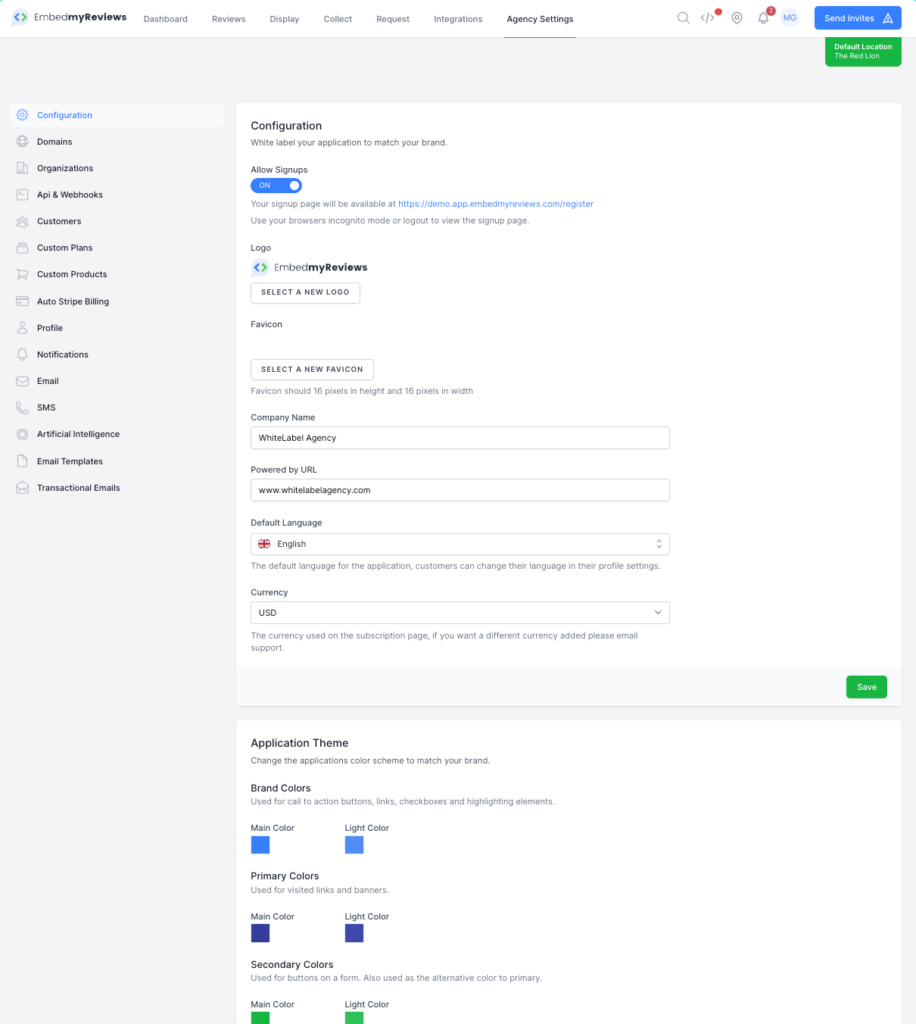
The built-in Stripe integration means you can set up subscription plans, configure free trial offers, and collect payments directly within the platform without needing additional billing software.
EmbedMyReviews supports review monitoring and widget embedding for displaying reviews on client websites, with display options that can be styled to match different brand aesthetics.
For agencies looking to add a recurring revenue stream without building a product from scratch, it's one of the more turnkey options available.
Key features
- White-label setup: Connect the platform to your own domain or subdomain and add your logo and brand colors for a fully branded experience.
- Stripe payment integration: Accepts subscription payments directly through the platform, so you can sell review management plans without third-party billing tools.
- Custom subscription plans: Lets you configure your own pricing tiers and free trial offers for clients.
- Review monitoring: Tracks reviews across major platforms and surfaces them in a centralized dashboard.
- Review widgets: Embeds customer reviews on client websites with customizable display styles.
- Reseller-ready infrastructure: Designed from the ground up for agencies selling review management services, rather than adapted from a direct-to-business product.
Pros & cons
Pros
- Genuinely turnkey white-label setup that looks polished out of the box
- Built-in Stripe integration makes it easy to monetize the service directly
- Custom pricing tiers let agencies set their own margins without negotiating with a vendor
- 14-day free trial makes it easy to evaluate before committing
Cons
- Feature depth is more limited compared to full-featured reputation management platforms
- Fewer public reviews available compared to more established tools in this category
- May not be sufficient as a standalone product for clients with complex reputation management needs
What we like
The built-in Stripe integration is a genuinely practical detail. Most white-label software requires you to bolt on a separate billing tool, and having payments handled natively removes a meaningful piece of complexity from the agency's tech stack.
What users say
Users highlight the platform's ease of setup and reseller-friendly design. One Capterra reviewer said:
"We started using ReviewShake around 3 years ago to replace our old provider. We wanted a solution that was more cost-effective with all the same features.
The feature I like the most is the white labeling. We have now rebranded the platform as our own and a specialized solution to the niche that we serve."
On the downside, some users have noted limitations in the widget options. One G2 reviewer shared:
"The widgets are fine, but you don't have much control over how they appear on the site without custom edits."
Pricing
EmbedMyReviews offers a free 14-day trial. The paid plan costs $99/month.
Manage online reviews with LocalImpact
Track, manage, and grow your online reviews with LocalImpact.
13. NiceJob
Best for: Small businesses wanting automated review collection with built-in social media sharing
NiceJob is a reputation marketing platform designed to help businesses collect reviews, promote them on social media, and re-engage past customers to drive repeat business.
The automated review campaigns, social sharing tools, competitor tracking, and microsite builder all performed well during our time with the platform.
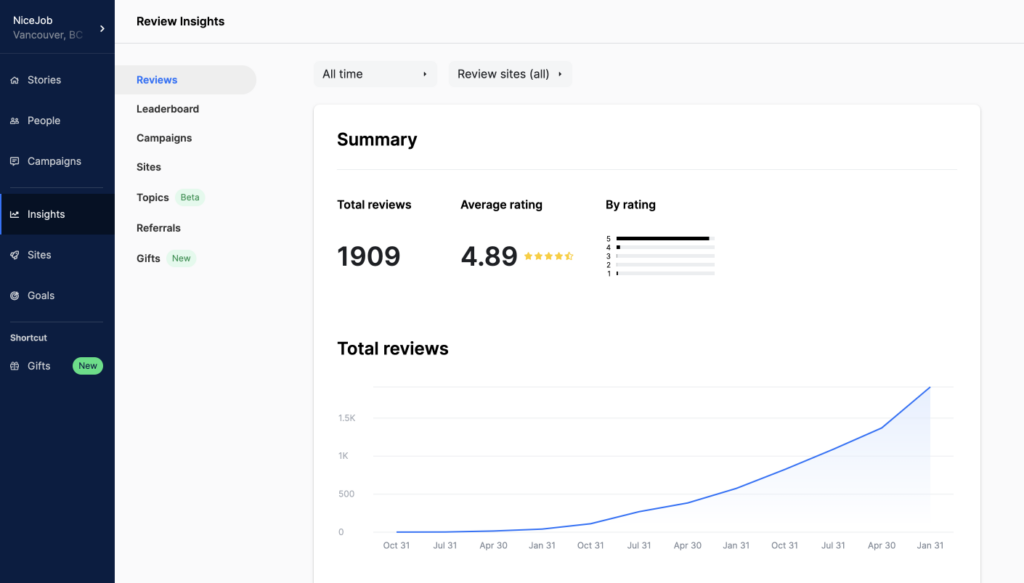
The pre-built campaign templates make it easy to get review generation running quickly, and the social sharing automation keeps your social presence active even during busy periods without any manual effort.
Competitor tracking lets you monitor rivals' review counts, average star ratings, and overall sentiment, giving you useful benchmarks to measure your own progress against.
The platform also includes pop-ups for showcasing top reviews on your website and a microsite builder for promoting your review portfolio independently.
For businesses that want their reputation management to double as an active marketing channel, NiceJob covers more of that cycle than most tools on this list.
Key features
- Automated review campaigns: Sends email and SMS review requests with pre-built or custom sequences, including automated follow-ups.
- Social review sharing: Automatically posts new customer reviews to your social media channels without manual intervention.
- Competitor tracking: Monitors competitors' review counts, average ratings, and customer sentiment across platforms.
- Microsite builder: Creates a standalone page that showcases all your customer reviews in one place.
- Review pop-ups: Displays top customer reviews as pop-ups on your website to build trust with new visitors.
- Campaign analytics: Tracks which review sites are driving the most reviews, your average star rating across platforms, and campaign performance over time.
Pros & cons
Pros
- Social review sharing automation keeps your social presence active with minimal effort
- Competitor tracking gives concrete benchmarks to measure your reputation against
- Pre-built campaigns make it quick to get review generation running from day one
- Covers both collecting and promoting reviews, supporting more of the reputation marketing cycle
Cons
- Uploading contacts to the database in bulk can be cumbersome
- Feature set is more review-focused than platforms that combine reviews with broader customer communication tools
- No white-label option for agencies wanting to resell the service
What we like
NiceJob's automatic social sharing is a standout for businesses that want to keep their social channels active without dedicating time to it.
Getting a steady stream of authentic review content posting automatically is genuinely useful for local businesses without a dedicated social media person.
What users say
Users frequently highlight how effective NiceJob is at generating reviews on autopilot. One reviewer shared:
"I love how NiceJob simplifies the otherwise time-consuming process of consistently following up with customers to get reviews. This automation frees up my time, making it an invaluable tool as a small business owner juggling many roles."
Some users have run into friction with the contact upload process. One G2 reviewer noted:
"The only thing that we dislike about NiceJob is the difficulty uploading clients to the database. It would be much easier to insert them one by one, rather than collecting them all and uploading."
Pricing
NiceJob offers the following plans:
- Reviews ($75/month)
- Pro ($125/month)
14. Synup
Best for: Businesses wanting review management and local listings management in a single platform
Synup is a reputation and local listings management platform that combines review acquisition, response automation, and directory management under one roof.
In practice, the Smart Response feature handled incoming reviews automatically with minimal configuration, and the sentiment analysis dashboard surfaced themes from recent feedback at a glance.
The review request campaign setup, listings sync, and multi-location management features all performed reliably during our evaluation.
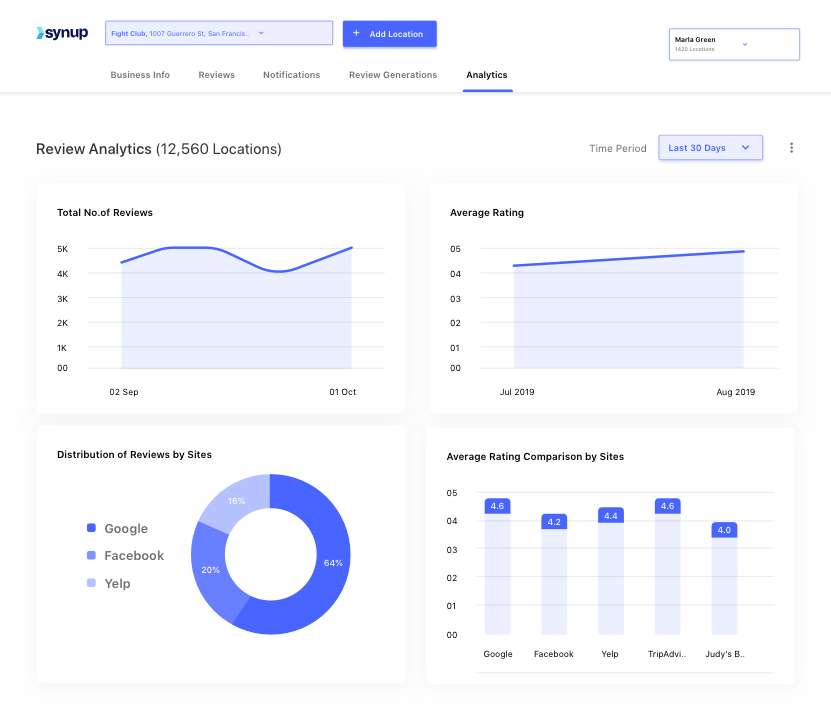
The customer sentiment analysis makes it easier to spot recurring issues without reading every piece of feedback individually.
Synup's listings management integration means you can update your business information across dozens of directories from the same platform you use to manage reviews.
For businesses that want both reviews and local SEO managed in one place, Synup offers a practical balance between the two.
Key features
- Automated review request campaigns: Sends email and SMS review invitations to customers, with campaign tracking and follow-up options.
- Smart Response: Automatically replies to incoming reviews using pre-set templates, reducing the manual effort of responding to every review.
- Sentiment analysis dashboard: Surfaces customer sentiment themes from recent reviews so you can quickly identify recurring issues.
- Listings management integration: Syncs business information across major directories and review sites from the same dashboard.
- Response templates: Pre-built reply templates that help your team respond to reviews consistently and on-brand.
- Multi-location support: Manages reviews and listings across multiple locations from a single account.
Pros & cons
Pros
- Combines review management with local listings management, reducing the need for multiple tools
- Smart Response feature automates replies to incoming reviews with minimal setup
- Sentiment analysis makes it quick to identify themes in customer feedback
- Per-location pricing makes costs predictable as you scale
Cons
- Feature depth for review management alone is lighter than dedicated review-only platforms
- Some users have flagged customer support response times as slower than expected
- The interface has a learning curve for users new to combined listings and reputation tools
What we like
Synup's Smart Response feature is genuinely practical for businesses that receive a high volume of reviews. Combined with sentiment analysis, it makes it possible to stay on top of your review inbox without spending a meaningful chunk of time on it each week.
What users say
Users highlight Synup's combined listings and reputation capabilities as a core strength. One G2 reviewer noted:
"Synup is helping us centralize and manage the digital presence of all our locations, which is crucial for maintaining consistent information across the web and staying on top of customer feedback in real time."
Some users have found the platform's support less consistent than expected. One Capterra reviewer shared:
"Customer service can be a bit slow to respond at times."
Pricing
Synup offers the following plans:
- Standard ($34.99/location/month)
- Premium ($89.99/location/month)
15. Chatmeter
Best for: Large multi-location brands needing NLP-powered review analytics and brand intelligence
Chatmeter is a brand intelligence and reputation management platform built for multi-location businesses that need deep analytics alongside review monitoring and response tools.
The NLP-powered analysis goes further than simple positive/negative categorization: it surfaces specific themes and recurring topics from customer reviews so you can see exactly what's driving satisfaction or dissatisfaction at each location.
The review management dashboard, sentiment analysis, and automated review request setup all delivered during our evaluation.
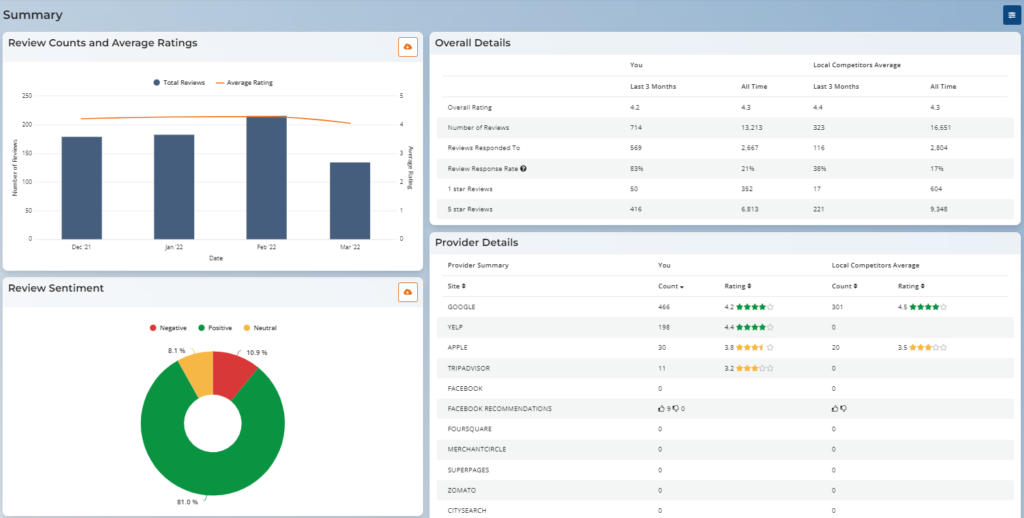
The platform is clearly designed for enterprise use, with reporting depth and multi-location management capabilities that would be overkill for a single-location business but genuinely valuable at scale.
Chatmeter also surfaces data-driven recommendations for improving customer experience based on what reviews are actually saying, which gives location managers something concrete to act on beyond the numbers.
Key features
- NLP-powered review analysis: Uses natural language processing to identify themes and recurring topics in customer feedback across all locations.
- Sentiment analysis: Goes beyond positive/negative classification to surface specific drivers of customer satisfaction and dissatisfaction.
- Automated review request campaigns: Sets up email and SMS review request sequences to generate reviews consistently.
- Review response tools: Includes response templates and AI-assisted reply drafting to streamline the response workflow.
- Data-driven recommendations: Surfaces actionable next steps for improving customer experience based on review content.
- Multi-location management: Manages reputation, reviews, and local listings across hundreds or thousands of locations from one platform.
Pros & cons
Pros
- NLP-powered analysis surfaces actionable insights from review content that basic sentiment tools miss
- Well-suited for large multi-location brands that need enterprise-grade reporting
- Automated review requests make it easy to generate reviews consistently without manual effort
- Combines reputation management with local SEO and listings management
Cons
- Pricing is not publicly available and is likely on the higher end for smaller businesses
- The platform's depth and feature set may be more than single-location businesses need
- Implementation and onboarding can take longer than simpler tools
What we like
Chatmeter's natural language processing is the most sophisticated review analysis capability on this list.
For multi-location brands that want to understand not just how many negative reviews they're getting but why, the theme-level reporting gives you something genuinely actionable to work with.
What users say
Users managing large numbers of locations frequently highlight Chatmeter's analytical depth. One G2 reviewer shared:
"Chatmeter is helping us centralize and manage the digital presence of all our locations, which is crucial for maintaining consistent information across the web and staying on top of customer feedback in real time."
Some users note that the platform's depth comes with a learning curve. One G2 reviewer noted:
"The reporting can be a bit tricky to manage for end users, but our service team has been great at helping that out."
Pricing
Chatmeter doesn't share its pricing publicly. You'll need to reach out to the company's sales team to get a quote.
How to choose the right review management tool for your business
The best review management tool depends less on which platform has the longest feature list and more on what your business actually needs day to day. Here are the most important factors to work through before making a decision:
- Think about your business type first: Solo businesses and small teams are usually best served by affordable, easy-to-use tools like LocalImpact, TrueReview, or NiceJob. Multi-location brands and agencies need more robust reporting, white-label capabilities, and multi-client dashboards, where platforms like Birdeye, Yext, Grade.us, and Reviewshake are stronger fits.
- Decide whether you need more than just review management: Several tools on this list combine reviews with SMS messaging, payments, or local listings management, which can reduce the number of separate tools you're paying for. If you only need review generation and monitoring, a more focused tool will likely be easier to use and more affordable.
- Take pricing structure seriously: Custom pricing makes comparison shopping harder and can lead to surprises once you're in a contract. If budget predictability matters, tools with publicly listed pricing like LocalImpact, Reviewshake, NiceJob, and TrueReview give you a clearer picture of what you'll actually pay.
- Use free trials deliberately: Most tools on this list offer a free trial, but 14 days goes quickly if you don't have a plan. Focus your trial time on the two or three features that matter most: how easy it is to send a review request, how clearly the dashboard surfaces incoming reviews, and how useful the response tools are in practice.
- Don't over-index on feature count: A tool that does fewer things but fits naturally into your team's routine will deliver better results than a more powerful platform that nobody logs into. Start with what you need now, and check whether the platform has room to grow with you before committing long-term.
The right tool is the one your team will actually use consistently. Take advantage of the free trials on offer, test the platforms that match your situation, and let the day-to-day experience guide your decision rather than the feature list alone.